Jenny’s Daily Drivers: Going 32-Bit With SliTaz In 2026

We’re used to seeing technologies move with the times, and it’s likely among Hackaday readers are the group who spend the most time doing that and are most aware of it. There’s one which we’ll all be aware of which has quietly slipped away for most of us almost without a word, I speak of course of 32-bit computing. For most of us that means 32-bit computing on x86 machines, and since the 64-bit x86 instruction set we all now use has been around for nearly a quarter century, its 32-bit ancestor is now ancient history.

In the world of software that means we’re now in an era of operating systems and browsers dropping 32-bit support, so increasingly keeping a 32-bit machine up to date will become a challenge. That sounds like something just painful and difficult enough to subject to a Daily Drivers piece, so just how practical is it to use a 32-bit machine for my daily work in 2026?

2005 Just Gave Me A Computer

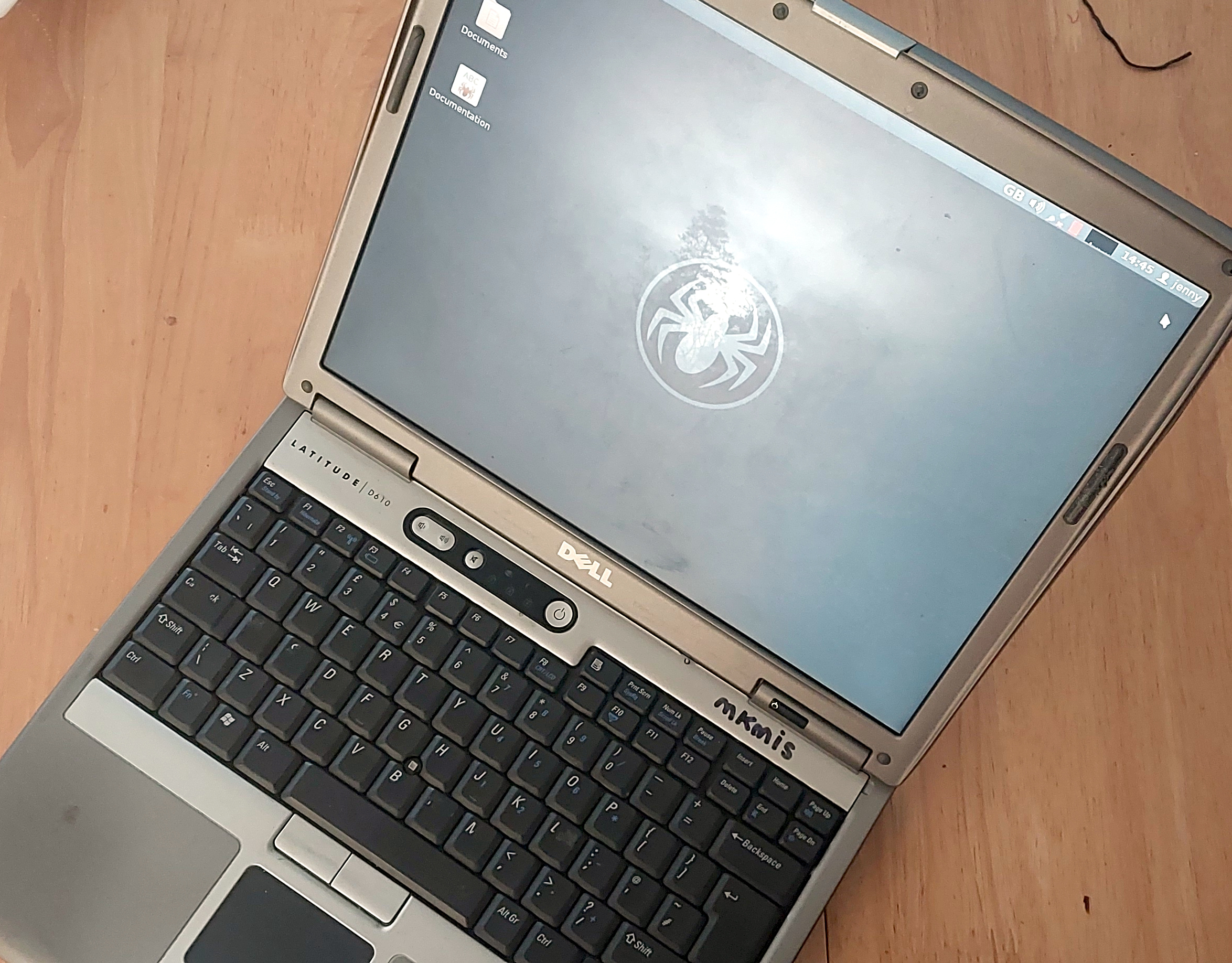
My trusty Dell, showing the SliTaz desktop
Not looking too bad for a 21 year old laptop.

On my desk I have a Dell Latitude D610. It was made in about 2005 in the days when Dells were solidly made, and with its 1.6GHz Pentium M and 2Gb of memory it represents roughly the final throw of the dice for a 32-bit Intel laptop. Just over a year later it would have been replaced by one of the Intel Core series with the 64-bit instructions grudgingly adopted from AMD, but at the time it was a respectably useful machine.

It came into my possession about eight years ago when I used it to test the Revbank bar tab software for my hackerspace, and for the past six years it’s languished unloved in my box there. It’s got an ancient Ubuntu distro on it, so my first task is to pick a 32-bit replacement from 2026. That’s now a dwindling selection, so it’s time to start digging though some minimalist distros. With the supply of those based on mainstream distros drying up as they drop 32-bit support, it’s time to look into more esoteric offerings. This fits well with the ethos of this series, we’re all about the unusual here.

Cutting out the mainstream based distros certainly narrows the field, and out of the promising contenders in the minimalist field, I went for SliTaz. It uses Busybox and the Openbox desktop, that runs from RAM. I was looking for good application support in the repos, and this distro has the things I need. Download it, stick it on a USB stick, and let’s see what it can do. I know one thing, I wouldn’t have been able to download that ISO in five seconds with the internet connection I had in 2005. Continue reading “Jenny’s Daily Drivers: Going 32-Bit With SliTaz In 2026”

Jenny’s Daily Drivers: Haiku R1/beta5

Back in the mid 1990s, the release of Microsoft’s Windows 95 operating system cemented the Redmond software company’s dominance over most of the desktop operating system space. Apple were still in their period in the doldrums waiting for Steve Jobs to return with his NeXT, while other would-be challengers such as IBM’s OS/2 or Commodore’s Amiga were sinking into obscurity.

Into this unpromising marketplace came Be inc, with their BeBox computer and its very nice BeOS operating system. To try it out as we did at a trade show some time in the late ’90s was to step into a very polished multitasking multimedia OS, but sadly one which failed to gather sufficient traction to survive. The story ended in the early 2000s as Be were swallowed by Palm, and a dedicated band of BeOS enthusiasts set about implementing a free successor OS. This has become Haiku, and while it’s not BeOS it retains API compatibility with and certainly feels a lot like its inspiration. It’s been on my list for a Daily Drivers article for a while now, so it’s time to download the ISO and give it a go. I’m using the AMD64 version.

Continue reading “Jenny’s Daily Drivers: Haiku R1/beta5”

Jenny’s Daily Drivers: ReactOS 0.4.15

When picking operating systems for a closer look here in the Daily Drivers series, the aim has not been to merely pick the next well-known Linux distro off the pile, but to try out the interesting, esoteric or minority OS. The need remains to use it as a daily driver though, so each one we try has to have at least some chance of being a useful everyday environment in which a Hackaday piece could be written. With some of them such as the then-current BSD or Slackware versions we tried for interest’s sake a while back that’s not a surprising achievement, but for the minority operating systems it’s quite a thing. Today’s choice, ReactOS 0.4.15, is among the closest we’ve come so far to that ideal.

For The N’th Time In The Last 20 Years, I download A ReactOS ISO

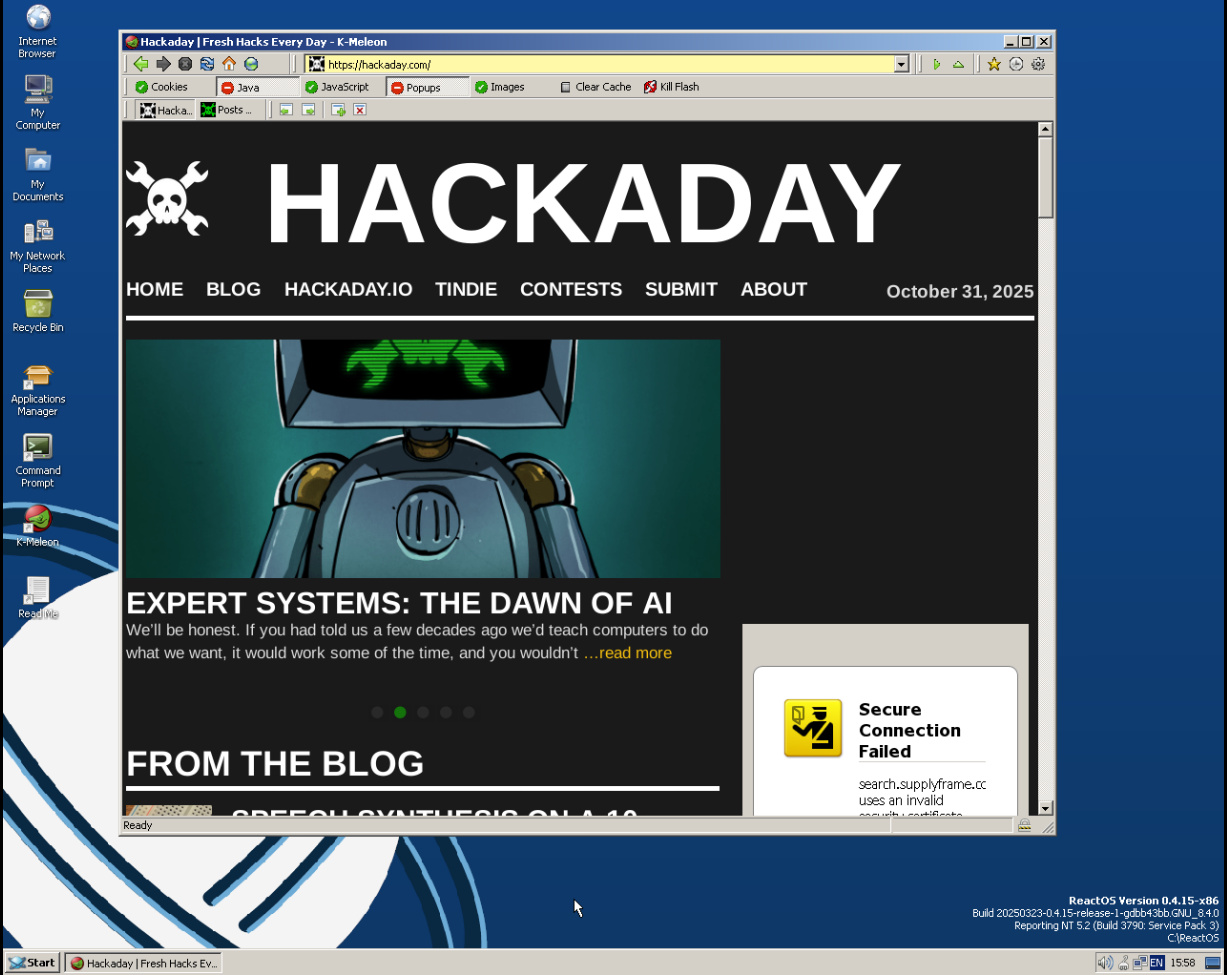
A Windows-style ReactOS desktop with a web browser showing Hackaday
It’s fair to say there are still a few quirks, but it works.

ReactOS is an open-source clone of a Windows operating system from the early 2000s, having a lot on common with Windows XP. It started in the late 1990s and has slowly progressed ever since, making periodic releases that, bit-by-bit, have grown into a usable whole. I last looked at it for Hackaday with version 0.4.13 in 2020, so have five years made any difference? Time to download that ISO and give it a go.

Installing ReactOS has that bright blue and yellow screen feeling of a Windows install from around the millennium, but I found it to be surprisingly quick and pain free despite a few messages about unidentified hardware. The display driver it chose was a VESA one but since it supported all my monitor’s resolutions and colour depths that’s not the hardship it might once have been. Continue reading “Jenny’s Daily Drivers: ReactOS 0.4.15”

Jenny’s Daily Drivers: KDE Linux

Over this series test-driving operating systems, we’ve tried to bring you the unusual, the esoteric, or the less mainstream among the world of the desktop OS. It would become very boring very quickly of we simply loaded up a succession of Linux distros, so we’ve avoided simply testing the latest Debian, or Fedora.


That’s not to say that there’s no space for a Linux distro on these pages if it is merited though, as for example we marked its 30th anniversary with a look at Slackware. If a distro has something interesting to offer it’s definitely worth a look, which brings us to today’s subject.

KDE Linux is an eponymous distro produced by the makers of the KDE Plasma desktop environment and associated applications, and it serves as a technical demo of what KDE can be, a reference KDE-based distribution, and an entirely new desktop Linux distribution all in one. As such, it always has the latest in all things KDE, but aside from that perhaps what makes it even more interesting is that as an entirely new distribution it has a much more modern structure than many of the ones we’re used to that have their roots in decades past. Where in a traditional distro the system is built from the ground up on install, KDE Linux is an immutable base distribution, in which successive versions are supplied as prebuilt images  on which the user space is overlaid. This makes it very much worth a look. Continue reading “Jenny’s Daily Drivers: KDE Linux”

Jenny’s Daily Drivers: FreeDOS 1.4

When I was a student, I was a diehard Commodore Amiga user, having upgraded to an A500+ from my Sinclair Spectrum. The Amiga could do it all, it became my programming environment for electronic engineering course work, my audio workstation for student radio, my gaming hub, and much more.

One thing that was part of my course work it couldn’t do very well, which was be exactly like the PCs in my university’s lab. I feel old when I reflect that it’s 35 years ago, and remember sitting down in front of a Tulip PC-XT clone to compile my C code written on the Amiga. Eventually I cobbled together a 286 from cast-off parts, and entered the PC age. Alongside the Amiga it felt like a retrograde step, but mastering DOS 3.3 was arguably more useful to my career than AmigaDOS.

It’s DOS, But It’s Not MS-DOS

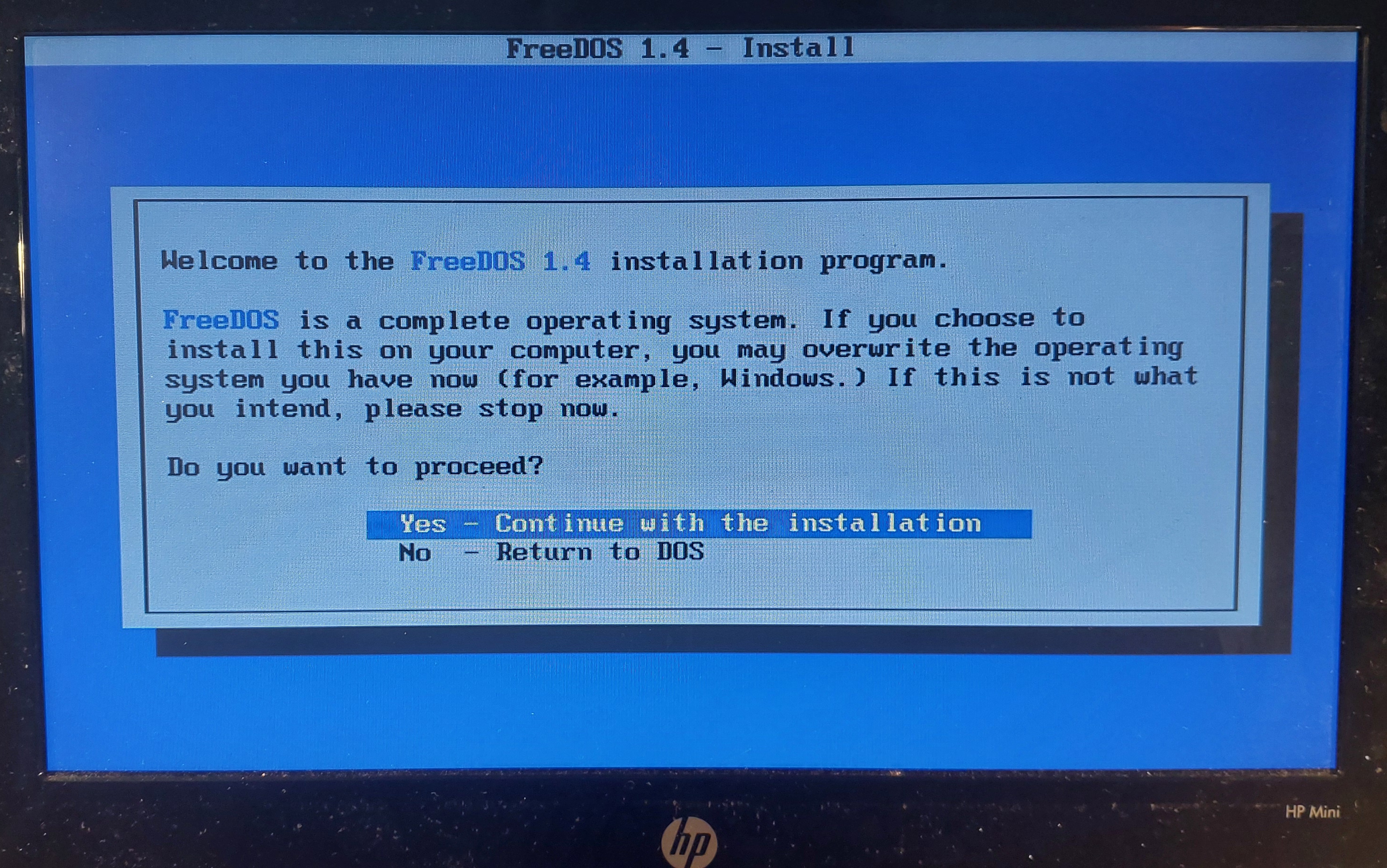
The FreeDOS installation screen
Where do I want to go today?

I don’t think I’ve used a pure DOS machine as anything but an occasional retrocomputing curio since some time in the late 1990s, because the Microsoft world long ago headed off into Windows country while I’ve been a Linux user for a very long time. But DOS hasn’t gone away even if Microsoft left it behind, because the FreeDOS project have created an entirely open-source replacement. It’s not MS-DOS, but it’s DOS. It does everything the way your old machine did, but in a lot of cases better and faster. Can I use it as one of my Daily Drivers here in the 2020s? There is only one way to find out.

With few exceptions, an important part of using an OS for this series is to run it on real hardware rather than an emulator. To that end I fished out my lowest-spec PC, a 2010 HP Mini 10 netbook that I hold onto for sentimental reasons. With a 1.6 GHz single core 32 bit Atom processor and a couple of gigabytes of memory it’s a very slow machine for modern desktop Linux, but given that FreeDOS can run on even the earliest PCs it’s a DOS powerhouse. To make it even more ridiculously overspecified I put a 2.5″ SSD in it, and downloaded the FreeDOS USB installer image. Continue reading “Jenny’s Daily Drivers: FreeDOS 1.4”

Jenny’s Daily Drivers: Damn Small Linux 2024

There was a time when the gulf between a new computer and one a decade or more old was so large as to be insurmountable; when a Pentium was the chip to have an older computer had a 16-bit 8086 or 286. Here in the 2020s, though, that divide is less stark. While a machine from the mid-2000s may no longer be considered quick, it can still run modern and useful software.

The problem facing the owner of such older hardware though is that as operating systems advance their requirements and eclipse their machine’s capabilities. A perfectly good machine becomes less useful, not because the tasks it needs to be used for are beyond it, but because the latest OS is built with higher-spec hardware in mind. The subject of today’s test is an operating system designed to make the best of older hardware, and it’s one with a pedigree. Damn Small Linux, or DSL, first appeared in 2005 as a tiny distro for the old machines of the day, and after a long hiatus it’s back with a 2024 edition.

Continue reading “Jenny’s Daily Drivers: Damn Small Linux 2024”

Jenny’s Daily Drivers: RiscOS 5.28

On a mundane day at some point in late 1987, though I didn’t grasp exactly what it would become at the time, I sat in front of the future. My school had a lab full of BBC Micros which I’d spent the previous few years getting to know, but on that day there was a new machine in one corner. It was a brand-new Acorn Archimedes, probably an A300, and it was the first time I had used an operating system with a desktop GUI. The computer was the first consumer application of the ARM processor architecture which has since gone on to conquer the world, and the operating system was called Arthur, which hasn’t. That’s not to say that Arthur is forgotten though, because it was soon renamed as RiscOS, managed to outlive both Acorn and the Archimedes, and still survives as a maintained though admittedly niche operating system to this day. So my Daily Driver this month is the current generation of RiscOS, version 5.28, and the machine I’m running it on is a Raspberry Pi 4. For a computer with an ARM core that’s designed and sold by a company based in Cambridge just like the original Acorn, it’s the most appropriate pairing I can think of.

Probably the Smallest OS In This Series

A beige desktop with no monitor, keyboard and mouse in front. It shows signs of yellowing with age.
The first ARM product, an Acorn Archimedes A310. mikkohoo, CC BY-SA 4.0.

At one point the Raspberry Pi folks even featured the Pi version of RiscOS on their website, but for those missing it there it’s freely downloadable as a disk image from the RiscOS Open site. Having spent most of its life as a closed-source product it’s been opened up over the last decade, and you can grab the source if you’re interested. When it’s normal for an OS download to run into the many gigabytes, it’s a bit of a shock to grab one that’s a shade under 140 megabytes and can be written to a 2 gigabyte SD card. This makes it probably one of the quickest operating system installs I have ever done, with all steps completed in a very short time. Sticking the SD card into the Pi it boots to a desktop in about 32 seconds which is only 5 seconds less than the latest Raspberry Pi OS image, so sadly that compactness doesn’t net you any extra speed. Continue reading “Jenny’s Daily Drivers: RiscOS 5.28”