Gesture Controls With Only A Camera

Back in 2002, [Takahiro Yonemura] and others built a system that used a single webcam-like device to track a user’s hand and generate inputs for a computer. Given that this was more than 20 years ago, the technological limitations were much greater than they are today. It wasn’t until nearly a decade later that we got something like the Microsoft Kinect, and even now many VR and gesture controls require something more than a simple camera. Although [Takahiro Yonemura]’s original paper (Japanese, Google Translate link) is now many decades old, he’s recently picked the project back up and used it to develop this game.

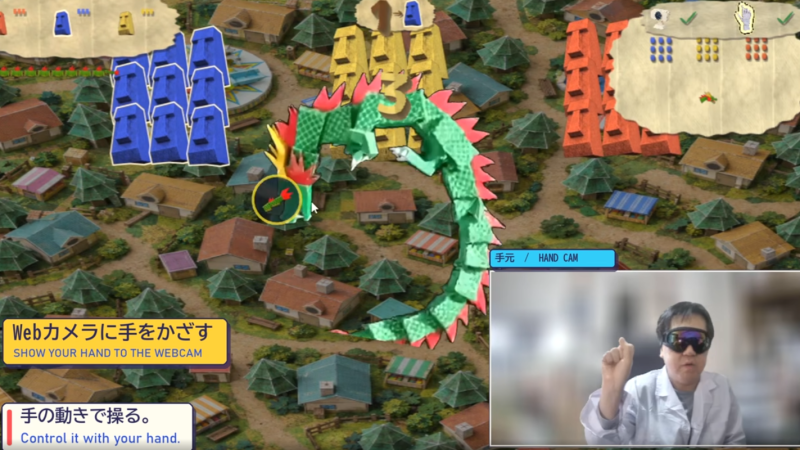
The original system worked by attempting to automatically identify the user’s fingers and head. The team had focused on user inputs for standard PCs, drawing characters in the air and allowing the software to interpret them and pass them to a computer. In the modern iteration the scope is slimmed down a bit. The system instead detects an open or closed hand, and can recognize when it leaves the camera’s view. For the game built around this concept, the player controls a dragon who whips his tail around a map. Closing and opening a hand generates a click in the game, and moving a hand off-screen pauses the game.

Although the game has relatively simple controls, these types of games can be quite fun and popular. From the video clip on the Steam page it looks like [Takahiro] is having plenty of fun playing it. Although we’d prefer it be open source so others can experiment with his gesture controls, we can also experiment with other camera-only gesture controls like this project which allows the user to move and interact with 3D objects in a virtual space.
Trombone Controls Virtual Trombone

Guitar Hero was a cultural phenomenon a little over a decade ago, and showed that there was a real fun time to be had playing a virtual instrument on a controller. There are several other similar games available now for different instruments, including one called Trombone Champ that [Hung Truong] is a fan of which replaces the traditional guitar with a trombone. The sliding action of a trombone is significantly different than the frets of a guitar, making it a unique challenge in a video game. But an extra challenge is building a controller for the game that works by playing a real trombone.

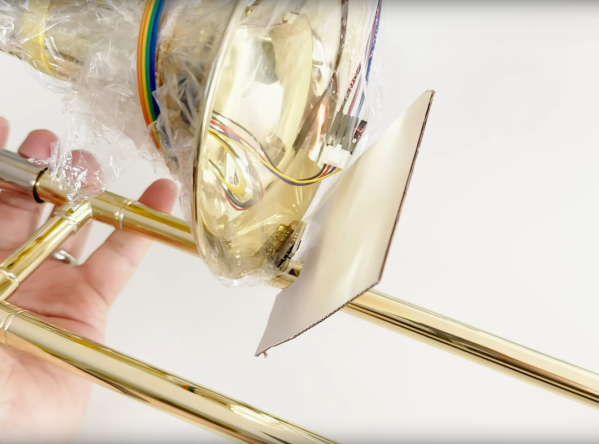
Unlike a guitar which can easily map finger positions to buttons, mapping a more analog instrument like a trombone with its continuous slide to a digital space is a little harder. The approach here was to use an ESP32 and program it to send mouse inputs to a computer. First, an air pressure sensor was added to the bell of the trombone, so that when air is passing through it a mouse click is registered, which tells the computer that a note is currently being played. Second, a mouse position is generated by the position of the slide by using a time-of-flight sensor, also mounted to the bell. The ESP32 sends these mouse signals to the computer which are then used as inputs for the game.

While [Hung Truong] found that his sensors were not of the highest quality, he did find the latency of the control interface, and the control interface itself, to be relatively successful. With some tuning of the sensors he figures that this could be a much more effective device than the current prototype. If you’re wondering if the guitar hero equivalent exists or not, take a look at this classic hack from ’09.

Continue reading “Trombone Controls Virtual Trombone” →

Mouse Mis-Clicking? We Got You.

A mouse with malfunctioning buttons can be a frustrating to deal with — and usually a short leap to percussive maintenance. Standard fixes may not always last due to inferior build quality of the components, or when the microswitch won’t close at all. But, for mice that double/triple-click, will release when dragging, or mis-click on release, this Arduino-based hack may be the good medicine you’re after.

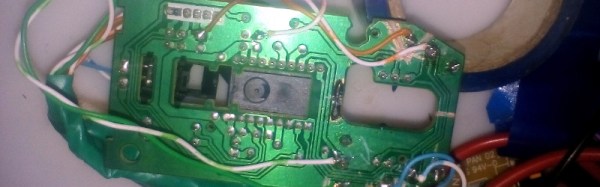
Instructables user [themoreyouknow]’s method cancels click malfunctions by latching the mouse’s controller switch trace to ‘on’ when pressed, keeping it there until the button normally closed contact closes again completely. Due to the confined spaces, you’ll want to use the smallest Arduino you can find, some insulating tape to prevent any shorts, and care to prevent damaging the wires this process adds to the mouse when you cram it all back together.

Before you take [themoreyouknow]’s guide as dogma, the are a few caveats to this hack; they are quick to point out that this won’t work on mice that share two pins between three buttons — without doing it the extra hard way, and that this might be trickier on gaming or other high-end mice, so attempt at your own peril.

Speaking of gaming mice, we recently featured a way to add some extra functionality to your mouse — cheating optional — as well as how to stash a PC inside an old Logitech model.