They Weren’t Joking: Gentoo WAS Ported To GNU Hurd

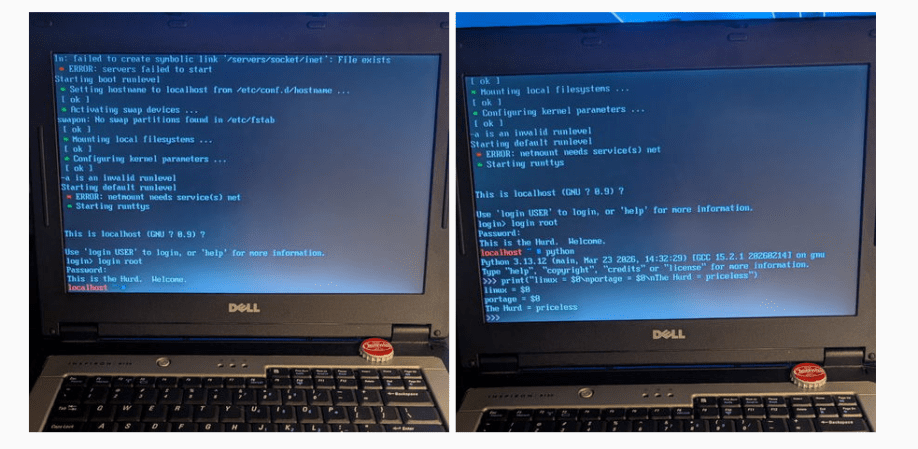
Long ago, in the aftermath of the UNIX wars, three kernels emerged from the rubble: BSD, Linux, and Hurd. BSD, being UNIX, was held back by legal wrangling in the aftermath of the wars, and that allowed Linux to pull ahead to a pole position it still enjoys to this day. BSD has its following, of course, but Hurd? GNU Hurd seemed destined to languish… until April 1st, 2026, when the Gentoo Linux distribution was ported to the Free Software Foundation’s kernel.

It turns out, they weren’t actually joking. The joke part was that they were moving fully to the Hurd kernel, away from Linux– you can absolutely still run Gentoo with the Linux kernel, and make no mistake, that’s still the default and best-supported option. Options are good, though, and the Gentoo team has decided that it’s time to add some options to the kernel space, and give the Hurd some time in the sun.

Unlike the Linux kernel, which follows closely the monolithic UNIX framework– and the BSD-Unix kernel, which is Unix–GNU Hurd is a microkernel architecture, based originally on the Mach kernel. In that, it’s rather like MacOS. Unlike MacOS, given its roots in the Free Software Foundation, GNU Hurd is 100% free and open source. There are advantages to a microkernel architecture– it keeps drivers out of kernel space so a dodgy WiFi adapter can’t crash your system, for example– but the big disadvantage is, of course, drivers. Both Linux and BSD drivers can be ported, but that takes work and many of them have not been.

Still, now that Microsoft has become a major contributor to the Linux kernel, we could see a lot of the old-school Linux users who talk about “win-doze” and still spell Microsoft with a dollar sign being tempted to join the Hurd. If that appeals to you and you’re not into Gentoo, Debian has quietly let you install with the Hurd kernel for years now. It’s either that or embrace BSD and escape the chaos vortex.

The big three aren’t the only POSIX kernels out there, of course– there’s even one written entirely in Rust, for the die hard rustaceans amongst you.

I Installed Gentoo So You Don’t Havtoo

A popular expression in the Linux forums nowadays is noting that someone “uses Arch btw”, signifying that they have the technical chops to install and use Arch Linux, a distribution designed to be cutting edge but that also has a reputation of being for advanced users only. Whether this meme was originally posted seriously or was started as a joke at the expense of some of the more socially unaware Linux users is up for debate. Either way, while it is true that Arch can be harder to install and configure than something like Debian or Fedora, thanks to excellent documentation and modern (but optional) install tools it’s no longer that much harder to run than either of these popular distributions.

For my money, the true mark of a Linux power user is the ability to install and configure Gentoo Linux and use it as a daily driver or as a way to breathe life into aging hardware. Gentoo requires much more configuration than any mainline distribution outside of things like Linux From Scratch, and has been my own technical white whale for nearly two decades now. I was finally able to harpoon this beast recently and hope that my story inspires some to try Gentoo while, at the same time, saving others the hassle.

A Long Process, in More Ways Than One

My first experience with Gentoo was in college at Clemson University in the late ’00s. The computing department there offered an official dual-boot image for any university-supported laptop at the time thanks to major effort from the Clemson Linux User Group, although the image contained the much-more-user-friendly Ubuntu alongside Windows. CLUG was largely responsible for helping me realize that I had options outside of Windows, and eventually I moved completely away from it and began using my own Linux-only installation. Being involved in a Linux community for the first time had me excited to learn about Linux beyond the confines of Ubuntu, though, and I quickly became the type of person featured in this relevant XKCD. So I fired up an old Pentium 4 Dell desktop that I had and attempted my first Gentoo installation.

For the uninitiated, the main thing that separates Gentoo from most other distributions is that it is source-based, meaning that users generally must compile the source code for all the software they want to use on their own machines rather than installing pre-compiled binaries from a repository. So, for a Gentoo installation, everything from the bootloader to the kernel to the desktop to the browser needs to be compiled when it is installed. This can take an extraordinary amount of time especially for underpowered machines, although its ability to customize compile options means that the ability to optimize software for specific computers will allow users to claim that time back when the software is actually used. At least, that’s the theory. Continue reading “I Installed Gentoo So You Don’t Havtoo”

Gentoo Linux, Now A Bit Less For The 1337

Among users of Linux distributions there’s a curious one-upmanship, depending on how esoteric or hardcore  your distro is. Ubuntu users have little shame, while at the other end if you followed Linux From Scratch or better still hand-compiled the code and carved it onto the raw silicon with a tiny chisel, you’re at the top of the tree*. Jokes aside though, it’s fair to say that if you were running the Gentoo distribution you were something of a hardcore user, because its source-only nature meant that everything had to be compiled to your liking. We’re using the past tense here though, because in a surprise announcement, the distro has revealed that it will henceforth also be available as a set of precompiled binary packages.

There may be readers with long and flowing neckbeards who will decry this moment as the Beginning of the End, but while it does signal a major departure for the distro if it means that more people are spurred to take their Linux usage further and experiment with Gentoo, this can never be a bad thing. Gentoo has been on the list for a future Jenny’s Daily Drivers OS review piece, and while we’re probably going to stick with source-only when we do it, it’s undeniable that there will remain a temptation to simply download the binaries.

Meanwhile this has been written on a machine running Manjaro, or Arch-for-cowards as we like to call it, something that maybe confers middle-ranking bragging rights. Read a personal tale of taking off those Linux training wheels.

* Used a magnifying glass? You’re just not cutting it!

Turning The PS4 Into A Useful Linux Machine

When the PlayStation 3 first launched, one of its most lauded features was its ability to officially run full Linux distributions. This was of course famously and permanently borked by Sony with a software update after a few years, presumably since the console was priced too low to make a profit and Sony didn’t want to indirectly fund server farms made out of relatively inexpensive hardware. Of course a decision like this to keep Linux off a computer system is only going to embolden Linux users to put it on those same systems, and in that same vein this project turns a more modern Playstation 4 into a Kubernetes cluster with the help of the infamous OS.

The Playstation 4’s hardware is a little dated by modern desktop standards but it is still quite capable as a general-purpose computer provided you know the unofficial, unsupported methods of installing Psxitarch Linux on one. This is a distribution based on Arch and built specifically for the PS4, but to get it to run the docker images that [Zhekun Hu] wanted to use some tinkering with the kernel needed to be done. With some help from the Gentoo community a custom kernel was eventually compiled, and after spending some time in what [Zhekun Hu] describes as “Linux Kernel Options Hell” eventually a working configuration was found.

The current cluster is composed of two PS4s running this custom software and runs a number of services including Nginx, Calico, Prometheus, and Grafana. For those with unused PlayStation 4s laying around this might be an option to put them back to work, but it should also be a cautionary tale about the hassles of configuring a Linux kernel from scratch. It can still be done on almost any machine, though, as we saw recently using a 386 and a floppy disk.

Thin Client As Robot Platform

geode

[Extra Ketchup] has a couple Neoware thin clients and thought they would make a good robotics platform. It’s a Geode based board that came with Windows CE. He built a small Gentoo system to fit on the 130MB solid state drive. He likes the idea of using it as a platform because the board has serial, parallel, and USB support. The best part is shown above; it can run off of just 4 AA’s.