They Weren’t Joking: Gentoo WAS Ported To GNU Hurd

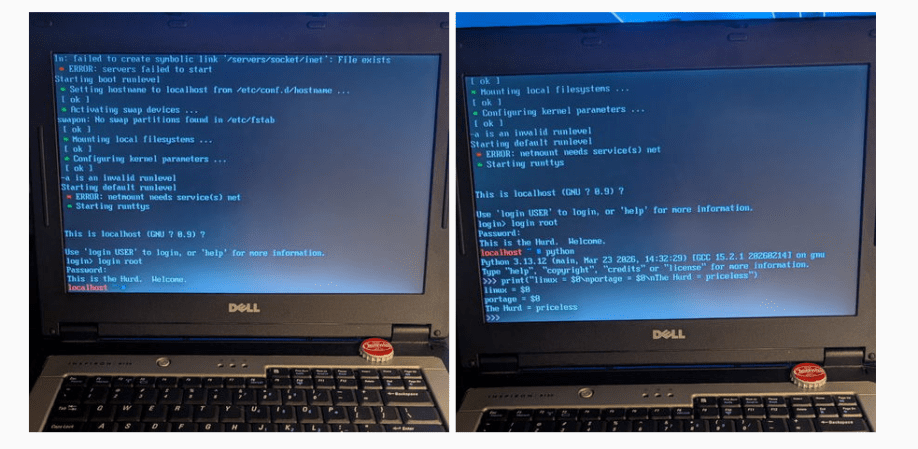
Long ago, in the aftermath of the UNIX wars, three kernels emerged from the rubble: BSD, Linux, and Hurd. BSD, being UNIX, was held back by legal wrangling in the aftermath of the wars, and that allowed Linux to pull ahead to a pole position it still enjoys to this day. BSD has its following, of course, but Hurd? GNU Hurd seemed destined to languish… until April 1st, 2026, when the Gentoo Linux distribution was ported to the Free Software Foundation’s kernel.

It turns out, they weren’t actually joking. The joke part was that they were moving fully to the Hurd kernel, away from Linux– you can absolutely still run Gentoo with the Linux kernel, and make no mistake, that’s still the default and best-supported option. Options are good, though, and the Gentoo team has decided that it’s time to add some options to the kernel space, and give the Hurd some time in the sun.

Unlike the Linux kernel, which follows closely the monolithic UNIX framework– and the BSD-Unix kernel, which is Unix–GNU Hurd is a microkernel architecture, based originally on the Mach kernel. In that, it’s rather like MacOS. Unlike MacOS, given its roots in the Free Software Foundation, GNU Hurd is 100% free and open source. There are advantages to a microkernel architecture– it keeps drivers out of kernel space so a dodgy WiFi adapter can’t crash your system, for example– but the big disadvantage is, of course, drivers. Both Linux and BSD drivers can be ported, but that takes work and many of them have not been.

Still, now that Microsoft has become a major contributor to the Linux kernel, we could see a lot of the old-school Linux users who talk about “win-doze” and still spell Microsoft with a dollar sign being tempted to join the Hurd. If that appeals to you and you’re not into Gentoo, Debian has quietly let you install with the Hurd kernel for years now. It’s either that or embrace BSD and escape the chaos vortex.

The big three aren’t the only POSIX kernels out there, of course– there’s even one written entirely in Rust, for the die hard rustaceans amongst you.

Recording HDR Video With A Raspberry Pi

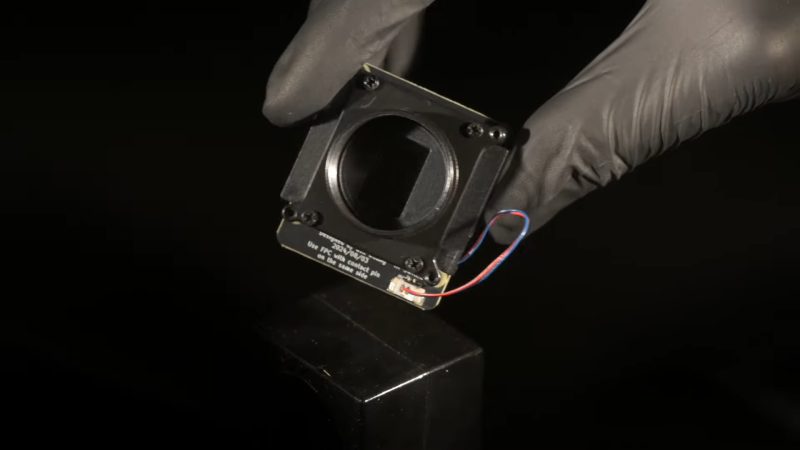
The Raspberry Pi line of single-board computers can be hooked up with a wide range of compatible cameras. There are a number of first party options, but you don’t have to stick with those—there are other sensors out there with interesting capabilities, too. [Collimated Beard] has been exploring the use of the IMX585 camera sensor, exploiting its abilities to capture HDR content on the Raspberry Pi.

The IMX585 sensor from Sony is a neat part, capable of shooting at up to 3840 x 2160 resolution (4K) in high-dynamic range if so desired. Camera boards with this sensor that suit the Raspberry Pi aren’t that easy to find, but there are designs out there that you can look up if you really want one. There are also some tricks you’ll have to do to get this part working on the platform. As [Collimated Beard] explains, in the HDR modes, a lot of the standard white balance and image control algorithms don’t work, and image preview can be unusable at times due to the vagaries of the IMX585’s data format. You’ll also need to jump some hurdles with the Video4Linux2 tools to enable the full functionality of these modes.

Do all that, recompile the kernel with some tweaks and the right drivers, though, and you’ll finally be able to capture in 16-bit HDR modes. Oh, and don’t forget—you’ll need to find a way deal with the weird RAW video files this setup generates. It’s a lot of work, but that’s the price of entry to work with this sensor right now. If it helps convince you, the sample shots shared by [Collimated Beard] are pretty good.

If you’re looking to record some really juicy, colorful imagery with the Raspberry Pi, this is a difficult but viable way to go. We’ve seen some other hardcore Raspberry Pi camera hacks of late, too.

Continue reading “Recording HDR Video With A Raspberry Pi”

Building A Dependency-Free GPT On A Custom OS

The construction of a large language model (LLM) depends on many things: banks of GPUs, vast reams of training data, massive amounts of power, and matrix manipulation libraries like Numpy. For models with lower requirements though, it’s possible to do away with all of that, including the software dependencies. As someone who’d already built a full operating system as a C learning project, [Ethan Zhang] was no stranger to intimidating projects, and as an exercise in minimalism, he decided to build a generative pre-trained transformer (GPT) model in the kernel space of his operating system.

As with a number of other small demonstration LLMs, this was inspired by [Andrej Karpathy]’s MicroGPT, specifically by its lack of external dependencies. The first step was to strip away every unnecessary element from MooseOS, the operating system [Ethan] had previously written, including the GUI, most drivers, and the filesystem. All that’s left is the kernel, and KernelGPT runs on this. To get around the lack of a filesystem, the training data was converted into a header to keep it in memory — at only 32,000 words, this was no problem. Like the original MicroGPT, this is trained on a list of names, and predicts new names. Due to some hardware issues, [Ethan] hasn’t yet been able to test this on a physical computer, but it does work in QEMU.

It’s quite impressive to see such a complex piece of software written solely in C, running directly on hardware; for a project which takes the same starting point and goes in the opposite direction, check out this browser-based implementation of MicroGPT. For more on the math behind GPTs, check out this visualization.

Continue reading “Building A Dependency-Free GPT On A Custom OS”

FLOSS Weekly Episode 862: Have Your CAKE And Eat It Too

This week Jonathan chats with Toke Hoiland-Jorgensen about CAKE_MQ, the newest Kernel innovation to combat Bufferbloat! What was the realization that made CAKE parallelization? When can we expect it in the wild? And what’s new in the rest of the kernel world? Watch to find out!

Continue reading “FLOSS Weekly Episode 862: Have Your CAKE And Eat It Too”

Screenshot of X running on Gloire

There’s No Rust On This Ironclad Kernel

Rust is the new hotness in programming languages because of how solid its memory protections are. Race conditions and memory leaks are hardly new issues however, and as greybeards are wont to point out, they were kind of a solved problem already: we have Ada. So if you want a memory-protected kernel but aren’t interested in the new kids’ rusty code, you might be interested in the Ironclad OS kernel, written entirely in Ada.

OK, not entirely in classic Ada– they claim to use SPARK, too, but since SPARK and Ada converged syntax-wise over a decade ago, we’re just going to call it Ada. The SPARK toolchain means they can get this kernel “formally-verified” however, which is a big selling point. If you’re not into CS, that just means the compiler can confirm the code is going to do what we want under all possible conditions — which is a nice thing to be able to say about the heart of your operating system, I think we can all agree. It’s a nice thing to be able to say about any code, which is one reason why you might want to be programming in Ada.

Continue reading “There’s No Rust On This Ironclad Kernel”

C Project Turns Into Full-Fledged OS

While some of us may have learned C in order to interact with embedded electronics or deep with computing hardware of some sort, others learn C for the challenge alone. Compared to newer languages like Python there’s a lot that C leaves up to the programmer that can be incredibly daunting. At the beginning of the year [Ethan] set out with a goal of learning C for its own sake and ended up with a working operating system from scratch programmed in not only C but Assembly as well.

[Ethan] calls his project Moderate Overdose of System Eccentricity, or MooseOS. Original programming and testing was done in QEMU on a Mac where he was able to build all of the core components of the operating system one-by-one including a kernel, a basic filesystem, and drivers for PS/2 peripherals as well as 320×200 VGA video. It also includes a dock-based GUI with design cues from operating systems like Macintosh System 1. From that GUI users can launch a few applications, from a text editor, a file explorer, or a terminal. There’s plenty of additional information about this OS on his GitHub page as well as a separate blog post.

The project didn’t stay confined to the QEMU virtual machine either. A friend of his was throwing away a 2009-era desktop which [Ethan] quickly grabbed to test his operating system on bare metal. There was just one fault that the real hardware threw that QEMU never did, but with a bit of troubleshooting it was able to run. He also notes that this was inspired by a wiki called OSDev which, although a bit dated now, is a great place to go to learn about the fundamentals of operating systems. We’d also recommend checking out this project that performs a similar task but on the RISC-V instruction set instead.

Mini Laptop Needs Custom Kernel

These days, you rarely have to build your own Linux kernel. You just take what your distribution ships, and it usually works just fine. However, [Andrei] became enamored with a friend’s cyberdeck and decided that he’d prefer to travel with a very small laptop. The problem is, it didn’t work well with a stock kernel. So, time to build the kernel again.

Of course, he tried to simply install Linux. The installer showed a blank screen. You might guess that you need to add ‘nomodeset’ to the kernel options. But the screen was still a bit wacky. [Andrei] likens troubleshooting problems like this to peeling an onion. There are many layers to peel back, and you are probably going to shed some tears.

Continue reading “Mini Laptop Needs Custom Kernel”