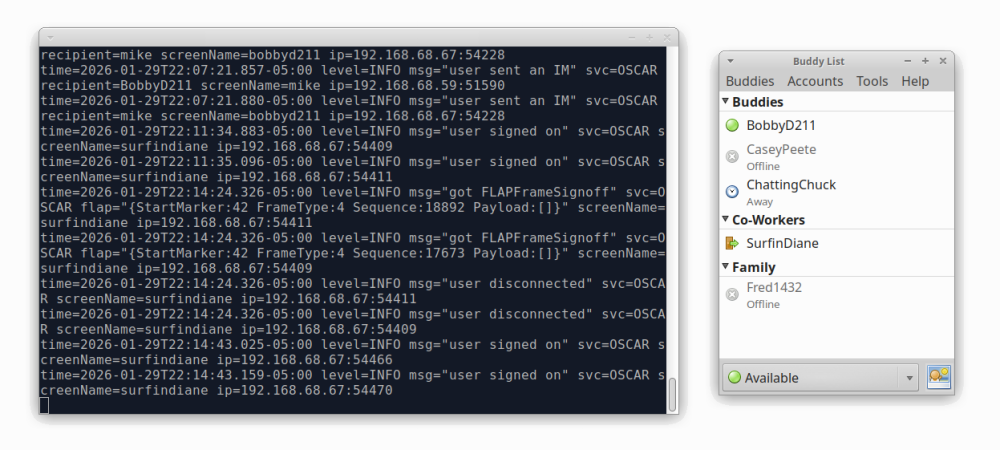
The OpenOscar Server in terminal, with Pidgin connected

AIM-ing For A More Open Platform Than Discord

Do you remember AIM? It may suprize you to hear that AOL’s instant messanger was actually supported all the way up to 2017– two years after Discord launched. Unlike Discord, AIM is a protocol, not a platform. Everything on your favourite Discord server is at the mercy of the corporate masters of said server; you can’t just spool up your own. Not so for AIM, as [Veronica] explains, both on her blog and in a YouTube video that we’ve embedded below.

The key is the fact that the AIM protocol isn’t locked into AOL’s now-defunct servers; it was reverse engineered in its prime for open-source messengers like Pidgin. You can host your own server, too, using the OpenOscarServer by [mk6i]. Even better, it’s not just AIM, but ICQ! In the sort of irony you only get in real life, the OpenOscar community does all its support on a Discord server. But then, they couldn’t hardly do it over AIM or ICQ these days.

For those of you who were too old or too young to get sucked into the 90s instant messenger craze, these protocols don’t just create chat rooms, that would be the even older Internet Relay Chat protocol, but usually worked more like SMS text messages. You have a contact list, and you send messages to your contacts via a server that acts as a hub. Once upon a time, that server was AOL’s, but now thanks to the OpenOscar project, it can be anybody’s computer. Of course, like texting, you can rope all of your contacts into one big group chat, and the protocol does support images and VOIP. (Which is starting to sound a lot like Discord.)

If you’re tired of your friend-group being at the mercy of American tech companies, [Veronica]’s blog post serves as a good guide to get you started running OpenOscarServer on a Linux system; she used a virtual private server but figures a Raspberry Pi ought to have enough grunt if you don’t have a huge number of people signed up.

For completeness, we should mention that while AOL pulled the plug on AIM nearly a decade back, ICQ, the other protocol supported by OpenOscarServer, lasted straight through until 2024.

Thanks to Keith Olson for the tip! Our tipsline is based on decentralized “electronic mail” technology that anyone can access.

Continue reading “AIM-ing For A More Open Platform Than Discord”
33C3: Understanding Mobile Messaging And Its Security

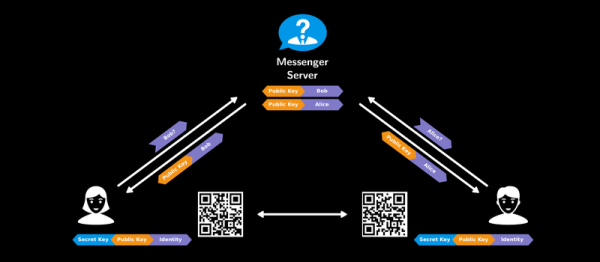
If you had to explain why you use one mobile messaging service over another to your grandmother, would you be able to? Does she even care about forward secrecy or the difference between a private and public key is? Maybe she would if she understood the issues in relation to “normal” human experiences: holding secret discussions behind closed doors and sending letters wrapped in envelopes.

Or maybe your grandmother is the type who’d like to completely re-implement the messaging service herself, open source and verifiably secure. Whichever grandma you’ve got, she should watch [Roland Schilling] and [Frieder Steinmetz]’s talk where they give both a great introduction into what you might want out of a secure messaging system, and then review what they found while tearing apart Threema, a mobile messaging service that’s popular in Germany. Check out the slides (PDF). And if that’s not enough, they provided the code to back it up: an open workalike of the messaging service itself.

This talk makes a great introduction, by counterexample, to the way that other messaging applications work. The messaging service is always in the middle of a discussion, and whether they’re collecting metadata about you and your conversations to use for their own marketing purposes (“Hiya, Whatsapp!”) or not, it’s good to see how a counterexample could function.

The best quote from the talk? “Cryptography is rarely, if ever, the solution to a security problem. Cryptography is a translation mechanism, usually converting a communications security problem into a key management problem.” Any channel can be made secure if all parties have enough key material. The implementation details of getting those keys around, making sure that the right people have the right keys, and so on, are the details in which the devil lives. But these details matter, and as mobile messaging is a part of everyday life, it’s important that the workings are transparently presented to the users. This talk does a great job on the demystification front.

Google Talk Used For Home Automation Communications Via Android

home-automation-using-instant-messaging

To call [Carnivore’s] home automation project impressive would be an understatement. He’s pulled together a system that is fast, well presented, and easy to use. To interface with items in his home he’s using X10 modules, and this example simply switches some table lamps. But the underlying setup seems incredibly polished and should be a snap to extend for just about any purpose.

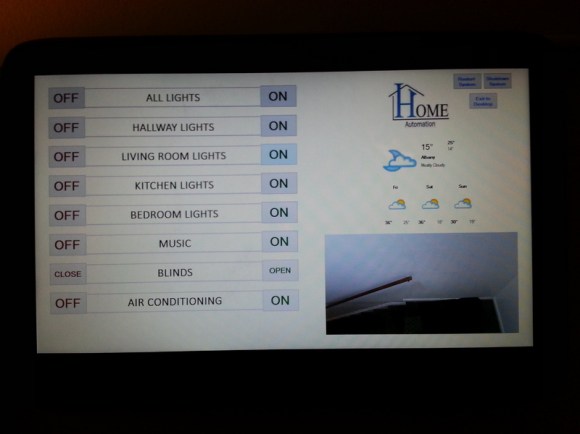
The guide linked above has all the gritty details, but the best overview is provided in the video after the break. [Carnivore] shows off the Windows 8 machine that acts as the server. It has am X10 transceiver connected to communicate with the appliances. He can control the system from the screen seen above, but everything can also be accessed from his Android phone. Communication between the two is handled by Google Talk, an instant messaging application — but the commands are home screen shortcuts and don’t need to be typed into the Google Talk app. He modified the source code of a program called TweetMyPC to use the Google Talk API which looks for keywords in received messages. The lag on an instant message is far lower compared to SMS or Email so commands are received very close to real-time. Feedback is sent from the server to the phone using a text message.

Continue reading “Google Talk Used For Home Automation Communications Via Android”

Chat List Indicator Uses Hacked Xmas Lights

Here’s a way to display which friends are logged into chat. This uses the same G-35 hacked Christmas lights we saw earlier in the month. [Andrejk’s] company uses Microsoft Lync as their chat protocol when working in teams. The service has an SDK that allowed him to write some .NET code to check status and display it on the string of lights. It works much as you would expect; red for busy, green for available, purple is out-of-office, and we’d guess that yellow is for away. Watch him demonstrate the system after the break.

Continue reading “Chat List Indicator Uses Hacked Xmas Lights”