Hackaday Links Column Banner

Hackaday Links: September 27, 2026

It isn’t quite hailing frequencies open, but researchers from Harvard claim they’ve picked up a radio signal directly from a nearby exoplanet. Before you get too excited, planets in our solar system also emit RF, so no one credible is claiming these are extraterrestrial reruns of their version of I Love Lucy, but it is the first time they’ve localized a radio signal to an exoplanet, in this case, Beta Pictoris B.

Speaking of space, the asteroid formerly known as 1981 EC26 is now sporting a new moniker: (14331) Alyankovic. If you think that sounds like (Weird) Al Yankovic, you aren’t wrong. The Tucson Star reports that, thanks to the efforts of several planetary scientists who are also Weird Al fans, the International Astronomical Union made the name official. Apparently, another asteroid now bears a name in honor of Weird Al’s predecessor, Tom Lehrer.
The postmarketOS — er — Nura logo.

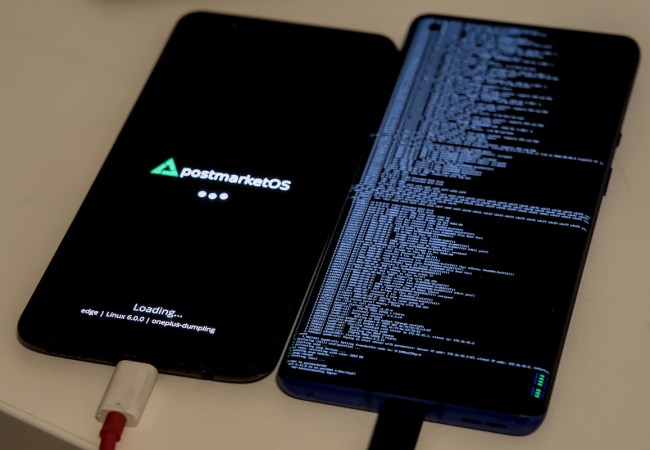
If you follow open mobile phone software, you probably know the name postmarketOS, a Linux distribution based on Alpine aimed at mobile phones and tablets. Well, now you can forget it. The project announced a name change, so we’re now talking about Nura. Why Nura? According to the team, it is a shortened form of Nuraghe, some granite structures in Sardinia that are over 5,000 years old. The FAQ mentions that postmarketOS was hard to remember. We aren’t sure Nura is that much more memorable. Perhaps they should have pivoted to Phonz OS.

Continue reading “Hackaday Links: September 27, 2026” →

Limiting Battery Risk On Repurposed Smartphones With PostmarketOS

PostmarketOS is a Linux distribution specifically designed for those who wish to repurpose old smartphones as general-use computers, to a degree. This can be a great way to reuse old hardware. However, for [Bry50], it was somewhat discomforting leaving the phone’s aging lithium battery perpetually on charge. A bit of code was thus whipped up to provide a greater measure of safety.

The concept is simple enough—lithium batteries are at lower risk of surprise combustion events if they’re held at a lower state of charge. To this end, [Bry50] modified the device tree in PostmarketOS to change the maximum charge level. Apparently, maximum charge was set at a lofty 4.4V (100%), but this was reconfigured to a lower level of 3.8V, corresponding to a roughly 40-50% state of charge. The idea is that this is a much healthier way to maintain a battery hooked up to power for long periods of time. There’s one small hitch—the system will get confused if the battery voltage is higher than the 3.8 V setpoint when switching over. It’s thus important to let the device discharge to a lower level if you choose to make this change.

It’s a neat mod that both increases safety, but keeps the battery on hand to let the system ride through minor power outages. If you’re new to the world of repurposing old smartphones, fear not. [Bryan] also has a tutorial on getting started with PostmarketOS for the unfamiliar. If you’re working on your own projects in this space, we’d love to hear about them—so get on over to the tipsline!

Factorio Running On Mobile

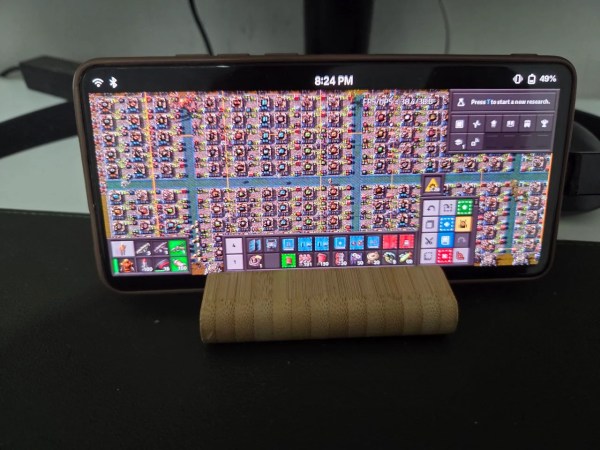
As a video game, DOOM has achieved cult status not just for its legendary gameplay and milestone developments but also because it’s the piece of software that’s likely been ported to the most number of platforms. Almost everything with a processor can run the 1993 shooter, but as it ages, this becomes less of a challenge. More modern games are starting to move into this position, and Factorio may be taking a leading position. [Point Substantial] has gotten this game to run on a mobile phone.

The minimum system requirements for Factorio are enough to make this a challenge, especially compared to vintage title like DOOM. For Linux systems a dual-core processor and 8 GB of memory are needed, as well as something with at least 1 GB of VRAM. [Point_Substantial]’s Xiaomi Mi 9T almost meets these official minimum requirements, with the notable exception of RAM. This problem was solved by adding 6 GB of swap space to make up for the difference.

The real key to getting this running is that this phone doesn’t run Android, it runs the Linux-only postmarketOS. Since it’s a full-fledged Linux distribution rather than Android, it can run any software any other Linux computer can, including Steam. And it can also easily handle inputs for periphreals including a Switch Pro controller, which is important because this game doesn’t have touch inputs programmed natively.

The other tool that [Point_Substantial] needed was box86/box64, a translation layer to run x86 code on ARM. But with all the pieces in place it’s quite possible to run plenty of games semi-natively on a system like this. In fact, we’d argue it’s a shame that more phones don’t have support for Linux distributions like postmarketOS based on the latest news about Android.

Thanks to [Keith] for the tip!

How Many Phones Sport A 5 And 1/4 Diskette Drive? This One.

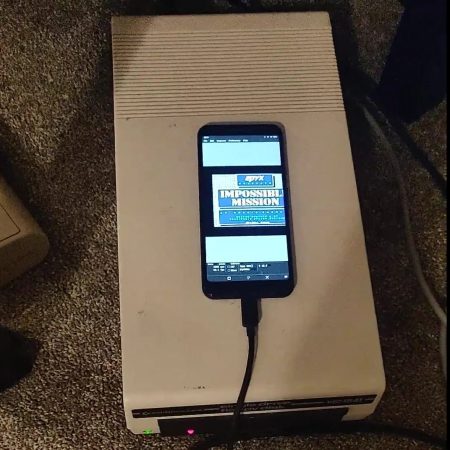
It all started with a sarcastic comment right here on Hackaday.com: ” How many phones do you know that sport a 5 and 1/4 inch diskette drive?” — and [Paul Sanja] took that personally, or at least thought “Challenge accepted” because he immediately hooked an old Commodore floppy drive to his somewhat-less-old smartphone. 

The argument started over UNIX file directories, in a post about Redox OS on smartphones— which was a [Paul Sajna] hack as well. [Paul] had everything he needed to pick up the gauntlet, and evidently did so promptly. The drive is a classic Commodore 1541, which means you’ll want to watch the demo video at 2x speed or better. (If you thought loading times felt slow in the old days, they’re positively glacial by modern standards.) The old floppy drive is plugged into a Google Pixel 3 running Postmarket OS. Sure, you could do this on Android, but a fully open Linux system is obviously the hacker’s choice. As a bonus, it makes the whole endeavor almost trivial.

Continue reading “How Many Phones Sport A 5 And 1/4 Diskette Drive? This One.” →

8-Core ARM Pocket Computer Runs NixOS

What has 8 ARM cores, 8 GB of RAM, fits in a pocket, and runs NixOS? It’s no pi-clone SBC, but [MWLabs]’s smartphone– a OnePlus 6, to be precise.

The video embedded below, and the git link above, are [MWLabs]’s walk-through for loading the mobile version of Nix onto the cell phone, turning it into a tiny-screened Linux computer. He’s using the same flake on the phone as on his desktop, which means he gets all the same applications set up in the same way– talk about convergence. That’s an advantage to Nix in this application, compared to the usual Alpine-based PostMarketOS.

Of course some of the phone-like features of this pocket-computer are lacking: the SIM is detected, and he can text, but 4G is nonfunctional. The rear camera is also not there yet, but given that Mobile-NixOS builds on the work done by well-established PostMarketOS, and PostMarketOS’ testing version can run the camera, it’s only a matter of time before support comes downstream. Depending what you need a tiny Linux device for, the camera functionality may or may not be of particular interest. If you’re like us, the idea of a mobile device running Nix might just intrigue you,

Smartphones can be powerful SBC alternatives, after all.  You can even turn them into SBCs. As long as you don’t need a lot of GPIO, like for a server,a phone in hand might be worth two birds in the raspberry bush.

Continue reading “8-Core ARM Pocket Computer Runs NixOS” →

Self-Hosting A Cluster On Old Phones

The phones most of us carry around in our pockets every day hold a surprising amount of computing power. It’s somewhat taken for granted now that we can get broadband in our hands in most places; so much so that when one of these devices has reached the end of its life it’s often just tossed in a junk drawer even though its capabilities would have been miraculous only 20 years ago. But those old phones can still be put to good use though, and [Denys] puts a few of them back to work running a computing cluster.

Perhaps the most significant flaw of smartphones, though, is that most of them are locked down so much by their manufacturers that it’s impossible to load new operating systems on them. For this project you’ll need to be lucky enough (or informed enough) to have a phone with an unlockable bootloader so that a smartphone-oriented Linux distribution called postmarketOS can be installed. With this nearly full-fledged Linux distribution to work from, the phones can be accessed by ssh and then used to run Kubernetes for the computing cluster. [Denys] has three phones in his cluster that run a few self-hosted services for him.

[Denys] also points out in his guide that having a phone that can run postmarketOS might save some money when compared to buying a Raspberry Pi to run the same service, and the phones themselves can often be more powerful as well. This is actually something that a few others have noted in the past as well. He’s gone into a considerable amount of detail on how to set this up, so if you have a few old smartphones gathering dust, or even those with broken screens or other physical problems where the underlying computing resources are still usable, it’s a great way to put these machines back to work.

Thanks to [mastro Gippo] for the tip!

Smartphone Runs Home Server

It’s one of the great tragedies of our technological era. Smartphones that feature an incredible amount of computational power compared to computers the past, are largely locked down by carriers or manufacturers, dooming them to performing trivial tasks far below their true capabilities.

But there is hope. In part one of this build, a OnePlus 6T is stripped of its Android operating system in favor of postmarketOS, a Linux distribution based on Alpine designed for a number of Android phones and tablets as well as some Linux-only handhelds. The guide also demonstrates how to remove the battery and use a modified USB-C cable to essentially trick the battery management system into powering up the phone anyway. The second part of the project dives into the software side, getting the Linux system up and running before installing Docker and whichever Docker containers the user needs.

There are a few downsides to running a server from a smartphone. Although there’s plenty of processing power available for a wide range of applications, most phones won’t have Ethernet support out-of-the-box which forces the use of WiFi. There’s also limited storage options available, so a large NAS system may be out of reach. But for something like a home automation system or a music streaming server this could put plenty of older devices to work again. And if you don’t want to hunt for an Android phone that isn’t completely hobbled out-of-the box you might want to try a phone that’s Linux-based from the get-go instead.

Thanks to [JohnU] for the tip!