Overclocking The Raspberry Pi 3 For Tasty Speed Increases

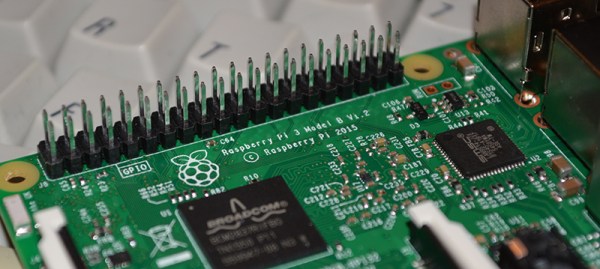
Some people are never happy. [Jackenhack] got hold of a couple of shiny new Raspberry Pi 3s, and the first thing he did is to start overclocking them. Fortunately, he knows what he is doing, so none of the magic smoke escaped, but it seems not all Pis are happy with the process.

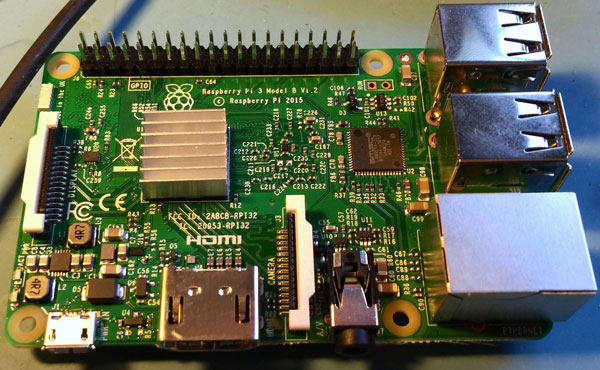
For one of the three seemingly identical Pi 3, adding heat sinks let him push the CPU from the native 1.2GHz up to 1.45GHz. That did involve a bit of overvolting (increasing the voltage to the CPU), but that can be easily done in software. He also experimented with adding heat sinks to the memory, then bumping up the speed of the memory to increase throughput. Again, he was able to make some impressive gains, bumping the speed up from the native 400 Mhz to 500 Mhz. Both of those are stable overclocks: he was able to run the system at 100% CPU load for an extended time, and has incorporated the overclocked Pi into his system that contributes to the NTP pool project.

However, when he tried the same overclock with the second of the Pi 3 victims test subjects, it failed due to the CPU overheating. So, it seems that there is a lot of variation in the individual bits of silicon on the Pi 3. Perhaps some liquid nitrogen would help? It did for an Arduino…
Pi 3 Benchmarks: The Marketing Hype Is True

The spec bullet list for the latest Raspberry Pi begins as you’ve already heard: WiFi and Bluetooth, now standard. While this is impressive itself, it doesn’t tell the whole story. The Pi 3, with an ARM Cortex A53, is up to 50% faster than the Pi 2 from last year. That’s an astonishing improvement in just 12 short months.

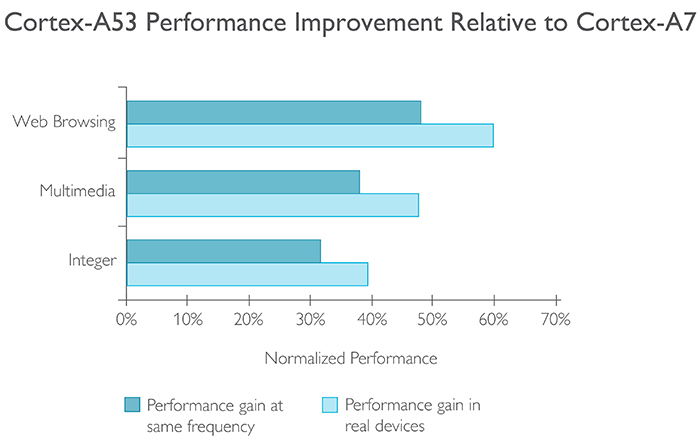
In playing with the Pi 3 for a few hours, it’s apparent the Pi 3 is fast. It passes a threshold of usability. The Raspberry Pi isn’t a computer that just sits on a shelf and runs a few cron jobs and blinks LEDs anymore – this is a computer that’s usable as a computer. But how fast is it? By stroke of luck, the official website for the Cortex A53 gives us a direct comparison between this chip and the CPU in the Raspberry Pi 2:

image credit: arm.com

In real devices, the performance improvement from the Pi 2 to the Pi 3 is somewhere between 40 and 60 percent. At least that’s what ARM and the Raspberry Pi foundation are claiming. Is this true? There are tests we can run, and the marketing speak, for once, isn’t too terribly off the mark.

Continue reading “Pi 3 Benchmarks: The Marketing Hype Is True”

Introducing The Raspberry Pi 3

TL;DR: The Raspberry Pi 3 Model B is out now. This latest model includes 802.11n WiFi, Bluetooth 4.0, and a quad-core 64-bit ARM Cortex A53 running at 1.2 GHz. It’s a usable desktop computer. Available now at the usual Pi retailers for $35.

News of the latest Raspberry Pi swept around the Internet like wildfire this last weekend, thanks to a published FCC docs showing a Pi with on-board WiFi and Bluetooth. While we thank the dozens of Hackaday readers that wrote in to tell us about the leaked FCC documents, our lips have been sealed until now. We’ve been doing a few hands-on tests with the Pi 3 for about two weeks now, and the reality of the Pi 3 is much cooler than a few leaked FCC docs will tell you.

The Raspberry Pi 3 Model B features a quad-core 64-bit ARM Cortex A53 clocked at 1.2 GHz. This puts the Pi 3 roughly 50% faster than the Pi 2. Compared to the Pi 2, the RAM remains the same – 1GB of LPDDR2-900 SDRAM, and the graphics capabilities, provided by the VideoCore IV GPU, are the same as they ever were. As the leaked FCC docs will tell you, the Pi 3 now includes on-board 802.11n WiFi and Bluetooth 4.0. WiFi, wireless keyboards, and wireless mice now work out of the box.

Continue reading “Introducing The Raspberry Pi 3”