
WSL9x: Add A Linux Subsystem To Your Windows 9x

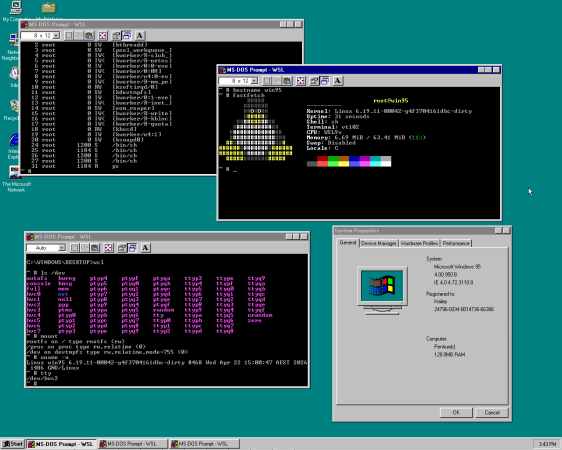
Considering that Windows NT has the concept of so-called ‘subsystems’ whereby you can run different systems side-by-side, starting with the POSIX subsystem and later the Windows Subsystem for Linux (WSL), it was probably only a matter of time before someone figured that doing this with Windows 9x was also completely reasonable. Ergo we now got [Hailey Somerville]’s Linux Subsystem for Windows.

To make running Linux inside Windows 9x work, it was necessary to heavily patch a Linux kernel, as normally there are no provisions for such a subsystems in Windows 9x’s kernel unlike the NT kernel. Correspondingly, the Linux kernel is based on user-mode Linux and hacked to call Windows 9x kernel APIs instead of the POSIX ones.

In order to use WSL9x you thus need to build said modified Linux kernel – currently at version 6.19 – along with a disk image containing an installed copy of Windows 9x. From there WSL9x can be loaded with the wsl command and you’re then free to cooperatively run the Win9x and Linux kernel side-by-side. This is reminiscent of Cooperative Linux (coLinux), which did something similar except with Windows NT and Linux kernels running side-by-side, and of course we have WSL2 with Windows 10+.

Thanks to [adistuder] for the tip.
Wine Is For Windows And Darling Is For MacOS

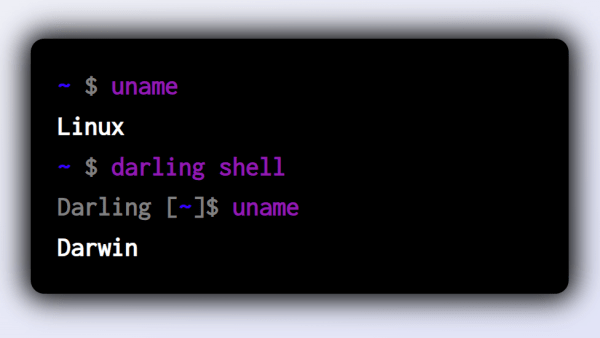
Wine has become a highly optimized and useful piece of software for those that live in Linux, but occasionally need to walk on the Windows side. In case you’d wondered, there’s a similar tool for when you need to run a MacOS program in your Linux environment. Enter Darling, the translation layer you’ve needed all along.

Just as Wine is not an emulator, nor is Darling. As a translation layer, it duplicates functions of the MacOS operating system that programs need to operate but within Linux. It’s fast, because it’s effectively running the MacOS software directly. Initially, Darling was mostly only capable of running MacOS apps at the console level. However, there is rudimentary support for running graphical applications that are based on the Cocoa framework.

Hilariously, if you’re into weird recursive situations, you can go deeper and run Darling within Windows Subsystem for Linux, itself running within Windows. Why? Well, you’re probably bored or just trying to for the sake of it. Regardless, we don’t judge. If you’ve got your own nifty translation or virtual machine hacks in the works, don’t hesitate to let us know!

Linux On The Windows 11 Desktop

A month ago Microsoft officially released Windows 11. One of its features is the ability to run Linux GUI applications side by side as peers to normal Windows desktop apps. [Jim Salter] of Ars Technica took a closer look and declared it works as advertised.

This is an evolution of the Windows Subsystem for Linux (WSL), which has existed for a few years but only in command-line form. Linux being Linux, it was certainly possible to put visuals onscreen, but doing so required jumping through some hoops and dealing with limitations. Now “WSLg” gives a smoother and more accessible experience.

While tremendously valuable for those who need it, WSLg is admittedly a niche feature. The circumstances will be different for different needs. Around these parts, one example is letting us work with pieces of proprietary Windows software (such as low level hardware drivers or hardware-specific dev tools) while still retaining Linux tools for the rest of our workflow.

It’s also interesting to take a peek behind the scenes for an instructive look at bridging two operating systems. A Microsoft blog post describes the general architecture, where we were happy to see open-source work leveraged. And by basing this work on Wayland, it is more forward-looking than working with just X11.

The bad news is that WSLg is limited to Windows 11, at least for now. WSL users on Windows 10 will have to continue jumping through hoops (We described one method using X11.) And opening this door unfortunately also opened the door to security issues, so there’s still work ahead for WSL.

Linux Fu: The Windows X11 Connection

The life of a Linux user can be a bit difficult. Sometimes you have to — or want to — run Windows. Why Windows? Sometimes you have a work computer or a laptop that Linux doesn’t support well. Or it might be software. Although there are plenty of programs that can edit, say, Word documents, there’s always that one document that doesn’t quite translate correctly. Things like videoconferencing software sometimes works on Linux but might have fewer features.

So what do you do? You can dual boot, of course, but that’s not very handy. You can run Windows in a virtual machine if you have enough horsepower. There’s also Wine, but that often has its own set of problems with features and stability of complex programs. However, recent versions of Windows provide the Windows Subsystem for Linux (WSL).

With WSL, you can have most of what you like about Linux inside your Windows session. You just have to know how to set it up, and I’m going to show you one way that works for me with reasonably stable versions of Windows 10. Continue reading “Linux Fu: The Windows X11 Connection”










