
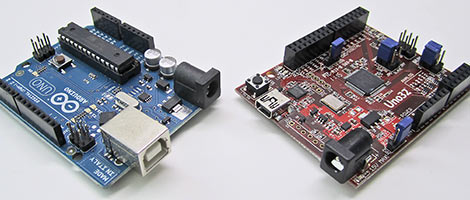
Following Maker Faire, we’ve had a few days to poke around with Digilent’s 32-bit Arduino-compatible chipKIT boards and compiler. We have some initial performance figures to report, along with impressions of the hardware and software.
Disclaimer: Digilent has provided Hack a Day with Uno32 and Max32 boards for evaluation.
chipKIT isn’t the first attempt to extend the Arduino form factor to a 32-bit microcontroller core…other products such as Maple, Netduino or the FEZ Domino have been around for well over a year…but the chipKIT boards are notable for the effort Digilent has put into creating a seamless transition. The aim is to create a single unified tool both for traditional 8-bit Arduino boards and Digilent’s 32-bit work-alikes, where the same IDE, the same code, and a good number of the same shields can all work despite the different underlying architectures. In fact, they’re hoping the Arduino project accepts their integration method as an official means of adding new hardware to the Arduino IDE — not just for their own product, but for anyone else to use as well.
As noted in our prior report, we were impressed that they do appear to deliver on this promise. The transition between “classic” Arduinos and the 32-bit boards is indeed quite slick. But we’re finding at this early stage that there are still some rough bits to be worked out. So, for the time being, we’re keeping both the Arduino IDE and Mpide (Digilent’s multi-platform derivative) installed on the development system; the latter has not yet obviated the need for the former. But we see how the concept is supposed to work, and we like it.
For the most part, Mpide works as intended as a dual-platform IDE. Just select the appropriate device from the Tools->Board menu, recompile, and the code is now ready for the corresponding chip. But a couple things have bit us in the rear:
- The AVR compiler in Mpide either isn’t fully optimizing, or the floating-point libraries were built sans optimization or something. This threw off our benchmark numbers initially — the results were atrocious! In order to keep the numbers realistic, we’re using the standard Arduino IDE for the corresponding benchmarks. To be fair, they did warn us about this performance issue in person at Maker Faire, but until it’s fixed they could be more forthcoming about it with some documentation or on the web site…otherwise it could look like they’re trying to skew benchmarks more in their favor.
- The String() constructor is borked when handling integers. The following line compiles fine for AVR chips, but throws a tizzy fit with the PIC32 compiler:
String foo = String(42);
Given that the IDE was wrapped up literally hours before going live online and at Maker Faire, it’s understandable that there are some loose ends. Just be prepared as an early adopter that this won’t be as pain-free a transition as they’re aiming for. The great thing with open source is that we can get in there, spot such problems, and offer suggestions and submit fixes…the situation will no doubt improve with time.
Some Benchmarks
We wanted to create a fractal demo similar to what they were displaying at Maker Faire. We didn’t have the spiffy SparkFun Color LCD Shield on hand, so instead we had to settle for a serial LCD, 4D Systems’ uLCD-144. This does affect the numbers somewhat, as we’ll see.
In MIPS alone, the chipKIT should beat the Arduino by a factor of five. Then there’s the native 32-bit-ness of it: when dealing with larger numbers, the AVR processor at Arduino’s core has to shift and fiddle bits between consecutive 8-bit values in order to achieve 32-bit results. So the PIC32 should show a considerable performance benefit beyond MIPS alone. In practice, this doesn’t always pan out.
The uLCD-144 is a 128 by 128 pixel 16-bit color LCD with a serial UART interface running at 115,200 bits per second. The graphics commands aren’t terribly efficient, and it’s necessary to send a five byte packet for every pixel drawn. This includes coordinate data; there’s no block write function in serial mode. On the plus side, it’s easy to talk to using the Arduino or chipKIT’s native serial UART.
Here’s the code for the Mandelbrot sketch, using floating-point math:
/* Simple Mandelbrot set renderer for Arduino vs. chipKIT benchmarking
   w/floating-point math, via www.hackaday.com.  This example uses the
   4D Systems uLCD-144(SGC) serial display module, wired as follows:

      uLCD Pin:   RES  GND  RX  TX  VIN
   Arduino Pin:     2  GND   1   0   5V    */

const int
  pixelWidth  = 128,  // LCD dimensions
  pixelHeight = 128,
  iterations  = 255;  // Fractal iteration limit or 'dwell'
const float
  centerReal  = -0.6, // Image center point in complex plane
  centerImag  =  0.0,
  rangeReal   =  3.0, // Image coverage in complex plane
  rangeImag   =  3.0,
  startReal   = centerReal - rangeReal * 0.5,
  startImag   = centerImag + rangeImag * 0.5,
  incReal     = rangeReal / (float)pixelWidth,
  incImag     = rangeImag / (float)pixelHeight;

void setup()
{
  pinMode(13,OUTPUT);   // Arduino status LED
  pinMode(2,OUTPUT);    // LCD reset pin
  digitalWrite(13,LOW); // LED off
  Serial.begin(115200);

  digitalWrite(2,LOW);  // Reset LCD
  delay(10);
  digitalWrite(2,HIGH);
  delay(2000);          // Allow time for reset to complete

  Serial.write(0x55);   // Issue auto-baud command
  while(Serial.read() != 0x06); // Wait for ACK
}

void loop()
{
  unsigned char cmd[20];   // Serial packet for LCD commands
  int           x,y,n;
  float         a,b,a2,b2,posReal,posImag;
  long          startTime,elapsedTime;

  Serial.write(0x45);      // Clear screen
  delay(100);              // Brief pause, else 1st few pixels are lost

  cmd[0] = 0x50;           // 'Pixel' command is issued repeatedly

  digitalWrite(13,HIGH);   // LED on while rendering
  startTime = millis();

  posImag = startImag;
  for(y = 0; y < pixelHeight; y++) {
    cmd[2] = y;            // Y coordinate of pixel
    posReal = startReal;
    for(x = 0; x < pixelWidth; x++) {
      a = posReal;
      b = posImag;
      for(n = iterations; n > 0 ; n--) {
        a2 = a * a;
        b2 = b * b;
        if((a2 + b2) >= 4.0) break;
        b  = posImag + a * b * 2.0;
        a  = posReal + a2 - b2;
      }
      cmd[1] = x;          // X coordinate of pixel
      cmd[3] = n * 29;     // Pixel color MSB
      cmd[4] = n * 67;     // Pixel color LSB
      Serial.write(cmd,5); // Issue LCD command
      posReal += incReal;
    }
    posImag -= incImag;
  }

  elapsedTime = millis() - startTime;
  digitalWrite(13,LOW);    // LED off when done

  // Set text to opaque mode
  cmd[0] = 0x4f;
  cmd[1] = 0x01;
  Serial.write(cmd,2);

  // Seems the chipKIT libs don't yet handle the String(long)
  // constructor, hence this kludge.  Working backward, convert
  // each digit of elapsed time to a char, with " ms" at end
  // and text command at head.  Length is variable, so issue
  // command from final determined head position.
  cmd[19] = 0;
  cmd[18] = 's';
  cmd[17] = 'm';
  cmd[16] = ' ';
  n = 15;
  do {
    cmd[n--] = '0' + elapsedTime % 10;
    elapsedTime /= 10;
  } while(elapsedTime);
  cmd[n--] = 0xff; // Color LSB
  cmd[n--] = 0xff; // Color MSB
  cmd[n--] = 0;    // Use 5x7 font
  cmd[n--] = 0;    // Row
  cmd[n--] = 0;    // Column
  cmd[n] = 0x73;   // ASCII text command
  Serial.write(&cmd[n],20-n);

  delay(5000); // Stall a few seconds, then repeat
}
And the timing results, in milliseconds, for the Arduino (top) and chipKIT (bottom):
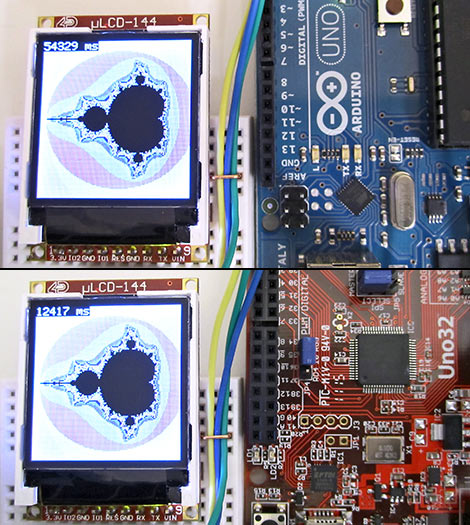
Arduino: 54,329 ms.
chipKIT: 12,417 ms.
To reiterate (pardon the pun), due to some performance issues we used the traditional Arduino compiler, not the one included in Mpide. If you’re curious, the output from that compiler took about 8.5 minutes to complete the task! Oof.
So, about a 4.4x speedup. Not bad, but we were expecting a more dramatic difference. Part of this is due to the inherent bottleneck of the serial communication with the LCD…we’ll get back to that in a moment. Another limiting factor is that both chips are emulating floating-point math. If we can use 32-bit integer data types, thePIC32 should really shine. So, a fixed-point Mandelbrot generator followed:
/* Simple Mandelbrot set renderer for Arduino vs. chipKIT benchmarking
   w/fixed-point math, via www.hackaday.com.  This example uses the
   4D Systems uLCD-144(SGC) serial display module, wired as follows:

      uLCD Pin:   RES  GND  RX  TX  VIN
   Arduino Pin:     2  GND   1   0   5V    */

const int
  bits        = 12,   // Fractional resolution
  pixelWidth  = 128,  // LCD dimensions
  pixelHeight = 128,
  iterations  = 255;  // Fractal iteration limit or 'dwell'
const float
  centerReal  = -0.6, // Image center point in complex plane
  centerImag  =  0.0,
  rangeReal   =  3.0, // Image coverage in complex plane
  rangeImag   =  3.0;
const long
  startReal   = (long)((centerReal - rangeReal * 0.5)   * (float)(1 << bits)),
  startImag   = (long)((centerImag + rangeImag * 0.5)   * (float)(1 << bits)),
  incReal     = (long)((rangeReal / (float)pixelWidth)  * (float)(1 << bits)),
  incImag     = (long)((rangeImag / (float)pixelHeight) * (float)(1 << bits));

void setup()
{
  pinMode(13,OUTPUT);   // Arduino status LED
  pinMode(2,OUTPUT);    // LCD reset pin
  digitalWrite(13,LOW); // LED off
  Serial.begin(115200);

  digitalWrite(2,LOW);  // Reset LCD
  delay(10);
  digitalWrite(2,HIGH);
  delay(2000);          // Allow time for reset to complete

  Serial.write(0x55);   // Issue auto-baud command
  while(Serial.read() != 0x06); // Wait for ACK
}

void loop()
{
  unsigned char cmd[20];   // Serial packet for LCD commands
  int           x,y,n;
  long          a,b,a2,b2,posReal,posImag,startTime,elapsedTime;

  Serial.write(0x45);      // Clear screen
  delay(100);              // Brief pause, else 1st few pixels are lost

  cmd[0] = 0x50;           // 'Pixel' command is issued repeatedly

  digitalWrite(13,HIGH);   // LED on while rendering
  startTime = millis();

  posImag = startImag;
  for(y = 0; y < pixelHeight; y++) {
    cmd[2] = y;            // Y coordinate of pixel
    posReal = startReal;
    for(x = 0; x < pixelWidth; x++) {
      a = posReal;
      b = posImag;
      for(n = iterations; n > 0 ; n--) {
        a2 = (a * a) >> bits;
        b2 = (b * b) >> bits;
        if((a2 + b2) >= (4 << bits)) break;
        b  = posImag + ((a * b) >> (bits - 1));
        a  = posReal + a2 - b2;
      }
      cmd[1] = x;          // X coordinate of pixel
      cmd[3] = n * 29;     // Pixel color MSB
      cmd[4] = n * 67;     // Pixel color LSB
      Serial.write(cmd,5); // Issue LCD command
      posReal += incReal;
    }
    posImag -= incImag;
  }

  elapsedTime = millis() - startTime;
  digitalWrite(13,LOW);    // LED off when done

  // Set text to opaque mode
  cmd[0] = 0x4f;
  cmd[1] = 0x01;
  Serial.write(cmd,2);

  // Seems the chipKIT libs don't yet handle the String(long)
  // constructor, hence this kludge.  Working backward, convert
  // each digit of elapsed time to a char, with " ms" at end
  // and text command at head.  Length is variable, so issue
  // command from final determined head position.
  cmd[19] = 0;
  cmd[18] = 's';
  cmd[17] = 'm';
  cmd[16] = ' ';
  n = 15;
  do {
    cmd[n--] = '0' + elapsedTime % 10;
    elapsedTime /= 10;
  } while(elapsedTime);
  cmd[n--] = 0xff; // Color LSB
  cmd[n--] = 0xff; // Color MSB
  cmd[n--] = 0;    // Use 5x7 font
  cmd[n--] = 0;    // Row
  cmd[n--] = 0;    // Column
  cmd[n] = 0x73;   // ASCII text command
  Serial.write(&cmd[n],20-n);

  delay(5000); // Stall a few seconds, then repeat
}
And the numbers:
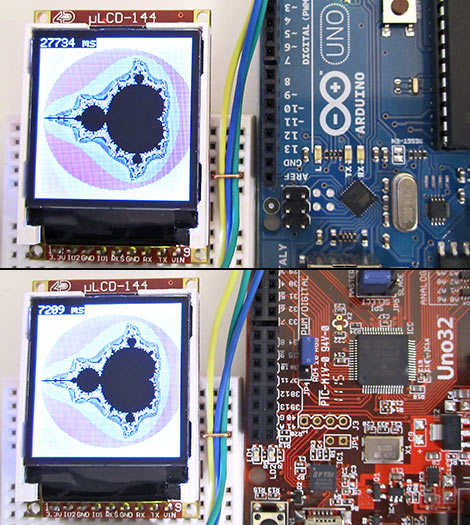
Arduino: 27,734 ms.
chipKIT: 7,209 ms.
Now only a 3.8x difference, despite the PIC32 speaking its native tongue. What gives?
Even at 115,200 bits/sec, the serial LCD is seriously holding us back, as the code is going to “block” as each character is output. Some back-of-envelope calculations suggest how much time is being lost there:
128 x 128 pixels, 5-byte command per pixel = 81,920 bytes.
Including start and stop bits for each byte = 819,200 bits total
819,200 bits / 115,200 bps = ~7.1 seconds.
So our MCU is sitting there for seven seconds with its thumb up its ASCII in order to update the display. Sure enough, if we comment out the Serial.write() command but leave all the calculations in place, the results are significantly more dramatic:
Floating-point:
Arduino: 49,685 ms.
chipKIT: 5,822 ms.
9.3x improvement.
Fixed-point:
Arduino: 22,326 ms.
chipKIT: 168 ms
133x improvement. Hot damn. Now we’re talking!
So we could actually render this at interactive frame rates, for the want of a sufficiently fast interface to the LCD. This sort of limitation is going to crop up every time we connect to a real-world device. Not everything is 100% internal code and math…there are finite limits to I/O throughput, and that more than anything can cap the speed of the total application. So we really can’t give a consistent “Everything will be X percent faster” estimate for this board.
The performance looks good for math, especially if an algorithm can work in integer or fixed-point formats. Another thought we had was analog-to-digital sampling, which has applications in robotics…say for a line-follower or balancing robot. More frequent samples should yield smoother operation, or multiple samples can be averaged to yield higher-precision results. The PIC32 should scream in that regard. And yet…
void setup()
{
  const int samples = 10000;
  int       i,n;
  long      startTime,elapsedTime;

  Serial.begin(115200);

  startTime = millis();
  for(i = 0; i < samples; i++) {
    n = analogRead(0);
  }
  elapsedTime = millis() - startTime;

  Serial.print(samples);
  Serial.print(" samples in ");
  Serial.print(elapsedTime);
  Serial.print(" ms = ");
  Serial.print(((float)samples * 1000.0) / (float)elapsedTime);
  Serial.println(" samples/sec");
}

void loop()
{
}
Arduino: 10000 samples in 1119 ms = 8936.55 samples/sec
chipKIT: 10000 samples in 1008 ms = 9920.63 samples/sec
Running full-tilt, the PIC32 is capable of up to 1 million ADC samples per second, compared to 125,000 on the Atmel chip. Certainly the library implementation is going to introduce some overhead, but what gives? Rooting through the library source code turns up this gem in wiring_analog.c:
 //*     A delay is needed for the the ADC start up time
 //*     this value started out at 1 millisecond, I dont know how long it needs to be
 //*     99 uSecs will give us the same approximate sampling rate as the AVR chip
 //      delay(1);
 delayMicroseconds(99);
This raises a couple of red flags. First, why should the sampling rate aim to match the AVR? For time-related functions like delay() and for Serial.begin() bitrates, of course we’d want similar numbers, those relate to temporal increments. But we don’t — or at least shouldn’t — measure time with ADC readings. And secondly, well, why not find out how long the ADC startup time really needs to be? A few minutes’ sifting through Microchip datasheets eventually turned up the correct answer: two microseconds. So, changing the line in wiring_analog.c to:
delayMicroseconds(2);
Yields dramatically different results:
chipKIT: 10000 samples in 101 ms = 99009.90 samples/sec
About a tenfold improvement, and the readings still look valid. This does break like-timing compatibility with the AVR-based Arduinos, but as we said, why? It’s understandable that some decisions may have been made in haste…it’s a monumental project, getting all this code ported to an entirely different chip, and the IDE is still fresh from the oven…but some of these little broken details do have us concerned about what other surprises may still lurk beneath.
Don’t get us wrong…we’re enthusiastic about the chipKIT boards. The technical challenge is met, and just needs some cleaning up. What remains for Digilent now is a marketing challenge: who is this really for? When we talk about things like megasamples and fixed-point algorithms, these aren’t exactly day-one topics familiar to the Arduino’s target audience of first-time programmers. And the more advanced user may have moved on already, leaving Arduino behind. So why keep this form factor? Why keep this IDE?
Obviously, part of the allure is the existing ecosystem of Arduino shields. There’s some pretty nifty stuff out there, networking and touch screens and stepper motor drivers, most of which will physically plug right in. Having an existing solution saves development time. Then there’s the ease and familiarity of the Arduino libraries. Even though they’re slow and clunky in places, it can be really handy sometimes just to squirt out some status information to a serial port without having to do all the UART setup manually.
The chipKIT boards are cleverly priced to approximate Arduino on a cost basis (even undercutting a bit). That’s a great start, with code and price parity, but where’s the extra value? What the Uno32 and Max32 may need are some killer apps. Ideas that the novice can implement, but that really take advantage of the PIC32 chip’s added performance and capabilities. Speed may be just one part of that. What can we do with the extra RAM and flash space that a normal Arduino just can’t handle, even with the fanciest of shields? Folks have done some mind-blowing stuff with the little 8-bit AVR. We’re looking forward to seeing if this is the tool that takes these hacks to the next level.













“To reiterate (pardon the pun)…”
“…with its thumb up its ASCII…”
Great, smart puns! More from this writer!
I’ve been wondering if this chip was really going to break new ground for the arduino crowd. I still have one foot in and one foot out of arduino. There are times that the arduino has shot me in the foot for having lack of programming space due to bloated libraries and there are times that the arduino just makes stuff easy! I’ve been waiting for a good review on Digilent’s new prize. Can you do a follow-up in the next few months as they roll out updates?
I’m interested in this board because it seems a nice way to learn about the PIC32 without dropping $900 on Microchip’s compiler (and it works, now, on Linux/Mac) or having to spend the time building/installing/configuring my own toolchain. It lets me incrementally learn how to use the PIC32 (e.g. I can start writing some useful code immediately without having to spend time digging into some proprietary tool/set of libraries). Over time I can then add other library support or move to Microchip’s official (and seriously overpriced) development environment.
Note to Microchip marketing people: Expensive tools are a disincentive to having people adopt your microcontrollers. You, of all companies, should understand this. Given the dominance of the ARM architecture, I would think you’d want to make use of the PIC32 as painless as possible.
The existing ecosystem of Arduino shields was my reason for ordering one of these. Great review.
@DanJ: MPLAB X is free, the only limitation is that the higher optimization levels (-O2, -O3 and -mips16) are disabled. No code size limits. Pretty good deal.
Something I neglected to mention in the review is that both boards have ICSP headers and can be used with the PICkit 3 and MPLAB X. So there’s an opportunity to use a “grown up” IDE with the chipKITs, at the loss of the Arduino libraries and C++ features (Microchip’s C32 is C only).
Another feature of the PIC32 that I haven’t seen mentioned is its built-in USB On-The-Go (OTG). This lets the PIC act as a USB master without the addition of extra boards/chips. This could be used to talk to USB slave devices, like USB flash drives, USB printers, etc. Do you think they’ll make a USB library for this? I’d be really interested in seeing that happen.
Great Article! I’m waiting for my own boards to arrive so I can run a Dhrystone benchmark on them
Very nice article Phil. This really makes my coverage look quite amateur. Can’t wait to read more chipKIT coverage from you!
Yeah great review. I really hope the guys at Arduino see this as a good thing. In the end what makes arduino is the code or another way to look at it is the people who use it. There are people (my self for instance) who are completely put off by the stock problems of atmel, who initially learned on a 16f84. This opens the doors for me and like minded people. There is no debate really if this board will be more powerful with the proper tweeking. But the real benefit to the arduino community is the wide scale adoption of their platform, and willingly inviting their (microchip’s)loyal users the ability to contribute directly to the business side that drives Arduino. The shields. More users means more shields sold which means more incentive for people to make shields. This isnt so much subtracting from people buying Arduino TM, but ADDING people to the community that might otherwise have been excluded. More advanced users using the platform means faster improvements (think the silly serial lag problem) will happen making the Arduino platform even better, and more widely used.
wow that was long winded.
Just a nitpick: the Chipkit board actually has about a factor of 7.5 times the MIPS of an Arduino, since AVR delivers a max of 1MIPS/MHz (less around branches), and PIC32 is a max of 1.5MIPS/MHz (again, less if the pipeline gets blown).
Awesome. As soon as they put out the communications shield that brings the ethernet pins out to a PHY, I’m getting the max32
I think one aspect of the the chipKIT that is a downside, but which can’t be helped, is that the microcontroller is a surface mounted one which means it’s a step beyond the average electronics hobbyist to make their own boards using a bit of stripboard and a DIP IC as with the more traditional microcontrollers people use.
On the upside it means chipKIT users will be heavily reliant on the pre-built boards and shields so the companies making/selling chipKITs and sheilds will do more trade.
@Zing, The official chipKIT ethernet shield will be out in June.
@Haku, I have a feeling there will be some PIC32 bare chips with the bootloader already burnt on them. Its not hard to hand solder a lot of SMD stuff as long as you have a flux pen, thin
soldering tip and some very thin solder.
@Andrew You can’t quite compare them like that since the low level instruction parameters are 32 bit long in PIC32 vs the 8Bit AVR… a 32bit sum takes a single instruction on the PIC32 architecture ;)
@Danj, @Phil Burgess: Microchip’s compiler is just GCC, isn’t it? AFAIK you can recompile their source releases and get the full compiler, all optimizations enabled.
What’s about a comparison between Maple and Uno32?
As I bought a Maple recently, I’d be curious to know.
Also, Arduino is far from being optimized. Look at DigitalWrite definition and think about replacing it with a simple register access.
It’s made to be simple, but for this reason, it’s verrryyy slow
why does the uno in the picture have two ICSP pins?
Here is the official forum (ie support) for the chipkits. I think it was left out of the above post.
http://www.chipkit.org/forum/
I think it was left out of the above post.Look at DigitalWrite definition and think about replacing it with a simple register access.
@Diego that only means it’s faster by an even larger margin :)
>> AVR delivers a max of 1MIPS/MHz, and PIC32 is a max of 1.5MIPS/MHz
The PIC32 core is supposed to deliver about 1.5 “Dhrystone MIPS” (DMIPS) per MHz, which is a specific benchmark performance that is about more than just the raw instruction speed. The AVR apparently clocks in on a similar benchmark at about 0.3 DMIPS/MHz. (http://www.ecrostech.com/Other/Resources/Dhrystone.htm )
@WestfW
PIC32 seems to reach 1,5 DMIPS/Mhz on paper but…I didn’t find any real bench so this has the same reliability as 1 MIPS/Mhz from Atmel.
Then, this value is given while memory is configured at “0 Wait State”. This means the max clock speed should be 30MHz. To reach 80MHz, wait state should be set to 2, reducing Dhrystone results.
Anyway, it’s logical that a 32 bits chip is faster than a 8 bit, and hopefully, it is ^^
My personal impression of the ChipKIT is that if you’re doing a very quick project and want to use prewritten Arduino code, you just go for using the mpide compiler. The similar delay times are there to ensure that code is /completely/ compatible.
If you’re doing real high performance stuff, though, you get the benefit of being able to use a PICKit to write more optimized code in C, so you get the best of both worlds.
Things I really wish they implemented:
a) why not switch between high performance and arduino compatibility mode? have two sets of libraries, one with delays, one without.
b) why not have line-by-line debug??? they should have written the thing to work with a PICKit. I was talking to someone who recently switched to the MSP430 cheapo board, and he realized something I’d forgotten about Arduinos (I usually just do straight up PIC or microcontroller with the native programming tools): You don’t get the built-in line-by-line debug functionality! It’s built into the chip, but you can’t use it because it uses a silly bootloader! I was hoping a company like digilent would think to make that work out, but i guess not =/ Really, for an easy debug/prototyping tool, I really think giving the ability to do line-by-line debug and watching code is really, really great for a beginner to have access to.
Good writeup and well done on the controlled criticism and research.
As for why arduino, I feel other systems than arduino might be better but they are often very confusing and convoluted instead of having a basic board and adding shields which is a simple clear setup.
It’s a bit like {companynamewithheldbyauthor} does, it’s not that it’s not all available elsewhere cheaper and faster but the package is what makes it sell.
Sounds like a very cool board and I *love* the common IDE: I can use a kit-built $15 ‘duino work-alike from Modern Device for low-end projects, and the Chipkit for more demanding stuff. The big disappointment for me is that the ADCs are still only 10-bit: I really want 12-bit (as in the Maple) for projects where measurement is more critical…
Does anyone know if the PIC32 can handle SSL? Specifically HTTPS? a 32-bit processor should theoretically be able to handle that.
We got the compiler speed problem fixed. The problem was a gcc vs g++ command for the step that converted the elf file. It needed to be gcc instead of g++
Mark and Rick
Guys, this is a non libre hardware project. I wouldn’t even touch it.
We arduino users enjoy an open and libre hardware/software/community .. let’s keep it that way.
@fabio
We arduino users enjoy a great community, with a great history of sharng code and project examples. This is being sold as a one piece, pre-built board that is compatible with that same community’s projects and code. Who cares if the board itself is closed source, copy out the bootloader code and plop it in a pic 32 if you want to make your own hardware on the platform level or simply wait till the chips are sold indivdually with pre-burned boot code.
Want breadboarding? Simply get an adapter for tqfp smd chips and extend the vertical pins with wire…
This is the first real step in the right direction to really open the arduino platform up to better micros, and then the “it’s not 100% open source” nutters show up…
I definitely second Fabio in calling out the none-libre aspect. The open design and the ecosystem of Arduino clones is a large part of its success. Success that chipKIT wants to ride to the bank with shield compatibility.
Open Hardware is where we the DIY community have power and future. It is what we do. What would we gain by forgetting that? Vendor lock-in? Yum-yum!
@fabio: which part are you complaining about not being open enough? HW: published w CC/SA license. SW: published modifications to Arduino IDE plus gcc/mips underlayer…
Sorry, my fault! I didn’t noticed that there were downloadable sources of the designs..
Just bought one a couple of days ago. Should arrive sometime this week. I am still impressed with the price / quality ratio. Compared to my KIM-! microcomputer I bought in 1976 :)
threepointone: If you’re doing real high performance stuff, though, you get the benefit of being able to use a PICKit to write more optimized code in C, so you get the best of both worlds.
That’s not much use at all then, given that you have to pay $900 to Microchip if you want higher compiler optimisation levels enabled in their C32 compiler. (Which they didn’t even develop – it’s a rebranded version of MIPS gcc with copy protection added.) One of the advantages of this is that it seems to avoid the need to deal with Microchip’s horrid compiler licensing.
@wetware: it’s not the board itself that’s closed, but stuff like the libraries they’re using (in particular, the C library is closed source and under an unclear license, and I believe some of the code and headers used to access peripherals are too).
@Andrew My point exactly =D , I’m waiting for mine to arrive right now
I’m also excited about the Chipkits, but in the calculations of time above I have a few questions. When commenting out the serialWrite, we would expect about 7 seconds less for all boards if communications are running at the same speed (115Kb), but in your second floating point test for the Arduino the time measure is exactly the same (54,329 ms). Is this a typo or miscalculation?
And another question I had, as I was sifting through the “wiring_analog.c” file and looking at the delay I noticed directly after it is a delay loop which is waiting for the interrupt flag to be set, so is the delay even necessary?
@Jason: Good catch…I’d copied the wrong number from my notes. The Arduino floating-point time without the Serial.write() calls should be 49,685 ms (article now updated). The improvement factor was correct as posted, just the time was incorrect.
Not sure about the delay vs. interrupt flag. I needed to poke around in that file today anyway, and will try either case.
@Jason, part II: some delay is necessary, to allow the ADC time to ‘settle’ after being enabled and switched to a new input line. After a little experimentation, it turns out that the 2 uS delay is too short after all…it returns correct-looking readings, but they’re mapped to the wrong pins! Ditto if the delay is disabled.
9 microseconds appears to be the minimum “safe” delay to get correct readings from the correct pins. This has minimal impact on the sampling rate: it still manages a very good 92,592 samples/sec.
@Jason, the final chapter: okay, found the real issue. analogRead() isn’t clearing the interrupt flag before testing, instead it’s done after the reading, which isn’t correct behavior (it’ll just get set again as the ADC free-runs). The 2 uS settling time is probably still a good idea though.
So, original stuff in wiring_analog resembles this:
delayMicroseconds(99);
while ( ! mAD1GetIntFlag() ) { }
analogValue = ReadADC10(0);
mAD1ClearIntFlag();
Should be changed to:
delayMicroseconds(2);
mAD1ClearIntFlag();
while ( ! mAD1GetIntFlag() ) { }
analogValue = ReadADC10(0);
Now getting expected readings from expected pins at favorable speed, exactly 100,000 samples/sec.
@Phil, That is great news about the ADC. I’m not familiar with the overhead of the Arduino platform, but as I was looking through some of the files I didn’t see where the “sample bit” of AD1CON1 was set. So is that something that is done in overhead periodically?
Thanks again for the updates.
@Jason: I don’t know the gritty details of PIC32 ADC, but my impression from the ADC_AUTO_SAMPLING_ON bit passed to OpenADC10() (still in wiring_analog.c here) is that they’re running the ADC in a sort of free-run mode and just taking one sample from the resultant stream when needed. Not exactly sure why that route was chosen, but it does produce valid results.
I’m guessing that setting ADC_SAMP_ON and watching ADC_CONVERSION_DONE would be the equivalent for a single-shot ADC sample? It’s not a terribly huge function to get through, so maybe I’ll try rewriting it that way.
@Phil, You are right. I checked the datasheet and found the “ASAM” bit is set which set up auto-sampling immediately after the last conversion. It also sets the “Sample” bit. So the delay makes more sense now. I’m guessing it allows for the a sample or two to be taken while changing channels and the sample actually taken is after a stable period.
Does the Uno32 have any EEPROM for storage when the batteries are disconnected? I know the Previous Arduino had some. Or can you tap into the Flash?
@Matt: not EEPROM proper, but there are ways of storing data in the program flash space. Google around for “pic32 eeprom emulation.”
@Phil
Thanks. I’ve just ordered my Uno32! Looks good
Nice review and followup on the Uno32 board. I would like clarify one thing: Digilent (me specifically) designed the hardware, and we (some interns who work for me) ported some of the Arduino libraries, but Digilent did not do any of the work on the MPIDE, boot loader or the Arduino core files.
That work was done by Mark Sproul and Rick Anderson (FUBAR labs) . I dont’t want to take credit for work we didn’t do.
It’s good to hear EEPROM is somewhat supported http://www.chipkit.cc/forum/viewtopic.php?f=7&t=242
I tested that codes with a Emperor 795 + UBW32 bootloader and Pinguino IDE, using a ITDB02 Display 400×240, I take 48s for float version and 5.7s for integer version, note my display has so many more pixels and uses 16bit data bus + 4bit control bus…
Hi Phil and all,
5 years has past so I hope I find you well and my question is did anything change in respect of that ADC conversion speed.
I just get ChipKIT Pi version with little slower PIC 32MX250xx UART version on 40MHz and to upgrade it to USB boot-loaded 50MHz version to be able to ADC some sensors from PC at top ADC speed because UART/serial is like limited and then i stumble up on your review and get relay disappointed to find out about >10x slower then specified (1.1MSPS) sampling speed.
Is there any improvements in that MPIDE, code etc. area?