
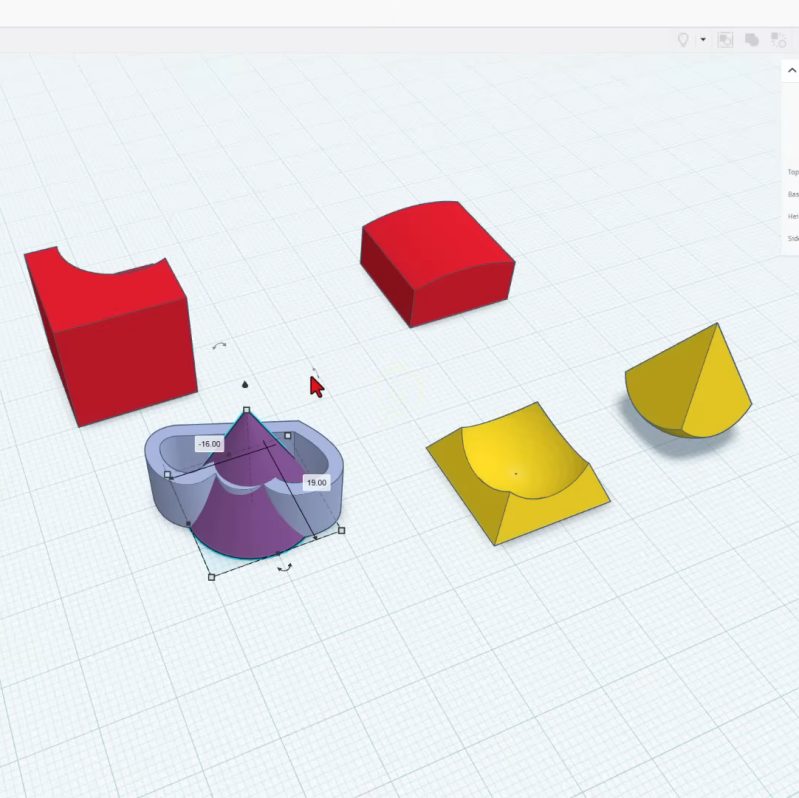
TinkerCAD had its first release all the way back in 2011 and it has come a long way since then. The latest release has introduced a raft of new, interesting features, and [HL ModTech] has been nice enough to sum them up in a recent video.
He starts out by explaining some of the basics before quickly jumping into the new gear. There are two headline features: intersect groups and smooth curves. Where the old union group tool simply merged two pieces of geometry, intersect group allows you to create a shape only featuring the geometry where two individual blocks intersect. It’s a neat addition that allows the creation of complex geometry more quickly. [HL ModTech] demonstrates it with a sphere and a pyramid and his enthusiasm is contagious.
As for smooth curves, it’s an addition to the existing straight line and Bézier curve sketch tools. If you’ve ever struggled making decent curves with Bézier techniques, you might appreciate the ease of working with the smooth curve tool, which avoids any nasty jagged points as a matter of course.
While it’s been gaining new features at an impressive rate, ultimately TinkerCAD is still a pretty basic tool — it’s not the sort of thing you’d expect to see in the aerospace world or anything. ut it’s a great way to start whipping up custom stuff on your 3D printer.












TinkerCAD could already do intersections, but it was a bit awkward. Essentially, you’d make one of the shapes a hole, do the subtraction (union with hole), then turn the result into a hole, and subtract that from the original first shape.
Thanks for sharing! Having a blast with these new tools in Tinkercad.
Tinkercad is incredibly frustrating just at the point where fillets/chamfers/bevels come in since you have to go to Fusion etc. for that. Students liken it to being locked into Minecraft. The usual explanation is that the whole thing is running in browsers and those features are resource-heavy but given Moore’s law that excuse won’t last forever.
Being browser-based isn’t a valid excuse. Onshape and other browser-based CAD applications manage just fine. I suspect filets and chamfers are being held back to distinguish tinkercad as being what it is: a toy/educational tool rather than a pro level tool. If you want the “pro” level features, pony up for a fusion subscription…
TinkerCad was never intended as a full-fat CAD program. Running in a browser has nothing to do with it, OnShape runs in a browser.
What? I literally added a fillet to a project today. Search the market for metafillet.
Im not using online tools.
only offline. convert to offline web page, electron or whaterwer one
Why not just us a native application then and remove the handicap that is the browser?
AutoCAD needs to harvest your usage and telemetry. If a service is free, then YOU are the product.