

So Long Firefox, Hello Vivaldi

It’s been twenty-three years since the day Phoenix was released, the web browser that eventually became Firefox. I downloaded it on the first day and installed it on my trusty HP Omnibook 800 laptop, and until this year I’ve used it ever since. Yet after all this time, I’m ready to abandon it for another browser. In the previous article in this series I went into my concerns over the direction being taken by Mozilla with respect to their inclusion of AI features and my worries about privacy in Firefox, and I explained why a plurality of browser engines is important for the Web. Now it’s time to follow me on my search for a replacement, and you may be surprised by one aspect of my eventual choice.

Where Do I Go From Here?
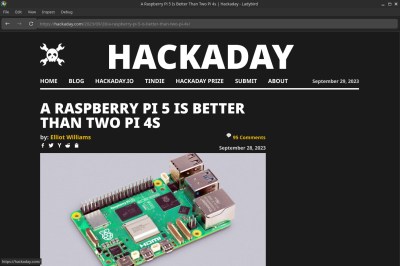
Hackaday in the Ladybird browser
It’s Hackaday, in Ladybird! (Ooof, that font.)

Happily for my own purposes, there are a range of Firefox alternatives which fulfill my browser needs without AI cruft and while allowing me to be a little more at peace with my data security and privacy. There’s Chromium of course even if it’s still way too close to Google for my liking, and there are a host of open-source WebKit and Blink based browsers too numerous to name here.

In the Gecko world that should be an easier jump for a Firefox escapee there are also several choices, for example LibreWolf, and Waterfox. In terms of other browser engines there’s the extremely promising but still early in development Ladybird, and the more mature Servo, which though it is available as a no-frills browser, bills itself as an embedded browser engine. I have not considered some other projects that are either lightweight browser engines, or ones not under significant active development. Continue reading “So Long Firefox, Hello Vivaldi”

Simple Tricks To Make Your Python Code Faster

Python has become one of the most popular programming languages out there, particularly for beginners and those new to the hacker/maker world. Unfortunately, while it’s easy to  get something up and running in Python, it’s performance compared to other languages is generally lacking. Often, when starting out, we’re just happy to have our code run successfully. Eventually, though, performance always becomes a priority. When that happens for you, you might like to check out the nifty tips from [Evgenia Verbina] on how to make your Python code faster.

Many of the tricks are simple common sense. For example, it’s useful to avoid creating duplicates of large objects in memory, so altering an object instead of copying it can save a lot of processing time. Another easy win is using the Python math module instead of using the exponent (**) operator since math calls some C code that runs super fast. Others may be unfamiliar to new coders—like the benefits of using sets instead of lists for faster lookups, particularly when it comes to working with larger datasets. These sorts of efficiency gains might be merely useful, or they might be a critical part of making sure your project is actually practical and fit for purpose.

It’s worth looking over the whole list, even if you’re an intermediate coder. You might find some easy wins that drastically improve your code for minimal effort. We’ve explored similar tricks for speeding up code on embedded platforms like Arduino, too. If you’ve got your own nifty Python speed hacks, don’t hesitate to notify the tipsline!

Unusual Circuits In The Intel 386’s Standard Cell Logic

Intel’s 386 CPU is notable for being its first x86 CPU to use so-called standard cell logic, which swapped the taping out of individual transistors with wiring up standardized functional blocks. This way you only have to define specific gate types, latches and so on, after which a description of these blocks can be parsed and assembled by a computer into elements of a functioning application-specific integrated circuit (ASIC). This is standard procedure today with register-transfer level (RTL) descriptions being placed and routed for either an FPGA or ASIC target.

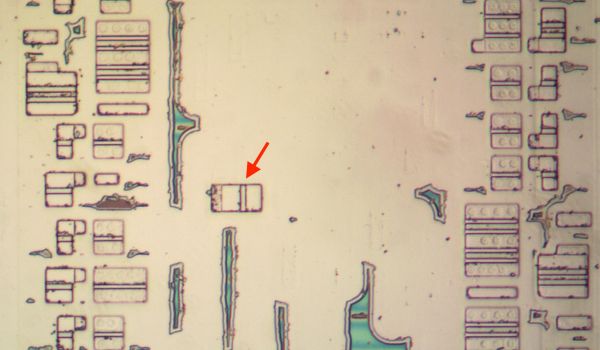
That said, [Ken Shirriff] found a few surprises in the 386’s die, some of which threw him for a loop. An intrinsic part of standard cells is that they’re arranged in rows and columns, with data channels between them where signal paths can be routed. The surprise here was finding a stray PMOS transistor right in the midst of one such data channel, which [Ken] speculates is a bug fix for one of the multiplexers. Back then regenerating the layout would have been rather expensive, so a manual fix like this would have made perfect sense. Consider it a bodge wire for ASICs.

Another oddity was an inverter that wasn’t an inverter, which turned out to be just two separate NMOS and PMOS transistors that looked to be wired up as an inverter, but seemed to actually there as part of a multiplexer. As it turns out, it’s hard to determine sometimes whether transistors are connected in these die teardowns, or whether there’s a gap between them, or just an artifact of the light or the etching process.









