
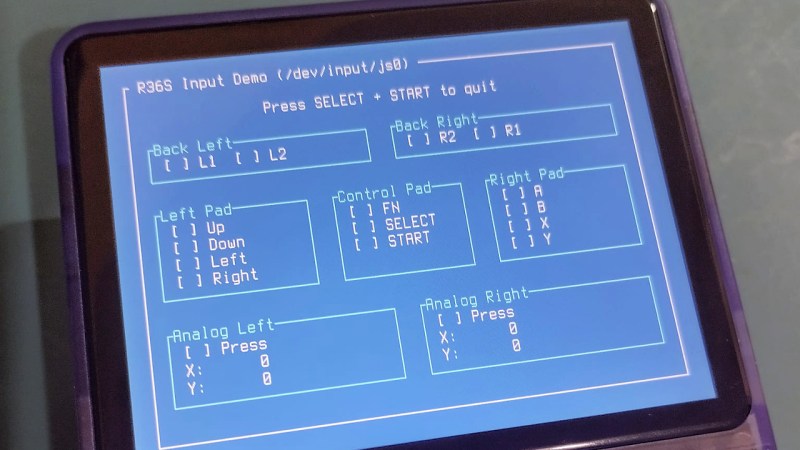
The age of cheap and powerful devices is upon us. How about a 20 EUR handheld game console intended for retro game emulation, that runs Linux under the hood? [Luiz Ferreira] kicks the tires of a R36S, a very popular and often cloned device running a quad-core RK3326 with an Ubuntu-based OS, and shows us how to write and cross-compile a simple app for it using Rust – even if you daily drive Windows.
Since a fair bit of the underlying Linux OS is exposed, you can quickly build even text applications and have them run on the console. For instance, [Luiz]’s app uses ratatui to scan then print button and joystick states to the screen. Perhaps the most important thing about this app is that it’s a detailed tutorial on cross-compiling Rust apps for a Linux target, and it runs wonders using WSL, too.
Installing your app is simple, too: SSH into it, username ark and password ark. Looking for a Linux-powered device with a bright screen, WiFi, a fair few rugged buttons, and an OS open for exploration? This one is quite reassuring in the age of usual portables like smartphones getting more and more closed-off to tinkering. And, if the store-bought hackable Linux consoles still aren’t enough, you can always step it up and build your own, reusing Joycons for your input needs while at it.












I too bought this device on a whim but I don’t use it for anything. The lack of built-in WiFi is just a shame
its 2 dollars and 4 solder points to make it wifi.
2 more solder points to give the wifi an on/off switch.
They sell them with built in WiFi. Called the R36XX.
I bought one accidentally, thinking I was getting a R36S. Then spent a week trying to get a WiFi dongle working over OTG to no avail, because it already had it and the dongle I was attaching was clashing with the built in module.
It’s sad that you can buy 20€ Linux game consoles, but nobody makes a Linux pocket computer (with keyboard) in that price range. Even the Raspi Pico based handhelds are way more expensive.
exactly
Not really a surprise though – the retro console has a nearly solid case surface with a few holes that is really easy to injection mould and only has maybe 10, 20 buttons and many an analogue input axis or two. A real pocket computer needs 100+ keys, still needs something similar to those analogue input axis (mouse and scroll wheel etc) AND the expectation on the screen quality and CPU performance goes up too.
The $20 pocket ‘PC’ would be rather disappointing, but that low spec CPU and lower resolution screen required to hit the price point is fine for retro gaming, probably even still overkill…
Then why do bluetooth remote controls with a full keyboard and a touchpad cost only a few $?
Why does nobody combine the two?
Wouldn’t be $20 then, and even if you accept its now a $25 to use one of those awful quality barely functional (in my experience anyway) keyboards you still have a display and CPU that really isn’t very suited to using like a PC… Folks complain the Pi 4 isn’t quick enough to PC (not entirely justly IMO) but this thing is about half of that performance or worse from every comparison I’ve seen (actually a much bigger gap than expected from the on the paper specs)…
Yeah, I really have to agree with you there. Economies of scale I guess.
I’m still waiting for the modern successor to the Psion 5, I don’t really want to have to design and build it myself.
UX-50 sony clie with good keyboard and sound , camera.
I did really love my UX-50 when I owned it. The camera was “meh”, but the rest of it was really great. I even did the mod to charge it via the USB port.
When I say “modern” I don’t mean “very slightly more modern”. I mean a portable computing platform from now or at least very recent.
So true. I would love to just have a reasonable screen and a usable keyboard that ran Linux on somewhat not completely starved compute resources. Ideally not a Bluetooth keyboard.
The picocalc is $80 USD, Add in a luckfox lyra and you’re basically there. I know that’s not the same range, but it’s at least the same ballpark (and to be fair clockwork is very small and doesn’t benefit from the economies of scale)
Since there’s a number of pico based PDA designs and the standard Lyra is pin compatible (hence why it works for pico calc) it’s not hard at all to get a pocket sized Linux palmtop going.
M5stack even has a pre built i2c keyboard that would work.
ok tell me where I can bought 20$ console
As a fan of these retro handhelds, these prices are exaggeratedly small for ego’s sake. You can’t find them easily that cheap AFTER shipping that costs more than the device, or need a bunch of AliExpress work arounds.
Plus, for not much more you get a huge boost in spec and features. The MagicX Mini Zero 28 ($50-75) runs Android, has 2gb RAM, and has Linux builds in the works. The Mangmi Air X for $100 has 4gb. Below 75 you get the other variants of this exact console that are newer with better features.
Right????
I have a couple of these, no idea if it has WIFI.
But definitely, handy to know. It is interesting that potentially such a flexible computer has SSH open with default passwords.
The SSH server is off by default even if you turn on wifi (at least on ArkOS which, by implication, is the firmware being used here). Presumably they expect anyone who wants to ssh in to know they should change their password.
The PortMaster project has been doing this for quite a while for games across many of the Linux game handhelds. There are over 1200 games available. https://portmaster.games/games.html
Smartphones are not getting more and more closed off to tinkering. Stop spreading FUD.
Where has the bar been set? Oh yeah, using rust to mirror input state on the screen. Yeah, Android phones can do that.
Android phones can do that (with Google’s permission)
Android phones can do that, full stop.
“Getting more closed off” isn’t the same as “currently closed off”, yes, that is true.
I also can go to the Tower of London and try on all the crowns with the King’s permission. The Tower of London can do that, full stop.
Three other administrations did little to help with my current budget, and the current one is just disastrous embarrassment overall. It will probably take three moar administrations to undo the damage of this one alone.