
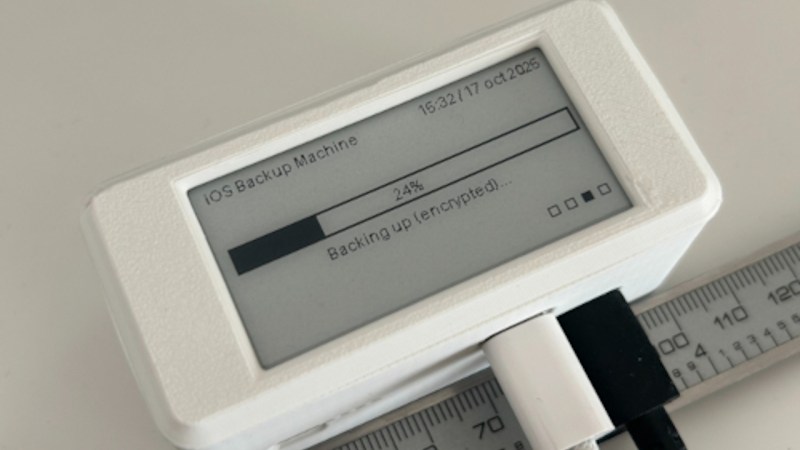
What if you find yourself as an iPhone owner, desiring a local backup solution — no wireless tech involved, no sending off data to someone else’s server, just an automatic device-to-device file sync? Check out [Giovanni]’s ios-backup-machine project, a small Linux-powered device with an e-ink screen that backs up your iPhone whenever you plug the two together with a USB cable.
The system relies on libimobiledevice, and is written to make simple no-interaction automatic backups work seamlessly. The backup status is displayed on the e-ink screen, and at boot, it shows up owner’s information of your choice, say, a phone number — helpful if the device is ever lost. For preventing data loss, [Giovanni] recommends a small uninterruptible power supply, and the GitHub-described system is married to a PiSugar board, though you could go without or add a different one, for sure. Backups are encrypted through iPhone internal mechanisms, so while it appears you might not be able to dig into one, they are perfectly usable for restoring your device should it get corrupted or should you need to provision a new phone to replace the one you just lost.
Easy to set up, fully open, and straightforward to use — what’s not to like? Just put a few off-the-shelf boards together, print the case, and run the setup instructions, you’ll have a pocket backup machine ready to go. Now, if you’re considering this as a way to decrease your iTunes dependency, you might as well check out this nifty tool that helps you get out the metadata for the music you’ve bought on iTunes.












Beginning of this week, the 1TB drive of my MacBook was full. I checked for stuff to delete. Had a bunch of GBs of videos and downloaded disk images. Some crud leftover from Xcode.
And then encountered a folder named “00008…4709”. That contained 90GB of data. Turned out to be my iPhone backup…
So I moved that to a backup drive. With the full cleaning action, I went from 14GB to 245GB free space.
Also I want to express my opinion that it is RI-DI-CU-LOUS that macOS already starts to cave in while there is still 14GB of free space left on the drive!!!
I forgot to mention the whole point of writing that:
It makes full sense to store your iPhone backups on a separate device and not your laptop. :D
Not an iPerson but that is to be expected on any modern device:
Sounds to me like you were burning out your NAND flash by continuously writing to the same left-over 14GB. Spare should be 10-20% empty or over-provisioned so the drive controller can avoid block re-use.
NAND is overprovidioned (typically the size exposed to the computer is 10% less than the actual capacity of the flash), but also it’s constantly garbage collecting partially full blocks to consolidate them.
The flash controller also knows what’s “cold” blocks from a write perspective and will wear level by putting cold data in to well used blocks.
It can also dynamically allocate some worn blocks as it’s SLC (instead of trying to write 4 bits of data to a cell with multiple writes and reads it’ll do just one write and aim for 1bit per cell) as SLC cells see less wear.
Basically until the drive is so worn that the flash controller has had to retire bad blocks it has enough reserve blocks to prevent over wear to some blocks).
It does this all quietly in the background when there is idle time.
The only thing the host needs to do is TRIM data when deleted so the flash controller has the best view.
Whoops totally misread your comment..consider my other response redundant!
MacOS makes very heavy use of swapspace / virtual memory and has for a long time.
The free space reported by macOS is not the actual free space on the drive. So while it was saying 14GB free, it was probably at 99% and evicting cache files that it simply doesn’t consider important enough to tell the user about.
Your ire is misdirected, but not wrong ;D
Lost me at that part. Secure would be a GnuPG keyring and using dedicated local credentials. If the same key fits any lock, they only need to force your finger on the unlock button and dump the phone data to have your legacy of backups too.
I had a similar thought- taking a look at the project, it looks like it uses
idevicebackup2to do the backups. Crucially with a passphrase that is also required to do restores. So while it may use the devices Secure Enclave for the encryption, it also requires a passphrase known only to the user to actually restore the backups.For a belt and suspenders approach, it seems like incorporating a secondary encryption like you suggest would be pretty trivial though.
Fair point and thanks for explaining it to a NIXer who owns no iDevices! I am noriously bad at picking secure passwords, so I used ECC-Keys. Whilst I don’t have any data that needs this level of security, I always wonder when today’s freedom is tomorrow’s dissent or sedition.
Takes me only one stop at TSA to find out if I have turned thought criminal ;)
heh this actually alludes to the greatest success of authoritarian governance. We don’t have to punish people for wrongthink, instead we have made the material conditions such that wrongthink is almost impossible. Very few American citizens are capable of seriously entertaining a wrongthink even as a thought experiment.
By the time the regular things you do that you identify as dissent become punishable, the government is moribund and of such a short duration that it’s an acute problem to be solved reactively rather than a chronic problem to be solved with good protocols.
And FWIW when people do entertain wrongthink, the reason it’s relevant to a strong government is that it is effective. Ineffective wrongthink is harmless. And once you’re effective, you’re hard to miss. By necessity, effective wrong-thinkers must participate in movements. And then infosec is irrelevant, it becomes just a question for raw physical force.
IF a bad actor wanted your backups (how would they know you have this device and what is does to start with anyway?) and you had a password or phrase protecting it, and they had you detained, all they need to do to get the password is to start waving a crescent wrench around the general vicinity of your knees…
The best defense would be to keep your use of this device secret.
Even better would have it default to a USB storage device containing something semi-important but ultimately useless like last years tax return. Do a ‘secret thing’ and the real purpose is revealed.
Good point, but common consensus is the worst they are legally allowed to do without violating chain of custody or making the evidence worthless is both in the US and where I currently am “force your finger/face” on the biometrics sensor/towards cam.
I am not subjected to UK laws where they can jail you indefinitely for refusing to surrender a password for encrypted data. So even Android lockdown mode (a panic button that forces a long pre-boot keyword) is safe.
But I enjoy talking about “crypto nerd fantasies” since I take it you referenced the famous XKCD. Your forgot the part though where I’m offered an alcoholic drink before my beating :)
xkcd #538
If you want to control your backups (or any other function of your mobile device, really) why would you buy an iPhone?
because Steve Jobs was awesome?
Your ignorance and prejudice are showing. Apple devices are capable of all the same geeky or control-freak stuff as Android, but you can use them without geeking if that’s not your jam.
I have an iDevice and I completely controlled my backups. So my two years of putting off performing a backup broke me when I then inadvertently wrecked said iDevice. I didn’t morn the loss of ‘data’ as much as the two-year window of my kids lives I lost. I had privately shared photos along the way and I can ask for copies. However, there was a bunch of little moments only worthwhile to me that were gone.
Now my new iDevice is whinging at me the 5GB iCloud free partition is full.
* Yes; I didn’t want cloud photo backups, I just skipped that step as I was in a rush for a working phone again.
* Yes; I’ll turn off photo syncing sometime, but a full capacity 5GB iCloud account blocking further backups is performing the same job while I procrastinate setting up the new phone.
* I’m not paying for more space only to be held to ransom for more money later on and/or any other data sovereignty drama we can all think of.
* And yes, I’ll backup new iDevice soon. Probably tonight after I’ve read this article.
A plug-and-go backup process feels like a homelab project option to me. If you’re homelab is residing in a study type of room like mine.
Could this be used by a bad actor to get data from locked iPhone?
No. iPhone backups are encrypted and can only be decrypted by your iPhone.
If it was this simple the U.K. government wouldn’t have put a gagged IPA demand on them – which thankfully they refused.
But they did drop E2EE for iCloud in the UK.
Sure would like the possibility to have two boot options, one that boots by one password for plausible deniability and another with a second password where it boots with your usual iPhone system.
The implementation looks pretty slick – I can definitely see the appeal for someone wanting to avoid a cloud storage subscription. Restores would presumably be much faster as well. The physical device looks good as well.
Is it really that hard in the iOS world? Y’all pay top dollar for that! It should be easy!
In Android I like to just copy my stuff over to the NAS with kdeconnect but the phone can make itself show up as a USB storage device if I want it to. Piece of cake! And it’s up to me if I want to store it encrypted or not. Mostly I am just copying over my photos and keeping them on the big drive where I can come back to look at them when and if I want to.
I don’t know friend, without ADB+root pure MTP is too high level with no access rights. I swear, without the old TitaniumBackup or a custom ROM with TWRP recovery I hardly would say Android has any “better” backup solution at all.
You need apps with associated data and ideally keys. Since these reside in security chips these days, I wonder if I could even make my backup work if I factory reset and reflash my storage. Everything was easier in the 2010 – 2015 era.
Partially it is for our safety, but also a hard vendor lock-in.
As you say ‘vendor lock in’. Only thing on my phone is pictures which I off-load to my home server and then clean off the phone. No ‘cloud’ storage needed/wanted … ever. I can switch phones any time I want, or just get rid of it after I retire. We’ll see.