
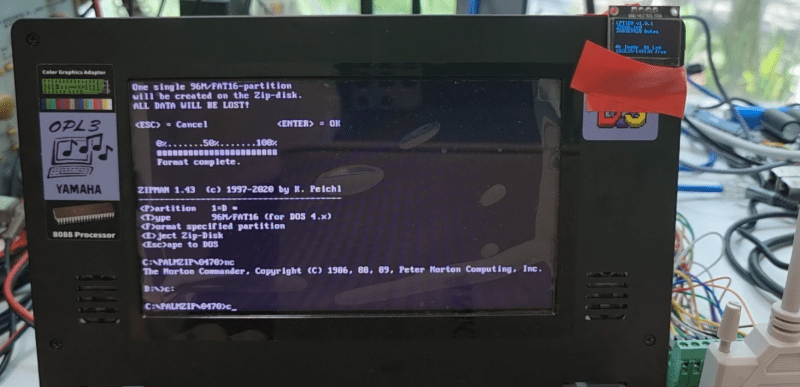
Iomega’s Zip drives filled an interesting niche back in the 1990s. A magnetic disk that was physically floppy-sized, but much larger in capacity– starting at 100 MB, and reaching 750 MB by the end–they never quite had universal appeal, but never really went away until flash memory chased them out of the marketplace in the early 2000s. While not everyone is going to miss them, some of us still think it’s a better form factor than having a USB stick awkwardly protruding from a computer, or microSD cards that are barely large enough to see with the naked eye. [Minh Danh] is one of those who still has affection for Zip drives, and when his parallel port Zip 100 drive started to give up the ghost last year, he decided to do something bold: reverse engineer it, and produce an emulator. First software, and then in hardware.
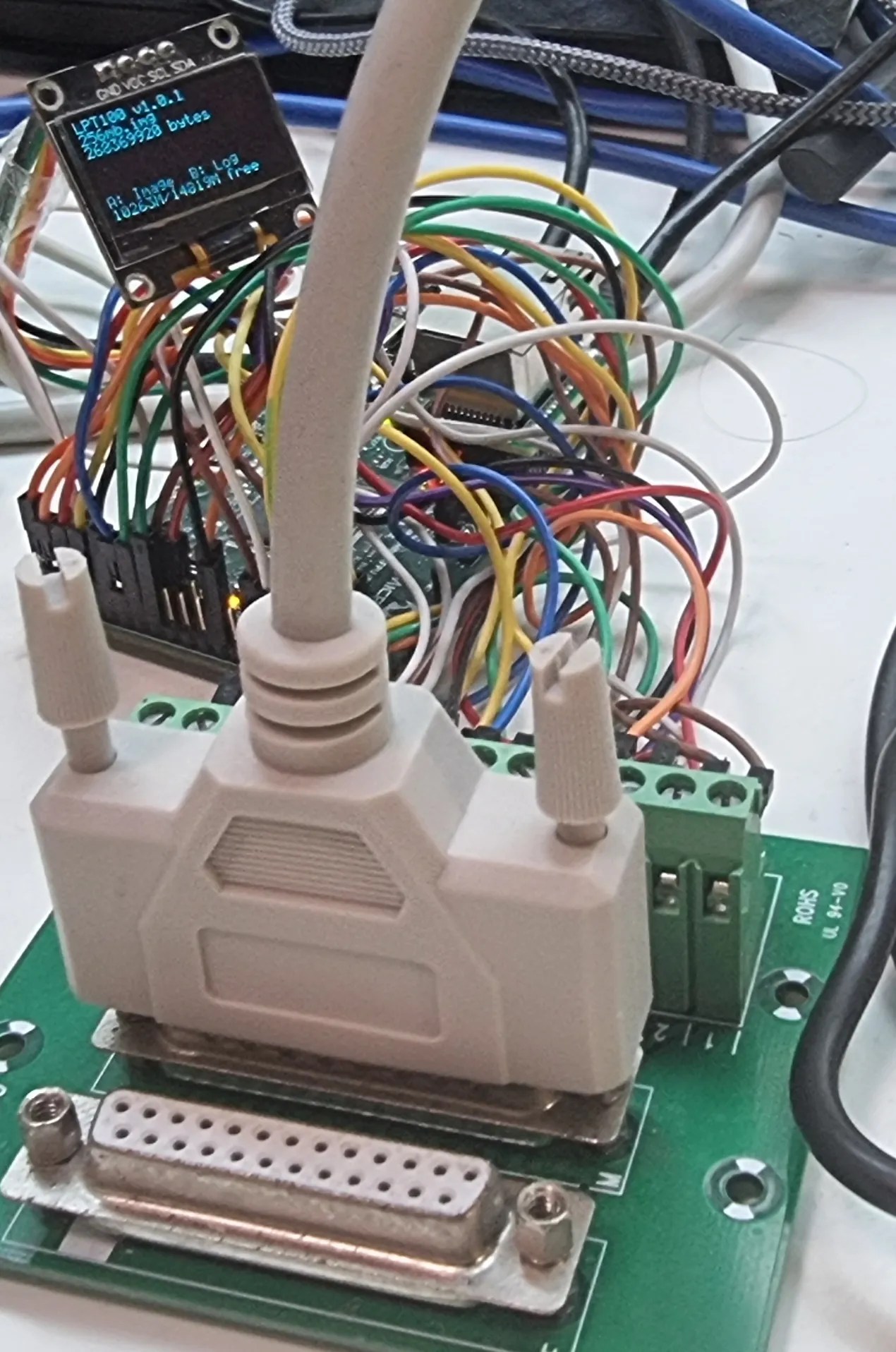
The first was to create a virtual zip drive that could run on a virtual machine and be accessed with DOS or Windows up to XP. The next task was to move that functionality onto a microcontroller to create something like a GoTek floppy emulator for LPT Zip drives that he’s calling the LPT100. Yes, Zip drives were built for ATAPI, SCSI, FireWire and USB, too, but [Minh]’s was on the parallel port and that’s what he wanted to replace, so the LPT interface is what set out to recreate.
It works, too, though took more guts than was expected– the 8-bit PIC18F4680 he started with just wasn’t up to the task. He moved up to a 32-bit PIC, the PIC32MZ2048EFH144 to be specific, which proved adaquate when testing with his Book 8088, a new DOS PC from 2023. Iomega’s official driver won’t run on an 8088, but the PALMZIP utility does and was able to transfer files, though only at the slow nibble rate due to limitations with the Book8088’s LPT hardware. Watch it in action below.
Alas, moving up to the Pocket386, it seemed the PIC just could not keep up. [Minh] says he’s thinking of moving to the faster Teensy 4.1, which sounds like a good idea. Considering the Teensy can be configured to serve as a drop-in replacement for a 68000, bit-banging the bus at 7.8 MHz, we’d think it should handle anything a parallel port can throw at it.
Thanks to [Minh Danh] for the tip!












How about an emulator for a Backpack CD-ROM drive? The drivers work on 8088 systems.
That’s easy. You just need a user-mode cd-rom driver with a whole lot of sleeps added. I mean a LOT of sleeps!
We had those where I worked and more often than not we didn’t bother. Instead we opened up the computer, set a box or other non-conductive object next to it, placed a CD-ROM or hard drive on that and ran the wires. Remove and re-assemble when the install or large copy is complete. Life was too short for CD-ROM access via parallel port!
It will take forever to copy data from a 650MB CD ROM over a parallel port in nibble mode at 7KB/sec.
just about a day or so (~26hrs).
“just” lol
Note that, as magnetic media, zip drives may have been more stable over time than flash media would be.
I was using jazz drives, a larger storage member of the zip family, to transport system images to update a customer site for updates, back before high speed internet was ubiquitous.
I used Zip disks in 2003 to send the newspaper to the printer, 30 miles away from us. It was quicker to send the daily edition in 2 disks than to use the internet at that time.
Never underestimate the bandwidth of a station wagon full of HDDs.
And in 1988 it was quicker to walk a packpack of 360 kB floppies 25 minutes to work than it was to transfer the data by modem.
I still have some of those floppies somewhere. I wonder if they’re readable.
Hey, even the Event Horizon Telescope, for their famous black hole image, transported their data on physical disks rather than internet, because it would have taken too long.
OK, it was a LOT of data, 5000 TB or so.
Never underestimate the bandwidth of a cargo jet full of HDDs.
(The original quote was a “station wagon of magnetic tapes hurtling down the highway”. Disk drives at that time were just transitioning out of the “top load washer” form factor.)
SyQuest ftw! I loved my parallel port SyQuest drives. One at home. One at the office. Heaven.
I worked with a really exceptional programmer, and I remember the day he exclaimed that he would now have to carry two 1.44MB 3.5″ floppies, as his source code would no longer fit on one (after pkzip-ing). He’d been programming that project for about 3 years. Source code compresses very well.
I remember SparQ drives. 1Gb! Idiot I used to work with got one and to this day he calls it a “Sparcue” and not a “Spark”. Same with other idiots who called EZSetup EzedSetup.
That “idiot” quite possibly knew how aggressive SPARC International Inc were in defence of their brand.
https://hackaday.com/2009/10/23/sparkfun-gets-a-cease-and-desist/
With older, “rough” ones maybe. Modern ones have about the same expecration as SSD. While thumbdrives have none.
Rp2350 with its additional PIOs could be a good fit too
Yep, way better than that expensive-because-we-sit-on-the-bootloader Teensy thing.
I had parallel port zip I used in Linux. These are in fact a SCSI ZIP with a SCSI to parallel port adapter to convert it to parallel. (Actually two, there’s ‘ppa’ and ‘imm’ driver depending on the vintage of the zip drive.
Perhaps part of why it requires a hefty microcontroller, since i imagine implementing a subset of scsi, and whatever extra support the converter itself requires, and bit banging the port, is probably more complicated than some minimal zip-specific command set plus bit bang the port.
There are Raspberry Pi Pico or RP2040/2350 emulators for SCSI (that allow SCSI HDDs to be replaced. They may also be worth a look. The PIOs on the Pico/RPs are very useful I believe.
Back in the day, my intention was to move on to Zip when my Bernoulli drive but it, but much to my surprise mine outlasted all my old Macs. That Bernoulli drive had its quirks, making sure the screws for the connector were in tight was a big must, an accidental unplugging killed my Mac Quadra permanently, luckily I was hosting the BBS on the IIci. I seem to recall the Bernoulli drive being extremely loud due to the extreme RPM it had to run for the media inside to do its Bernoulli effect thing. I was a kid at the time and hoping the Bernoulli would die so I could petition my folks for a Zip drive, mainly because the Zip disks looked cool. And yeah, I had really cool parents.
Hmmm…. At least some (if not all, or maybe just the C and D models?) of the Tektronix TDS500/600/700 series oscilloscopes that are equipped with the serial/Centronics port option support the use of parallel Zip and Zip plus drives.
The TDS714L specifically is called out as supporting it, and apparently many other related models do too due to hardware and software sharing.
This project could make for easier fast data transfer, as even using a Gotek floppy emulator in place of the 3.5″ floppy drive, while convenient for the USB port, is still limited by the speed of the floppy bus data speed.
“ATAPI”. AT Attachment Packet Interface — where AT means IBM PC-AT, the 286 with 16-bit expansion slots, so “Advanced Technology.”
I almost wrote IDE before I remembered ATAPI would be more accurate. Good thing I did– with my luck I’d typo my way into hooking a Zip drive up to an IED and blown us all to kingdom come. Apati sounds like a bougie brand of bottled water; much safer to connect zip drives to.
Had a Zip drive back in the day, but it eventually fell to the dreaded “Click of Death”.
https://en.wikipedia.org/wiki/Click_of_death
Yep. Truly horrible devices.
I like having drives for old media installed in or hanging off my modern desktop. You never know when someone might stumble across something from their school days and want to view it again right? I’ve had a zip drive in a drawer waiting for me to install it for at least a decade now. Exactly zero opportunities to use it have been missed in that time.
I’ll still install it some day just because.. that’s how I am. I’d probably hang an 8″ floppy drive off my Greaseweazle if they weren’t so expensive. And I am not sure if I have ever even seen an 8″ floppy IRL or not. I do have a vague memory of huge disks used in a school computer when I was very young… but that could just be a 5¼ viewed from my smaller young eyes too.. I don’t know.
IIRC, 8″ floppy disk was used with the IBM System 3, System 34, and System 38. Slso used to load boot microcode for the IBM System 370 mainframes, which it was originally invented for.
And before the Zip drive, there was the Bernoulli Box – a unit bigger than your 5150 with cartridges the size of a third of a ream of paper that stored 10M bytes each! Still, much more storage than a 1.2M floopy!
This seems relevant: https://github.com/nilseuropa/dosmnt
I have a SCSI zip drive and the USB version too. Old music studio equipment writes to the scsi drive, and the zip disk gets copied to the pc with the usb. Zip is a great alternative to the built in floppy drive on the old Roland samplers. With the ram maxed out, I soon realised to actually save each session permanently would require several floppies so the zip was a great investment. The other option at the time were the bulky tape drives that cost an arm and a leg.
I know for a fact that I used to use my Zip 100 on our old IBM PCjr via the parallel port. It worked in nibble mode but it did work. Not sure what version I used but I’m pretty sure it was a Guest driver, maybe v5 or v6? So it should be possible to get it working on an 8088 via parallel.
i remember ZIP drives. i ended up with the Iomega LS120 “super floppy disk” drive and found it superior to the zip drive due to it being able to read regular 1.44MB (2MB unformatted) floppys in the same drive but at 25 times faster.
click
Curiously, the purple colour used by the Zip drives was a perfect match for some of the SGI workstations. I’ve always wondered whether Iomega were chasing a big order which fell through: possibly because of CoD.