
You probably don’t spend a lot of time using the FAT32 file system anymore, since it’s thoroughly been superseded many times over. Even so, Microsoft has seen fit to deliver an upgrade for FAT32 for the latest Windows 11 Insider Preview build. Finally, the stock Windows tools will let you format a FAT32 drive up to 2 TB instead of locking you to a 32 GB maximum!
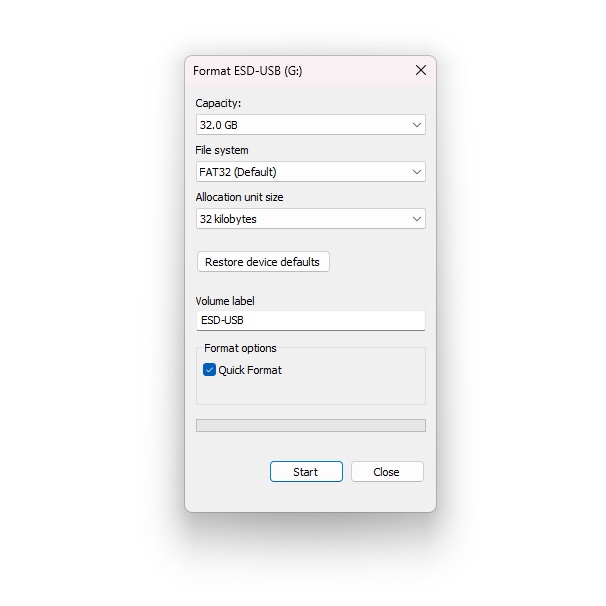 The size limit was never baked into the FAT32 spec itself. With a 32-bit field for counting sectors, the file system supports up to 2 TB volumes with 512-byte sectors. However, as explained by former Microsoft developer [Dave Plummer], it just so happened that the 32 GB limit came about because of a random decision made when slapping together the Format dialogue box over 30 years ago.
The pending change was first announced in 2024, affecting the command line format tool as well. It’s actually been possible to create larger FAT32 volumes for some time, you just couldn’t easily do it with Microsoft’s standard formatting tools.
FAT32 is still a terrible file system to use in 2026, mostly because it has a hard limit on file size that tops out at 4 GB. It’ll ruin your life if you’re shooting HD or 4K video. We often don’t spend a lot of time musing over file systems in detail, but they’re right at the heart of everything we do on our computers on a daily basis. Sometimes, it bears thinking about!












I’m pretty sure it used to be possible to format a 1 TiB USB hard drive into FAT32 using the My Computer dialog around Windows XP times, until Microsoft started pushing exFAT (whether for technical reasons or patent fees, I dunno). Am I misremembering hard?
You could from the command line but not through the GUI. XP was the split however, with 7 (probably vista) removing options even there. 3rd party tools have been the go-to ever since.
exFat pretty much was a patent/license thing for them at first. Kinda petty too. I remember having to pay $5 to license its use on my synology, but they stopped charging for it at some point.
This is relevant to some game console mods. R4DS carts and PSP mods, for example, use FAT32. But still a million years too late
Pretty much everything Windows is 3rd-party tools the way to go to.
ExFAT is part of the SD card specs now and released to be free of charge.
And it has many advantages when used in modern devices, not just the max size.
For Android devices I also would advise exFAT over FAT32, and I say that because sometimes cards people use are pre-formatted with FAT32 and people don’t bother changing it.
There’s always pros and cons..
exFAT has merely one filetable anymore, for example.
FAT/FAT32 had two. So third-party utilities could use the second for repairs.
Why not 3? Or 4? or 10 copies of the filetable?
I’m just saying, 2 seems arbitrary. Maybe good drivers that don’t corrupt the table in the first place are the better solution.
The official formatting tool for SD cards is “SD Formatter”, I think.
It’s available to both Windows and macOS platform.
https://www.sdcard.org/downloads/formatter/
The older versions were better in some way, though, I think.
I remember using v2 on Windows XP. It had some optional settings, still.
The quote is suppose to be “640K ought to be enough for anybody.”
And I do believe he said that about a system at that time.
Same as you could now say ‘128GB (or even 64GB) ought to be enough for anybody’, which is true at the moment for a home computer for the general public, but of course not true forever, nor for large scale servers/supercomputers/render-farms andsoforth.
But in the end nobody seems sure, and there seems no way to ever be sure if he said it.
What we do know is that all Apple fans say: ‘8GB is enough for any laptop’
Um, well.. I remember how a few years ago Apple had stopped selling 8 GB RAM models and then the 16 GB RAM models became new baseline models.
Previously, the Mac community had concerns that the 8 GB models would cause high swap file and wear out the SSD more quickly.
Of course, this was many years ago. Maybe Apple has adapted/fixed latest macOS to run accepatble on the Neo models?
I have a 1TB drive formatted with FAT32 in use with FreeDOS right now. You just need to let it use a bigger block size.
Who cares? All my USB sticks use NTFS, except for the one I’m using for oscilloscope captures – but there all file sizes are probably under 1 MB.
“except for the one I’m using for oscilloscope”
I guess many devices are like this – I worked with bilge water separator that accepted only FAT32. The same for some HMI.
There was a time when Linux and Unix technically “could” handle NTFS…but would crash randomly. Also if you wanted to plug a USB media file in anything (like TV’s, car radios or dvd players) it needed to be fat or fat 32.
I’ve used NTFS formatted USB HDDs on Linux via Fuse driver.
Because in my opinion NTFS as such is more trustworthy than EXT.
If the delayed write was disabled, it wasn’t that dangerous, even.
In case of damage, the filesystem could be fixed without loosing data.
(NTFS uses Journaling by default.)
That being said, NTFS is rather slow on USB pen drives.
Unless it’s an quality model, such as an SSD based model, I mean.
By default setting, NTFS stores so much extra information than FAT/FAT32 (last access etc).
Maybe it’s “better late then never”, but for me it’s just another example of microsoft desicions that are not thought out with any depth in advance, and then they are patching holes for many years to come.
One of the huge blunders was to start with a “Program Files” directory right at the start when spaces in file and folder names was possible. For many years that caused problems with software that could not be installed in that directory because it got confused by the spaces in the filename. You can of course (rightfully) argue these are bugs in those programs, but even if the bugs get fixed, not everybody can afford or is willing to buy the “newest / latest geatest” version of that software.
It’s now over 10 years since I last used microsoft software, and even on my linux box I never use spaces in filenames, because it’s such a chore to use them from the commandline.
I don’t have much love for the FAT file system, but are there realistic options for using for example uSD cards on a microcontroller? FatFS is still the go to for many uC based projects.
And file system related: Has NTFS specifications been released in the meantime, or is Linux still relying on a reverse engineered implementation that works for 99.999…% of the time?
While I agree, I also think it’s an important change for people who are into retrogaming.
Imposter me … I didn’t write this
Gratefully, that wasn’t an issue with localized versions of Windows prior Windows Vista.
Back then, we international users had paths such as “C:\Programme\” or “C:\Programmes\” or “C:\Programmi\” etc.
https://www.samlogic.net/articles/program-files-folder-different-languages.htm
I forgot to mention, often it was also possible to use 8.3 DOS names as an alternative.
“Program Files” became “PROGRA~1” or similar, I vaguely remember.
Imagine using alternate width spaces in file names.
Or emoji.
Boy do I appreciate the democracy of Unicode including characters for EVERYONE.
… But it also clearly shows the problem with EVERYONE being allowed to make important decisions.
C:\ ::eggplant::
Maybe they solved the problem they personally created but at least too late ;-)
I don’t think I will ever use this update in a meaningful way, but LOADs of sbc systems use FAT32 for their trickery as do many other small computers. And it is the save your butt format when others have borked the filesystem or not respected flags of the other os and decide it is invisible. So yeah I see it on a weekly basis in one way or another lol. I can particularly see this being handy with the modding community as well as long as it can be implemented.
It is also a simple enough filesystem that one can use on pretty much any microcontroller, allowing to write data on a SD card, that can be read by pretty much anything. FAT32 is not going away anytime soon.
I think FAT32 is one of those legacy technologies such as VGA, Composite video, RJ45 network sockets or ASCII.
It’s good that it’s still supported. It’s simple, DRM free, has no concept of permissions and can be handled by all sorts of things.
It’s not great, but useful as a bridge technology that just works.
Presumably to keep it patented/licensed for another 20 years?
This is interesting. Weren’t the long file names a factor here?
FAT12/16/16B without long file names are fine, I think, but VFAT and the long file names in FAT32 are not?
I wonder if a FAT32 library with short file names only (8.3 naming scheme) could be unaffected by patents.
Btw, exFAT is a little bit worse, right? And it has merely one FAT instead of two (FAT/FAT32)?
So in case of filesystem corruption, there’s no backup file table that could be used for correction.
As far as I know, the last patent on long file names expired in 2021.
Thanks, I wasn’t aware of the recent news. 2021 was just yesterday to me.. 😅
While the disk size limit is not in the spec the file size limit is; change that you probably can’t offer backward compatibility to older systems that support FAT32
Indeed. And the older systems have a general 32-Bit (4GB) limit for files, often.
For example, Windows 98SE can use NTFS filesystem via Paragon NTFS driver or Sysinternals NTFS driver, but the old 4GB limit still persists on 98SE.
Trying to go beyond 4GB results in a file corruption, as far as I know.
Seems like for USB sticks, a lot of embedded stuff uses FAT32, recently I had a problem with a system, unable to read a USB drive. Turned out I had to reformat in FAT32 and it then recognized it. Of course, ext4 is used everywhere else. Recently I formatted a floppy ext2 so I could read/write to it while playing around with 1.44M disks with a usb floppy drive attached to a RPI-5. I keep a few boxes of floppies around for retro uses. Also to show people what we used with the mechanical ‘sounds’ that go with reading and writing!
True – around 10 years ago there was new bilge separator installed. After some time we were asked to get logs and appeared that it would accept only fat32. We also had HMI that wworkerd with FAT32 only. You would hope that 10 years later things would change but the PLC still works fine so no reason to replace it.
“640K is all anybody will ever need” was never said lol.
Unfortunately, A lot of IOT-like devices only accept Fat32. The fairly new copier in my building is a good example. Only Fat32 Memory sticks can be used for printing documents. Apple formats like EFS or AFS wont work nor will NTFS and EXFat. None of the “good” formats work in my three year old HP printer either. I had to write a manual so residents would know about this, and how to format their sticks for Fat32 on various platforms. I wonder if they will support the larger format, even though it’s a “standard” that Microsoft finally adopted. UGH!
Hi, I remember that the Windows XP setup (text-mode) didn’t format FAT32 partitions larger than 32 GB.
However, if a large FAT32 partition was already created before, it could use it just fine.
(XP supported installation on both FAT32 and NTFS partitions.)
Same goes for Windows 98SE or MS-DOS 7.1, they could use large FAT32 partitions, too.
Back then gParted could be used to create large FAT32 partitions.
Versions before 0.9.0 were safe, I think.
https://forums.opensuse.org/t/gparted-since-0-9-0-removed-support-for-fat16-and-fat32/70447
Windows XP is possible to install with nLite. No need for MS-DOS.
Hi, thanks. It just came to my mind, because MS-DOS 7.1 is still very popular in retro gaming scene.
Mainly because of FAT32 support, because the classic MS-DOS 6.22 doesn’t have it.
Windows 98SE, too, but it needs an LBA48 patch to handle big HDDs.
I just tested on Linux and it’s possible too. As far as I could research, the sector counter was always a double word, 32-bit, but just the interface on Windows seem to be wrong until now.