
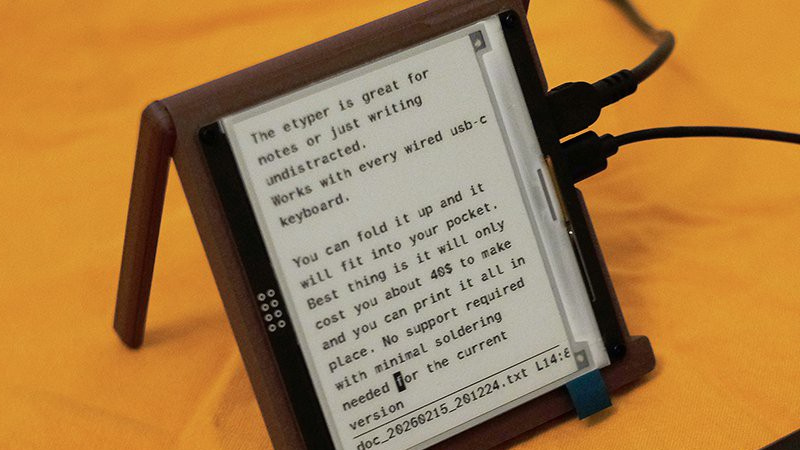
Distraction free writing tools are a reaction to the bells and whistles of the modern desktop computer, allowing the user to simply pick up the device and write. The etyper from [Quackieduckie] is one such example, packing an e-paper screen into a minimalist case.
These devices are most often made using a microcontroller such as an ESP32, so it’s interesting to note that this one uses a full-fat computer — if an Orange Pi Zero 2W can be described as “Full-fat”, anyway. There’s an Armbian image for it with the software pre-configured, and also mention of a Raspberry Pi port. It works with wired USB-C keyboards, and files can be retrieved via Bluetooth. It doesn’t look as though there’s a framebuffer or other more general driver for the display so it’s likely you won’t be using this as a general purpose machine, but maybe that’s not the point. We like it, though maybe it’s not a daily driver.
This hack is part of our 2026 Green Powered Challenge. You’ve just got time to get your own entry in, so get a move on!













It works great as long as you have a keyboard handy, and electricity. So keyboard driven, electrically powered paper. Super green bro.
Quite likely greener by a huge margin than creating all that paper to work on if you wish to have non ‘electrically powered paper’. And if you actually have the handwriting to make good use of real paper these days you are if not already in the minority becoming it.
A project like this makes me wonder if my ‘backup’ mechanical keyboard that happened to have a battery and bluetooth built in actually can/does deliver any power to a device connected to it unmodified.
(I say ‘backup’ in quotes as I bought as an emergency backup when my 122 key terminal keyboard’s microprocessor based signal converter let out the magic smoke, I think now at least 4 years ago, and have yet to find time to do anything about it as this keyboard is good enough, if annoyingly laid out)
“requires […] minimum 20w 5v usb-c”
Yeahum. a 4 amp 5 V supply doesn’t really qualify as “low power” now, does it?
A Pi Zero 2W, iirc, is not exactly a speed demon. How long after power up do I need to wait before I can capture that fleeting thought? If it takes longer than my 1986 TRS-80 Model 100 (a half second), then what have we learned in the last 40 years?
That TRS-80 Model 100 also only draws a tenth of a watt.
You really don’t need a speed demon for a project like this, so the Orange Pi Zero is overkill of insane proportions really, and no doubt for software convenience its going to take way more time to be ready to work, because its doing vastly more stuff in the background as it boots.
Though a fairly minimal Linux, with all the tweaks for speed of boot from fast storage devices can be quick enough the trade off compared to an 80’s machine or much more limited microprocessor variation on this theme is probably worth it for many folks – do you want just a very very basic system that isn’t particularly flexible and can’t ever do anything else but accept keyboard input to work on text files, likely with very clunky file manager, or a more ‘real’ computer with more normal software stack so its easy to make your ‘distraction free’ device more streamlined and easy to use. Both have merits, but unless you are building this distraction free device actually into the keyboard so it can share the same Pi Pico that reads the keypresses to do the writing tasks I’d personally lean on the side of a more capable flexible ‘real’ computer in the box you plug the keyboard into.
I’ve yet to find anything that beats a TRS-80 Model 102.
Just sayin what i always say…if it’s that limited / distraction-free, you really should use something like pico / esp32 instead :)
Huge overkill going with a full Linux OS.
What is up with the huge abundance of these ‘distraction-free’ note taking devices? I’ve never had a desire for such a thing, nor have I heard of anyone else wanting one.
We all have extremely capable machines in arms reach at almost all times. Finding pocket space to lug another device around seems like a pretty poor replacement for growing up and having some self discipline
Not to mention modifying another pocket to accomodate the keyboard. And what’s that I don’t see just outside the frame crop, a wall wart? It’s nae Scottish and if it’s nae Scottish…
Yeah. My pocket is already occupied by…. A notebook, and a Bic 4-colour pen. No electricity required, and it still works great if I drop it. I can also use it to write things like maths formulae, or sketch a diagram. I can hand it to someone else too, and they’ll know how to use it. [1]
But hey, building stuff is cool, and even if you can’t see a use for someone’s homemade tool, if it does the job for them or they learned something while building it, it has a purpose. But yeah, I do question the “green” credentials of this device.
[1] Although sometimes they do look at me funny when I hand them a notebook and paper, even though it’s the best tool for the job. No, I’m not going to unlock my phone and hand that to a stranger….
Yellow legal pad and a black ballpoint pen.
Think of the children!