
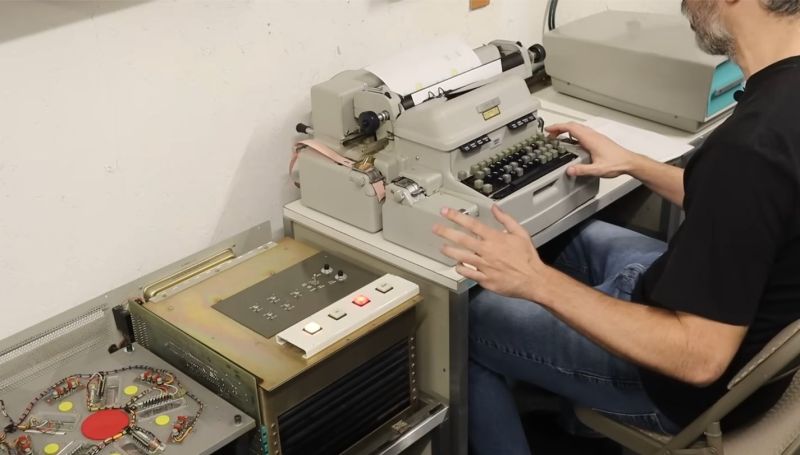
One of the nice things about magnetic storage is that as long as the magnetic layer remains intact, the data it contains should stay readable pretty much indefinitely. That raises the prospect of recovering data from really old computer systems featuring magnetic memory, such as the 63-year old LGP-21 that [David Lovett] of Usagi Electric is currently restoring. Its magnetic memory disk is nothing amazing by modern standards, but after initial testing it seems to spin up and read data just fine, raising the question of what was left on the drive when it was last used, meaning what was in memory at the time.
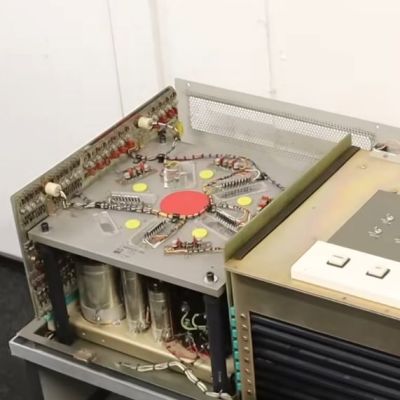
Non-invasive data recovery here involves writing a program that will simply read the entire disk from beginning to end. Tracks 0 and 1 were found to be unreadable due to some kind of hardware issue, but track 2 could be backed up by looking at the output on the CRT, thus providing a track to use. Fascinatingly the LGP-21’s memory disks uses interleaved tracks to reduce the number of read/write heads as part of the overall cost-saving measures relative to the more expensive LGP-30. As you might expect, this slows down memory access a lot over its big brother.
Before any recovery attempt could begin, the Flexowriter typewriter that forms the user interface to the computer had to be given some serious maintenance, along with a few other components like a switch and the paper tape reader. This restored the ability to even properly enter data and receive output instructions.
The subsequent effort to recover the stored data involved a bootstrap program that got loaded into memory, after which the remainder of the program was loaded from paper tape. Following this everything worked swimmingly, though with the caveat that with not even a floppy drive to use, the raw hexadecimal data was hammered out on paper with the Flexowriter over the course of 1.5 hours.
This data will now be scanned in and OCR-ed into something that can hopefully be easily analyzed. Hopefully we’ll know before long what this system was last used for.












I think I would have punched the data to paper tape, so it would be directly machine readable.
The tape storage as explained in the video was much less information dense and wohld have required an exceedingly long tape punching run.
The flexowriter can punch tape at the same speed it prints. A raw binary dump to tape will take less than 10 feet of tape per k byte.
This is 100% incorrect. The Flexowriter or Tally punch punches just 6-bits, and one line is one hexadecimal value. At the bare minimum, it is 8 lines of tape per word, although 9 I think is more accurate because you need a stop code. But on paper tape, 10 lines of punched code is equivalent to 1-inch of tape. At the bare minimum of 8 lines, all 4,096 words of memory would take 3,276 inches of paper tape, or roughly 273 feet.
Actually, OCR might be cheaper than buying or creating a new old sock paper tape reader that will work with USB or at least FT232.
His LGP-21 DOES have the Tally high-speed paper tape punch & reader option. And while new old stock (I don’t think anybody wants to use old socks) 1″ paper tape may be hard to find, 2″ calculator/cash register paper rolls could be slit down.
some paper tape was oiled to save the punch dies. been there, done that.
For reading the tape, assume it’s possible to find ASR33 teletypes to buy or borrow. A simple current loop to RS-232 converter and a serial to USB would hook it up to a modern computer.
Impossible, hah!
Not only do I have an ASR33 teletype in the room, just across from the LGP-21 and sitting on top of the TI-980, I also have a dedicated Remex RS-232 based paper tape reader.
BTW: found a roll of Teletype paper tape for $40 on eBay.
It took us less time to get it OCRd and proof read than it did to print out I think, and neither tape punch needed to be fixed up. :)
I bet 3.5 hackaday dollars it was being used to learn to program something. I don’t know what the 1960s equivalent of hello world is, but something like that.
Even at a U.S. National Laboratory, even in the 1960s, you would need some kind of justification for purchasing a departmental computer. If LANL already had some LGP-30s, because the LGP-21 is code-compatible, once the demand for their LGP-30s outpaced the time available on them, THAT would be the justification for purchasing one or more LGP-21s. So they would most likely be used for the same type of work as the LGP-30s, which would be scientific stuff like simulation of the reactivity of a given reactor core design. Google”Chernobyl” to understand why this would’ve been important.
Towers of Hanoi!
How does what’s on the disk tell you what was in memory?
If “after initial testing it seems to spin up and read data just fine [except for Tracks 0 and 1]” how does that raise “the question of what was left on the drive”? I really don’ t understand this.
The disk was the memory of the LGP-21. No core other other RAM.
I don’t understand “No core other other RAM” but if “The disk was the memory of the LGP-21” is true, that would be a fact worthy of mention in the article. Leaving clarity for another day, are you correct?
I was trying to write “No core or other RAM”…
Something that many people who grew up with modern computers don’t know, is that some types of memory are inherently non-volatile. It used to be standard on computers with magnetic core memory, to have a way of shutting them down that preserves what was in memory, so they can be started back up without needing to be booted. And this was even more common on earlier main memory types, such as drum memory. On the LGP-21 in particular, you can write protect the first eight (IIRC) tracks so that even if your program crashes, it can still be restarted without having to go through a bootstrapping procedure.
Write protection <> non-volatile.
Yes, but even a non-volatile memory needs write protection to prevent spurious writes caused by program crashing or powering down the computer.
Just ask anybody who’s ever have a program on a microcomputer snow-crash!
Not the same thing at all. non-volatile means you can turn the computer off and the program and data will still be there when you turn it back on. Write protection means that the computer itself cannot alter certain tracks.
Track 0 & 1 are typically the landing zone for read/write heads, when the drive is spinning down or powering up. As the landing zone, it is most suseptible to data loss. On many drives those tracks are intentionally left blank.
The 4 kB drive has 32 non-movable fixed heads. I think the first track contains CPU registers.
The track that holds the CPU registers (the program counter, the instruction register, and the accumulator) is not one of the numbered tracks – it is a track unto itself that is independent of the track addressing mechanism. Tracks 0 and 1 that he is referring to are the first two addressable tracks.
The track that contains the CPU registers is even more special than that: all four registers (counter, instruction, accumulator, and extended accumulator (used for multiplication)) share the same track, and they each recirculate their own data, so that the contents of these registers are accessible at all times. Ever since David started describing this machine, I’ve been studying it, and it was quite an impressive example of innovation for cost reduction. Too bad all of this class of machines very quickly got replaced by machines using magnetic core memory.
I learned to program on a Recomp II, which was derived (or maybe inspired by) from the LGP series. Design decisions were made on the basis of simplicity, not speed. Fitting a computer into a desk and selling it for a lower price than the big machines drove the design.
Edit: Recomp III
Yes. This is not a disk, it’s a drum.
Absolutely incorrect. This is literally a rotating disk memory. It operates in a similar principle to a rotating drum, but it is not a drum.
like in ibm documentation…
The heads on this disk are always loaded. There is no landing zone.
Interleave was used on the LGP-21 to reduce average latency, because it ensured that most instructions completed before the next-numbered sector (and therefore the next instruction) came around to its heads. Kind of like why floppy disks and old hard drives used interleaved sectors. One thing to remember is that in terms of computer generations, this machine is difficult to compare with newer generations. Where most floppy and hard disks had sectors that held 256 or 512 bytes, each sector on the LGP-21 held 31 BITS, which was just enough for ONE instruction or ONE word of data.
And IMMEDIATELY I realize I missed the point being made about interleave. The LGP-21 was meant to be object code compatible with the LGP-30, which had 64 tracks of 64 sectors. But the LGP-21 had only 32 physical tracks, and the interleave here meant that the least-significant track bit was implemented as an additional sector bit, putting an actual 128 sectors on each track. I don’t think this actually slowed it down, though, because while the disk rotated slower than the LGP-30’s drum, each sector (and thus, each instruction) passed the heads more quickly. This was possible because even these early-generation germanium transistors were faster than the vacuum tubes in the LGP-30.
Thanks for fascinating info!
It is safe to say this computer will never run DOOM :)
Well, there goes all interest I ever had in it…
I don’t know if there’s any barriers to doing it but I’d have been tempted to knock up an interface to something modern to control the drive &/or read the data out in a more convenient format.
But then I also greatly appreciate this guy doing everything on old hardware and showing a new generation where we came from.
What about making an interface to convert punch data or even punch strucks in to serial data instead of actually punch the paper. So a modern PC can receive them