
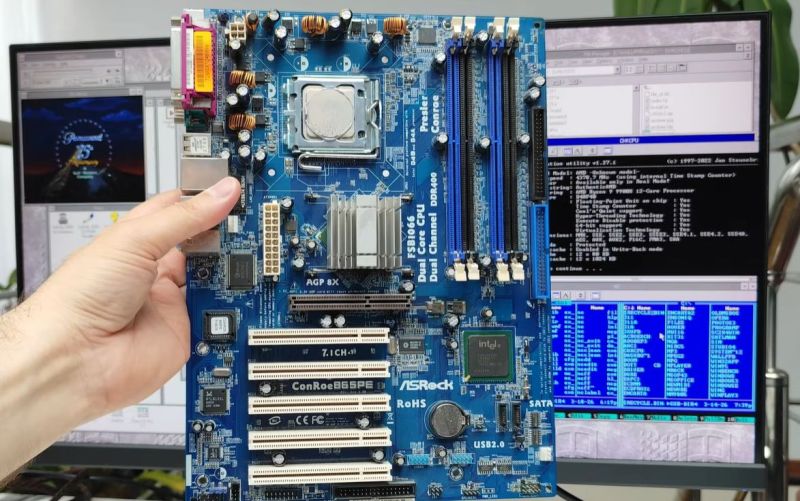
Although the thought of installing a modern operating system like Windows 11 on something as archaic as a Core 2 Quad Q6600 Intel CPU may seem ridiculous, it being the flagship CPU of the time means that it still chews up low-end Celeron systems that are on the supported hardware list like the N4020. Hence [Omores] commencing on this latest adventure, with the snag being that the chosen mainboard features an AGP bus that Windows 11 no longer supports.
This system is intended to multi-boot a range of Windows OSes starting with Windows 98, while also playing nice with DOS and even Windows 11. In addition to the quad-core, 2.4 GHz Q6600 there’s also an amazing 3 GB of DDR1 RAM in the system.
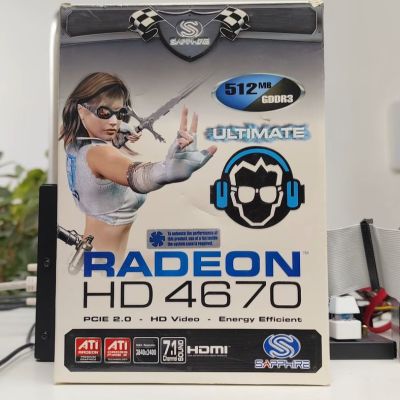
The mainboard is the 2003-era Asrock 865PE, with the GPU being the highest-end GPU that still came in AGP flavor: the Radeon HD 4650 from 2009. Since the sole reason that Windows 11 doesn’t support AGP any more is due to the supporting files not being included with Windows 11, hence you can track it down on a Windows 10 1507 release install – such as the Intel AGP440.sys driver here – and install them with some file editing.
Since Windows 11 still supports the WDDM driver model from Windows Vista and 7 you can then install the Catalyst drivers from 2012 and be up and running. You only get 1 GB of VRAM for this card, but you probably don’t need much more on this level of hardware.
One major stumbling block remains, however, as Windows 11 24H2 enforces SSE4.2 instructions which the CPU doesn’t support. Ergo 23H2 is the newest Windows 11 version that can run on this system, with only the Education and Enterprise still receiving security updates, making it a bit of a pyrrhic victory, especially as Windows 7 benchmarks a fair bit faster on the same hardware.












I’m surprised by the AGP port+GraKa.
All eight LGA775 boards listed in my inventory have more than one PCIe slot (but no AGP slot I think)
And 3GiB of RAM – you can easily install a lot more. Was that supposed to be an additional challenge?
Then again all my boards use(d) DDR2, not 1…
Was it an intentional choice to use such a wired board with this obscure(?) combination? AFAICT/R LGA775 was usually combined with DDR2 – all thirteen DDR1 boards listed in my inventory are either socket 478 (Pentium 4) or 462 (Athlon).
865PE was a P4 chipset and some late P4’s came on LGA775 but I’m ultra surprised that the chipset can support the C2Q. The 3GB limit is going to be a chipset limitation as it’s designed for 32bit P4s with 1GB reserved for GPUs and other peripherals. But yeah this choice of MB with this CPU is… Odd!
Not like Windows has changed much in the last two decades.
thanks youtubeaday
At heart, Windows 8 and 10/11 still use the NT 6.x kernel.
At one point NT 6.4 was simply renamed to NT 10..
https://www.windowscentral.com/microsoft-confirms-nt-kernel-version-windows-10-will-go-100
Some of the “new” CPU features are already being used since Windows Vista/7,
but there used to be a workaround (say emulation) for CPUs without them.
Windows 8.1 was requiring the CMPXCHG16b, for example, which after updating made former Windows 8.0 installations hang during re-boot.
Previously, CMPXCHG16b functionality was being emulated in software for previous CPUs (AMD K9 etc).
https://www.pcworld.com/article/448350/new-windows-8-1-requirements-strand-some-users-on-windows-8.html
But Linux is doing exact same thing right now.
All the classic CPUs are being dropped, one after another.
By contrast, Windows XP just got support 486 processors! Because people still care about it! 😃
That way, it’s on eyelevel with Windows 2000, which also supports 486 CPUs!
https://hackaday.com/2024/06/23/kernel-hack-brings-windows-xp-to-the-486/
accretions beyond the scope of an operating system notwithstanding.
i think an operating system needs to be as barebones as possible. windows 2k, 7, and ltsc version of 10 are all examples of an ideal operating system. notice linux is not on this list and the reason for that is its tendency to glom over everything and you are fighting to get permission to do things on your own damn stuff.
Hi, especially Windows 2000 had a good reputation, I think.
It was like an advanced, user-friendly version of Windows NT 4.0.
And it had many features and APIs that could be accessed if needed.
However, Windows 2000 (aka NT 5.0) never distracted users. It just kept doing its duty.
That’s how an OS should be, I think. That doesn’t have to exclude visual effects, though.
As long as they are decent and not flashy, they’re welcome.
Btw, I sometimes think if OS/2 Warp 4 was a Windows NT 4.0 counterpart,
then OS/2 Warp 4.52 was a Windows 2000 counterpart (aka NT 5.0).
In simple words, I mean. Both NT4/Warp4 are from ’96, while NT5/Warp4.52 are from 2000.
Apparently Open Source ain’t so open after all…
i usually run an older windows on newer hardware, so this is kind of backwards for me.
really its not about whether or not you can run the operating system, its whether or not you can run the os AND the software you actually care about (and would totally run on bare metal if that was possible).
If you really want to go backwards, run newer software on older OSes.
KernelEx project and One Core API make it possible.
That way, Windows Vista/7+ Win32 applications will run on 98SE and XP.
On top of that, .NET framework 2 just had been ported to Windows 95.
https://github.com/itsmattkc/dotnet9x
It’s amazing how much modern software can be made run on a Pentium notebook from the 90s! :D
Provided that no special compiler flags are set (just plain i386 or i586).
Funny thing about that is many of those projects “skip” Windows 8(.1) -> A lot of newer software can be run on Win7 with some hacks etc. but not on Win8.
only problem i have with modern software is it lives too much in the cloud. would rather use something older that stays local.
I feel the same, especially about commercial software.
Luckily, there’s also a lot of recent Freeware and Open Source software that isn’t using any cloud computing.
The writeup is incorrect in saying that the motherboard is 2003-era–the 865PE chipset is, but the board itself is from 2006, the main clue being its model name “ConRoe865PE” referring to the codename (Conroe) of the first-gen Core 2 CPUs. Also, the earliest BIOS releases are from June of that year, as seen in Asrock’s support site.
The 865PE only goes up to 800MHz FSB officially, and is overclocked in order to support 1066MHz FSB CPUs like the Q6600.
Windows 11 has a lot of problems with fees and privacy. Why would someone accept fees for storage and office applications. This is not acceptable. You own your computer, and you should own the software, and your habits online should not be harvested. So why does everyone accept this? Even Hewlett Packard has switched to Linex OS on all their machines due to cost and being chained by fees, to Microsofts panic I should add. Break out of the mold. Windows 11 is a fee trap.
I’ve been thinking same about Windows 10.
When it came out, it forced Windows 7 users to upgrade (remember the sneaky, re-occuring pop-up in taskbar?)
But then suddenly, users accepted Windows 10 and criticism went silent.
Now we’re here in 2026 and users complain about Windows 11 while praising “good, old” Windows 10.
As if it ever was good by any means to begin with. Sigh. 😮💨
To me, Windows 10 and 11 are just about as bad.
Both are software-as-a-service and do serve the needs of MS in first place.
But they’re not seldomly required by current Windows software, sadly.
WINE exists for ages, sure, but it has its limitations, too. So Windows 11 has its place as a runtime, still.
The thing that was a bit too much for me was Recall, which tries to take screenshots in certain intervals. That’s espionage, simply.
Luckily, it doesn’t do that on all installations and it can be manually disabled/removed.
In older versions of Windows 11, at least. 23H2 or 24H2, I think.
The current versions now fully go the AI (LLM) route, unfortunately.