
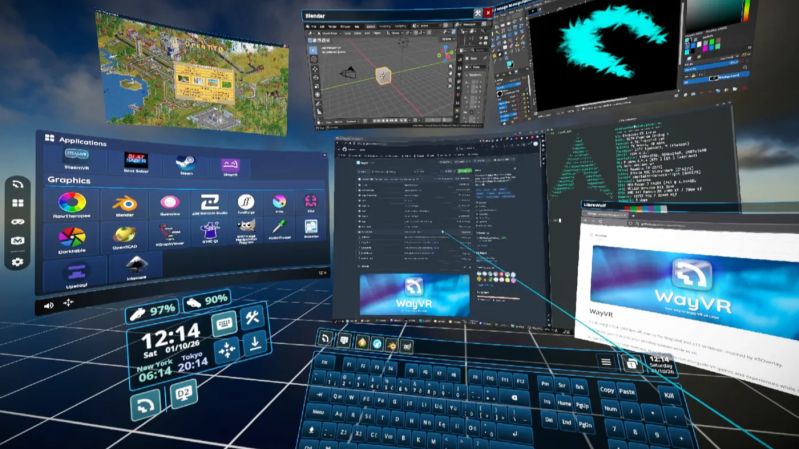
Linux folks are used to having to roll many of their own solutions, and better Linux desktop usability is a goal of the WayVR project, which aims to provide desktop control and app launching from within a VR session.
VR applications can already stream from Linux to standalone headsets with projects like WiVRn (check out this WiVRn setup guide for a fuller understanding), but what WayVR does is let one launch programs and access desktop screens within VR. Put another way, instead of the headset being limited to acting as a pseudo-monitor that only receives the output of an already-running VR application, the headset and controllers can now be used to interact with one’s computer as if one were physically sitting at it. Controls and user interface are highly flexible and help users to do anything they need — including clicking, typing, and launching applications. It’s a considerable step forward for convenience and general usability.
Naturally, when it comes to using a computer from within VR there is plenty of unexplored territory regarding user interfaces. It’s fertile ground for experimentation in everything from DIY headsets to ways to input text without a keyboard, so if you enjoy working on the frontiers of such things, it’s a good scene to dive into.












I wonder how hard it would be to make it run on the standalone Oculus Go headset
I wonder how easy it would be to get rid of the vr goggles and port it to a holographic style display with leap motion style hand tracking, Maybe use ultrasound for midair haptic feedback. Something akin to the computer interfaces portrayed in films like minority report or iron man.
With the vr goggles it feels more like the file system navigator from Jurassic park but with more up-to-date graphics.
Several of the current “inside-out tracking” headsets can use their positioning cameras to locate each of the user’s fingers in real time (leap motion style as you requested).
The element that make such sci-fi displays cool on film is the same element that would make them extremely suboptimal IRL: transparency. You can see the actor AND what they’re working on? So cool! You can dimly see what you’re working on and the brighter sunny day past it? Not cool.
Rather depends on the context – seeing through your display isn’t a problem as long as the display isn’t set at a depth basically identical to the background. Your eyes can focus on whatever is through the window or on the dirty marks on the window surfaces for instance.
Though I do agree you would probably want a blind you can draw for a consistent background and less distractions sometimes, all you need is enough contrast between your display and the “backlight” the real world provides to have a clear enough image. Which really is no different to the transflective, e-ink or simply crank the brightness up not transparent screens that cope with being viewed in direct sunlight by matching or exceeding the ambient light level somehow.
The Quirkey keyboard was designed to be used by people without vision or two hands, so it works pretty well when you’ve got a headset on and are waving a controller about.
As an IT professional who works remotely from a small apartment with young children, I’ve been waiting for years for a functional and stable 3D desktop environment for Linux.
I’ve been following the https://simulavr.com/ project for years; I hope it becomes a commercial product someday. I wish them all the best.
The https://simulavr.com/ seems like the steam frame.
I’m hoping the Steam Frame will be a good platform for developing and trying out ideas like this.
WayVR is an incredible project and it works very well, but due to having to use the VR inputs, it might interfere or even stop a VR game from working properly. I test different VR games on Linux on my youtube channel and at times I have to turn off WayVR (which I use with WiVRn) to be able to play a game. As a funny example in a video, if I play a game modded with UEVR like System Shock, pressing the menu button often makes the player camera spin uncontrollably:
https://youtu.be/lTK-K72WOg8
emacs VR will soon break through the glass.
put my finger on what the ‘space’ element is…the windows in the center and the sides, the windows in the front and the back, windows in space. it’s a way to manage clutter. a vast pseudo-physical space to litter with my lost tabs
thanks i already have one of those
But only one of those (up to maybe 3) all very heavily bounded by the screen bezel, now you can as many of those as you like, with no inconvenient bezels and even use 3 dimensions and thus stack related stuff in depth too! Though maybe not with this software implementation, and I expect it would be even more useful with AR so the real world can be so directly interacted with as needed too.
My experiments with a VR desktop actually showed it has huge promise that I couldn’t really make full use of with only the original Vive’s awful resolution – as you can keep all those reference materials etc spread in easy view on the right spot in the page for the task at hand, and then never have to tidy them up to make room for anything else – you can do two or three tasks really easily (assuming you don’t need the real keyboard) just rotating away from one dining table sized array of related stuff to the next (or re-centering at your desk still with one virtual desk swapped out)
Cool but I just couldn’t imagine wanting to wear that crap on my head for hours on end to do computer work, gives me a headache just thinking about it.
The headsets are getting lighter and more comfortable — we’re still in the early generations of “practical” consumer VR headsets.
I’m one of those people that can wear one for hours at a time. The biggest thing is making sure the headset is adjusted to fit comfortably with each lenses perfectly centered on your eyes. That and a counterweight on the back (e.g. battery) to keepnit from slipping down and reducing neck strain.
Improperly set IPD for the lenses, strap too tight and poor screen refresh rates can lead to headaches, issues that plagued early VR gear that has persisted in peoples impressions since. All of these issues have been largely addressed, its common for headsets to support 120Hz and have adjustable IPD for the lenses so that focal distances with your eyes are appropriate and prevent ‘crosseye’ fatique.
I’m waiting to see what Valve Frame is running
I’ve been trying to get eyetracking piped in as pointer control; been somewhat slow going