
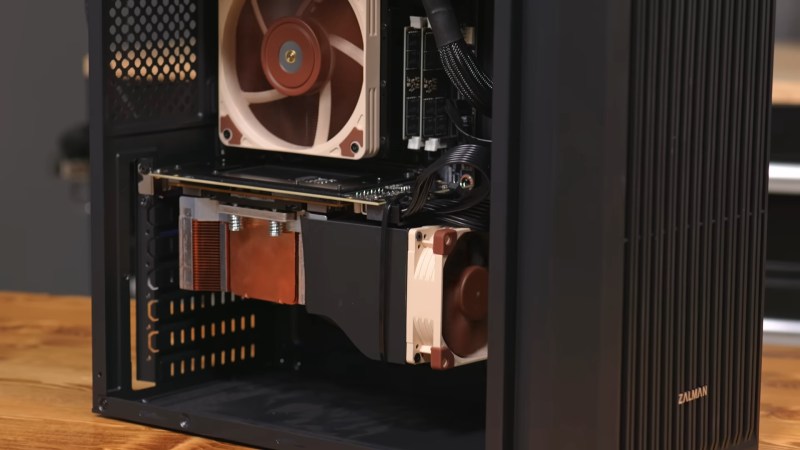
If you’ve been thinking of getting into self-hosting generative AI, but don’t have a big budget for hardware, you might want to check out [Hardware Haven]’s latest video on an unusually cheap GPU option — but you’ll have to do so quickly, before the market realizes the chance for arbitrage and prices rise accordingly.
He’s gotten a hold of a 16 GB NVidia V100 card for only about a hundred bucks, mostly because it’s not easy to plug in, being on an SXM2 socket rather than the PCIe bus. SXM is a server architecture, and not something you’re likely to get on your motherboard. Another hundred got him an adapter board to fit this enterprise GPU on a consumer motherboard. That’s still a lot less than the PCIe version of the same card, which will likely set you back a thousand or more unless you get very lucky on eBay.
It’s not the newest card, dating back from 2017, but that doesn’t mean it can’t run the latest open models. After 3D printing a fan shroud for the thing so it didn’t cook itself, adding very slightly to the build cost, [Hardware Haven] set to work seeing what it could do. Going head-to-head against an RTX 3060 12 GB, the older V100 delivered more tokens per second at a slightly higher efficiency — but much higher idle power.
Still, it’s nice to see a cheap way to get into local AI, even if it might not still be cheap by the time you read this. Once you have the hardware, you might want some easy software options so you don’t have to spend all day on setup. Of course you only need a hefty GPU to run larger models — you can get into hosting your own AI on a Raspberry Pi, if you’re patient.












There are a bunch of these cards IN PCIE FORM FACTOR right now on eBay for less than they said. ($350 buy now, $90 OBO, etc.) This is specifically an exercise in adapting SXM to PCIe.
This wasn’t the case until recently. Adapting SXM2 has been the cheaper route over the last few years, especially for the 32GB version. It seems like this may be changing now that these cards are aging further and no longer supported by the latest CUDA.
IIRC, the SXM2 versions of the V100 have slightly different specs than the PCIe versions – higher clock speeds but slightly less memory bandwidth. So the PCIe version may actually be a little bit better for LLM inference.
To further confuse things, these days I also see a lot of SXM2 modules being sold on eBay with a pci-e adapter pre-installed, and not always advertised as such.
Sxm2 v100 + adapter can be done sub-$200 with fan, cheapest legit v100 pcie for sale is $300 and you’ll need a fan to cool beyond that. Dunno where you’re seeing $90 for a pcie v100
hailo H10 with M.2 is cheap and ….. better
The Halio H10 has only 4 lanes of PCIe 3.0 and a maximum of 8GB RAM. That’s not in the same class as the 16GB V100 for inference by any measure.
8GB memory limits the models you can run. Still plenty of useful models that will fit in 8GB, but models like gpt-oss:20b are not going to fit.
Also the Hailo H10 is delivering 40 TOPS using INT4, while the V100 give 60 TOPS using INT8 and 125 TFLOPS of FP16.
But 2.5Watts for 40TOPS sounds awesome. I am seriously tempted to get now.
Although as I’m looking for some where to buy, I see conflicting info about the performance, like it does 26 TOPS for M.2 version, and 40 TOPS for the RPi AI hat version.
Given an rtx 3060 goes for max 250, it’s much better to get one of those and enjoy recent CUDA support. It was interesting for the 32 gb version before prices rocketed. Rtx 3060 is still one of the most cost effective cards to run llms on, 1 or multiple
Rather misleading title, SMX is not a bus, nor a “server architecture” as claimed in the article, it just an alternative form factor and connector for PCI-E.
These cards also have no video output capability, so not really a “GPU option”, CUDAPU would be a more accurate description.
You can use the video output from another GPU.
PCI-E is a bus.
In fact, “SXM” supposedly stands for “Server pci-eXpress Module”.
Though there is also a proprietary bus on the SXM2 socket – NVLink. It just happens to be completely ignored by these single-card PCI-E adapters.
While there is no video output directly on the card, it can still do graphics generations and rendering. Pixar uses these type of cards to generate movies, but has no use for video outputs on each card. Describing these as a GPU is still accurate, but they are certainly not “consumer GPUs”.
I’m hoping we have more of this when the AI bubbles burst so we can use some of the equipment from the AI glut. I expect a lot of parts will be out of date before these companies even get the data centers built. Maybe well even see some chip transplants to consumer gear.
“AI bubbles burst”? Pro tip: do a bit more research before making silly comments like that.
Daily reminder that a bubble bursting doesn’t mean that a technology goes away. It just means that there’s currently an over investment in the technology in question where the market needs to be corrected. Case in point, we had an IT bubble around the year 2000 that eventually burst. Last time I checked we still use IT. Same thing will happen with AI. The bubble will burst, and then we will take a sober look at how AI technology should be best used and the technology and its market will mature.
I think the case was not in your point.
^^^ This x10
It’s the same example I use to explain the current situation to people.
Of course there was the dot-com bubble but that doesn’t mean that the core idea – the WWW – was a useless invention, per se.
Sometimes it does just go away. Nobody uses expert machines anymore, the subject of the second-last AI hype cycle (the previous being genetic algorithms). They even spawned their OWN generation of useless accelerator hardware, in the form of LISP machines. These fascinating behemoths are a parallel world unto themselves, being neither DOS nor Unix nor VMS. Also, a total dead end with absolutely nothing that survived.
The world is littered with far more technological dead ends than successful technologies, we just only happen to remember the winners. (winners who occasionally includes technologies that happened to be revived)
This time, it will be different.
yep, read this book.. https://press.princeton.edu/books/paperback/9780691152646/this-time-is-different
ie it is never different….
If you don’t know about the hundreds of billions of dollars being burnt with zero profit being made and essentially zero return on investment, coupled with the drying up of investment, then it seems you haven’t done much research yourself.
For example, here are a few things you might’ve discovered:
-MIT has found that 95% of AI initiatives fail to provide any measurable benefit to profit or productivity at all, and further follow-up research has found that they overall make people less effective not more when you factor in things like needing to mop up after them
-In trying to raise funds for OpenAI, even blue owl was unable to attract investors. This is a company that has previously gotten even the stupidest things funded. If they can’t attract investment for the single biggest name in AI at the same time that they’re burning about 100 billion a year, that’s bad.
-None of the datacenters being touted are getting built. Literally. Not a single project started in 2023 can be found that has gotten all the way to completion and started serving customers. There are lots of letters of intent and a few big holes in the ground, but none of the projects have achieved completion. At this point it looks like the many millions of GPUs nvidia have been selling are rotting in warehouses, waiting to see who writes them off the books first.
So yeah, big bubble. About to pop. Less a question if than when.
That may be of use in games. I am not a gamer, my gpu’s are cuda only engines. For me this is not at all a good deal. You wind up with a 16G GPU that is next to useless, and that generation is on it’s way out.
The way I see cuda these days is save your quarters and get at least a 3090. You can do some fun things in 24gb, but even that is not an open ticket, and as soon as you have to swap large amounts of data around all the time, the performance suffers badly. The step up for a 3090 is a 5090, which sounds like a solid investment, you get a bit more ram, though probably not life changing, and a generation that will be around for a long time to come. What you really want is a pro 6000, which should let you get the vast majority of your ya ya’s out without going oom. The downside is they want more than I paid for my last 3 cars, combined, for one.
You can also go the other way, embrace the fact that a lot of things do not have to be done in realtime and see what you can do on the low end. I have been having a lot of fun with Microsofts BitNet on tiny core virtual machines. There are a lot of things you can do when you have even a small brain at your disposal, and the vm I have takes under a gig and a half on the disk, most of that is the model, and a gig and a half or ram. I have created a few cool one trick ponies for my own devices built around that boilerplate. My last lora took > a week to cook on my big computer with the gpu, so I had some time to mess around with tiny stuff.
It depends on use case.
I got a 16GB V100 and an adapter card in 2025 for a combined total of ~100.
It’s sitting in my proxmox server, limited to 100W, split into 2x 8GB vGPU instances, and each is 3d accelerating a remote desktop.
It was way cheaper to set up a remote gaming server for my nieces this way rather than buying discreet GPUs and jamming them into the little 1 liter ex-corpo desktops I built for them 3 years ago.
They run Minecraft just fine.
Maybe not the worst idea, though it seems like it adds extra costs & steps, as others have said. I’m taking a different route with adapters, and I may be stupid or insane for doing it. I had been getting into AI as a hobby, almost a year ago, and my mom decided to give me a Strix Halo mini PC (GMKtec Evo X2). She had a budget, so it could only be a 64GB version. A few months later, I decide that I want to go for my certifications, so I get another Strix Halo (Corsair Workstation 300), but with 128GB this time.
The Strix Halo (AMD AI Max+ 395) is a nice little system, especially for anyone who just wants to play around. They aren’t the greatest option for AI, but that keeps them from being $8K apiece. Their downside is that they use LPDDR5X to get ~275GB/s in bandwidth, using a quad-channel configuration. It isn’t like using a Mac Studio, but the difference is that a Mac Studio is so proprietary, it can’t accept adapters & relevant Linux distros.
In case it hasn’t become clear yet, I had realized that the Strix Halo uses M.2 slots, those slots can be adapted to PCIe, and that their drop from eight lanes to four would still allow nearly 4GB/s in connectivity — and that’s bidirectional. They are suitable for RDMA, through Infiniband, making them acceptable for clustering. I wound up selling some stuff, and buying another Workstation 300 128GB, along with enough adapters to put 40Gbps Infiniband cards “inside” each machine.
Serendipitously to all of this, I had spent four years budgeting & planning to upgrade my desktop, going from a Ryzen 3950X & 6600 XT, with 64GB DDR4, to a 7800X3D & 7900 XT, with 96GB DDR5, but had been lazy about selling the DDR4-gen parts. The RAMpocalypse™ happened, causing DDR4-gen parts to regain value, but I also realized that my old machine has the capacity to run two PCIe 3.0 slots with eight lanes dedicated to each. The 7800X3D board (X670 chipset) requires M.2 adapters to get the second & third PCIe slots needed for clustering.
Now that I’ve written an article, I’ll cut to the chase: I now have a DDR5 desktop, with a 7900 XT GPU & 96GB system memory, a DDR4 PC, with an acceptable 6600 XT & 64GB memory, and three Strix Halos — two 128GB, one 64GB. How can a dirt farmer use all of that as a cluster? The Strix Halos are going to use USB 4 to attach NVMe OS drivea(the enclosures are USB 3 2×2 20Gbps) — with CLI Linux — so they can each have a pair of dual-port Infinibands, with the 7800X3D PC getting a pair as well, while the 3950X gets one card for now. The 7800X3D & Halos will cluster directly, sacrificing dedicated 4GB/s in bidirectional speed per port, in order to allow all four to directly connect to each other. The 3950X will connect to the 7800X3D & a 128GB Halo. I will effectively have 340GB of 275GB/s (or greater) memory, plus another 160GB of system memory, and an 8GB GPU, all allowing me to run a 1T — thanks to TurboQuant — or possibly a 405B, as well as being well-suited to operate an agentic cluster, or one which could make good use of MoE.
Have you ever tried exo to split models between multiple machines?
What is the turboquant percentage of compression?
I’m still very new to this. I think the biggest thing to keep in mind is that this is my first cluster, and… I don’t see a lot of information online about having a DIY AI cluster. It’s tempting to set up a camera, just in case anyone actually wants to see my fumbling & bumbling.
As for TurboQuant — I’ve played a bit with it, and it’s pretty great, but it all depends on the architecture. If you want to use it for good ol’ transformer LLMs (conversational/coding/etc), it really can help compress the context window. Diffusion models — I didn’t get to do a lot, but mostly because it wasn’t impressive. I think that’s because TurboQuant focuses on the KV cache, and works on quantized models. Basically, the larger the parameter count, compared to the tighter the quantization, is going to affect the results of TurboQuant. If you take a 1T model (massive, I know), and you make it a Q3 — which is more fitting for the big models — then the model is close to the edge of how much it can be quantized; the next step is to compress the KV, which absolutely saves RAM for a 1T. The claim is that TurboQuant is going to be very helpful for the hybrids, like Sora, but I haven’t tried it yet.
It’s worth noting that these suckers are also on the legacy branch of the drivers, so pretty soon they’re going to stop being ported to newer versions of the kernel. They’re already probably not going to see any newer versions of cuda. Buying one of these things might be cheap, but it’s an something that will rapidly depreciate.