
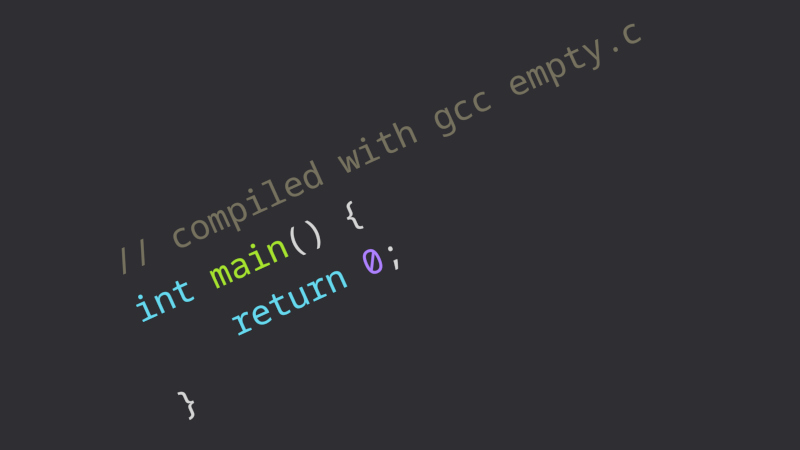
It’s well known that the difference in executable size between a compiled binary and one hand-written in optimized assembler will be significant. The compiler brings in all manner of boilerplate whether it needs all of it or not, which is responsible for the extra space. [Weineng] has fallen down the rabbit hole of trying to make the smallest possible gcc-compiled C executable, and the resulting write-up is a fascinating read.
Surprisingly the smallest C program isn’t “Hello World”, but one which simply does nothing but return 0. This results in a binary weighing in at a surprisingly large 15,816 bytes — something which surely could be improved. There follows a set of clever compiler flags and bits of code manipulation to remove some debugging information, and strip out unnecessary stuff executed before void main().
At 13,632 bytes it’s still a little on the chunky side, so it’s time to examine what libraries it brings in. More compiler flags get it down to 8,704 bytes. Removing a code comment section and error handling with more flags takes it to 4,320 bytes. Then there’s code which dictates how memory is allocated, which brings it down to 400 bytes. That’s an impressive reduction!
Reading this as hardware people we maybe don’t have the elite knowledge of compiler flags it takes to manage something like this. But we’ve all at times had to reduce the size of a bit of software, so we’re sure some of the techniques used are going to be interesting to quite a few readers.
After all, even hardware people need to trim the fat at times.











B4 02 B0 61 CD 21 C3
I think you missed the main part where it states “gcc-compiled C executable”
But it does show that a program doing something similar can be 7 bytes instead of more than 2000 times as large.
Although if I must beleive Gemini, this prints “a” instead of returning 0.
Indeed, 61. The a was intentional.
But that was the point. It’s amazing how much bloat compliers can introduce into even the simplest of programs.
That being said, those seven bytes were intended to be run as a DOS com file. It doesn’t take many more bytes to make it an exe.
Interacting with modern operating systems, especially when there’s a GUI like windows as an example, can require quite a few hoops to jump through to even set things up for the bare minimum.
No doubt if something like windows was written from the ground up, in bare metal asm, it would be substantially smaller and faster.
I guess that’s one of the hopes for using AI during the programming process. Although personally I’m not convinced the drawbacks outweigh the benefits overall.
“No doubt if something like windows was written from the ground up, in bare metal asm, it would be substantially smaller and faster.”
not at all. Windows is slow and bloated because of complexity. ASM is the worst possible language for managing complextiy.
All of the bloat in this do-nothing program are downstream of attempts to manage complexity. If you’re not trying to do something complex, they are all wasted. But if you are trying to do something complex, they pay off in spades.
Windows is slow because microsoft’s corporate culture is systematically bad at handling complexity.
If you know a little bit about compilers, it’s not really surprising that they can (and will unless you take steps to make them not) add a bunch of stuff that isnt strictly necessary for a given executable.
By the way, if windows was written in assembly from the ground up it would probably be a lot more buggy (readability and maintainability notwithstanding).
When comparing a 7 byte program that does pretty much the most useless thing in the world, to a fully featured OS; don’t.
“Printing” an A and returning a zero are two completely different things. Returning a 0 (error level) is basically an executable that runs and tell the OS it didn’t have an error hence the 0. Returning anything other than 0 indicates an error of some sort to the OS.
Technically a program that prints an A also returns a 0 assuming something didn’t cause an error during execution.
Returning a 0 is probably the most basic required level of output for an OS to successfully execute it without indicating an error.
This is not what the title of the article says.
For CP/M, an even shorter one would be C9. But probably no C compiler would produce that.
Possible one-bit bug in the tiny executable: I believe the B0 should be B2 there, function 02h expects the character in DL, not AL. Tiny code, tiny bugs. :)
Importantly, this is about compiling to the smallest a.out (old fashioned linux style) executable. I assume this was chosen because the ELF (modern linux style executable) header is slightly larger and ELF is somewhat more complex. Either way, you’re dealing with
The article now has a link to a reddit post from someone who managed to get it down to 84 bytes, with (I think) 32 bytes required to be devoted to the header. truly impressive.. although using inline assembly in your C program feels a bit like cheating…
You could presumably go even smaller if you were targeting something without a header; presumably this includes most microcontrollers, but also classic MS-DOS (or CP/M), which have an executable format (“.com”) which has no header at all.
also…
I’m not usually one to critique hyperbole or complain about something that might be intended as sarcasm.. but surely nobody is surprised by that a binary that contains the text “Hello World” and the machine code to display that text is not the smallest one a compiler can generate.
my inability to complete a sentence before hitting post?
meant to say that either way, you’re dealing with the need to create a valid header in addition to program code.
DOS Turbo C and MS C could produce .com files which are essentially just binary images. With the right linker script you can get something similar on GCC or Clang – you can use either for hobby OS dev of boot sectors or similar where there is no dynamic loader. The issue here is not the C language but the lack of a light enough binary format in modern OSes.
I used to have a demo program (I must have it somewhere, just can’t find it) that displays a starburst, with an overlaid blown-up text from a command line argument and plays a midi version of Bronski Beat’s Smalltown Boy, all in under 2200 bytes, which was amazing to me at the time.
The actual code for main() {return 0;} is only a few bytes. Where it gets larger is using the standard libraries that get linked in (even for statically linked). I assume that the flags used to create the smallest versions just bypass that altogether and effectively have a start location pointing to set result to 0, clean the stack (if that’s necessary) and return, which is what you’d do in assembly.
This is mildly off topic, but fun to note. On ye olde IBM 360, the smallest program was the IEFBR14 utility. It consisted of two instructions and weighed in at exactly 4 bytes: 1B FF 07 FE. It sets a condition code of 0 and returns. Commonly used in JCL decks where all of the action for a job step happened in the JCL cards preceding the EXEC IEFBR14 card.
I challenge you to read the source code of GNU coreutils’ “true”.
which is 67428 bytes on my system!
What? True is a builtin in many shells. My /usr/bin/true is 32304 bytes (Fedora 44). Why is yours so big?
Challenge accepted. Wow, just wow. For a program that’s essentially a NOP, it sure carries along an amazing amount of baggage. A comparison of “true” and IEFBR14 stands as a good example of why while machines get faster and more capable, software performing an equivalent task gets bigger and slower. And keep in mind that of OS/360 is was said, “It sure is complicated, but it makes up for it by being slow.”
20 times as many lines as the manpage!
When the program’s name is longer than it’s binary. Neat factoid. Thanks.
4A 65 73 75 73 20 49 73 20 4C 6F 72 64
You might be pleased to onow when I put ” what is 4A 65 73 75 73 20 49 73 20 4C 6F 72 64 in Unicode” into the local Gemma 4 E2B it tried to generate a table and broke itself. 🤣
FWIW, Gemini, Perplexity, and Copilot had no trouble
When you just make an empty ‘main’ program you’re ignoring the loader and setup code (the module often known as ‘crt0,asm’ that calls the function ‘main’. If you’re a ‘C’ programmer then you’ll know the difference between something that’s compiled for a OS environment and something that’s, well, just compiled (for example, as part of a bare metal embedded program). A ‘C’ programmer will understand implicitly all the setups, libraries and segment usage. To them assembly usage — or, more likely, non-usage — is a matter of convenience and choice.
(Incidentally, this extends to C++ as well.)
These days a utility to set Adressable RGB or your mouse DPI can easily near a gigabyte, whereas the functional portion would be 1 to 10MB in years past (even a couple hundred kilobytes when streamlined).
I assume most of the bloat is including a full web browser and integration with social media platforms. Seems a lot of cruft. Annoying.
I’d say you were exaggerating but current desktop development is ridiculous for including the kitchen sink, bathroom sink and the laundry room
I can still remember running a Martian terrain renderer program that ran on windows. I think the one I saw was an earlier version that was a whooping 9 KB
https://chaos.if.uj.edu.pl/~wojtek/MARS.COM/
Reading the above link looks like someone dropped the windows executable down to 1517 bytes!
“Removing a code comment section”. Comments are never compiled so I don’t see how this could make the executable smaller.
there’s a thing called “reading the actual article”. Try it sometime. It’s fun!
“4,320 bytes. Then there’s code which dictates how memory is allocated, which brings it down to 400 bytes”
Can someone tell me; would the program still work without me allocation?
It wouldn’t, since the allocations in question are how the ELF is actually loaded into memory as well. In the article itself, it’s stated more clearly. A complicated scheme of many memory allocations/loads is replaced with a single memory load for all metadata and the .text section.
A program to return zero on the Cray-1 is only 1 parcel (2 bytes): 004000
But the required exchange package is 128 bytes.
:-)
Guessing here, but doing this job with Electron would be…what… about 150 megs? I’m no programmer for sure.
The 2011 ISO C standard defined the smallest C program as
int main(void){}
where, under certain conditions, main() is allowed to NOT specify a return value. In that case, main() will return an implicit (int) 0.
5.1.2.2.3 Program termination
1 If the return type of the main function is a type compatible with int, a return from the initial call to the main function is equivalent to calling the exit function with the value returned by the main function as its argument; reaching the } that terminates the main function returns a value of 0. …
Our new AI coding overlords could care a less about this type of a discussion. Git it 20 years and no one will know what c code is except as LLM output.
When I was young (MS-DOS 6.0 era), I started off making fancy batch files with ANSI escape codes to make relatively interactive “programs” with menus and black on black hidden text, etc.
To “compile” my batch files, I used a program that converted them to .com, and then a second program that would convert .com to .exe … My reason for doing so was that I found was that my “programs” were generally too small. At the time I felt that by being too small it was rather obvious that the program was not really a compiled program. I solved that by making executable zips and had those dump out all the various parts of my program (binaries that were no longer available in MS-DOS 6.0, etc.). The combination of the executable zip and the twice converted batch file made my “program” swell to around 1.2MB, just small enough to fit on one 3.5″ floppy, and just big enough to not resemble a batch file.
Now I’d go in the opposite direction, but at the time, having many lines of code and thus larger file sizes was synonymous with being an advanced program. It might seem dumb now, but at the time, it was a lot of fun, and I learned a ton.
simple , using 4bit cpu
or 10 bits
A while back I was doing some studies and exercises to reduce the executable size on ARM64 (https://github.com/efurlanm/edge) and when I realized that some approaches were using tricks to reduce the size of the elf header, I decided to completely eliminate the overhead by using a separate external loader. In one of the exercises, using only gfortran (without resorting to Assembly), the executable size (without the header) reached 20 bytes.
It depends on the OS, I guess. In ms-dos, the smallest program is just one byte: C3 (ret).
If you want to be a bit more compliant to the ms-dos standard, it’s 5 bytes:
B8 00 4C mov ax,4C00h
CD 21 int 21h
It will take quite a while to have a C compiler generate such code, I imagine. :P
By the way, you have to save this as a .com executable and not .exe. Because a .exe needs to contain a relocation table, a memory mapping, and whatnot.
void syscall(long di, long si, long dx, long ax) {
asm(“mov %0, %%rax\n”, ::”r”(ax));
asm(“syscall\n”);
}
void _start() {
syscall(1, (long)”Hello World\n”, 12, 1);
syscall(0, 0, 0, 60);
}
gcc file.c -nostdlib
./a.out
It would have peaked my interest more if the exercise was done on an embedded target, e.g. for a C bootloader on an STM32C031 with 32kB of Flash were every byte matters.
Although not compiler output, this reminded me of a post I saw a long time ago of someone trying to build the smallest valid ELF executable that simply returned an exit code of 42:
https://www.muppetlabs.com/~breadbox/software/tiny/teensy.html
It ends up storing the code in the middle of the ELF header (and other tricks) to get to a total size of 45 bytes.