
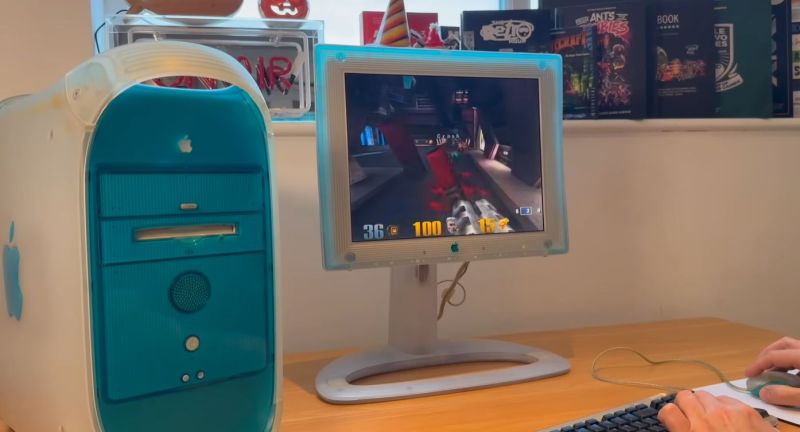
Back in the late 90s, Apple was definitely a pretty fruity company, with its aggressively translucent shades of colored plastic that often got described in terms of such fruit variants. Although the iMac steals a lot of the glory here, the Power Mac series and associated hardware deserves that spot in the limelight as well. Recently [Dan Wood] put together a full Power Mac G3-based setup, including the appropriate LCD monitor and other peripherals as someone with some serious disposable income back in 1999 might have owned.
Part of Steve Jobs’ return to Apple, the Power Macintosh G3 debuted first in basically recycled beige enclosures from previous Macintosh systems before its second generation introduced the Blue and White version, as it was officially called. This dazzling style was carried through in the peripherals, with pin stripes, translucent plastic and a distinct absence of sharp corners or edges.
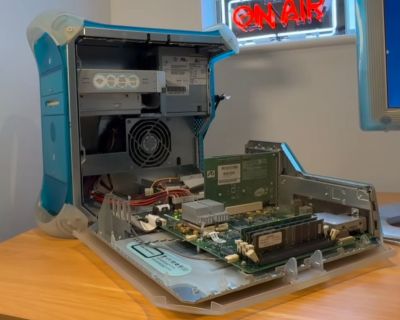
As for what you get in these colorful Power Mac G3s, a 300 to 450 MHz CPU, an official memory limit of 192 MB and perhaps the most user-friendly way to access the logic board to upgrade and install components with the folding lid. Something which had PC users with sharp edged cases and plentiful blood sacrifices to the PC gods somewhat steaming in jealousy.
For the time these Power Mac G3s didn’t just look fetching, they also were quite powerful. Something which came at a pretty hefty price tag, of course. The 400 MHz model that [Dan] got his paws on would have cost around $2,000 back in 1999, or closer to $4,000 clams today. The active-matrix TFT LCD screen would have been cutting edge as well, with a similar cutting edge price tag.
Released before OS X this system runs Mac OS 8.6, though it can run OS X 10.4 (Tiger) which unlocks more software options and of course the transition to a proper multi-tasking OS. This particular system was apparently used for graphics design until 2010 based on the files on the HDD. As demonstrated in the video, the system is still quite usable, even in 2026, thanks to all the software available online.











It was the ultimate mac setup for most of 1999, until the “Graphite” G4 tower models became available in October.
Though honestly, the Graphite wasn’t that much of an improvement at the time – they’re functionally the same system aside from the processor upgrade, few things were able to take advantage of the Altivec instruction set on the G4. The higher end ones had a redesigned motherboard with an AGP slot, but the real-world performance advantage of AGP graphics wasn’t all that big in 1999 either.
Within a year or two, third parties were selling drop-in processor upgrades to convert your blue-and-white g3 to a g4, further closing the gap.
(As an aside – personally, I think that the “graphite” case was much better looking than either the blue and white or the more muted “quicksilver” that followed it, but to each their own)
“an official memory limit of 192 MB”
The official limit was 1GB. using 4 x 256MB sticks. The early G3 Beige Desktop “had 192MB and the Beige Tower had 384/768MB at the time but that limit was due to what memory was available at the time. The 192MB limit was due to RAM height size as low profile DIMMs would only fit due to lack of room in the desktop case. The tower used normal sized DIMMs. The AIO version also had the same (at the time) RAM limit as the Tower version. All version of the Beige G3s has a limit of 768MB.
Thank you for that explanation, it definitely makes a lot more sense to me that way, especially considering that this was a high-end system for the time.
The Beige version sure feels like a stop-gap solution, even if it sort-of worked :)
About the Virtual PC thing.. Virtual PC for Mac v2 and v3 did support a pass-through feature for Voodoo 1 and 2 cards for 3D graphics.
So 3dfx Windows games played rather normal, like they would on a Pentium 1 (80586).
(Some MacOS 8/9 software natively supported Voodoo 2).
Virtual PC v4 dropped this feature in favor of an updated CPU core with MMX emulation, I think.
The change was related to endian-ness, I vaguely remember.
Switching it for faster x86 emulation caused trouble with Voodoo cards (V1 is little-endian, V2 is bi-endian).
Another PC emulation solution was SoftWindows 95 and 98, I think.
Both had Voodoo support, too.
Virtual PC v5/v6 supported both Mac OS 9.x and X, while v7 needed X.
By the way, there is an 3dfx software emulation for Mac OS 9: MacGLide
It’s useful for running 3D applications in Classic Environment in Mac OS X 10.2, for example.
Also works in later versions, but Classic performance is worse in, say, Tiger due to double buffering.
PS: If anyone of you is having trouble with certain 3D applications that rely on QuickDraw 3D or OpenGL,
please consider trying out an fully updated Mac OS 8.6.
Certain things such as graphical glitches or communication problems (modem, printer ports) may go away on 8.6.
Anyway, just saying, because Mac emulation tops out on Mac OS 9.0 anyway due to missing MMU emulation.
On real hardware, an up-to-date Mac OS 9.2.2 is also an alternative.
Sometimes, though, older system extensions provide better compatibility, still.
In fact, top-of-tree MAME can now run up to Mac OS 9.2.1 on an emulated Beige G3. Mac emulation topping out at Mac OS 9.0 is no longer a true statement.
Hi, thank you very much for the latest news! 😃👍
Though I think Mac OS 9.0 still is the limit for normal, dedicated Mac emulators. Besides, MAME is such a mess! :)
Personally, I’m looking forward DingusPPC.
Oh, if you consider upgrading the graphics cards..
Please be aware that the ATI card in that PCI slot is a special 66 MHz Mac version.
Flashed PC cards will work, but may run at 33 MHz instead.
The first PCI slot in that G3 (and G4 Yikes) is half an AGP port, basically.
It has no GART, but about same bandwidth as early AGP.
If you consider flashing an PC card, an Geforce 2 or Geforce 4MX might be an easy starter.
Both often have socketed DIL EPROMs and a “generic” Mac firmware with safe standard settings can be used.
Just make a backup of the oroginal PC/VGA firmware with, say, an TL866 programmer first!
(There are Mac OS utilities that allow editing a firmware file to adjust settings, too.)
On Geforce FX (5200 and up) it gets way more complicated (memory timings etc).
Also, Geforce 4 is the last to support 2D/3D acceleration in Mac OS 9.x.
ATI 7xxx or 9xxx series are an alternative, too, but I’m not sure.
The Geforce 3 was rare in Macs and flashing a PC card isn’t that easy.
On, and please be careful with early AGP Macs (G4).
They repurposed some previously unused AGP pins for delivering power to the Apple monitor.
Merely AGP 2x and 4x cards (?) might be old enough not to use these pins yet.
So please double check. There are workarounds involving masking tape and cutting pins on the card.
Good luck! 🙂🤞
OK, but how many $4,000 clams?
If you needed to ask, you definitely couldn’t afford them :)
I loved the all in one iMac.
Their best product visually.
A flatter screen on a stalk?.. that’s for liquor store counters….
I still have my B&W G3 among my other classic Macs, it has a 1.1Ghz processor and a Radon 7000 in it. Pulled a 450mhz processor out of a dead B&W and put that in my Beige G3, replacing the 266mhz processor.