
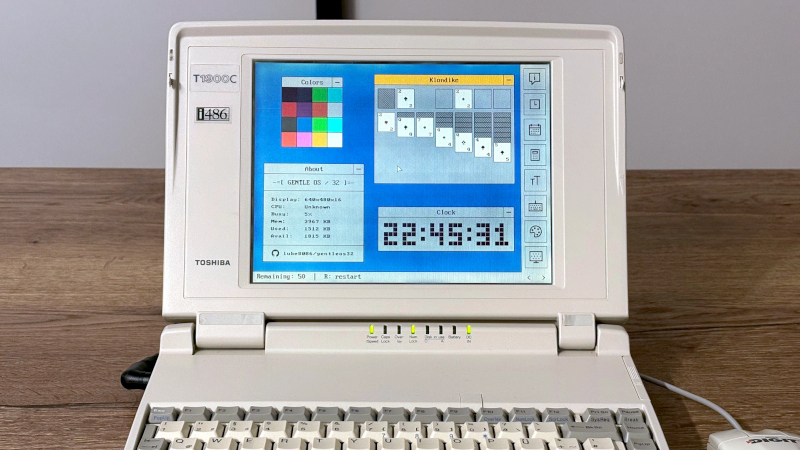
Every month or so we bring you a Jenny’s Daily Drivers article, in which we share with you an esoteric OS and try to use it for the everyday work of a Hackaday scribe. As part of that ongoing effort, the world of esoteric operating systems is always on the radar, even though many of them are unlikely to fulfill the Daily Driver requirement.
Even so, sometimes we see an OS that we like, and so it is with [Luke8086]’s GentleOS. It’s an operating system — or to be pedantic — a kernel shell into which applications are compiled, for older 16 and 32-bit x86 computers with a very low hardware requirement. It brings a simplicity to older PCs that we like.
Downloading the tiny image and booting it in a virtual machine, it’s almost ridiculously quick to boot on a 2020s computing behemoth with gigabytes of RAM and multiple 64-bit cores. It has a basic but nice and clean GUI, and a selection of basic applications and games. You won’t be using this for productivity work, but that’s hardly the point. It’s particularly pleasing to look at the code and find something simple enough to understand, too.
We like it, if you have an older PC it might be worth spinning this one up for a bit of fun.












But can it run Doom?!?
It’s a 486, sure
Well, the two almost identical Toshiba laptops I had could at least run Heretic (over serial null-modem cable no less).
4MiB of on board RAM and another 4 in/on a PCMCIA-like card and a trackball attached to the side.
200 or 300MiB HDD and possibly an external CD ROM drive via parallel port.
Even installed Win95 on at least one of them – after creating a set of Win95 installation floppies myself (~1.6-1.7MiB DMF formatted floppies and copied the data from a normal Win95 CD).
I’m a bit sad I threw them away ~10 years ago. :-(
I remember installing Win95 on a Compaq Contura Aero 4/33C (486SX 33MHz with 8MB RAM) using a parallel-port Zip drive.
8 MB? For a 386/486 laptop that wasn’t bad, actually!
Many had a lousy 4 MB of RAM as standard even after Win 95 was out.
OS/2 Warp 3 booted up with 4 MB of RAM, but 8 MB was real world minimum for a meaningful use.
16 MB was considered a sane memory expansion here.
Windows 95, by comparison, was sneaky.
It also booted with 4 MB of RAM, but compensated with heavy disk swapping.
It “worked” good enough for lightweight Windows 3.1 era applications, though, but as soon as commercial, shrink-wrapped applications were run it became sluggish.
Here, 8 MB did barely help. 16 MB was better, but to my knowledge it needed about 32 MB (!) of RAM to fully satisfy Windows 95 and stop swapping. Yes, 32 MB, no typo.
And a huge* amout of RAM for end users in 1995.. But Microsoft Bob was memory hungry, too.
Windows 98/98SE had better memory managment over Windows 95 and could handle memory constraints more intelligent.
It could run aligned programs directly from VCACHE, for example.
So they didn’t have to be moved into RAM first, like with Windows 95.
With 24 or 32 MB of RAM Windows 98SE could handle big applications better than Windows 95 could on same hardware.
*Windows NT 3.1 from 1993 used to have a “huge” memory requirement, too, by the way.
It required 12 to 16 MB of RAM as a minimum requirement, just be able to boot.
But that’s understandle, sort of. Real operating systems need RAM for buffers, disk caches, virtual memory and the DLLs loaded in RAM.
Unfortunately, in the 90s, end users often had an somewhat underpowered RAM expansion.
They were better of with running DOS, thus.
Yep, this is why 98Lite existed, in my opinion the best optimisation tool at the time. It allowed you to not only trim down 98, but replace heavyweight components with their counterparts from 95, making a a usable installation possible with 16 MB of RAM, and performant at 24.
I played doom on i486SX with 4MB RAM and my friend used to play it on i386 with 8MB of RAM.
Haha! My first computer was a 486SX with 4 megs of ram. No math co-processor for me! We later upgraded it to a DX and doubled the memory to a whopping 8 megs so I could run Photoshop! Those were the days for sure!
Grab your coat Grandpa we need to take you back to the home.
Lol! But really, people who played it in the 90s on authentic hardware can be still in their 30s.
Maybe in their 20s, when they played Doom on a family member’s PC in early 2000s.
At that time, I remember, VDMSound was popular on XP machines.
It allowed enhancing the DOS box of Windows XP (added SB16 emulation, MIDI etc).
Before DOSBox became the favor of choice to run classic games.
What the point? OS is just a space for applications. Sure it’s a challenge to build your own OS, but as a hobby, especially on old hardware. Install the OS – it’s not a rocket science to find installations of old OSes and applications for them – that was designed for this hardware and you’ll get the whole environment for doing whatever you’d like – games, programs, anything that was created then.
As I remember, it was enough for original Doom to have 386 and 4 mb of RAM. With some tricks it worked perfectly fine. I used to have two sets of config.sys and autoexec.bat – for work and for Doom.
I still have old computer with Win95 and OS/2 on Pentium 2 (slot version). Or was it P1… Well, I didn’t start it for… errr… ten years, sorry, but I bet it will run.
🤣😂🤣😂
486 SX 25 MHz with 4MB RAM with a massive 100 MB HDD. Loaded (read squeezed) Win 95 onto it with 5MB to spare. Updating to a ginormous 1GB HDD almost immediately. 🤣
Doom was made with a i486 in mind, so not only will it work. But your getting that retro experience everybody wants.
Where can I download this!?
Someone has picked up Terry’s holy work.
TempleOS, it takes a certain sort of mind to create something like that.
Would be great fun if it came with a basic interpreter for the old school vibe.
Hi! I think that’s not that difficult to implement, there are many BASIC interpreters available in source code.
An CP/M emulator or an MS-DOS Player might be possible, too.
Perhaps even a ZX81 or GB emulator. The foundation of GentleOS seems to be advanced enough.
But I’m just an user, of course. The author might be the one who could answer such a question.
Seems less functional than, say, just running DOS?
“Its goal is to provide a simple platform for tinkering with retro hardware and running graphical interactive apps on bare metal.”
I think that’s fair. It’s a fine basis for the tinkerer.
It would be really cool if more users would invole it into their hobby projects.
That being said, DOS remains unmatched, of course.
No other system out there is as flexible and allows as much freedom.
That’s why it has so much extensions and a gigantic software library of hundreds of thousands of applications, after all.
it reminds me a little bit of the original Mac OS GUI that could run on 128K of RAM
That’s what the FreeDOS project is for. It runs on any x86 PC with 640k, but still has modern things like up arrow command history and tab file completion natively. When you run an app, it will swap the history to disk and reload it when it closes – even on a 360k floppy.
On 386s or later, it uses JEMM, which is a much more advanced memory manager than its DOS-era ancestors. You don’t need to worry about running QEMM or Memmaker, just slap DEVICEHIGH and lh in front of your commands and it will just work. You will need to move everything from autoexec and config.sys into fdauto and fdconfig, but the advanced version of EDIT that is included supports opening multiple files at once so it’s simple to do so.
It will even run bare metal on any PC that has a CSM mode in the UEFI and has a SATA drive, so you can probably run it on an AM4 system if you’re crazy enough to want to. It will “only” address up to 4GB of RAM, though. :p
The only downside is that it’s pure DOS and isn’t compatible with Windows, but considering the use case (DOS apps and games) it’s not really a problem.
My first ” portable” computer was 2 small file cabinet sized boxes, that were connected to each other with cables.
A Sun 3? At least they were on wheels!
I wonder if it would run on an ESP32 microcontroller.
Wouldn’t run on my Altar 8800 😕
It is meant for x86 hardware, so of course it wouldn’t run.
The thing is, since x86, we’ve only piled code on, instead of adapting the hardware (& kernel). There used to be simple interfaces like /etc/locale.conf (sourced and exported by a environment setup script). Then came terminal emulators (still supporting modems) for PC use, udev to manage changing hardware, desktops with duplicated language & locale settings in an emulator (called display server). All just piled on, on hardware (and a software stack) designed to run a server. Which is why we have bloat and brittleness everywhere nowadays, even just to kick-start the kernel (which can fail).