
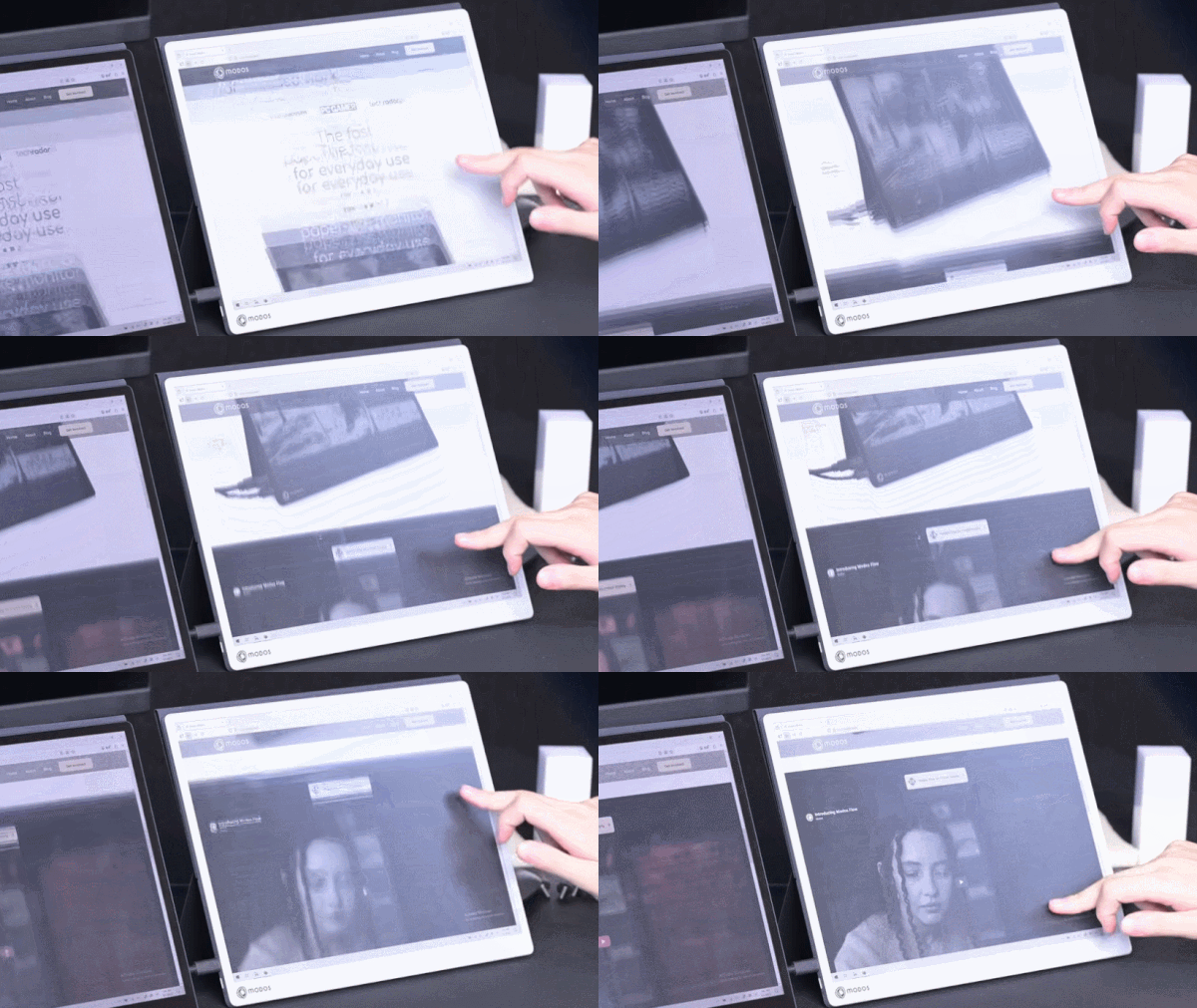
E-ink displays have a number of advantages over other display types, but their refresh rate isn’t one of them. But what exactly makes them slow? According to [Wenting Zhang], it’s not an inherent limitation of the technology. It’s mainly the controller, and this limitation can be overcome to create a high-resolution 60 Hz refresh rate E-ink display, totally suitable for use as a computer monitor.
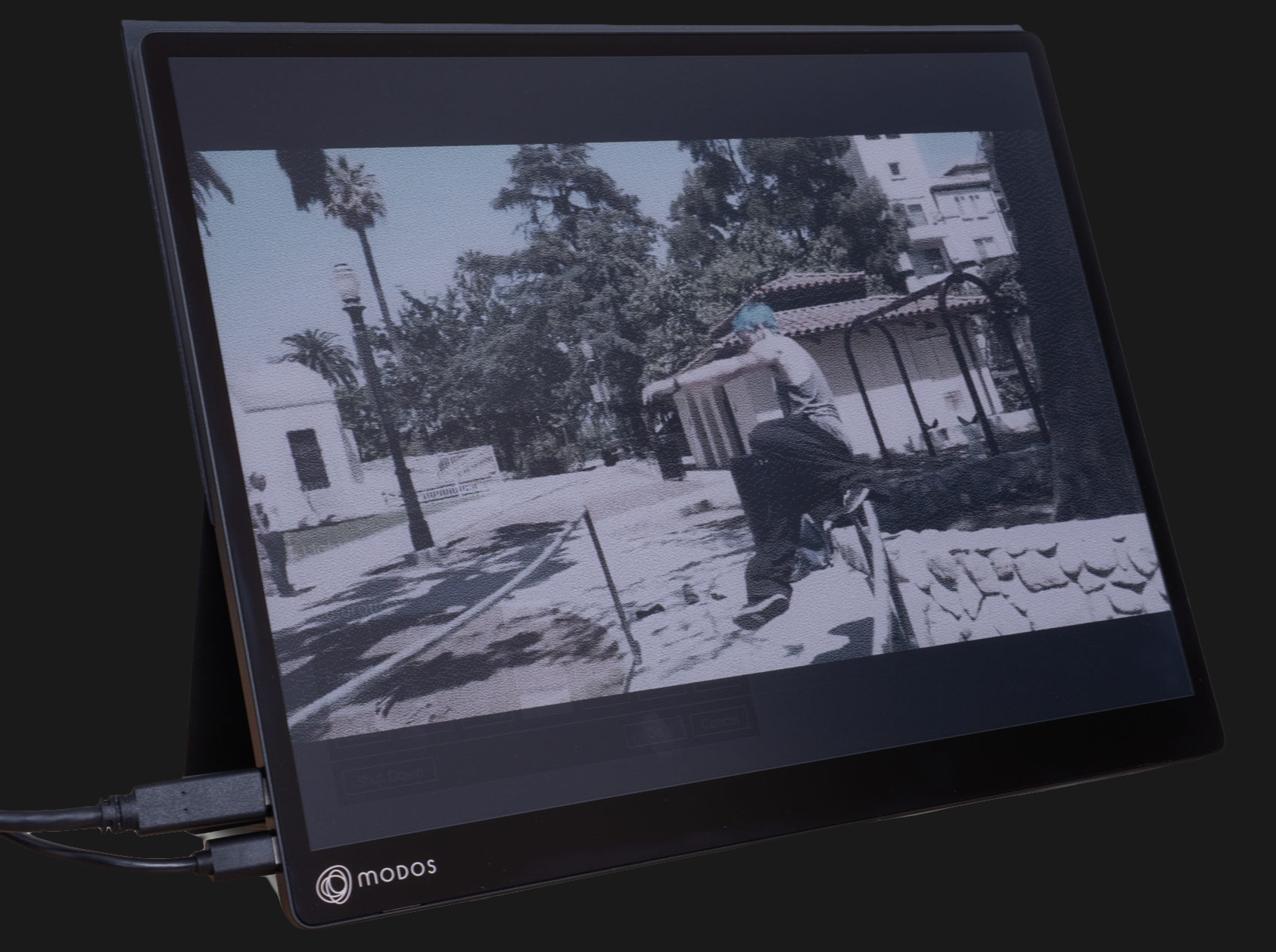 The reason E-ink displays are so slow is simple. For a long time, they existed for only one purpose: to be screens for e-readers. They had to work on devices that were generally low power, with limited interfaces and slow processors. Accommodating these factors was the primary driver behind the high latency and slow refresh rates associated with these displays.
It was actually the limited interface options rather than the slow refresh that initially led to a custom controller, because [Wenting] wanted to use an E-ink display on a laptop build. But it quickly became apparent that a custom controller could do considerably more than E-ink was known for.
Initial tests with fast refresh rates were so positive that it led to a Hackaday Supercon 2024 talk on how to make E-ink go fast, and more recently has culminated in the Modos Flow, a fully open-source, user-repairable 13.3″ portable E-ink monitor.
The development path from proof of concept to finished product has been a long one for [Wenting]. Not only did a lot of optimization and feature work need to be crafted from scratch in order to effectively balance appearance with responsiveness in different display modes, but the usual hassles of development and bad timing were also in full force. On top of it were wasteful vendor shenanigans, as well.
Check out the story in the video, embedded just below. If you’d like to buy one, there are monochrome and color versions offered through Crowd Supply.
Thanks [TrendMend] for the tip!












Yota Phone was released in 2013, and the Dasung Paperlike (I don’t remember whether 10″ or 13″ ones were around first) has been around since 2016. The slowness of monochrom e-paper displays has (in the eyes of consumers) kept disqualifying them ever since. So while Dasung now have a similarly priced product as well, they’re by no means open source.
Perfect to read old newspapers
One problem down, next up…color.
At the very end of the article they mention monochrome and color versions are available. That price though … :/
“That price though …”
Early adoption comes at a premium. Give it a few product cycles, Let the big names in Ereaders jump on board. Then it will be cheap as.
There’s a concept called “shallow tech”, which is people taking off-the-shelf stuff, putting it in a 3D printed box, and pretending that it’s a great new innovation to sell it on kickstarter at a price point that is only justifiable to early adopters.
Then it never becomes an actual product. Why? Because it was too expensive for too little practical use. Its only point was to run the booster campaign and then move on to the next thing.
For example, having a high refresh rate kills the main advantage that e-ink has: ultra-low power consumption. Instead, you get a monitor with washed out colors and bad contrast. We can already get that with cheap LCD panels under a hundred bucks, so why pay several for this?
Low power is a power of E-Ink, and one that likely still applies to high refresh rate capable in many cases, as the screen is still going to be static often. But it is not the only one. A passive purely reflective screen is vastly nicer on the eyes in most situations than the active illumination eye searingly bright, or not bright enough and quite likely to flicker if you try to make it dimmer screen techs…
Is it the right solution for everyone obviously not, but nothing is ever that. It is however probably a perfectly good screen for almost everyone in all situations as it has adequate looking colour and fast enough refresh to just use like any other screen. Perhaps a touch expensive, but big deal its a rather unique (for now) product.
This thing needs a second USB cable for “additional power” to get the full 60 Hz refresh rate. E-ink refresh actually takes more power than LCD to change the state of a pixel, so it has to do partial refresh and other tricks to not end up wasting more battery when you have moving content on the screen.
It’s a perfectly good screen for what it is, but there are better options for less money and fewer compromises. Again, this is shallow tech: something that is possible to do, but does not actually offer the consumers a clear advantage and usually ends up compromising more than it offers. It’s major point is being different so some people who believe they need it would pick it up, and pay the price, even when the majority of the market ignores the product. There’s always that 10% of techbros and trend chasers who can be exploited by creating niche stuff.
Less money perhaps, but fewer compromises not really – you just personally don’t find the compromises of the other options impactful enough to notice perhaps.
But not everyone is you, I happen to like a screen that goes really dim most of the time to match the relatively gloomy room, except you can’t actually get that 99.99% of the time now as the focus for decades has been on getting brighter and brighter way beyond the reasonable requirements for a usable display with no care for lower brightness settings. They only go from eye searingly uncomfortable to full on flash-bang pain to glance at bright, heck even the LED clock on the new oven is like that as somehow brightness to overpower the noon day sun is a feature you must have – could read a book across the room with that darn thing its so bright!
And in daylight especially dappled varied daylight as you or the clouds move around is having the choice of completely invisible content, which likely includes the brightness adjustment (as the ‘automatic’ ones are always garbage if you want just bright enough to see at least) or really really bright full screen at all times to overwhelm the sun, which is going to eat your battery life and not really be enjoyable.
E-ink may not be the screen who’s compromises suit you, but doesn’t really burn in, static images take no power, usually huge viewing angle, doesn’t make much difference to the power consumption in ‘dark’ or ‘light’ mode, which means you will never get a benefit of dark mode to find those annoying websites and applications that are always no matter what bright white eye searing background when you change to them (not that e-ink really does eye searing bright anyway, as its only ever as bright as the ambient light which your eyes are already adapted to), often nicer on the eyes more natural and sharp high contrast display too – instead of the just blast the bright bits even brighter so it pops but in the process creating halo around the darker objects, trails where the pixels so over driven can’t switch fast enough etc…
ultralow power isnt the only advantage of eink.
Because E Ink relies on reflective light, it does not emit harsh glare or disruptive blue light. This minimizes eye fatigue during prolonged reading sessions.
The term “shallow tech” typically refers to a business and innovation strategy focused on incremental apps rather than fundamental breakthroughs, These companies lack deep intellectual property (IP), making them easy for competitors to copy.
But sticking with YOUR interpretation of the term….
A large portion of “kickstarter shallow tech” falls from market, because the high novelty price fails to produce a meaningful return as the makers fail to account for the myriad of expenses involved in scaling a prototype’s cost, producing the units in large numbers, shipping expenses, kickstarter fees, and other business expenses.
However, when the technology is merely an incremental improvement of an existing markets offerings, these “KS shallow tech” endeavors can draw the attention of companies already in the market that can cheaply and easily implement these features on their next generation device.
Foldi-One, you do realize reflective LCDs exist and also have the same benefit of not using a lot of power and being visible in sunlight.
IIRC last I checked e-ink does take more energy to change than an LCD if ran at the same refresh rate. Also most e-ink screens aren’t rated for that many refreshes, as someone else pointed out, and running them like this might lead to a premature dead screen.
So at the moment the only benefit seems to be that the paper look is nicer than reflective LCD. But there are a ton of tradeoffs.
Indeed, I even own a heap of them in the varied old Toughbooks I have laying around – I bought more cheap second hand very old ones because I like ’em that much figuring I’d reuse the screens with some upgraded brains eventually. But the tech has some significant compromises still. With the biggest one IMO being that the more pixel density the screen has the less effective the reflective concept becomes – so while you can get perfectly useable screens that way, that do work so much better in varied and bright light the sharpness of the display is generally lower than even old rather coarse e-ink. They are also still emissive screens that can come with all the usually issues of that technology, so might still have excessively bright minimum and flickering backlight issues should you ever use them in darker condition for instance.
Yep. That’s exactly the same thing – I’m simply generalizing the principle beyond phone apps and other platform-dependent innovations typically associated with shallow tech.
Shallow tech in a generalized sense is picking what already exists and differentiating it just enough to find new niches to sell to. Like, “What if we combine a cheese grater and a bottle opener?” I’m sure there’s someone out there willing to pay money for that – if you can find them. That’s where the kickstarters and crowdfunding platforms come in.
Ironically, the relatively poor contrast of an e-ink screen means that in order to read it in a dimly lit room, you must increase the ambient light level considerably as most of that light will fall on anything else but your monitor. Trying to squint at it in the darkness gets you the eye strain and headaches back.
That’s why they added a “front light” to the display as well.
I like the expression “made a liar out of me” in this context. People who go into the business with naive ideas about how their tech is going to scale will inevitably face the hard truth, but at that point their business is no different from the people who already knew and planned to stop at the prototype.
Even if you end up with zero returns after expenses, at least your project paid your expenses for several years, and that’s kinda the point. Going through the motions is the business – you just need to know when to bail yourself out. That’s the difference between naive kickstarters and seasoned serial entrepreneurs.
Not really or at least completely missing the point – the screen is perfectly readable in most any sane conditions as it matches the light level in the room and your eyes are correctly adjusted for that is the point! That is far more comfortable a situation than holding the flash-bang you don’t want to look back at should your eyes ever adjust to the room, or blinding yourself to everything else when they are focused on the device. Still time and a place the self illuminated display even in e-ink as sometimes you just don’t want to bother with room lights, perhaps to disturbing to your SO. Which is where being able to be really really dim but self illuminating is nice, and where most all active displays fail as they either flicker horribly or just don’t go dim at all. But for serious screen usage time it is so so much nicer to actually have the surroundings and screen rather closely matching each other in brightness, e-ink just does that and works comfortably in any light level you should actually be doing anything other than sleeping in.
Foldi-One…. Reflective LCDs don’t have backlights.
Go do some reading on alternative display tech and you’ll see the issue with using e-ink in this particular way and why other tech is used for high refresh rates.
Lots of them do, not all yes but there is a whole family of reflection does some significant portion of the illumination work screens out there. And the ones with no backlights at all tend to end up with even more compromises to consider than the ones that do have some active illumination – usually awful viewing angles, terrible pixel density, and much worse colour (if any).
For a desktop monitor, power isn’t an issue but a screen that’s easier on the eyes is a big plus – as a 2nd or 3rd monitor for reading or editing documents an e-ink monitor would be lovely, much easier on the eyes – if I want full rich colours to watch youtube videos etc. I can do that on my main monitor.
Nice work, and ugh I feel for the guy. The display chip companies are awful to deal with, their code IS broken, and the supposedly unbroken code doesn’t actually exist. Camera companies are the same. And if you want to implement it on an FPGA? That’s a whole 4 year project itself, or somebody else wants to sell you the IP core for an arm and a leg, and maybe a per unit fee on top of that, and charge you to change timing.. it all sucks, so massive kudos for sticking with it. It looks great.
Aint that the truth. Drew the short straw at my old job and had to rescue a display project that not even the vendor’s engineers could give us a working example for. And it was just a bog standard “connect mipi display to fpga” thing! AMD only ever bothered to provide an example for a display that doesn’t need initialisation, which is precisely none of them, and they helpfully locked the required pins inside a read-only IP block so you couldn’t even easily modify things to make it possible.
I did get it over the line, but bleeeeeeeep those guys. I’m not even an fpga guy!
This crap is what the article should have lead with, it’s the real reason these displays are still expensive and underutilized for their obvious benefits.
I have wasted so so much time trying to get a MIPI display to work with a MIPI capable device, even with (seemingly) all the info to hand it’s somehow a crapshoot at best, and others have had similar experiences.
It really feels like your only hope with MIPI is to be buying the display and the driver/source device from the same manufacturer or at least as a proven pairing.
This is impressive work! This would help usher in some new use cases for eink.
The e-ink displays I can find datasheets for say they’re only rated for 1 million refreshes. At 60hz, that’s under 5 hours. Do we know what the lifespan of this panel is like?
I wonder if that number is that low because they normally have a much much lower refresh rate.
At 1hz that would be more than 11 days of constant refreshing, which most e-ink displays won’t really do.
A e-reader is probably closer to 1 refresh every minute or so, which would turn out to 1.9 years of reading.
I’m definitely interested in some long term usage reports.
Exactly. Even a clock refreshing at 1Hz is too frequent for eInk. 12 days x 24h x 60m x 60s = 1,036,800. A clock that only runs for 12 days ain’t much of a clock.
I haven’t seen any evidence of related failures and there are millions of older displays around to check.
Now I can’t vouch for non-eink-corporation screens but I’ve been using an eink android tablet for about two years with no signs of display failure. Definitely gotten more than 1M full refreshes on it to say nothing of partial refreshes
I did quasiresearch and looks like 10 years old kindle is perfectly fine:
https://www.androidauthority.com/old-kindle-support-ending-wont-buy-another-model-why-3656440/
People do use e-books for more than 5 years. To be honest I know people who buy new devices for newer technology – but never met one person who red too much books and wore the screen out.
Good news:
I asked LLM “does eink in ebook readers deteriorate” and it replied: “E Ink screens do not naturally “deteriorate” or lose contrast from normal reading. The microscopic ink particles are physically shifted by an electric charge and remain in place without power. However, physical damage, extreme temperatures, or direct UV exposure can cause permanent screen degradation”
Bad news:
So I asked the same LLM “does eink deteriorate” and it replied: Yes, E Ink displays do deteriorate, but they degrade very slowly. Under normal conditions—such as reading an e-reader—a screen will remain crisp and functional for many years. However, their physical lifespan is dictated by specific factors.
“I asked an LLM and it spitted out both A and not(A), and I could not be bothered to verify it, so I’m sharing this with you”
I wonder whether people who post such comments think the rest of the world have not heard of LLMs or don’t know how to find them…
I have a kindleDX I’ve used really heavily for years now and it is still flawless screen wise though the battery is completely knackered. At this point its got to have done substantially more than 1 million refreshes, especially if the rating counts the 3-5 refresh cycles most e-ink readers do per single page turn to completely eliminate the ghosting individually.
In practice I suspect the screens themselves will never wear out without UV or mechanical degradation of the micro structure itself, as functionally an electrode that goes positive or negative to push inks around shouldn’t really wear, and those ink and the oil its in aught to be rather captive in the substrate too. Maybe over time the refresh would have to get a bit longer as the lighter oils present might manage to volatile off thickening the mix and slowing things down, but it aught to still just work. The reference drive electronics are probably more likely to be the point of failure through use in a controlled environment at least.
Even extreme cold seems to only affect the electronics. The screen on an older Boox model does need to be above freezing to update properly, but I have seen no indication of failure despite having been at -60 for a week.
I was hoping to hear something about that in the video… but surely stuff is also driven quite hard and over long periods during testing and development, so he might have run into early issues by now.
I vaguely remember [Martin Fasani] having run into degradation issues with some panels when exploring driving waveforms (some pics may be on twitter, the other work can be found under: https://fasani.de/2025/01/03/on-driving-eink-displays/ https://github.com/martinberlin/CalEPD).
It’s possible to overdrive them, sure, but that’s not what’s happening here. There is no reason to think this will decrease three lifespan of the display noticeably. I’d like to see some evidence of any claims that aren’t based on experimentally pushing the hardware to its limits.
thats valid concern and driver driver is built around that
to get 60fps and minimize wear it is not reloading entire panel 60x per seconds, just the the diffs: spots that changed
so yeah if you play videos or games on eink monitor like this, you will wear panel down in weeks/months. Then again its wrong kind of screen for that. if you get eink, you porbably want mostly to read / write text, which is much slower and panel should last many years
The advantage is that it is easy to read and it is great that you can watch colour videos too. My question is how much power does it consume when watching a colour video at 60Hz and with the front light turned on?
More than an LCD, but remember that these are better at some purposes than others. Colour photos and vdeo aren’t a strong point of newspaper either.
“I’m tired, but it’s my tired”
that line hits so hard right now.
The sales pitch needs to show use outside, by a sunlit pool. People shading their phones, trying to snap pictures. Eink might not show perfect colors, but at least you would be able to tell what is in the frame.
Back-reflective LCD would be better for that.
In both cases, most consumers would reject it because they can’t understand that the color temperature and spectrum of the light outdoors vs. indoors and in different lighting environments changes how the display looks – because it’s not generating its own light. They would observe that the colors look all wrong almost all the time, and conclude that the display is faulty: worse than the regular OLED/LCD screens that show the right colors even if it’s dimmer.
He did make a monochrome lcd driver. I do recall better displays from the early laptops, 640×400 types. But they do seem to have a lot of ghosting during motion.
https://www.youtube.com/watch?v=n7uxEaGB9t0
I do like back reflective lcds, small nokia phone, very low power. They run on SPI bus power alone.
Those have terrible colour too though. This isn’t a problem that’s easily solved now that people are used to seeing accurate colour projected at them vs their eyes adapting to environmental colour shifts.
Mirasol:
https://didyouknowscience.com/the-amazing-origins-of-the-mirasol-display-the-science-behind-colorful-screens/
Great video and they clearly know their stuff. Very nice work, thanks for sharing.
So, I have a device from the first batch. I’m honestly a bit mad that just after finishing the first kickstarter round, they spin up a second version, now with front light, color, and touch. So now I have kind of a very expensive prototype while they now promise a much more polished product. Bummer.
Regardless of that, some observations:
It’s amazing to see the display in action at its high refresh rate. It’s nice to have a reflexive display if you want to work outside in the bright of day.
Yet, it is still E-Ink, with mediocre contrast, and you have to choose between fast update rate with B&W+grainy dither or a slow but high resolution mode with grey tones. Think about what this means for you use cases before buying it. If you want fast updates, the effective resolution is a fraction of the display’s actual resolution, in practice.
Sadly there’s only USB-C DP input, so I have nothing I can drive this with. The GPUs around here are only DP, DVI, and HDMI.
You don’t have a usb port?
Duh? Isn’t E-ink about two things: ability to read in any lighting, and LOW power consumption. If I leave the WiFi off on my Kobo, it’s good for two weeks (with a10+year old battery). Wouldn’t a 60hz display reduce my battery life by at least an order of magnitude?
You don’t have to update the screen rapidly if don’t want to – in theory it is still able to be a zero power display much of the time. But it would make the UI and interactions much easier as you say highlight the word to use the thesaurus/dictionary functions on your e-reader, or when you need to scroll a webpage/document to so show the bit you need on one screen having the fast refresh option.
So your e-book with this ability might well not have any real change in its battery life at all, as 99.99% of the time in your use it might only turning the page for a full refresh once every few mins. But when you would find a more interactive display useful you can have it. While it will cost you battery life as the screen refresh is going to be relatively power intensive the utility it brings in those moments is likely still worth it (assuming it doesn’t eat into the displays lifespan badly – but I doubt it would). Also needs the software and UI to handle it well rather than adding all the stupid window decorations and animations that will force the screen to update rapidly for half a second with every interaction when a single refresh would have done the job.
I remember someone years ago rooting a Kindle PaperWhite and figuring out that it was possible to do 30Hz refresh on its display by using a 1bpp pixel format. He then demonstrated running a PSX emulator on it.