
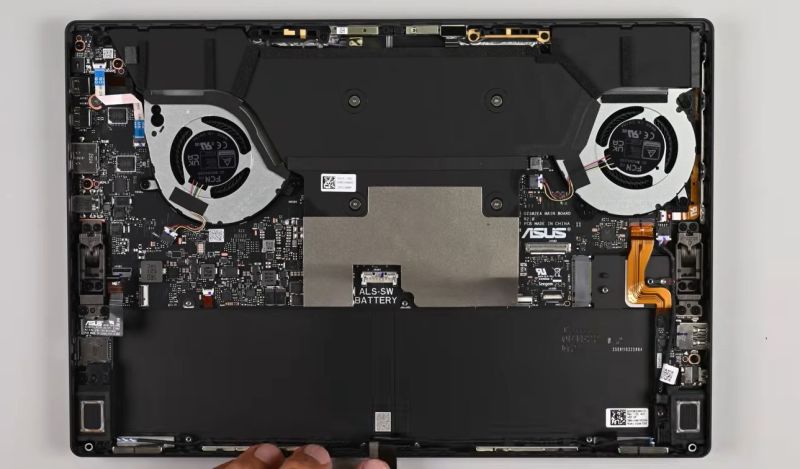
 A few years ago, France introduced a mandatory repairability score for consumer goods like laptops and tablets. It involves five criteria that range from documentation and availability of spare parts to ease of disassembly, with the manufacturer using a government-provided checklist to determine their score.
Recently Asus determined that their Asus ROG Flow Z13 – model GZ302EA – scored a 10 out of 10 using this system. This led [iFixit] to run the same tablet/laptop hybrid through their own rating system.
You can find the filled-out spreadsheet for this device here, with this Asus-provided site showing a list of devices that all score a 10/10 or a measly 9.9/10 according to this system. As a self-reported score it is hard to take it as the objective truth, as there is every incentive for the manufacturer to tweak the truth to their own benefit and gloss over inconveniences. This is where it’s interesting to compare it with [iFixit]’s 7/10 score.
On documentation, Asus gives itself a perfect score but [iFixit] finds it to be incomplete. Removal of one fan requires the disassembly of the cooler with its liquid metal thermal interface on the CPU. The wireless card, and most ports, are soldered to the mainboard. On the bright side, after you get the screen off, the insides are quite modular, which is a plus.
[iFixit] dings three points: for documentation, soldered-down components, and a fan accessibility glitch. Parts accessibility outside of France is also significantly harder, but one can hardly blame the French system for that. Overall the French self-reported rating would seem to be a fair start, but depending on which criteria you define as required you may find yourself disagreeing with the score.
In the case of LPDDR5 RAM one could argue for example that with LPCAMM2 modules soldering RAM onto the mainboard ought to be a thing of the past, and Wi-Fi modules should always be removable as well. You can take that up with the French regulators.












Onboard WiFi is a pain. If the manufacturer puts in a shitty WiFi chip, there’s no option to upgrade it. If the WiFi chip dies, you’re screwed. Intel’s CNVi is another POS, putting part of the WiFi functionality inside the chipset, and the rest on a dumb card that doesn’t work in non-CNVi systems. It’s a bit like those AMR/CNR dialup modem cards in the late 90s/early 2000s, but many times worse.
Do WiFi chips ever fail? I’ve never heard anyone complain about that.
Also, I find repairability and upgradability different things: If a device allows you to easily swap out propriatary subcomponents for the same (readily available and fairly priced) compoments, it is repairable, which is good, but it’s not very upgradable (or as we would say: not hackable). Which is poor for us hackers but fair enough for the average consumer.
And you can’t expect a Daihatsu Cuore producer to make their cars readily accept a swap to Ferrari engines and still be fairly priced.
I have a brand new Motorola phone right now that has a bad wifi chip. I bought it to use exclusively over wifi too, so it’s particularly infuriating.
WiFi chips rarely fail, but it’s the sort of thing that can really limit a device’s lifespan regardless by not being compatible with newer standards. With physical i/o ports, you can usually find adapters, but with WiFi cards an upgrade is often the only path to keeping it usable. I wouldn’t rate modular WiFi at the same level as a replaceable battery, but it’s also not quite there with the car engine analogy.
They do fail but rarely. Intel ones are actually the creme de la creme, when it comes to WiFi adaptor chipsets, sadly they are PCIe only, not USB. They are plug and play however, you just put on in and it just works
Realtek, broadcomm are all garbage, with garbage drivers. I hate em. I wish they put in some effort into making their drivers work, but they seldom do
Broadcom WiFi drivers are quite gnarly on Linux. Most would just opt to remove it and put in an Intel WiFi card.
WiFi cards do fail as they get older– I’ve encountered a few over the years, like an Intel 2915ABG that wouldn’t connect to anything, a 3945ABG that refuses to load its firmware, a Broadcom that causes the laptop to shut down while booting Linux, etc.
Then there are crappy ones like the Realtek 88(something)AE that only connects at 5GHz occasionally and somehow speed-limited to < 100Mbps at that; swapped it with an AX210 and it happily served the 300Mbps internet connection.
Ah, Realtek wifi. Where the developement model is to copy the last iteration and adapt, for driver and hardware from what i’ve heard. In short, a buggy mess to cheaply flood the market. At least it was like this 10 years ago, still the case?
When the onboard wifi chip dies, most people would just put in a USB wifi dongle and carry on as if nothing had happened. Wifi performance might even improve, depending on your choice of dongle.
I had an LG SmartTV that used an internal WiFi module as well as Bluetooth. Both were in a sub-assembly that connected to the main board using some sort of USB – even the diagnostic system/terminal on the TV showed the devices as USB.
The problem is that this sub-assembly started malfunctioning; the remote control connected to the TV via BT, so remote also became useless. I tried to plug in dongles, but even though they got recognized by the OS, the internal functions never got routed to the new adapters – and all attempts trying to change the system were useless.
Long story short, some time later the main board started to misbehave with the LED panel (chronic problem in LG TVs of this specific model), and I now have a 55″ flat smart paperweight…
Nope now you have a 55″ monitor.
I’ve only once replaced a laptop’s wifi, which was a complete pain.
My lenovo yoga 2 came with a 2.4GHz only card when 5GHz was readily available, so I bought the dual-band version of the same card, only to find it had a bios whitelist that didn’t recognize it.
A year later I had a problem (4k over hdmi) with my T440 which could be solved by downgrading the bios, which also removed the whitelist from that machine. Somehow I figured out the T440’s dual band wifi card WAS whitelisted in the Yoga, so I could do a 3-way swap and finally enjoy my 5GHz wifi on the yoga.
In short: replacable cards are nice, but as long as whitelisting is a thing, it is almost useless.
These days there’s ISO standards that have to be followed for cybersecurity, most of them require lock down of OTA and local firmware updates, hardware changes etc. The regulations designed to make things more secure, less likely to be physically or digitally hacked and better for the geneneral consumer are pushing towards reducing repairability/upgrade. I was recently looking at adding wifi/HA connectivity and OTA updates for a domestic appliance and eventually concluded it just wasn’t worth the effort and vast pentesting costs, it can stay dumb, and it can stay inside security screws and welded enclosures.