
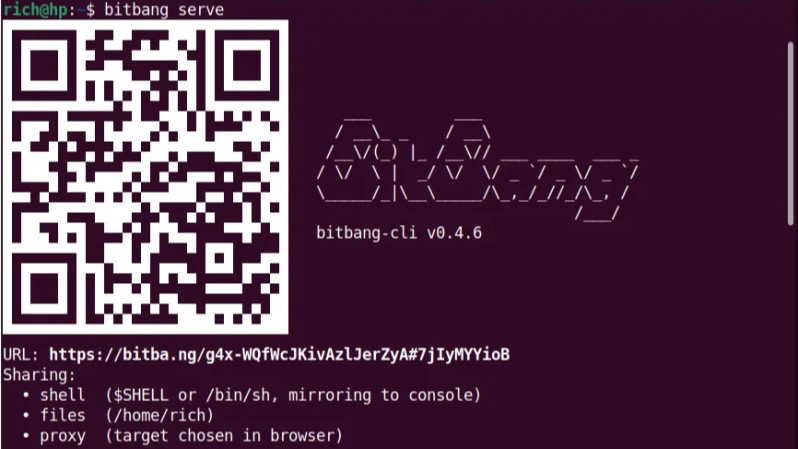
Launch a single static binary executable, send someone a QR code or URL (or failing that, text a numerical code or shout it across a room), and they’ll get an encrypted terminal in their browser. No VPN, no port forwarding, no firewall modifications, and no account setup required. It’s BitBang by [Rich LeGrand], and there is a lot to go through in this one.
The best part? It’s not actually limited to just firing off a terminal. It’s a whole open framework for establishing an encrypted peer-to-peer connection between two systems over WebRTC without needing either a trusted central authority, or any special network configuration.
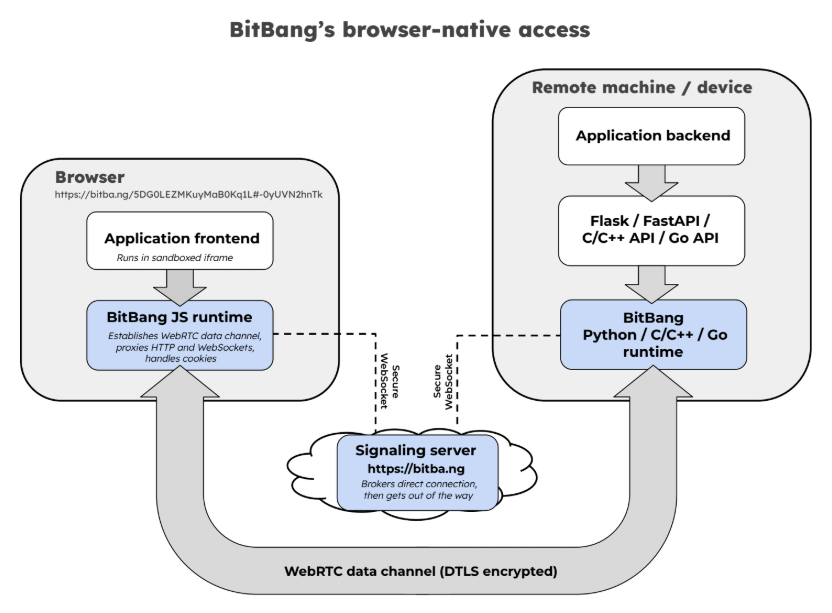
Opening a remote terminal, transferring files, or accessing web apps on a remote machine’s network is done with bitbang-cli, an implementation of BitBang focused on providing simple, zero-config remote access.
Before we go on, we want to mention that BitBang does require a lightweight, trustless signaling server only to broker the initial connection, but more on that in a moment.
On the machine to be shared, one first downloads the binary. Easiest way to do that is to go to bitba.ng and download manually, or copy and paste the one-line installer to auto-detect one’s system, download the correct release, and verify the checksum.
After the binary is downloaded, simply run it in a terminal and receive a QR code to scan, a URL to copy & paste, or a numerical code if those are inconvenient. On the remote side, one accesses the signaling server and the connection is made — one gets a terminal on the target machine open in the browser tab, with added options for file sharing and accessing web applications on the target network.
The signaling server isn’t involved in authentication or encryption, and couldn’t see private data between the two ends even if it wanted to. Prefer not to use someone else’s regardless? Run your own local instance with bitbang-server.
Originally developed as an easy way to securely make telepresence robots reachable over the Internet with nothing more than a QR code, today it’s a whole framework.
It includes not just the remote-access tool mentioned above, but also a BitBang Octoprint plugin for cloud-free remote access to 3D printers, and bitbang-python is a library for turning local Python web applications into a URL that can be opened from anywhere.
We’re sure some of you are getting more than a few ideas from this. If it lets you bring a project over the finish line, let us know on our tips line.












With my hackaday hat on this seems pretty neat.
With me set to be on the clock in 15 minutes I’m wondering how soon I’ll get to see C2 traffic employing the concept.
ha! fair… it’s the same property ssh has. In defense, bitbang doesn’t listen on a port, so there’s no service to scan for, and the URL is a bearer credential the device verifies itself rather than a login you can brute-force.
I am pretty sure linux will close that hole ASAP.
I mean this is no doubt going to be abused by a few billion of nasty people and their AI.
It’s a pity, but it’s 2026 you know.
Looks like you don´t know what you are talking about.
What part of this setup would you consider a hole? From what I understand it’s more or less the same as P2P connections commonly used for multiplayer games.
Linux will close what exactly? It seems you didn’t read or understand the post.
For safety, you can use it with wireless cables.
Looks similar to Gradio imho.
Similar feel, run a thing, get a URL. Two differences under the hood: Gradio’s share link is a tunnel through their servers with an expiry, while this is a direct peer-to-peer connection with the server only brokering the handshake.
The closest analog is bitbang-python (https://github.com/richlegrand/bitbang-python) It wraps any WSGI or ASGI app (Flask, FastAPI, Quart). The bitbang CLI goes a bit further, it’ll proxy whatever’s already listening on a port, whether or not you wrote it, plus a shell and a file browser.
I always wonder if stuff like this couldn’t be done over a DHT network instead of a “trustless signaling server”.
Veilid was introduced 3 years ago to solve issues like that and afaik hasn’t been used in any well-known software. Any maybe they wanted to do too much (not only peer identification and hole punching, but also TOR like onion routing), but IDK. eMule had DHT peer discovery. Why can’t that be used today to connect to a server?
Right — DHT gets you discovery, but WebRTC needs a bidirectional channel to trade SDP offers/answers and ICE candidates which is a conversation, not a lookup. The bigger blocker is that a browser can’t join a DHT– no UDP sockets, no raw networking. I think the point here is that the connecting side is an unmodified browser, the rendezvous has to be something a browser can actually speak, which means a WebSocket to a server.
Drop the browser requirement and DHT discovery works fine. that’s roughly what Iroh does with public-key node IDs. Different tradeoff: they get decentralized discovery, they give up the browser.
DHT works the same, usuability wise, to that server. For a DHT to work you need bootstrap (public) IP server to find the root of the DHT. For WebRTC to work you need a TURN server because someone on the public Internet has to learn your public IP address. So it’s exactly the same issue, solved by 2 different ways.
So basically tmate?
I think tmate is similar in spirit, and tmate is good at what it does. But tmate relays everything through a server, where bitbang is peer-to-peer once the handshake is done. The server brokers the introduction and then isn’t in the path. And it’s not just a terminal, the same URL also gives you a file browser and a proxy to web apps on that machine’s network.
Ah gotcha… Interesting and thanks for clarifying
Glad to see that it has a “Self-hostable server” so technically literate people no not need to use bitba.ng
And this “The secret never touches the server. The access code lives in the URL fragment (#…), which browsers never send — bitba.ng brokers the connection without ever seeing the credential that authorizes it.” might persuade me to use bitba.ng after I have fully digested the source code.
Thanks, the fragment trick is cool mostly because it falls out of how browsers already work rather than needing anything clever.
ONe thing to point out, in case you dig deeper, the fragment keeps the access code away from the server, but a browser client still gets its JavaScript from bitba.ng, so a compromised server could serve code that reads it, and sends it back to the server. So the server isn’t completely trustless when running from a browser, but still pretty good (the browser code is inspectable). The CLI has no such dependency (no browser code coming from bitba.ng). Self-hosting is painless, so it’s a good option. Not that it’s a huge deal, but the server is really simple, not many lines of code, and it compiles into a single binary (~10 MB).
I hope this isn’t the classic “curl | sh” or worse “curl | sudo sh”.
Too many projects keep endorsing that unsafe practice.
You’re gonna run untrusted code anyway. If you trust the compiled code, you might as well trust a shell script. So it’s not a security issue. (If that’s what you meant by “unsafe”)
Having said that, I assume stuff I download and run will stay in their directory, create something in .config/.local or .appname or similar. I have no idea where a shell script will install the stuff into and what else “| sudo sh” will do. So I also avoid using those installation methods.
It’s curl | sh but never sudo. To Mike’s point about not knowing where things get installed: it’s one binary in ~/.local/bin, overridable with –prefix. Nothing in /etc, no service, no daemon, and uninstalling is deleting the file.
The script that get’s downloaded is here (get’s routed through bitba.ng) https://github.com/richlegrand/bitbang-cli/blob/main/install.sh. It’s does what you’d want a script like this to do– verifies the binary’s SHA-256 against the release checksums. If you’d rather not pipe it, the README shows fetching it first (curl -o install.sh, read it, run it — that’s what I’d do before running). You can grab the binary from Releases and drop it on your PATH also.
As a matter of security communication, the term “trustless” is going just a bit too far. You have to trust the server with respect to traffic analysis of IP addresses. Admittedly it’s as good as you can ever do with a coordination server, but there is one small measure of trust that remains. I’d prefer “minimal trust” or something of that ilk.
You’re right, the server sees IP addresses of both ends — its own connections plus the ICE candidates it relays, so the scope of “trustless” isn’t 100%.
I see your point, “minimal trust” is more accurate.
I run a mesh central server. its open source and point to point after brokered connection. https://github.com/Ylianst/MeshCentral . full encryption. there isn’t any public server, so you , or a friend, has to host the server. I use it to manage my menagerie of servers, vms, and ‘computers’. anything that can run linux or windows … it supports terminal access or full remote sessions.