
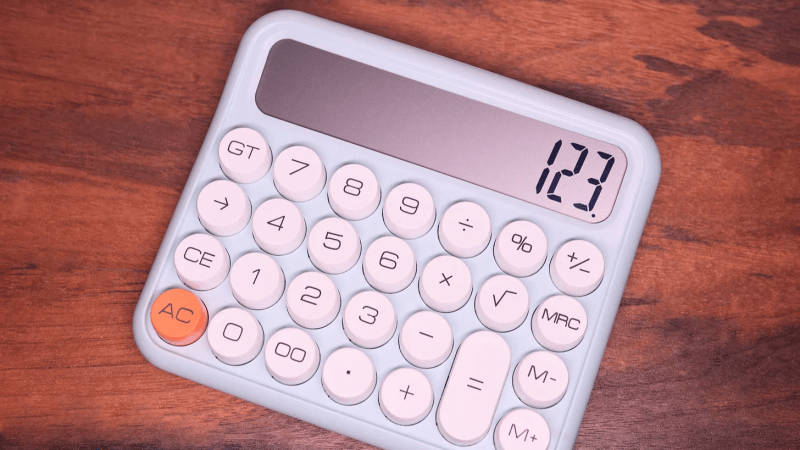
Calculators are so ubiquitous and so familiar that they are easy to take for granted in many different ways. [lcamtuf] points out one that has probably never occurred to many of us: the user interface for a calculator is an unexpectedly complex thing.
Resolving something like 1 + 2 = is pretty straightforward but complexity compounds rapidly after that, with numerous special cases. Let’s imagine one decides to program a simple calculator UI as a weekend project. The development process might look a little like this:
- User types in
1 + 2 =and the calculator displays3. What happens if the user immediately presses-? - No problem, just consider the result of the previous operation as an already-there input. So we’ll have
3 -for this next operation, and wait for more. - Unless we should have treated that
-as a negative sign for whatever number is coming next, making it a negative number? No, ignore that. Just treat whatever results from pressing equals as a pre-typed input. - Unless the user hits a number. Because if they hit
2(for example) then we’ll have a32and not a2which they probably, definitely don’t expect. So that’s a special case and we should insert a clear if that happens. - Oh, better clear if the user enters a decimal, too.
- I’m going to need a coffee…
And that’s just the tip of the iceberg. Imagine trying to figure all this out for the very first time, without the benefits of habit and history to fall back on.
The fact is that supporting the apparently trivial behavior of a simple calculator requires an underlying complex state machine that deals with all kinds of special cases in order to make the UI feel intuitive. And that’s just for a basic four-function calculator; we haven’t even touched on how special keys like % should behave.
We know [lcamtuf] speaks from experience, not just because of their deep knowledge of calculator history but because they rolled their own calculator that uses voltmeters as digit displays and there’s nothing like actually implementing something to make one appreciate it.











Bla bla bla why not just use RPN like we nerds did since before we even learned to speak. This is superior and the only sane way to do math.
Bing! Bing! Bing! Winner!
If you design your UI correctly in the first place, you won’t have to deal with ugly ambiguities.
I second RPN and stack. The Good Old Faithful Forth has both and runs baremetal.
#2: What if I want to subtract a negative number from 3? 3 – – |number|?
3 – |number| [+/-]
There is an explicit key [+/-] for toggling the sign on the calculator pictured in the article.
“3 – |number| [+/-]
There is an explicit key [+/-] for toggling the sign on the calculator pictured in the article.”
I don’t l see when the negative number that should be added. I don’t see the logic being played out in the code.
That had me confused…. calulators have a dedicated +/- key, toggle the sign… it’s even in the picture.
I picked up a calculator in the 80’s as a kid, don’t recall ever being confused about it.
What had me confused was the next generation, that tried to be like a commandline, but not really, with a cursor, wanna be code, that executes on equal… cringe.
If I wanted to write code I write code, my calculator executes, is the ALU, I do the ordering.
My first encounter with a calculator was our teacher’s HP so RPN got learned first, but my TI “normal” calculator seemed just fine. I think learning RPN first on the calculator was good for me in a fairly limited area I just can’t find the term.
Yah, but those HPs where expensive. They have stack that is more than 1 value deep. They where the iPhones of the day, so shiny, so unobtainable without disposable income.
That is BECAUSE the UI had already been thought about and was in a good state to be immediately understood (calculators – mechanical, electromechanical and electronic) already having been in general use for decades by then).
PLUS as a kid, you were playing around and trying things out, aka playing, whilst how the thing worked quietly settled into your mind. That is sort of the whole point of the process of being a kid.
The joys of designing a calculator from scratch: https://saccade.com/writing/projects/CS428/WireWrap.html
I found it really simple to write a quite complex calculator.
I mean: I didn’t find it hard at all to ask Claude to write the code. I just specified what I wanted, and Claude filled in the blanks and wrote the code. It even wrote unit tests. And it did make a number of wrong assumptions that I had to correct. It also hadn’t properly taken the case “X – -Y” into consideration, but all that was corrected really easily.
I am not joking. In 2026, writing a calculator state machine is effortless. We’re standing on the shoulders of taller giants than ever.
Funny, that quote with that smiley, in the middle of my comment was supposed to be the smirking emoticon > : )
That. XY … that old/basic calculator has no stack. When you can only hold a single value in the background… all else follows…
Tomorrow on Hack-a-Day: why build things when you can just buy them in the store?
Nothing wrong with using modern tools, or do you get out a file and file away for hours when the CNC is right next to you?
Besides, if you don’t tell the AI what you want in minute detail you get a bunch of crap, same with the CNC. You just move the abstraction layer one higher.
I once submitted project where teenager designed and made his own SBC. I guess it was not mentioned because all material was in polish. At some point dude asked AI to make a software for him and still it was hell of hacking work. Not to mention that guy who made cancer cure for his dog with AI.
Some of us prefer to learn over using theft-based, planet killing hallucinators.
I discovered two shortcuts on my Sears (Bowmar) 4-banger:
N × = would give N squared
N ÷ = would give 1/N
Or don’t treat everything like a string?
Why would you even want to do that?
This seems like an entirely invented problem.
Or possibly a problem for UX designers who don’t actually know how to program.
Or do math?
Numbers (and decimal, sign change)
Operators
Grouping symbols like parentheses
The result is a number.
User input of another number is invalid.
Either ignore it or throw an error.
When you type 100 + 10 % into a Casio calculator, it calculates a 10% markup (adding the profit margin). Instead of giving you 110, it calculates 111.11
I found this only on most (not all) Casio calculators.
Percentage buttons on calculators have always been a mystery to me.
My “vintage” fx-451M calculates “x+y%” as “100*(x+y)/x”, the percentage of the ratio of the sum (x+y) over the starting value x. Newer scientific Casios seem to calculate “x+y%” as “x + y/100” so “100+10%” gives “1001/10”.
I wouldn’t say I was surprised when I recently added a calculator function to my hardware numpad but I was surprised and how many “gotcha”s i failed to initially account for in my formula parser.
That’s before I just said m’eh, adding a parser library and calling it a day. Not like I was releasing it anyways.
Still, works great and does what it says on the tin. Even added a speaker and a music function for shits and giggles. QMK is incredible.
Slightly off-topic: My late ex-mother-in-law was from the generation of bank staff who totted up ledger columns of figures with a pen. Apparently it was common for some of these people to just look at a page and instantly spot an error in the total. I can’t even add up with electronic assistance.
I just happened to read about how my Numworks breaks operations for internal processing. That’s a goo inside at how non-trivial this is.
https://github.com/numworks/epsilon/blob/master/poincare/doc/tree.md
On the other hand, computer calculator apps have had the wrong UI forever, as I carefully explained in … 2004.
https://ralsina.me/pages/33.html