
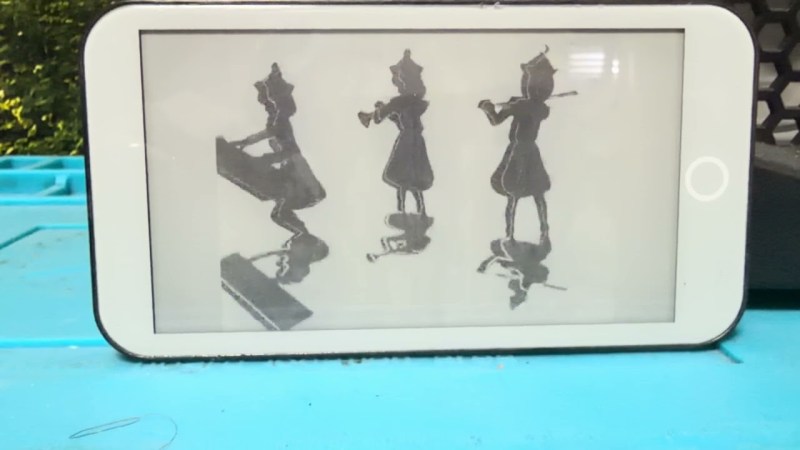
If electronic paper displays have one downside, it’s generally refresh rate. Earlier versions of the tech might only have been able to do single-digit frames per second, while modern, mid-range devices can sometimes manage 10-20 FPS — and that’s not including the frames needed to blank the display. Getting up past that double-digit barrier typically requires higher-end displays, more powerful processors or FPGAs, and more money. On the other hand, [Tony] was recently able to get 20 FPS out of an ESP32-based device without using any extra processing power.
The key to improving e-paper performance is understanding how the display actually works. The “ink” consists of microscopic charged pigment particles that physically move in response to electric fields, making the display much slower than LCD or OLED panels. Rather than fully erasing and redrawing every frame, the software takes advantage of the particles’ existing state by generating optimized driving waveforms that only move the particles needed to produce the next image. On the software side, an MPEG-like encoding is used so only changes between frames are transmitted and converted into these waveforms, reducing unnecessary data transfers and allowing much higher frame rates.
[Tony]’s method is able to drive 960×540 panels, like those found in the Lilygo or M5PaperS3, to 20 FPS, and these platforms are based on nothing more than the capable but limited ESP32 chip. It’s an impressive push, and worth checking out the video in the linked project page. We assume you’d need a little more to drive something like the massive e-paper display found in this home automation setup, though.












I want this for my reTerminal E1001…
I wonder what the power consumption of an e-paper display @20fps is, in comparison to an OLED display the same size.
That’s impressive! Does it impact the display life though? I’ve read somewhere that they deteriorate much much faster when driven at high speeds.
Since the tiny balls that constitute them move inside a white fluid, mechanical wear is likely involved. Also ANY e-paper display has calibration data. The calibration is also temperature-related. If ever erased, the result is in my cases not brilliant: full, or exaggerated contrast, too dark, too hell… In short: e-paper displays are notoriously hard to drive and most of this complexity is hidden by the calibrated wave data.
This is the fast waveform. Its very kind in that it doesn’t move the eink that far…it can’t – eink takes time to move. So the movie shows blacks as greys. BadApple is also kind in that pixels don’t move that much compared to frames.
The calibration is all my own, well, lots of trial and error to get the right waveform to show right.
Since you’re preprocessing the video, you can include a bit of the external contour of it to force a “black to black” transition where it was white few frames ago. In Image processing terms, you’re dilating the black map (and/or the white map) a given amount of pixels. The black pixel that were black in the previous frame but now included in the dilated mask should still be sent to the screen, actually darkening a black image from the previous image and having less ghosting artifacts visible.
It uses about 0.5 watts when playing. And 0.4 watts when playing, but the screen turned off.
about 0.5 watts, and 0.4 watts with the screen turned off…0.4 watts is the ESP32 doing its thing.
Have you driven a display to failure?
IIRC a typical e-ink pixel is rated at about 10M refreshes.
Which isn’t a lot of time at 20 fps.
500,000 seconds.
139 hours.
Less than a week.
Im going to do this. Watch this space!
What AI-written garbage is this?! You’re just describing literally the most basic optimization of….drawing only the pixels that are different between two frames instead of the entire frame. It’s got nothing to do with e-Ink, it’s got nothing to do with waveforms and you don’t need MPEG-like encoding for the data, either! This has literally been done for as long as we’ve used pixels to do stuff on displays!
Due to the squishy nature of pulling magnetic dots through fluid, it actually is a little more complicated than just figuring out which pixels are different between two frames. Even for regular B/W changes, but expecially for grayscale, the “waveform” you apply to a pixel (sequence of on/off for a given number of periods at a specified clock) matters a ton to get a good output. These tend to be proprietary to the screen manufacturer, dependent on temperature, and distributed under NDAs and as binary blobs. Their LUT nature is why so many drivers are FPGA based.
I don’t think that this firmware implements them (at least not properly), as there is a lot of ghosting and grayscale remnants (I’m sure there’s a more proper word for this) following motion. The demo video itself demonstrates why waveforms are important. Still a cool project.
If it focused on the idea of generating a special waveform in the article, then I think this complaint wouldn’t be here. As it stands the article focuses on the idea of only sending changed pixels which is extremely basic.
If there is more complexity in the waveform, then that should be the focus.
E-ink is electrostatic. not magnetic.
Using a lookup table (LUT) has little to do with FPGAs.
We were optimizing the “driving waveforms”?
Next time try to understand things before complaining, I heard LLM’s can help with learning.
The complaint is about the article not the project. Complaining that the article sounds like AI fluff because it focuses on one of the most basic optimizations and making it sound impressive instead of the waveforms is a fair criticism.
But this is specifically necessary (not optional) in order to sidestep refresh timing limits. Incidentally, it also allows you to do things with mechanical flip displays that would otherwise exceed their mechanical timing limits.
It’s not e-ink specific. Rather, a standard approach has been adapted to e-ink timings and dwell requirements, allowing the display to substantially exceed its naive performance profile.
Your response is kind of like complaining that digital is nothing special, it’s just a pair of analog values! it has nothing to do with anything! (All of which is true, yet utilizing this particular technique allows us to shift analog behaviors into more-coherent domains, and thus do things that would be possible but very challenging in a pure-analog domain).
… oh. Sorry. My bad. I’ll stop getting in the way of your anti-ai virtue signaling. But, uh, you know that there’s a lot of trash in the universe that isn’t ai, and conversely, there’s a lot of ai that isn’t trash (although there’s plenty that is trash, too).
I think you are missing the point of his comment. The point is that sending only the changed pixels is so basic and standard that it isn’t interesting and doesn’t make sense to focus on.
The article fluffs up the idea of sending only changed pixels enough that he is saying that it sounds like AI hot air.
Having not quite 24 frames per second gives a charming, nickelodeon look….it might look better under a hood…going along those lines.
Different frame-rates can tell different stories, as in The Brutalist.
Had I the funds to make a COVID documentary about how hard New York was struck, I would show pre-pandemic New York using film only, beginning with IMAX…and de-res things, use the camcorder type tech seen at the beginning of the COPS series where that footage and old sodium hell-lights made the night hideous…. digital cameras-on-a-chip, and a daguerreotype of an empty street.
As life comes back, you use surreal motion smoothed 4K stuff to show that a mark was left…finally…I’d use this humble e-ink with a flicker to perhaps show what was lost…
Sodium lights lake me back to the days of clandestine indoor grows.
Metal halide are the bulbs you’re thinking of.
Anything besides these dry, soul-less LEDs, though Prince would have liked the purpling.
-even if HOAs don’t:
https://m.youtube.com/shorts/VdY-SXwhOLY
Just FYI: Nook Simple Touch (NST) ebook reader also has an awesome e-ink display with actually two different hacks/apks providing fast refresh modes.
https://m.youtube.com/watch?v=nHbA2-_qzH4&pp=ygUKNjBmcHMgZWlua9IHCQmZCwGHKiGM7w%3D%3D
This guy built a 60Hz eInk
If this is the one I’m thinking of then it was also posted to HaD recently.
And it’s using amazing custom FPGA hardware to do the driving. It’s like a Ferrari.
This one is using an ESP32. It’s like a tricked out Ford Escort.
Like an MPEG? Even closer perhaps is a .FLC or .FLIC file. Anybody remember those?
it’s a neat hack…though i’m surprised taking into account the delta isn’t already the norm, implemented within the on-display driver chip…since ghosting is so prominent and transistors are becoming so cheap and numerous.
but i gagged on the first sentence…”If electronic paper displays have one downside, it’s generally refresh rate.” what?
in my life, the downsides are, in descending order: size (or its cousin, cost), resolution, and contrast (or its cousin, ghosting). i want to use it for what it’s good for and those attributes get in the way of doing that…let alone using it for something it’s not good for!
in particular, i’m disappointed that resoltion hasn’t improved, since very high dpi is something i’ve come to take for granted with printed paper. and where small screens have really shown up in a big way (phones), absurd high resolution is the norm for more than a decade now. like, the difference between reading a book on my phone and reading it on my nook (RIP) was that the phone can render the font like it’s 2015 but the nook is still stuck in the mid 1990s.
These particular displays on the M5PaperS3 or Lilygo T5 Pro, dont have much of an intelligent driver chip. what is exposed is a leaver to make the pixel darker, and a leaver to make the pixel lighter. All waveforms, all delta, its all to be handled by the client program.
Which is a good thing – Can experiment with sending different waveforms or use different techniques to get the frame rate higher.
Very high printer DPI doesn’t mean much, because it takes a matrix of pigment dots to emulate grayscale or color by dithering. The typical 1200 DPI printer puts down roughly 150 actual image dots or pixels per inch.
The E-ink display is capable of rendering grayscale in a single dot, and since they typically come in at 200-300 DPI they’re usually sharper than your office printer, and don’t lose much to professionally printed stuff.
If the fonts turn out ugly, it’s probably because of the rendering engine not being optimized for the display.
https://pixelcalculator.com/en/dpi-vs-ppi-difference.php
Another thing with print is size. You’re trying to read stuff from a screen the size of a post card held right up to your face, making the text much smaller than you would if you were printing it on an sheet of A4 paper.
Half the distance needs twice the resolution to look equally sharp.