
In a recent post, I mentioned that I wanted to build some tools for a stripped-down Linux running on a 3D printer with a MIPS CPU. I had two options: build a toolchain to cross-compile, or use Zig, which, in theory, has built-in toolchains for MIPS. I had to jump through hoops to get Zig to work, and I did mention Crosstool-Ng, so you might wonder why I didn’t start there. Turns out, it had its own set of hoops to work through.
What is Crosstool-Ng?
Crosstool-NG is a build system for making cross-compilation toolchains: compilers, assemblers, linkers, C libraries, kernel headers, and all the other pieces needed to build software on one machine that will run on a different kind of machine. Instead of manually matching a particular GCC version with the right binutils, glibc, or musl release, Linux headers, patches, and configuration options, you select the target architecture and let Crosstool-NG download, patch, configure, and build the stack. The result is a self-contained toolchain with commands such as mipsel-linux-musl-gcc or arm-none-eabi-gcc, ready to produce binaries for the target system.
The four-part name is in a particular format that is often used in the cross compiling world. For example, consider arm-none-eabi-gcc. The tool here is gcc and, as you might expect, there will also be arm-none-eabi-as and arm-none-eabi-ld, among other things. The first part, arm in this case, will be the target architecture.
The second part of the name can mean a few different things. In theory, it is a vendor name but it is sometimes “none” which often means “generic” or, in the case of a linux target, “linux,” which isn’t technically a vendor.
The third part is the calling convention and, often, some idea of the library. For example, arm-linux-gnueabihf-gcc would mean the GNU library using the ARM EABI and hardware floating point. These are sometimes called “target triples” because, historically, it was CPU-VENDOR-OS, but now there are usually four or even five parts if the calling convention includes the OS, like linux-musl, for example.
That sounds simple, but cross-toolchains are unusually sensitive to version combinations and ABI details. Endianness, floating-point conventions, instruction-set variants, threading support, and C library choices all have to agree. So saying “Arm” or “MIPS” doesn’t mean much. You need to account for all the possible variations in the CPU and the libraries. Crosstool-NG does not eliminate those decisions, but it turns them into a reproducible configuration rather than a long sequence of hand-built components. I had two problems that I eventually resolved.
Problem One: Versions
One nice thing about Crosstool-Ng is that it pulls the right versions of everything for you. The problem is, when you install it from your system repositories, you are probably getting a crazy old version of the tool itself. I couldn’t find the right entries in the configuration when I did that, so I eventually uninstalled and picked up the latest version right from the source.
If that was the only problem, I would have been lucky.
Problem Two: Infinite Combinations
The CPU on the printer is an odd bird. As I noted last time, the executables use the r2 instruction set but also use the nan2008 convention which is usually found in r6. While Crosstool-Ng is good at letting you specify exactly what you want, it isn’t always clear on how you specify every detail.
To be fair, just like with Zig, some of that may be on me. I don’t use Crosstool-Ng or Zig every day, so maybe I was making either or both of them too hard. The bad news: It took me three or four attempts to get the right toolchain. The good news: It was a lot easier than manually downloading a bunch of stuff, trying to fix it up, building it, and still having to do it three or four times.
Configuration
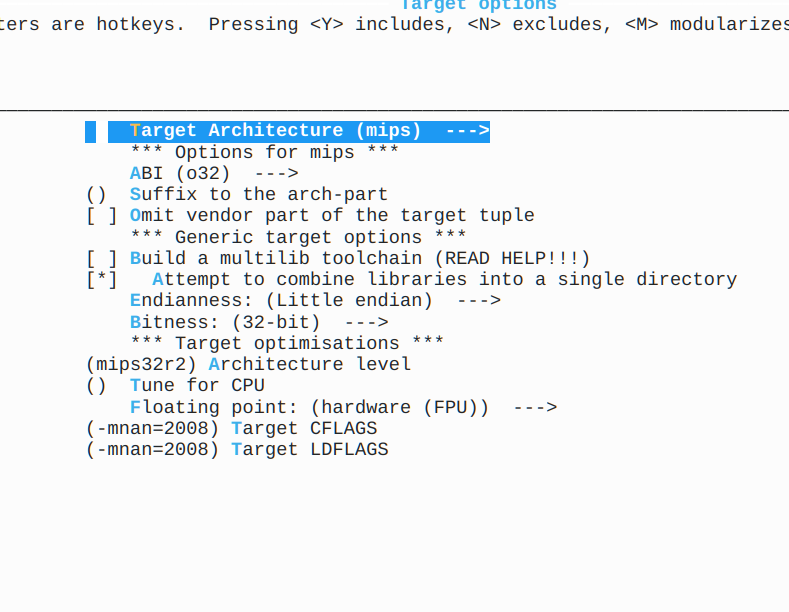
Sort of like buysbox or building a custom kernel, the configuration for Crosstool-Ng uses the command: ct-ng menuconfig. This gives you a menu where you can set options about what you want and where you want it stored.
The problem is that the nan2008 setting I needed isn’t part of a standard mips32r2 setup. I suspect that if I had needed mips32r6, everything would have just worked. But, of course, I’m not that lucky.
In the target settings, I needed to match all the specifications, of course, but I also needed to add -mnan=2008 to both the CFLAGS and LDFLAGS as you can see in the figure.
So what’s so hard about that? Just those changes won’t produce a working toolchain for my printer. The C compiler also needed --with-nan2008 (in the C Compiler options screen under extra target CFLAGS) and the same option needed to be placed in the C Library screen, too.
Of course, it is like a word search puzzle. Once you see the answers, they look obvious. But when you are searching through pages of options, it is easy to miss one. It isn’t like there is a checkbox for “Use nan2008” that does it all for you because using nan2008 with mips32r2 is “strange.”
The Proof is in the Build
Once everything was set correctly, I was able to produce a toolchain (ct-ng build) that could compile busybox and even a small text editor. Everything ran fine on the printer.
To build busybox, I used:
make V=1 CC="mipsel-unknown-linux-musl-gcc -march=mips32r2 -msoft-float -static -Os" STRIP='mipsel-unknown-linux-musl-strip' -j6
Unlike Zig, no patching needed. The Zig version was about 9 kB larger than this version, so not much different there. Both were just over a megabyte total. I could probably have used hardware floating point to get a smaller executable, but given that I don’t think any of this is using much floating point at all, it didn’t seem to matter very much.
I had also threatened to compile a text editor. Turns out most have dependencies on things like ncurses, which are a pain to bundle. So I grabbed a copy of the tutorial editor kilo and extended it to look a little like emacs. Works great. Great place to start if you need a static editor that doesn’t take much space.
Lesson Learned
If the CPU on the printer had been more conventional, I think either approach would have worked fine. I prefer the Crosstool solution in this case, because I’m not lying by patching the ELF header. In this case, I don’t think that lie hurts anything, but a program that did a lot of floating-point math might not work correctly, whereas I think the one produced by Crosstool would be fine even for a floating-point program.
On the other hand, like most Unix and Linux things, there are always more ways to solve any problem. If your problem is wedging executables on an alien Linux box, there are two perfectly fine ways to solve it.












Man that’s a name i haven’t heard in a while. Crosstool-ng was very popular in the 2000s and 2010s, it was the preferred tool for most C++ FOSS software, even stuff that had no business outside x86, and no one wanted to cross compile stuff anyway.
I wonder when and how it fell out of favor, i haven’t seen it in many years in a project
Are they all using Zig or are you seeing some other tools?
I the last 20years of professional embedded linux development have I not (really*) cross compiled. As we always had the ‘it must also build in the pipeline’ requirement (OK OK you can do this with cross compilation and a lot of chroot pain), we accepted the small performance ce hit and did everything with docker containers pretending it was native (e.g. get the MIPS) alpine container, install normally your deps and GCC and build. So what is this magic you say? Simple, you can use binfmt to dynamically run those containers with qemu, and you wouldn’t be the wiser. It solves your ‘docker as build setup definition ‘ and the ‘qemu to crossompile’. No dicking around.
*I could actually cross compile uboot and the kernel rather simply with arm-none as that was trivial, likewise we had some microcontroller firmware, that we obviously also cross compiled.
So next topic for an article :D
You’ll find some cool stuff on my gitlab.com/esbs ..
Most have likely moved to yocto which can build a toolchain for you and do all the compilation/image generation for a target.
I guess the follow-up will be a proper Doctor layer…
Hi there,
I’m the current maintainer of crosstool-ng. Great to see people doing things with obscure CPUs. It’s always a trade off as to what options to provide menu options for vs telling people to use the catch-all “Extra options to pass to GCC configure”.
We’re actually looking to do another release fairly soon which will add support for the recently released GCC 16.
A please to hear from you
Keep up the good work!
When you are searching through pages of options, it might be a good idea to ask chatgpt to find the option for you.
Don’t rely on it all the time, and always double check the documentation yourself, but figuring out options for an obscure tool that you don’t frequently use and don’t need to learn to use is where it shines.
I was confused by the title, “Compile Here, Run /Elsewhere/” would have been accurate. I’m a buildroot fan as well as going lower-level with some significant kboot work back in the day, but I’ll take a look at these…
Anything that can simplify making a cross-compilation toolchain functional is a net good in my book.
But I pulled out all my hair trying to get such toolchains working and to remain working (sure… that’s why I’m balding…), which is why I pivoted to running the destination OS in a dev container under qemu-user-static as my main tool for building non-native user-space binaries. That way the binaries are perfectly tailored to the target environment (even if the target itself is too small or too inconvenient to run gcc on) because they are native binaries, not cross-compiled.
Sure, user-space code like gcc ends up emulated, but the kernel, CPU cores, RAM and IO are all still from the host machine, so the actual overhead of the emulation is quite modest and compilation practically screams along. Can be a bit of a pain to figure out how to get such containers set up right, but once they’re going they’re so very robust (like anything that’s primarily described by a container configuration rather than a manually set up host build environment.)