
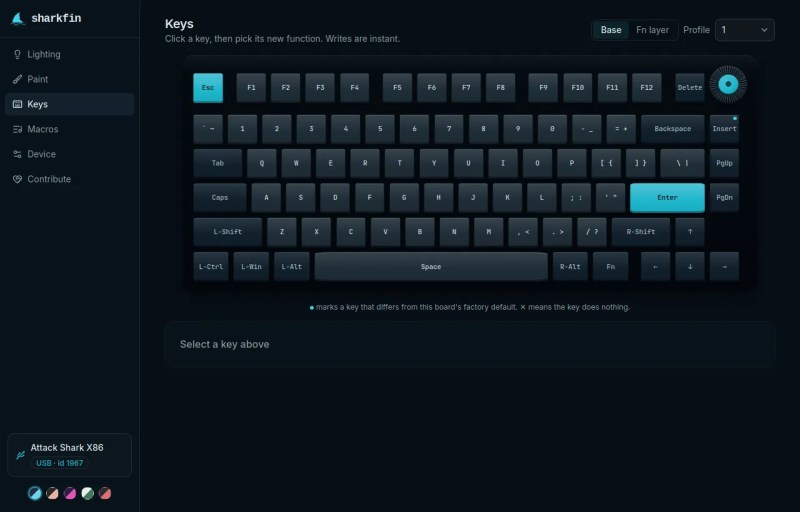
The Attack Shark is a modern keyboard with fancy magnetic keyswitches, macros, configurable blinky LEDs, and more. The problem is that the configuration software only works on Windows, so [JR Lanteigne] set out to fix that. Along the way, he completely worked out the configuration protocol that this keyboard needs, and wrote the comfortable sharkfin web-app so that you can flash yours too.
Don’t have an Attack Shark? Well, you might have one of the 522 other boards that are made on the same ROYUAN hardware, but are re-branded under 100 different names. Want to find out if yours is supported? Look it up in the list here, or just plug it in and find out.
[RJ]’s path to reverse engineering the config protocol wasn’t entirely straightforward, but since the “Windows only” application was actually an Electron app under the hood, he patched it to run on Linux and logged a few configuration sessions. Of course there are gotchas like two different firmware generations and the fact that writing to flash too fast put the keyboard into a boot loop, but after these problems were surmounted, it just remained to map all of the bytes out, and wrap it all up in a user-friendly application.
We don’t have one of these fancy-schmancy keyboards, but if we did, we’d certainly be glad to have the configuration protocol documented. Nothing is worse than finding out that the company that made your keyboard has gone belly-up, and you’re left with a backlight setup that doesn’t match your new deskpad. If you’re a keyboard-head and you don’t already follow [Kristina]’s series, well you should.












Maybe we just need to stop giving money to companies that make windows exclusive products. Just a thought.
No we dont.
Yes we do.
LTT is that way.
It is far better to look at the minority using Linux or the small number of people using macOS compared to those using Windows. I’ll let you in on a secret: companies sell products to make money for their owners or investors, not to make you happy.
He didn’t say companies had to do anything different like cross compile (the horror!). He suggested that free and private individuals make individual choices and not give money to companies that don’t make products those individuals can use.
“minority using Linux ”
Linux is the most prolific OS in the world.
“pure” Linux (not MacOS or Android) is not the most prolific OS in the world on desktop personal computers that have keyboards. There Windows is still king. The majority of linux “computers” is actually servers running headless or IoT devices, both in the large majority don’t have a keyboard hooked up to them, and if they have, it’s usually a $ <10 Logitech K120 or similar.
macOS is not Linux, it’s based on BSD, which is a UNIX system, but not based on a Linux kernel.
The browser version needs Chrome, Edge or another Chromium browser
There’s nothing like libratbag for dynamic keyboards?
Unfortunately tools like this cannot support Firefox since Mozilla refuses to implement WebHID and WebUSB citing https://mozilla.github.io/standards-positions/#webhid, citing that HID “devices are generally not designed with access from arbitrary websites in their threat model.”
Beautiful tool, thanks for bringing this to our attention!