
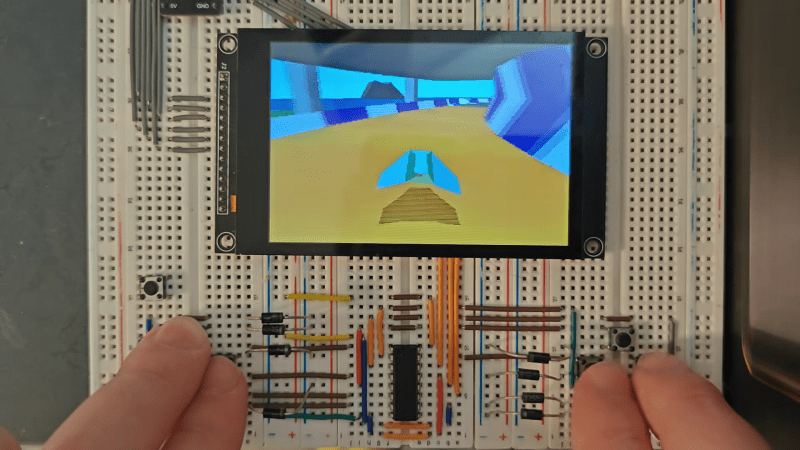
Once upon a time, doing graphics on a microcontroller was challenging, to say nothing of the concept of going into three dimensions. But modern microcontrollers are far more powerful, and you might find yourself wanting to do all sorts of graphical wizardry with one. To that end, you might find Jet useful.
Created by [CubeCoders], Jet is a compact 3D rasterizer built for modern chips like the ESP32 and STM32. It’s dependency free, relatively tiny, and is written in C++17 with an eye towards working well on memory-limited platforms. It runs entirely in software, uses only integer arithmetic, and is built around 16-bit RGB565 color — intended to make it easy to use with parts like the ST7796, ILI9488, and other similar displays interfaced via SPI.
As a point of reference, on a ESP32-S3 Jet can render around 650 on-screen triangles (post-culling) at 60 frames per second on a 480×320 display, or 1300 triangles at 30 FPS. The developers note that 3D performance lands somewhere between the Sega 32X and Sega Saturn — not bad for a microcontroller you can buy for under $20. The Wipeout-like demo shows off the capabilities of Jet rather fantastically, we think.
You’d be foolish to expect your next microcontroller project to render Crysis. However, if you want some retro 3D graphics for your next ESP32-based build, you might just consider exploring what Jet can do for you.










SNES or GBA had maybe the 1/10th power of a modern STM32F1 microcontroller yet they already had 3D games like Mario Kart or Golden Sun. It doesn’t matter how fast the CPU is but how smart the brain writing the code is.
Arduino community of late 2000s was a notorious example of this. The stuff that we (I mean people who were 1337) easily did on PIC12 or ATtiny they needed the whole expensive ATmega and some stupid “shields”.
The PIC16F84(A) was very popular by turn of the century. It replaced the older PIC16C84.
There were many websites with schematics and hex files for download.
The PIC was notable for its easy programming.
A simple serial interface and one of the dozen freeware programmers was all it needed.
It was a fun time, years before the Arduino appeared.
However, sharing source code was more difficult back then.
People either used commercial IDEs or did write in assembly language.
The PICs all had a different instruction set, so the PIC16F84 and closely related types (PIC16F628A and PIC16F88?) were popular.
Some 20+ years ago, I found in some forum a HEX file and schematic for a DCC train controller using a PC16F84. Back then I was a full time PCB designer I redesigned the board to be single layer, so that I would etch it myself, but the new layout required moving around some of the pins of the device.
As I was still young enough that time didn’t really matter, I spent a few days with the code decompiled to assembly printed out on an dot-matrix printer, identifying the commands, pins and then adjusting everything to my needs, recompiling it and after flashing it to the device, and to my surprise everything worked on the first attempt.
What annoys me now, is that apart from testing it, I never even built a permanent train track to use it.
“It doesn’t matter how fast the CPU is”
You’re right! Because it wasn’t the CPU providing Mode 7 for Mario Kart, it was the PPU which did the transformations directly in hardware. For the more advanced games they brought in the SuperFX chip which was a basic GPU.
Pure soft rendering is a lot harder.
GBA had real 3D games that were software rendered and they ran like ass.
Mario Kart isn’t true 3D and neither is Golden Sun. Not even Doom was true 3D. You can get away with a lot of trickery to make things look like 3D, but that doesn’t mean it is. Elite was true 3D though, running on 8-bit computers. That was impressive, but the polygon count is relatively low.
According to your logic even Minecraft isn’t fully 3D because it’s plaid on a 2D screen. To have fully 3D games we need to invent a holographic display.
You’ve invented an argument that [jalnl] didn’t use. It’s not about the display but about how the games themselves work.
C’mon, don’t cheat with the flat shading, gimme the textures!
According to the github, it does support affine-textured geometry. Actually, reading further, it says “Affine and perspective-correct texture mapping; optional bilinear filtering.”. So it’s there, it seems.
duuuuh….. does it play doooooooom? it looks like doododododoooom! duhhhhhhh!
At my old lab in New York, before Pixar, we did computer graphics professionally on PDP-11s. They got as fast as 600 KHz. Then we got a Vax 11/780 the size of a minivan, that ran at an amazing 1 MHz. I still have the front panel from Pixar’s Vax in my office.
Neat trivia! Would you mind sharing a pic or two of this front panel?
check small3Dlib, pure C, integer arithmetics only, single header.
sounds a lot like REND386 and VR386….the reinvention cycle continues.
Ah, this sure brings memories. Sorry : -]
Summer of 1989, out of boredom designing theoretical pseudo-3D raster engine that would be baked into the OS. Gaming, no, I wanted to design and build a 3D GUI, so one can shove windows far or bring them closer depending on what you are working on. I remember one of my ideas was a virtual cube with apps on each face, so rotating the cube would place apps into sleep or active mode depending on which cube face you are looking at.
If I remember right, my boredom drove me into thinking “vector graphics”, but the initial groundwork, trigonometry calcs, etc, was vector-based, so had a potential to be simpler overall. Nothing came out of it, since I had no access to any computers, so this was “programming on a paper” kind.
Rewind to present and find multicore MCUs that can do plenty more – three years ago I was looking into ASM programming Mali processor, which meant to do 3D, and average older generations of Malis (Cortex-A53, A55, etc) are the proverbial “dime a dozen”. I wish I had Mali processor back then, and suitable laptop to do the thing I wanted in 1989, no, sadly.
I am pretty sure 3D desktop has been implemented since then many times over.
Yodm 3D / DeskSpace was an app that worked with windows 7 around 2009-2010. It was kind of a gimmick in that it turned your desktop into a cube you could rotate with the mouse. So, there were six “sides”, each one its own desktop, you could store your shortcuts on. In idle mode it spun slowly.
Not sure if made workflow or organization any better but it was fun to play with. I like your idea better. Very Snow Crash esque.
For a while I ran a compositor that made each virtual desktop the face of a polygon. It did look pretty cool, but in practice you don’t really want to wait for even a cool and fast animation that adds no information to your experience.
I think in the year of 2003 or so I played with the rotating cube 3D plugin, too, but it was not exactly stable on the corporate-issued-bottom-of-the-foodchain computer, which was not tremendously good even with one desktop.
My idea was even simpler, the cube faces would be the apps, not desktops, and I also thought it would be confusing, too, as one wouldn’t see the caption of the app on the other side of the cube. I haven’t thought that concept too far, just entertained the idea of rotating cube or some kind polygon.
The original idea really was a concave virtual desktop with the main screen for the active app and other apps/screens shoved to the sides or behind the main one, ie, captions still partially visible, but the windows slightly minimized. I also thought all app should be auto-saved once minimized/shoved-away. 1980s was the last decade when it was over-optimistically thought that static RAM was the future, ie, turning the computer off wouldn’t lose any data, and simply turning it back on everything would appear as it was.
Nowadays I can probably design and build what I wanted by forking something like ThreadX and adding some kind of a lightweight GUI.
There was a sit-on type arcade game called Stun Runner. God only knows how many quarters I fed it. I’d love to port it to this platform to play again.
I’m pretty sure the owner of the arcade also knew how many quarters you fed it.
I was unable to find the code for the game demo