
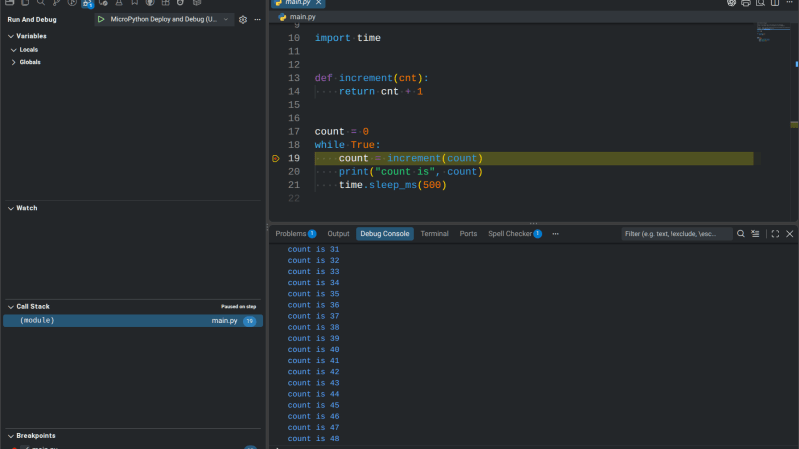
If you’ve used MicroPython much, you know that debugging usually amounts to printing a few things out, trying your code out, and then repeating. But [ghi-electronics] wants you to have full on-chip source-code debugging in Visual Studio. You don’t need anything special to use it — just a supported MicroPython host and the same USB cable you program with now.
The downside is that you either have to build a custom MicroPython image and flash it or use one that they include. They support several Raspberry Pi Pico versions and ESP32 chips, as well. However, at least one “odd” Pico we had lying around wouldn’t take the firmware. A stock one did, and it worked as you would expect. A little more investigation showed the odd Pico (an RP2040 GEEK) probably did take the firmware; it just produced an error during setup. There is a known problem with Linux and the ESP32-S3 having similar behavior.
Of course, you can build your own image, but now you are talking a bit more work to get a toolchain and all the dependencies together. For simple programs, you might not need a full-blown debugger. But it is nice to be able to peek at variables and see the control flow visually.
There are a few limitations documented on GitHub. For example, you can’t catch exceptions that the code already catches, although, presumably, you could set a breakpoint in the exception handler. Breakpoints halt all threads. There are a few other limits, but nothing we’d consider a showstopper.
Full Python has some debugging assistance built into it. MicroPython has some of the same things, but it isn’t trivial to build a debugger.











This is amazong finally. This will save so much time. thonny is so slow when debugging and having to write so many prints to identify the problems was taking up so much time
Fortunately the world is full of unreal applications that are suitable for joke languages like MicroPython and JavaScript :)
My company uses it in our product, simply because development is both fast and fun. The customer sees no difference. We have devices in the field with years of uptime, happy customers, and developers who aren’t such Negative Nancy’s.
All the blog noise about it made me want to try it for a small project a while ago. It’s the worst kind of pain imaginable. Literally the worst of all worlds concentrated in a tight spot, with zero benefits. And yet, somehow it’s a thing.
(It was a comment re: “micropython is a joke”, which magically disappeared, not about the debugger from the article)
I’ve used micropython quite a bit. But it’s not for every project. It works well if you just need to read out some pins/sensors and send that through USB/network/bluetooth as a one-off.
If you have a more complex project, the benefit of quickly hacking something together doesn’t weight against the speed loss and lack of compile time checks. So having a better debugger option would help a bit with more complex projects. But I personally would still use C++ for those.
We might point out that there is a difference between Visual Studio and Visual Studio Code.
The last one is a totally ugly piece of crap.
I used micropython quite a bit and for small quick projects it is fine. I discovere after the program exceeds 80kb cannot run on pico due to memory issues. At first i started using mpy-cross as a work around, then I realized compiling from C wpuld be even quicker so switched to C sdk and loving it.
Thanks for trying it, Al. And also for testing on a board we hadn’t. We’re looking at the RP2040 GEEK setup error now and will post here when it’s fixed. If anyone else hits a board that won’t take the firmware, please open an issue on GitHub with the board name and we’ll add it.
Small clarification since it came up: it’s Visual Studio Code, not Visual Studio.
@shynka — that’s exactly the itch we were scratching. Glad it’s useful.