
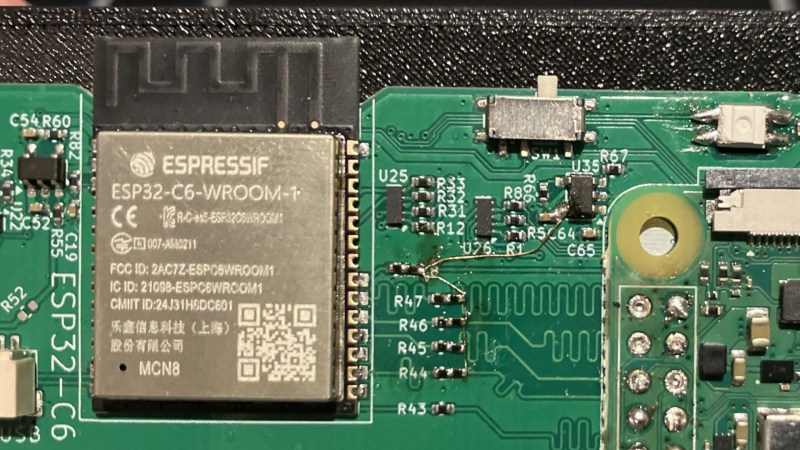
A laptop with no wireless connectivity feels like a rarity – but when you shop for powerful Linux single-board computers (SBCs), it is pretty common to see one skimp on WiFi. At the same time, current wireless cards can leave much to be desired. A mess of proprietary firmware, ephemeral or even binary blob drivers, weird glitches never resolved, and sometimes entirely source-less blobs with an expiration date. Maybe the SBC doesn’t have a free USB port for a plug-and-play WiFi chip, or you don’t want to design for an obscure hard-to-source castellated module.
What if I told you there’s a unique solution to the problem, as long as the SBC has an SDIO or SPI to spare? There’s a wireless card we can all try to get behind, and it’s certainly not flawless but gives us way more room to grow – it’s got somewhat open-source firmware, it comes from a respectable company, and it’s nigh-guaranteed to be easy to source. I am, of course, talking about esp-hosted – using ESP32 modules as your WiFi/BT card, over SDIO or SPI.
I’ve recently added an ESP32-C6 into my project, and setting up esp-hosted wasn’t ultra straightforward – so here’s a guide, and a discussion on what makes esp-hosted so cool and so incredibly promising. Spoilers: it works with privacy switches that cut out power, it could be hacked into a coprocessor for mesh protocols, and it could potentially help us build a fully open-source SDIO WiFi card.
Two Halves, Most Chips Supported
A quick clarification is warranted, as there are two projects under the esp-hosted roof. There’s the esp-hosted-mcu (previously known as esp-hosted-fg, “First Generation”), which runs the ESP32 as more of an MCU connected to WiFi and provides a relatively limited but self-sufficient interface on the Linux side; your connection aspects are mostly managed by the ESP32 module, so it will connect to your defined WiFi networks no matter if your host is rebooting or even fully off. As such, esp-hosted-mcu works best on microcontrollers, or in cases where you want your ESP32 to be a fully conscious separate entity, so to say. Want to make your ESP32 into an EC for your board, complete with WiFi connectivity? Then go with the -mcu version.
esp-hosted-linux (previously known as esp-hosted-ng, “New Generation”) leaves the wireless stack on the Linux side, with the ESP32 being a relatively thin proxy for the Linux wireless stack. I’ll talk about esp-hosted-linux here because it behaves in the most “native” way that regular WiFi cards do under Linux, but a lot of this article will apply to esp-hosted-mcu too.
esp-hosted requires two to tango: a Linux computer with an SDIO or SPI port to spare, and an ESP32 chip/module out of supported ones, I opted for ESP32-C6. The generic ESP32-WROOM modules are more than enough, but most of the shiny new chips are supported as well. Specifically, ESP32-S2, -S3, -C2, -C3, -C5, and -C6/C61 can all work with the esp-hosted-linux, and if you’re playing with something like the -S31, check the issue tracker of the parent project. I run the C6 because I thought it was the chip with the largest amount of supported features, and it’s marginally more expensive than any of the other ones, so why wouldn’t I? However! That was a mistake, and if I were to design a new board, I’d go with the ESP32-C5. Turns out, despite the C number being lower, ESP32-C5 is straight up better than the ESP32-C6, sporting 5GHz support in particular.
From there, you’ll want to wire it up over SDIO or SPI – I recommend SDIO if available, because it’s way speedier. One thing – make sure that your SBC’s SDIO interface is supported by the OS, and not in the limbo state of “the hardware is ready, someone just needs to make the driver work”, unless you can be that somebody. If you already have a devboard, you can bodge in an SD card onto your supposedly-SDIO pins to verify that your SDIO interface actually functions!
SDIO is essentially a full-duplex parallel bus with one control signal (CMD), one clock (CLK), and four data lines (D0-D3) – or just one data line, D0, if you feeling ascetic. These lines wiggle fast, and they’re not diffpairs, so you’ll want to lay them out with respect as single-ended wires. I’ll be writing up a larger SDIO article, but until then, do refer to one of the numerous SDIO layout tutorials online. Here’s a reference schematic:
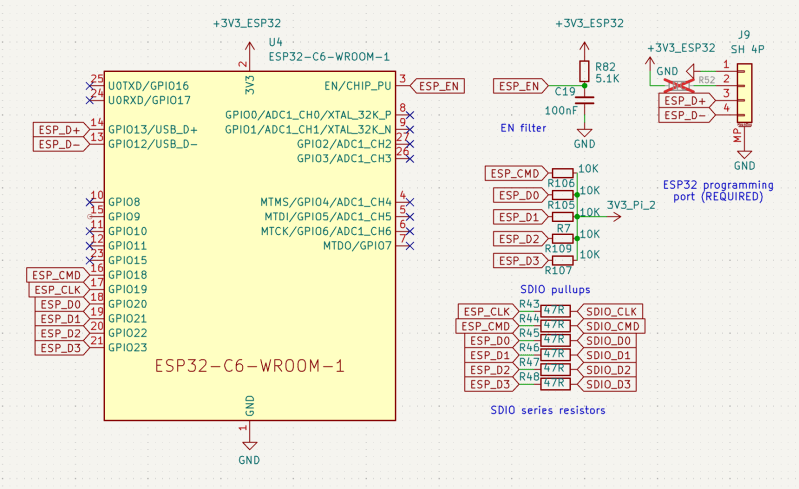
A short SDIO layout recommendation: make sure there’s a continuous ground return path underneath, length-match between signals to the best of your ability (within 1 mm?), and overall keep the SDIO link as short as you possibly can. When wiring up SDIO coming from the 40-pin header on a Pi Zero or a full-sized Pi, some signals will need a lot of length-matching and some will need none at all – that’s normal, such is the Raspberry Pi GPIO pinout, just remember to match them. Include both series resistors and pullup resistors, as asked by the ESP-Hosted documentation.
Apart from the SDIO signals, you’ll want control over EN, so the driver can reset the ESP32 into a known-good state before starting communications. For that matter, you can also wire up EN to a classic RC circuit used for OLED displays, if you’re short on GPIOs and don’t mind – the driver wants EN supplied, but it doesn’t require-require it, you can just provide resetpin=-1 to the driver init script if you take care of EN switching on your own.
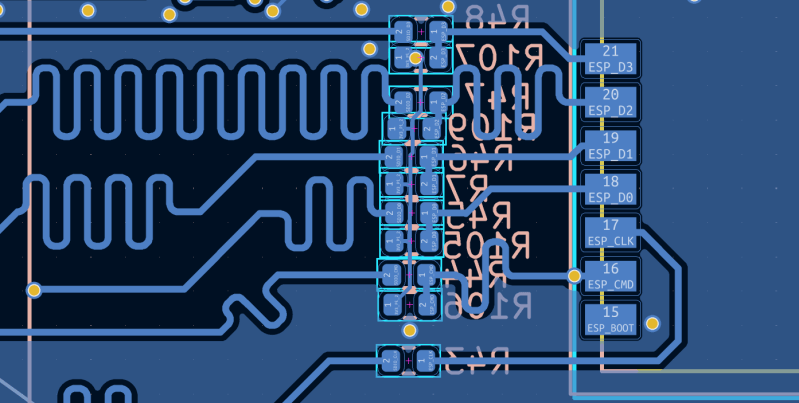
You don’t need to worry about the BOOT pin. You do need to make sure there’s sufficient 3.3 V power available, though: 300 mA to 400mA. The 3.3 V power rail on Raspberry Pi boards will generally be more than enough for powering your ESP32, but on other SBCs, you might end up adding an extra 3.3 V regulator to satiate the ESP32’s 3.3 V appetite. Last but not least, expose the ESP32 USB port somehow, because you’ll need it for flashing the firmware. Thankfully, the firmware flashing only needs to be done once. Personally, I put it on a 4-pin JST-SH with a QWIIC-like pinout, as you can see on the schematic above.
Build Firmware, Or Don’t
There are three things you need to do. Make sure your SBC’s SDIO (or SPI) interface is freed up, compile and flash your ESP32 firmware, then compile and load the driver. Not necessarily in this order, of course, but you need all three.
Freeing up the SDIO interface is relatively easy on Raspberry Pi: it’s a quick config.txt job. You only need to remap the SDIO pins, and if there’s an existing WiFi card, also disable its Bluetooth. The “Bluetooth disable” part is likely required because the onboard WiFi card’s firmware is uploaded over SDIO, so the Bluetooth part of the card wouldn’t function, anyway. It also frees up the UART console port on the Pi, which can be incredibly helpful if you need to debug your WiFi interface bringup! By the way, I have my doubts that the poll_once=off SDIO overlay parameter is required, and it does seem to spam up dmesg. If you ever need to get rid of that spam, removing that poll option might be a good start.
On other SBCs, you might struggle with SDIO, but as long as it is not too obscure, it shouldn’t be too big of a problem. If you’re rolling your own SBC, and if you have a devboard, feel free to wire up a microSD socket to the SDIO pins, add pullups as required, and debug your SDIO interface bringup using a spare microSD card. If a microSD card works, then in all likelihood, the ESP32 will work too.
ESP32 firmware compilation is also relatively easy. Maybe you don’t want to compile the ESP32 firmware on your SBC, since it might run out of RAM and lock up while executing cmake. On a Pi Zero, the lockup is basically guaranteed. Simply use your desktop computer to compile the firmware and avoid the hassle. Alternatively, you can skip all of that and download a firmware from the Releases tab on Github. Those are currently kept in the legacy repo, but I’m assuming eventually new releases will be put into the esp-hosted-linux repository, so look out.
Make sure that your driver is built from the same esp-hosted git repository version as your ESP32 firmware, using git log or the like to check the last commit. Otherwise, the driver will throw a warning and refuse to load, you can patch out that warning if you think the difference is too minor, but that’s at your own risk.
Drivers Done In Old-Fashioned Way
Now, the driver, you’ll want to compile the driver on the SBC itself, unless you cross-compile. The rpi_init.sh script compiles and loads the driver, and it also contains some notes you might find helpful. If you have an SBC with 512 MB of RAM or less – open the rpi_init.sh in the editor, find the make -j8 command, and replace it with make -j2 (or even -j1). Otherwise, your compilation process will run out of RAM and lock up your SBC.
Do you have everything connected by now? If you have SDIO properly configured and firmware has been flashed, the driver will just load successfully and a wlan interface will appear. Problems with that? Check dmesg to see the debug output of the driver module. I enjoy running dmesg -Hw in a spare terminal window, or just in the background.
Now, the rpi_init.sh script is a great tool for debugging, but it’s a tool you’ll want to shed when running the module longer-term, in large part because it recompiles the module every time it’s run. In the same directory, you’ll find esp_sdio.ko – that’s the Linux module you just compiled. Do this:
sudo cp esp_sdio.ko /lib/modules/uname -r/kernel/drivers>/code>

sudo depmod -a
It may be a hack, but at least now, you can modprobe esp_sdio, instead of insmod from the script directory. You can then also put the module name (esp_sdio) into /etc/modules to have it auto-load on every boot, which is way better than re-running the script and the associated recompile.
Workable And Very Promising
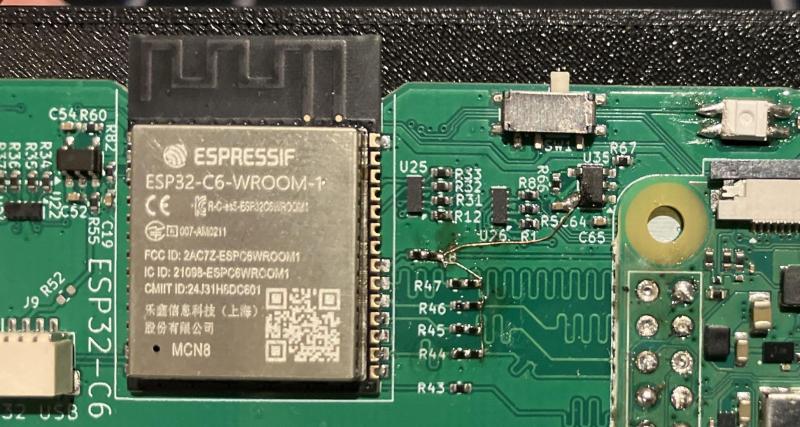
There are some things to be desired, of course. The module should be properly integrated into device tree interfaces, for one, so that it doesn’t need to be added into /etc/modules and can instead be auto-loaded by an overlay. It also should get a dkms integration, in the same way the esp8089 driver was distributed. Currently, you have to recompile it and re-add the module into the kernel modules directory after every kernel upgrade, and dkms would cut that right out. Throughput is alright, you can get 40 Mbps to 50 Mbps at default SDIO frequency. If you think your hardware is good enough and can push SDIO limits further, there’s some dials and knobs you can tweak!
Cool Trick, But Why?
So why talk about this? There are four reasons that I find important. First, this is the only WiFi card I know that can pass Bluetooth through over SDIO instead of tying up a UART port, which is especially helpful for Pi Zero form-factor boards. That alone is pretty cool.
Second, while the code is imperfect and there is a heap of pull requests one should take a look at, esp-hosted does handle hardware power switches in my project! There are no kernel module crashes or failures as the ESP32 loses power, it disconnects and reconnects seamlessly, the hardware switch just works, and I find that endearing.
The next two reasons are both about this being an essentially open-firmware WiFi card. The ESP32 firmware isn’t fully open, as the RF bits are traditionally closed-source and get compiled in as blobs, but there have been some mighty projects trying to liberate the proprietary bits of the ESP32 WiFi stack. As more and more people get a stab at it, it’s entirely possible we could turn the omnipresent ESP32 modules into fully open-source firmware Linux WiFi cards, incredibly cheap and abundant anywhere, too. Truly hacker-friendly WiFi cards that last, what’s not to love?
The final reason is the most fun of all, and doesn’t even need the de-proprietarization. After SDIO wireup, the ESP32 is left with many free pins, including ones with high-speed SPI. Who’s to say that we can’t wire up a LoRa modem to it and run Meshtastic/Meshcore/etc.? Since the firmware is mostly open, in theory, any code could be added within the WiFi/BT gaps, any meaningful data then forwarded to the Linux host. It also doesn’t escape my eye that new ESP32 chips support Zigbee and Thread natively, and exposing that to Linux is only a matter of code, too. To me, that’s the best part, thinking that one day we could turn the ESP32 into a true Swiss army knife communications co-processor for any Linux-running CPU.










The real power for me in an ESP32 co-processor is classic bluetooth – perfect for connecting to the internet via a user’s phone for portable devices, and even placing voice calls and sending/receiving texts (think geolocation with knobs on etc.). Such a pity the S3 has dropped classic support.
FWIW, the -S31 has it again.
Using this in production for quite a while. An esp32 module is a dollar, a wifi module for embedded Linux costs ten times more. Glad Espressif has moved the project under a new roof and it’s pushing it in the right direction.
Hey, uh, you misspelled “raspberry” in the title
We fixed it, thank you!
That makes me feel much better about being lazy in maintaining the esp8266 sdio driver for a couple of years.
You literally made one of my projects possible back in the day with that one! Thank you so much for that. Actually, I was thinking of linking to your project but forgot while writing, let me see where I can mention it.
Thanks! ZeroPhone was an amazing project and I’m glad I could help a bit
nothing against esp32 but i don’t understand why binary blobs are portrayed as a disadvantage of non-esp32 wifi, and open firmware an advantage of esp32. everyone uses binary blobs for wifi, it’s basically a level playing field. ???
Not a level playing field at all. With regular WiFi cards, the entirety of their firmware is a blob, often runtime-loaded over USB or SDIO, and you’re pretty much stuck with what you get. With ESP32, only the RF-interacting part is a blob, other parts of the firmware (the most important ones!) are open-source. As a result, the ESP32 firmware is way easier to fix, modify, and it’s also way easier to reverse-engineer the closed-source parts left – in fact, there’s multiple projects doing that! So, in comparison, you can’t as easily fix bugs in any other arbitrary WiFi SDIO chip, it’s way further from being fully open, and you also couldn’t pull off something like adding LoRa support.This is basically what the article already says reworded, but, there.
i care a lot about that issue. i made a minor modification to the intel iwlwifi driver i’m using right now to get it to accept my chipset. i’m just…are you actually fixing the esp32 driver? are you actually running into an inability to fix other drivers?
One of the reason that ath10k was so unpopular was due to its poor firmware quality. No one managed to truly fix the problem, since, well, binary blobs.
NXP has been having this sort of solution for some time with IW612 transceiver. u-blox and murata have some nice modules.