

Cellular modems come and go, and they can be tricky beasts to tame – yet, in every portable computer project I’ve worked with, “LTE modem” has been a top-three request from the audience. If you’re building a cyberdeck or a general Linux portable, then a cellular modem’s cellular data uplink, SMS support, and even voice calls, can be the killer addition you need to make your deck a true daily machine. These days, I see that the demand for cyberdecks is rising, my own projects could greatly benefit from modems too, and yet it sometimes it feels like informational drought. I think now is a great time to make a listicle, detailing a few modems you should keep in mind.
Testing out prospective modems can be costly and time-intensive – design a board, purchase a few sample modems at inflated prices, only to have your idea completely blocked by elusive firmware issues at the very last step. I’ve given some starting-from-scratch tips before, having shown how to use mPCIe cards for testbench purposes. Today, I’d rather give you a few battle-tested modems that others already use with great success, and describe the features you can get out of one.
It Used To Be Worse
There’s a personal reason I’m making a list, too. When I was sourcing modems for ZeroPhone, there was no shortage of 2G modems to source, but 2G was already shutting down. So I was looking for suitable 3G options instead, and coming up woefully short. Each module I’d find, eventually turned out to be datasheet-less, or hard to source, or priced at $100 apiece. Foolishly, I went to the Electronics StackExchange and asked a question about 3G modems that people use. Next day, I refreshed the page, and found an all too unpleasant surprise! My question was closed, hidden, and marked as “deleted”, for being a “shopping question”, a cherry of frustration on top of my cake of sourcing woes.
The modem sourcing situation has since significantly improved, even if StackExchange didn’t, but I think the baggage still remains. Nowadays, there’s a good few dozen modems you could buy, but most of them aren’t the best in their field, so I’d like to help you narrow those dozens down to three decent options. It won’t be hard to add one of those to a project, either – all you need is a free UART or USB port, some LiIon power, and a little bit of software. Let’s take a look at the first modem on my radar, then?
The Humble A7682E
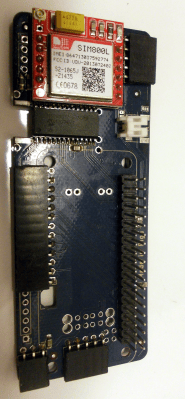
SIMCOM has been making modems for ages now, and you’ve surely seen their iconic SIM800 in many projects, probably paired to the famous tiny red board. I worked with it quite a bit, and I’ve come to hate the boards – the modem promised voicecalls, but they turned out to be incredibly buggy, and the firmware closedness was the nail in the debugging coffin. However, for needs like GPRS and SMS, it’d work decently well.
Years have passed since the SIM800 dropped, and many countries have since dropped 2G networks, cementing my SIM800 collection as the bricks I came to recognize, sadly, bricks that never got a chance to function as smartphone building blocks I badly needed at the time. SIMCOM’s success kept them building, thankfully, and they’ve developed a lineup of 3G of 4G modems since then. One particular modem of note is SIMCOM A7682E, and you ought to learn about it.
A7682E is an LTE modem that still supports 2G, and it’s a surprisingly mainstream option as far as devices are concerned. It’s cheap, abundant, and its Cat 1 connectivity (up to 10Mbps download) can provide you with a reasonable amount of mobile data; it can even do dual-sim, if you really must have it. Another advantage is compatibility with SIM800 series footprints – which means it’s exactly as tiny, and if you’ve ever designed a board for a SIM800, an A7682E might fit just as perfectly, the pin changes are non-critical from what I see.
You’ll find an A7682E or its brothers on quite a few modern boards, and SIMCOM doesn’t vary their AT command syntax as much – ensuring support from many third-party libraries, some major libraries explicitly tested compatible, and many more running on “accidentally compatible” fumes. The modem’s firmware also implements things like HTTPS and FTP, exposed through AT commands. If you don’t want to pull some heavy libraries into your on-MCU code, just let the modem handle the heavy stuff for you!
Not Without Criticism
There’s a few things I hate about A7682E – analog audio. Yes, you can build a small phone with it, at least unless the firmware does you dirty like I’ve had with the SIM800 – I couldn’t find anyone who has tried, and my own modems are yet to arrive. However, you’re expected to interface a speaker and analog mic directly to the modem and that’s a bit of a problem. First thing is, the built-in speaker amplifier is puny, but at least there’s amplifiers you can add to deal with that.
The analog mic is a bigger problem. Do you remember how mobile phones used to produce noise in nearby speakers every time a call came in? With an analog mic, you have a decent chance to hear them again, or rather, it’ll be a gift to whoever you’re calling right now. Smartphones have long given up on using analog mics, at least without on-the spot-amplification making the across-the-board mic signal high-impedance, but this modem has a mic amplifier already built in, so you’re kinda out of options. Supporting something like I2S PCM would make this modem perfect for tiny cellphone needs, but I guess we can dream. At worst, there’s other similar LTE modems from SIMCOM that do have PCM, they’re just not as popular as the A7682E is, but they’re still LCSC-able.
This modem has three more annoyances in store, first one a big gripe for me specifically – the LGA pads, every single pad out of reach all the time while you have it soldered onto the board. I enjoy QFN-style castellated pad modules way more, because not only are they easier to rework and solder, LGA modules also make it nigh impossible to tap into pads not routed onto the PCB. I know that castellated pads come at the cost of a board space and limiting the pin count, but I wish the castellations remained an option, still, or that these modules took a combined approach; suppose, until then, unholy testpoint and via arrangements will have to do.
The last two gripes are less expected. First one is that IOs are 1.8V. The hardware design guide provides some transistor-based shifting examples that you can use; surely, if they’re in the datasheet, they will work? Another one is – unlike so many other modems, this one asks you to never shut it off by yanking the batteries, instead using an AT command or the PWRKEY pin to shut it off before removing power; otherwise, it threatens flash corruption and possibly bricking the modem. Just how required is this in practice? No idea, sadly. It’s not a requirement you’ll see in other modern modems, that’s for sure.
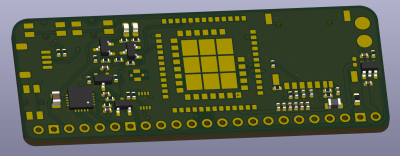
Despite the flaws, it’s certainly a modem you can use fruitfully nowadays. Our collective is working on an example board, currently untested, that hosts one of these modems with some minimal support circuitry, just bring your own VBAT and a USB (or UART) connection.
Do you need more oomph? More speed? SIMCOM has a few other modems in store, some can do higher speeds, some contain extra features like GPS, some contain extra firmware features like MQTT, and some will even do 5G; a lot of them are available on LCSC for bulk purchase and even JLC assembly. SIMCOM isn’t all there is, however!
Thankfully, Not A Monopoly
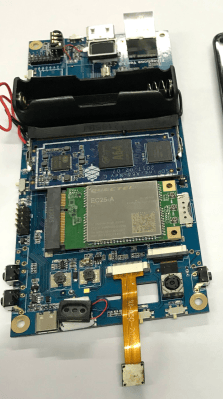
Not many companies produce cellular modems. However, if you were to only learn about two, the second one should be Quectel, and you should definitely remember EG25 and EC200 modems alike! Both are 4G modems, and compared to the smaller Simcom offerings, they pack a heftier feature punch. What’s fun is, they run Android under the hood – that you can hack, or maybe even have them run a custom firmware and omit the MCU altogether! The EG25 is best known for being at the cellular core of a PinePhone, from way back when PinePhone was a devboard. By all signs, Pine64 has picked well.
You can get these two modems on mPCIe cards, naturally, I’d argue that’s one of the best ways to connect a powerful modem. If you don’t want mPCIe and would rather solder the modem directly onto a board, they’re available in the usual pseudo-QFN packages too – I’ve got an EG25 building block board for you, it’s not battle-tested yet, but it should work well for “copy-paste modem into your circuit and order the board” purposes. Quectel’s documentation is login-gated, but bugmenot solves all.
Interfaces are the same, either USB or UART, there isn’t much to innovate here. I’ll heavily recommend USB, though – that’s the best chance you have at making use of the 150Mbps download (LTE Cat 4) capabilities. Over USB, you’ll get a USB-Ethernet interface, or you can use QMI, there isn’t much unexpected stuff to worry about. Want a stack to make calls, send SMS, or simply have better control over your data connectivity? As the EG25 is the PinePhone modem, you’re way more likely to find Linux software to drive it, for instance, the ModemManager and eg25-manager combo, and it will likely work with the EC200, too.
On both of the modems, there’s no shortage of interfaces and features, you get a fully-featured package – PCM for your digital audio, VoLTE support, oh, and there’s even a GPS module built-in! Of course, here too, you get in-firmware features like HTTPS, FTP, and SMTP, though given these modules data throughput, you’ll probably pair them with a powerful enough CPU and the firmware features won’t matter.
A Few Precautions
Closing thoughts? Check that you’re buying modems suitable for the country you’re in – watch out for the letters at the end of the part number, and compare LTE bands. Then, provide the modem with plentiful power – if you have a LiIon cell handy, just connect it direct! Need antennas? LCSC has got a surprising amount of 4G and 5G antennas as of late, and I wrote a small blog post about how to find them. If you’re feeling power-constrained, especially so by the “2A peak” requirement, here’s good news – both SIMCOM and Quectel modems show in their datasheets that the 2A peak requirement mostly applies to 2G, so, the peak consumption will be lower when using 3G and 4G networks. Hooray!
In some countries and with some specific telco providers, only consumer smartphones are allowed on phone networks, and modems might get blocked – which, I think, is done in part by distinguishing IMEI numbers, but I don’t know much more. Other countries, like Turkey, have certification schemes for smartphones. I vaguely recall that least a few of the modems mentioned, might be capable of IMEI changes. However, make sure that it’s legal for you to change the IMEI, of course, because I’d guess it might not be.
Whatever you might be building, good luck: grab yourself a module, a SIM slot, a sufficient power rail, and remember to have fun!











When I was a teenager I could only dream of having one of those LTE modems like we have nowdays. If I had one I’d probably buy a laptop and spend entire schooldays playing AoE 2 with my friends instead of listening to the teacher.
One note to add is that before buying also check that the modem’s internal chipset work in your country.
Chinese chipsets are banned from the US for example, so safest choice is to go for a Qualcomm chipset.
“Chinese chipsets are banned from the US” do you have something where we can learn more about this? From what I understand, Chinese chipsets are abundant in all sorts of phones in the US.
This is not true. I can’t speak for all the chips. But from my experiences of working directly with Simcom on my NB-IOT/CAT-M1 projects. Simcom’s SIM70xx series are based on Qualcomm chipsets and are certified by various US telco. SIM7090 has the smaller footprint, SIM7080 has the same footprint as SIM800, and SIM7070 has larger footprint and supports higher power class that can only by used in selective countries (such as US and Australia). SIM702x are based on MediaTek chipsets. The Simcom A76xx series as far as I know is based on the chipset from a Shanghai-based company.
You went to the wrong site for hardware recommendations, which is specifically verboten there. Use https://hardwarerecs.stackexchange.com for hardware recommendation.
Oh joy! Somehow, when closing my question, nobody bothered to tell me it exists =D
If you don’t mind a loredump (and if you do, stop here) – One of the older stack exchange sites (Super User) had a problem with people asking (poor) recommendations questions https://stackoverflow.blog/2010/11/23/qa-is-hard-lets-go-shopping/ and it got disallowed network wide. Software recs and hardware recs were kinda experimental – and unfortunately came up around the time the wider network was somewhat neglected. Its entirely possible no one remembered. So its a Stack Exchange wide rule (and in the help pages most likely that you can’t). Better communication with ‘new’ users about stuff like that’s an ongoing struggle both by admin and commnity and we don’t always get it right
(I’m a super user moderator if disclosure’s needed, and I’ve somewhat of a footprint on the broader network.)
It feels like a cheaper option might be to set up an old mobile phone for ta tethered usb internet connection or even use one of those cheap little mobile wi-fi hotspots, even if the antenna is cut and matched with whatever you’re trying to use it with, perhaps soldered in a tin, so it doesn’t broadcast too much.
Oh yeah, that will be a viable option pretty often, I’m not covering it because that’s the option everyone knows already. Also, both mobile phones and those small hotspots tend to be woefully limited in what they will do, and often come with badly suited firmware/hardware as far as hackability goes, sadly.
Can you not configure the simcom to do volte and stream rtp to it, sidestepping the need for the analogue bits? After all it’s just sip/rtp at the end of the day. I’ve had great success doing that with laptop cellular modems.
Oh I haven’t looked into this too intensely, but I do hope someone looks into that! Do you have any pointers on where I could start learning about this?
What, no SS7? I kid, this is a fantastic project that will help give a taste to youngins of how some of us cut our teeth (back when we had them). Reminds me a bit of rbcp’s cocot setup on his pbx.
Good article. What’s your experience with the Nordic nRF9151?
Apparently that was small enough for the recent Ledger supply chain attack to fit into a USB stick sized case with other electronics in it. Which I find quite amazing.
https://www.nordicsemi.com/Products/nRF9151
https://www.eevblog.com/2026/10/18/eevblog-1780-ledger-hardware-supply-chain-attack-examined/
Can it make a call or answer one? It doesn’t advertise this feature.
But Nordic forces you to use Zephyr, so no way!
“The last two gripes are less expected. First one is that IOs are 1.8V”.
Almost all (if not all) GSM/LTE modules are using 1.8V for its interface. Personally I don’t like to use level-shifter. Microchip has a fairly new series of MCU such as AVR128DBxx that provides Multi-Voltage I/O (MVIO) on one port C that you can setup as 1.8V interface to directly communicate with a GSM module without going through a level shifter, which is exactly what Microchip did on its AVR-IoT Cellular Mini which is based on Sequans GM02S (NB-IOT/CAM-M1) module.
“…2G was already shutting down. So I was looking for suitable 3G options instead…”
3G(UMTS) decommission has started as early as 2020 (China Mobile and Netherland Vodaphone) and many are off by now or in the next a couple of years), See 3G Phase-out. The reason been that for 3G(UMTS), not only the chipset manufacturer need to pay royalties to Qualcomm, the telco too, so there is every incentive for telco to phase-out 3G as soon as 4G is fully deployed.
I am in Australia, where we foolishly shut down our 2G GSM many years ago, followed more recently by the shutdown of the 3G networks in 2024. The mountains of e-waste this generated is a rant for another time, but my own cellular projects had to be thrown away too.
Since then, I have had some success with the SIM7600 on breakout boards from Waveshare. These breakouts are not cheap but they play nice with a Raspberry Pi and do voice calls with minimal hassle. As in, I took an old handset from a rotary-dial phone and just plugged it in! Voice calls were intelligible and easy to set up with AT commands over serial. One day I will finish my rotary phone project and post it here!
I think since last time I played with these breakouts, there might have been a revisions to the power supply – I can’t comment on the effect this may have had. The current version of the board can be found here: https://www.waveshare.com/product/iot-communication/long-range-wireless/4g-gsm-gprs/sim7600g-h-4g-hat-b.htm
There are two versions of the breakout board, including a smaller one that is about the same footprint as a Pi Zero, which is the one I used. It has pogo pins for power and USB that are supposed to allow it to drop straight on top of a Pi Zero, but they looked a bit dodgy to me, so I used the built-in USB that is also included.
They are supposed to do global positioning as well as voice and data, but I haven’t tried this out myself.
Finally, I loved the ZeroPhone! Thanks for a great project. If you ever update that project, or something similar, to suit a 4G network, I’ll probably buy at least one :-)
The reason for the gentle shutdown is likely that the modem is actually running Linux under the hood, just like the Quectel. These are unlikely to be actually running Android, btw, even though there is an ADB option to get a shell via USB. You just get dropped into a regular Linux shell.
Actually, on reflection, the SIMxxxx modems are Qualcomm based, and running Linux, while the Axxxx modems are using an incompatible Chinese LTE CPU/stack. The SIMxxxx modems can give an ADB shell (sometimes requiring some gyrations to enable), while the Axxxx are not Linux-based at all.
No thanks.
I’d love an always online laptop. But I already pay for fiber optic service to my house and wireless to my cellphone. I’ll pay for the phone so I always can take Internet with me and for the home connection so my machines at home will be accessible to me. But I am not willing to pay another monthly subscription for every device I own!
In the past my solution has been tethering. And that goes back a ways. I actually used to have a serial cable for my old Nextel brick that gave me 300 baud dialup! And to use that with I found a free dialup provider. It was good enough to run a text terminal and I actually did web development from the coffee shop that way (just the backend stuff, testing with images turned off in the browser).
Since then I have had an unlocked phone on Verizon.. I used to get great wifi based tethering that way. Phone calls weren’t always as good because Verizon gives their locked phones a Wifi assist when making calls and that actually seemed to matter in my area. Also multimedia messaging was hit or miss with an unlocked, non-Verizon branded phone.
Somehow I got talked into buying (or am I renting?) an actual Verizon phone. Damn Family plan discount… So now it does not let me tether unless I send Verizon extra money. There are apps to get around that… but without root they resort to some pretty unstable hacks.
So my current solution.. skip the laptop and use a lapdock. With Dex it is ALMOST laptop like. But… leave it to Samsung to always provide just enough annoying bugs… and Google to provide just enough hobbling in Android to make it still a bit painful.
I really hate cellphone companies, the service providers handset makers and OS developers equally.
Oh dear, not the lte modems! They are designed by people who have no interest or care in how hard they make the lives of the people who have to use them (qualcooooooooom!)
Story time!
Last decade I was the poor bastard integrating an nbiot modem into a smart meter application – hermetically sealed units with a high-capacity but low current lithium thionyl chloride cell strapped to a supercapacitor with a projected 15-year service life. The vendor simply could not understand that the modem wasn’t allowed to wake itself up whenever it liked, that there was no way to recharge the unit, and waking up when not allowed would overload the power system and permanently brick the unit – as it’s sealed, opening it up required destructive methods and rendered the unit unfit for purpose. We had a hardware issue where actively switching the module off used more power than leaving it on, so we were relying on the module doing the right thing (oh hindsight…)
The vendor secretly sent an OTA update on Christmas Eve when they thought we would all be on leave and wouldn’t notice them fixing a nasty flash bug. We came back after the break to find a couple hundred manufactured units bricked. They then lied and said they didn’t do anything (impossible, the timing was too convenient and there was no other possible route for the state we found them in, and they later admitted it in documentation.)
I made sure after that to keep a close eye on the module and hard-cycle it if it made any suspicious moves.