

With each passing day the rate we acquire digital media increases (we don’t even bother unpacking our CDs when we move anymore). Large publishers have started moving away from DRM, which means we’ll be buying even more digital media in the future. Acquiring all of this nonphysical property puts importance on not just making it easily accessible, but also protecting it from destruction. Slashdot asked for reader suggestions of what NAS to buy; we’ve compiled some of the options below and want to know what you use.
apple327 Articles
IPhone 2.0 Adds Secure Wipe
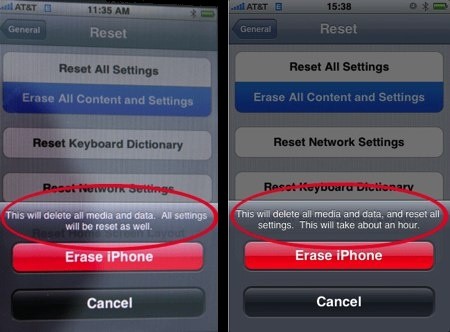
AppleInsider is reporting that iPhone Software v2.0 will add a secure wipe feature. The screenshot above shows the text “This will take about an hour.” added to the normal erase feature. This time is used to overwrite data to the disk multiple times. The need for secure phone erasure came to light after a researcher was able to recover personal information from a refurbished iPhone using forensic tools. Since then, a few people have published techniques for obliterating personal data using either the GUI or the more thorough command line method. Remote wipe has also been added to the new firmware in case the phone is stolen. We’re happy to see security being made easily accessible to nontechnical users and expect that remote wipe will become standard on laptops in the future.
Make A Universal Macbook Air Superdrive
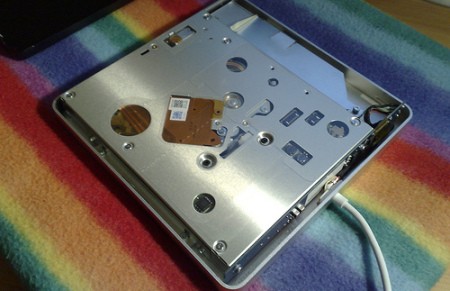
For $99, Apple will happily sell you a slick USB superdrive (aka DVD burner) that only works with the MacBook Air. [tnkgrl] swapped out the USB-IDE interface with a generic $9 unit to make it work with everything else. The generic board required a few mods: relocating the crystal oscillator along with the amputation of its daughter-board that carried an external power connector, usb connector and some caps.
EFiX Dongle Still Not Available
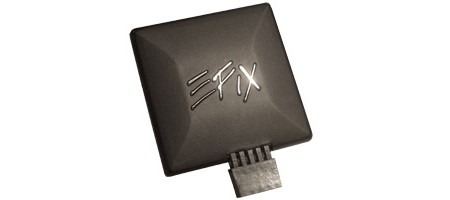
Well, it’s June 23rd, and still no dongle from EFiX. Despite a new product page on the company’s site, the OS X installing dongle is still not available for purchase. The USB dongle is supposed to facilitate the installation of Mac OS X by booting the Leopard install DVD on PCs, but so far no one has been able to verify this claim as no one has one of these in their hands yet. We’ve been covering this story since the beginning, and we’ll be sure to let you know when you can actually buy one of these.
[via Engadget]
Boxee Social Media Center Public Alpha
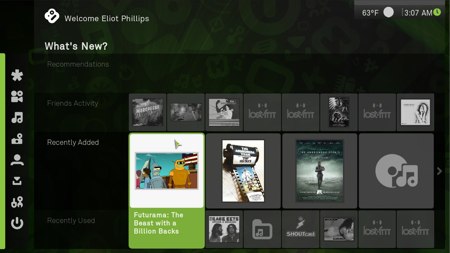
Boxee is the latest piece of software to enter the home theater PC space. It’s recently become available as a public alpha. The first build is only for OSX 10.5, but Ubuntu is coming. Built on the XBMC code base-they even hosted the XBMC developer con last weekend-it has the same goal of letting you navigate and watch/listen to all of your media from your using just a remote. There’s more than just that though.
Wiping An IPhone (more Thoroughly)

You may be hoping to subsidize the purchase of an iPhone 3G with the sale of your old one, but since you should wipe all your personal data from the old one first, we brought you [Rich Mogull]’s method for wiping all your private data off of an iPhone. The method, which involves overwriting your data with music, is slightly flawed, mainly because of live files that can’t be deleted while the phone’s OS is working and because the OS reserves a portion of the hard drive as unwritable space, which will make it impossible to completely fill it with music.
For those looking to annihilate every scrap of personal information, check out [Jonathan Zdziarski]’s method. It involves restoring the phone as a new phone, then jailbreaking it. Once the user has shell access, umount is used to force the two mount points into read-only mode. Now the partitions can be overwritten with /dev/zero, which should wipe them clean. The phone should then be forced into recovery mode to perform another full system restore, and the process is complete. As [Zdziarski] notes, several iterations of the process with /dev/random should prevent even NAND recovery, but there is an even better way of ensuring full data destruction: “simply take a sledgehammer to the device.” If you are unfamiliar with the command line though, chances are [Rich Mogull]’s method will be easier for you to handle, but don’t blame us if you sell your phone and the Feds get wise to the evidence you left on it.
[via Engadget]
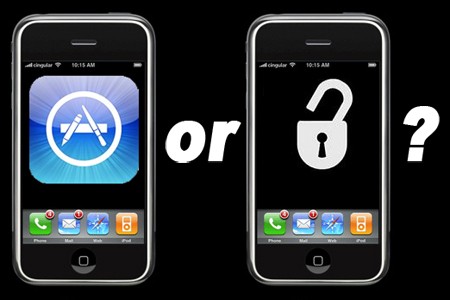
New Vs. Old IPhone Apps
You’ve probably never heard of this obscure new device called the iPhone 3G from no-name manufacturer Apple, but we decided to give a rundown of some of its newest apps anyway. We’ll be comparing them to non-SDK third-party apps that only work on jailbroken iPhones.









