Playing A Game Of Linux On Your Sony Playstation 2

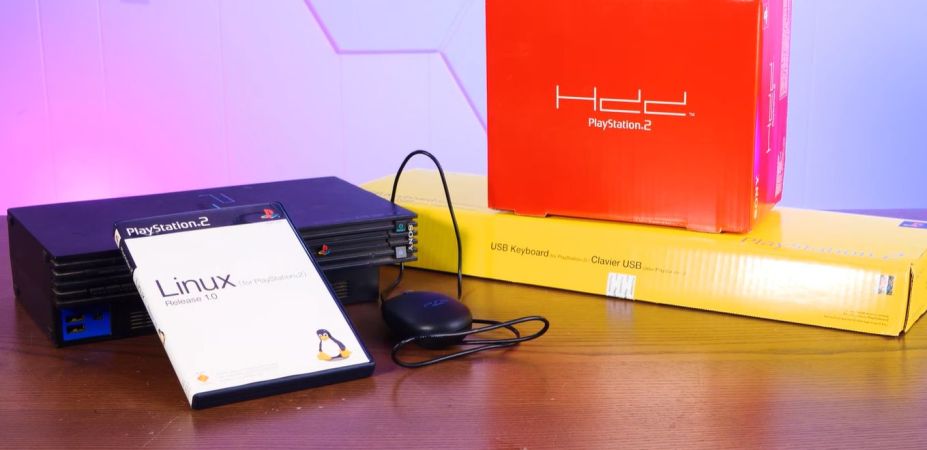
Until the 2000s, game consoles existed primarily to bring a bit of the gaming arcade experience to homes, providing graphical feats that the average home computer would struggle to emulate. By the 2000s this changed, along with the idea of running desktop applications on gaming console for some reason. Hence we got Linux for the PlayStation 2, targeting its MIPS R5900 CPU and custom GPU. Unlike these days where game consoles are reskinned gaming PCs, this required some real effort, as well as a veritable stack of accessories, as demonstrated by [Action Retro] in a recent video.

Linux on the PlayStation 2 was a bit of a rare beast, as it required not only the optional HDD and a compatible ‘fat’ PS2, but also an Ethernet adapter, VGA adapter and a dedicated 8 MB memory card along with a keyboard and mouse. PS2 Linux users were also not free to do what they wanted, with e.g. ripping PS2 game discs disallowed, but you could make your own games. All of which had to fit within the PS2’s meagre 32 MB of RAM.

Continue reading “Playing A Game Of Linux On Your Sony Playstation 2”

Using An E-Book Reader As A Secondary Display

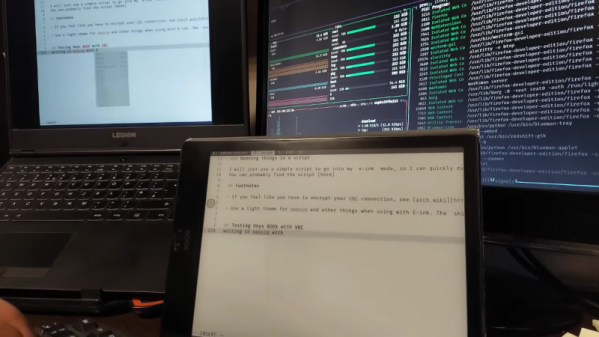
[Alireza Alavi] wanted to use an e-ink tablet as a Linux monitor. Why? We don’t need to ask. You can see the result of connecting an Onyx BOOX Air 2 to an Arch Linux box in the video below.

Like all good projects, this one had a false start. Deskreen sounds good, as it is an easy way to stream your desktop to a browser. The problem is, it isn’t very crisp, and it can be laggy, according to the post. Of course, VNC is a tried-and-true solution. The Onyx uses Android, so there were plenty of VNC clients, and Linux, of course, has many VNC servers.

Putting everything together as a script lets [Alireza] use the ebook as a second monitor. Using it as a main monitor would be difficult, and [Alireza] reports using the two monitors to mirror each other, so you can glance over at the regular screen for a color image, for example.

Another benefit of the mirrored screens is that VNC lets you use the tablet’s screen as an input device, which is handy if you are drawing in GIMP or performing similar tasks.

We sometimes use VNC on Android just to get to a fake Linux install running on the device.

Continue reading “Using An E-Book Reader As A Secondary Display”

Linux On A Floppy: Still (Just About) Possible

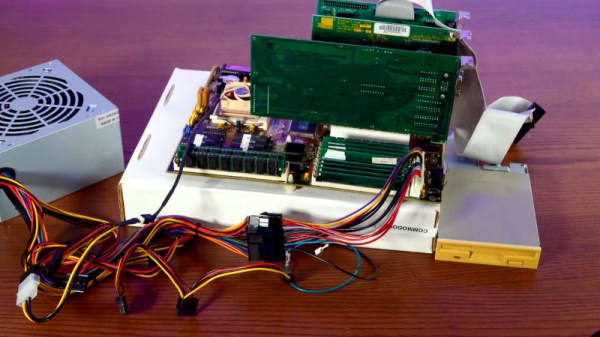
Back in the early days of Linux, there were multiple floppy disk distributions. They made handy rescue or tinkering environments, and they packed in a surprising amount of useful stuff. But a version 1.x kernel was not large in today’s context, so how does a floppy Linux fare in 2025? [Action Retro] is here to find out.

Following a guide from GitHub in the video below the break, he’s able to get a modern version 6.14 kernel compiled with minimal options, as well as just enough BusyBox to be useful. It boots on a gloriously minimalist 486 setup, and he spends a while trying to refine and add to it, but it’s evident from the errors he finds along the way that managing dependencies in such a small space is challenging. Even the floppy itself is problematic, as both the drive and the media are now long in the tooth; it takes him a while to find one that works. He promises us more in a future episode, but it’s clear this is more of an exercise in pushing the envelope than it is in making a useful distro. Floppy Linux was fun back in 1997, but we can tell it’s more of a curiosity in 2025.

Linux on a floppy has made it to these pages every few years during most of Hackaday’s existence, but perhaps instead of pointing you in that direction, it’s time to toss a wreath into the sea of abandonware with a reminder that the floppy drivers in Linux are now orphaned.

Continue reading “Linux On A Floppy: Still (Just About) Possible”

Creating User-Friendly Installers Across Operating Systems

After you have written the code for some awesome application, you of course want other people to be able to use it. Although simply directing them to the source code on GitHub or similar is an option, not every project lends itself to the traditional configure && make && make install, with often dependencies being the sticking point.

Asking the user to install dependencies and set up any filesystem links is an option, but having an installer of some type tackle all this is of course significantly easier. Typically this would contain the precompiled binaries, along with any other required files which the installer can then copy to their final location before tackling any remaining tasks, like updating configuration files, tweaking a registry, setting up filesystem links and so on.

As simple as this sounds, it comes with a lot of gotchas, with Linux distributions in particular being a tough nut. Whereas on MacOS, Windows, Haiku and many other OSes you can provide a single installer file for the respective platform, for Linux things get interesting.

Continue reading “Creating User-Friendly Installers Across Operating Systems”

Building Rust Apps For Cheap Hackable Handheld Console

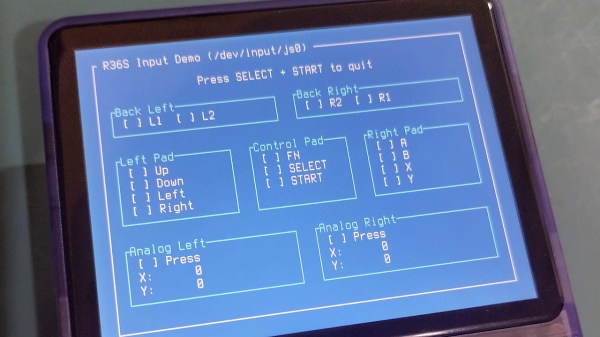
The age of cheap and powerful devices is upon us. How about a 20 EUR handheld game console intended for retro game emulation, that runs Linux under the hood? [Luiz Ferreira] kicks the tires of a R36S, a very popular and often cloned device running a quad-core RK3326 with an Ubuntu-based OS, and shows us how to write and cross-compile a simple app for it using Rust – even if you daily drive Windows.

Since a fair bit of the underlying Linux OS is exposed, you can quickly build even text applications and have them run on the console. For instance, [Luiz]’s app uses ratatui to scan then print button and joystick states to the screen. Perhaps the most important thing about this app is that it’s a detailed tutorial on cross-compiling Rust apps for a Linux target, and it runs wonders using WSL, too.

Installing your app is simple, too: SSH into it, username ark and password ark. Looking for a Linux-powered device with a bright screen, WiFi, a fair few rugged buttons, and an OS open for exploration? This one is quite reassuring in the age of usual portables like smartphones getting more and more closed-off to tinkering. And, if the store-bought hackable Linux consoles still aren’t enough, you can always step it up and build your own, reusing Joycons for your input needs while at it.

Linux Fu: The SSD Super Cache

NVMe solid state disk drives have become inexpensive unless you want the very largest sizes. But how do you get the most out of one? There are two basic strategies: you can use the drive as a fast drive for things you use a lot, or you can use it to cache a slower drive.

Each method has advantages and disadvantages. If you have an existing system, moving high-traffic directories over to SSD requires a bind mount or, at least, a symbolic link. If your main filesystem uses RAID, for example, then those files are no longer protected.

Caching sounds good, in theory, but there are at least two issues. You generally have to choose whether your cache “writes through”, which means that writes will be slow because you have to write to the cache and the underlying disk each time, or whether you will “write back”, allowing the cache to flush to disk occasionally. The problem is, if the system crashes or the cache fails between writes, you will lose data.

Compromise

For some time, I’ve adopted a hybrid approach. I have an LVM cache for most of my SSD that hides the terrible performance of my root drive’s RAID array. However, I have some selected high-traffic, low-importance files in specific SSD directories that I either bind-mount or symlink into the main directory tree. In addition, I have as much as I can in tmpfs, a RAM drive, so things like /tmp don’t hit the disks at all.

There are plenty of ways to get SSD caching on Linux, and I won’t explain any particular one. I’ve used several, but I’ve wound up on the LVM caching because it requires the least odd stuff and seems to work well enough.

This arrangement worked just fine and gives you the best of both worlds. Things like /var/log and /var/spool are super fast and don’t bog down the main disk. Yet the main disk is secure and much faster thanks to the cache setup. That’s been going on for a number of years until recently.

Continue reading “Linux Fu: The SSD Super Cache”

Moving From Windows To FreeBSD As The Linux Chaos Alternative

Back in the innocent days of Windows 98 SE, I nearly switched to Linux on account of how satisfied I was with my Windows experience. This started with the Year of the Linux Desktop in 1999 that started with me purchasing a boxed copy of SuSE Linux and ended with me switching to Windows 2000. After this I continued tinkering with non-Windows OSes including QNX, BeOS, various BSDs, as well as Linux distributions that promised a ‘Windows-like’ desktop experience, such as Lindows.

Now that Windows 2000’s proud legacy has seen itself reduced to a rusting wreck resting on cinderblocks on Microsoft’s dying front lawn, the quiet discomfort that many Windows users have felt since Windows 7 was forcefully End-Of-Life-d has only increased. With it comes the uncomfortable notion that Windows as a viable desktop OS may be nearing its demise. Yet where to from here?

Although the recommendations from the peanut gallery seem to coalesce around Linux or Apple’s MacOS (formerly OS X), there are a few dissenting voices extolling the virtues of FreeBSD over both. There are definitely compelling reasons to pick FreeBSD over Linux, in addition to it being effectively MacOS’s cousin. Best of all is not having to deal with the Chaos Vortex that spawns whenever you dare to utter the question of ‘which Linux distro?’. Within the world of FreeBSD there is just FreeBSD, which makes for a remarkably coherent experience.

Continue reading “Moving From Windows To FreeBSD As The Linux Chaos Alternative”