
Multicolor 3D Prints The Hard Way

After drooling over the Makerbot dual-head extruder, [Brett] decided to get off his duff and make a proper multi-color print.

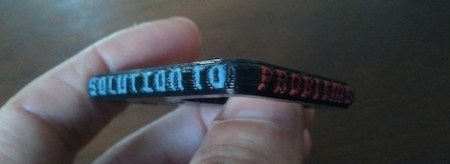
[Brett] has been making a few bottle openers for friends and has been successfully experimenting with switching filaments in the middle of a print. For his “Saturday Killer” bottle opener, he decided to push multicolored prints to the limit. For the “Saturday Killer,” [Brett] decided to print an abridged version of the classic Simpsons quote, “Beer, the cause of, and solution to, all of life’s problems” on the side of a bottle opener in 4 different colors.

The files necessary to print the Saturday Killer were generated in OpenSCAD. The general principle behind the design is to generate separate .STL files for the bottle opener and the sides, split those files into 2-layer chunks, and print those files while constantly adjusting the z-height. It’s not called the Saturday Killer for nothing, so [Brett] had to change the color of his filament 25 times.

A much simpler version of a complex multi-color print is [Brett]’s Shepard Fairey inspired self-portrait. Still, we’re thinking a dual head extruder is somewhere in [Brett]’s future. At least he’s got the technique down.
OnshouldersTV Knows How To Use OpenSCAD

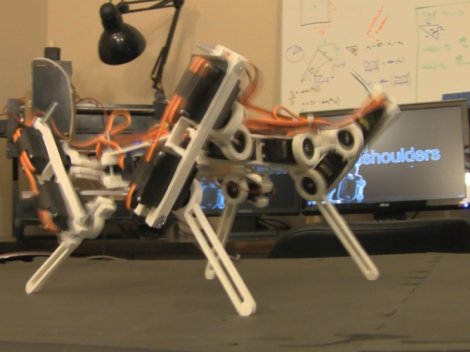
Recently there’s been a increase in the popularity of OpenSCAD as the tool of choice in the 3d printing community. [Gavilan Steinman] is putting out a series of webTV shorts on the use of OpenSCAD. While it lacks a lot of the features of big CAD suits (such as the ability to generate drawings of your parts), the community has proven it’s effectiveness as a design tool. There are only two episodes out so far but they cover  OpenSCAD, mathcast, 3d printing, and a really neat robot design.  Watch them below.

Continue reading “OnshouldersTV Knows How To Use OpenSCAD”

Punching Out Parts

If you’re more of a code monkey than artist, it may be tough to transform your ideas into the 3D models necessary for fabbing. The folks working on openSCAD apparently feel our pain.

openSCAD uses a language somewhat reminiscent of C for creating models. A preview of the model is rendered alongside your code. Fully cross-platform, it runs on Linux, OS X, and Windows. Much like SketchUp, openSCAD can also extrude 2D outlines into models. This feature comes in very useful if one already has a set of technical drawings for a part. With no price tag, it’s pretty affordable during this costly season.









