
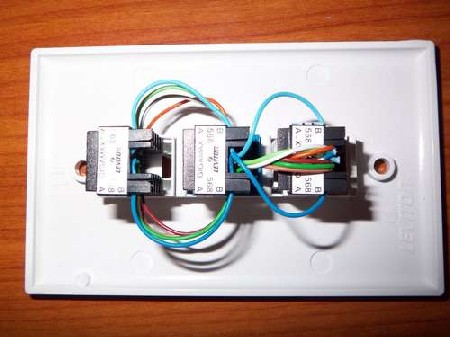
Making a passive network tap can be an easy and inexpensive undertaking as shown in this Instructable. Passive monitoring or port mirroring is needed because most networks use switches which isolate the network traffic and this does not allow for the entire network to be monitored. This example uses a single tap, using multiple taps will provide access to the full-duplex data separately. By using two taps you are able to monitor inbound data that is passed through one tap, and outbound data that is passed through the other tap. Separate taps are desired because most sniffer software handles half-duplex traffic only and requires two network cards for full-duplex.

It is easy to insert a passive Ethernet tap inline, as shown in the picture above from a different multitap project, simply plug the incoming line into a host port and a patch cable from the other host port to the outgoing port, then verify your connection status. Now connect the Ethernet port of your sniffer computer into either of the tap connectors on the passive Ethernet tap. This tap works by using sniffer applications that put your Ethernet card into promiscuous mode. This allows you to monitor all traffic on the network not just the traffic directed to your network adapter. After you install your favorite sniffer program, such as Wireshark, Snort, TCPDump, WinDump, or Ettercap to name a few, you are then able to monitor all traffic any way you see fit, like looking for passwords in the video below.
[youtube=http://www.youtube.com/watch?v=7ezGTP99xSw&hl=en&fs=1&rel=0&color1=0x3a3a3a&color2=0x999999]












Wait a second here.. since when is wireshark not full duplex?? The point of an ethernet tap is that you cant sniff traffic on a switched network and port mirroring doesn’t
usually work for malformed packets.
Since you can’t merge RX and TX in the RX of the host receiving the data without breaking the data stream, well, Wireshark will only work half-duplex! It is not Wireshark but the hardware that won’t do it.
Can you elaborate? Why does it fail? I just made a 3 jack tap. The connection works between any two but fails when a third is plugged in. What’s happening when I plug the third wire in? Thanks!
O that’s mean and I love it!
for scenarios where you don’t have physical access to the switch or the uplink line, if you want to intercept traffic between a target host and the router on a switched network, you can use arp spoofing
of course, this is not a permanent solution, because it can be easily detected, and incurs a lot of overhead (unlike the tap method in the article, which incurs no overhead)
this also reminds me of an old trick for secure logging: wire your logging server’s ethernet cable with only rx lines, so the server can’t respond to any packets or write any data to the network. this way, all your servers can stream logs to the logging server, but supposedly no one can break into the logging server to erase logs (since communication is only one-way)
on an unrelated note, the comment textarea is too wide, and text on the right side is hidden by the vertical white dividing line
What browser do you use? Do you use an adblock?
I am not sure I said anything about wireshark being only
half duplex? I said most sniffer software, because as
[alexfox] eludes to there are many times when you only want
to monitor one way, and no need to transmit your presence on the
network, ever.
Just spoke with [eliot], the issues with the comments are on the list of things to
be fixed.
Jason
You really should use twisted pair wires. keeping the twist keeps
the signal degradation to a minimum. building a tap this way
keeps the send and receive signals on separate cards. basically
if you were to put one of these in line with the network you’d
never be able to tell it was there. both lines go to the receive
side of the network cards, with no way for them to be able to talk
back to the network. though you’d need to make sure the computer
doing the sniffing wasn’t on the same network as what you are listening
to.
alexfox what the frick are you talking about. How could you ever authenticate yourself on a network if your ethernet can only RX. There’s something called “handshaking” you know. If you can only RX the only way you can receive is by sniffing all traffic and looking for some type of magic packet to log. But there can’t be some address for that computer that any computer on the network can address like normal.
Or you could just pull a 4-port 10mbit ethernet hub out of
somebody’s dumpster.
Most network admins would pay good money for 4 working cat5 jacks,
(as they’re actually rather expensive) while old 10mbit hubs get tossed away routinely.
also, guys, your text input box is a little screwed up on firefox, just FYI
I keep a 10/100 auto sensing hub (not switch) around just for sniffing. it’s in a smallbag with extra ethernet cables for when clients call with network troubles. I might make a tap to throw in my normal tool bag though. Small enough to keep handy that way.
This is better then a hub, not only for its size (You can make another one with one jack and two ends of a cable, making it only 3~4 inches long), but also because it does not need a power supply or empty outlet (Or the need to carry around a power splitter [Corollary: I carry a 1 to 3 outlet power splitter because there are more students with laptops then there are outlets at school. 99cents and I have power for my laptop with a dead battery :D]). This is completely passive and can be used by anything with an Ethernet port.
@dontbelieveyou
UDP. Ever hear of it?
@dontbelieveyou
i’ve never done it before personally, I’ve merely heard about it many times
after a bit of research, it seems like older non-autosensing hubs had no problem with these kinds of cables. newer hubs require a different cable in order to trick them into thinking there is a link on the port. some newer switches/hubs have options in their configurations to allow disabling of autosense, i believe
if you can get around the hub link detection, then you obviously use udp for communication
references:
http://newdata.box.sk/2001/jan/sniffing-faq.htm#receive-only
http://www.sunzidigital.com/samngms/sniffing_cable/
“Most network admins would pay good money for 4 working cat5 jacks,
(as they’re actually rather expensive) while old 10mbit hubs get tossed away routinely.
Posted at 10:22 pm on Sep 14th, 2008 by anon”
WTF are you talking about? I can get them for about 75 cents
a piece in bulk.
Neat, but an $18 hack when a $1 commercial product is available isn’t a good idea.
http://www.monoprice.com/products/product.asp?c_id=105&cp_id=10513&cs_id=1051304&p_id=1112&seq=1&format=2
If you have the parts laying around and the urgent need for a splitter then this is OK.
If you just are thinking of trying it pick up the $1 version.
I have 2 of these BTW, and they are wired identically to the instructable.
I find it funny that he places importance on the usage of the jacks, all of the jacks should be identical as far as electrical connection is concerned, no need to make them different colors.
If you need to sniff rx and tx you can buy another t adapter with a male jack to 2x female and plug it into the one I linked above, just open the shells and pull the pins or snip the wires that you don’t need, for $2 it is a reasonable solution.
I guess it makes sense the importance he places on the jacks if it is only going to sniff one side of the conversation.
@ nubie
Your name says it all. (I know older post but I need to add this). If you use that, you will screw something up. Unless you hack the cable from that adapter to your computer you need to do it the -right- way. It would be a lot easier to make the adapter than have to fumble for the right cable for that adapter.
Also, there is a reason you need 2 nics to sniff the traffic. Each nic only accepts 2 wires for input (10/100). If you try to put both sides of the conversation back into a single line, you will miss half the conversation.
PLEASE, go take a basic networking class at your local community college else you may end up forking out lots of money to fix a network you will break.
Anyone ever thing about using something like this with a gumstix and have the gumstix autorun tcpdump? Small battery and a tap could be very dangerous.
Ah yes, yet another case of the HIP-SNIDE internet disease aka…
“I know more than you and I will work my ass off to find holes in your ideas and together we will make you feel like shit, when in reality you had a fairly decent idea for the average non-CS-educated user, which works perfectly for certain applications but wouldn’t meet Cisco validation, and you went through lots of trouble to present it to us, but never mind the kind gist of the service and keep fucking the poor guy over to help the world see how much I know”.
Gotta love hiding behind a computer.
@me : yes, absolutely. I saw a “Rump session” about that during SSTIC (french security event) in 2006.
This configuration as presented is easy to make, and simpler than pulling a old router apart to de-solder the 4-port off the SMT board, 32 pins at once. High art would be to make it small enough that it can be concealed under the removable cube wall or disguised (surge protector). Whoever suggested twisting the wire should realize that the 4 pairs have different twist rates so are you going to recommend a twist rate for each pair while you’re giving out advise?
I am trying to tap optical Ethernet from optical fiber. There are fiber tapping devices available that extract small light out of the fiber but the problems is now to convert that into electrical Ethernet signal. There are Ethernet media converters available but the problem is how to make it work by connecting tapped signal into its Rx and leaving its Tx unconnected
this is good. now get this. how could you take this data and transmit it via wireless? I am researching how to use a IEEE 802.11 Wi-Fi Transceiver Module to transmit the ethernet data that is being sniffed.
Can’t use a hub, it changes electrical properties of the network connection. And Authentication is not an issue since you really SHOULD be turning off any protocols, etc on that Ethernet card, and therefore not broadcasting anything out of your interface…. These are great for IDS and other systems that you don’t want a hacker or any one else to know is connected to the network…..
But this works only on 10/100 Mbit
read more http://www.cubro.net/index.php/papers-docs/cat_view/6-whitepaper
Please use this link !
http://www.cubro.net/cubro/index.php/papers-docs/whitepaper/35-passiv-gbit-copper-tap
I know I’m a little late, but I was wondering: This network tap is passive, but is it possible to gain access to a local area network through in a method similar to this? My idea came because you know…mission impossible ‘n’ sh*t.
Yet anohter passive tap. http://www.instructables.com/id/Passive-network-tap-revised/
If you want a cheap readmade tap look at
http://www.tap-shop.net/shop/index.php/cubro-tap-10-100-mbit.html
I just made a PCB for a passive network tap today , i already have one similar with the one posted here , but i decided to build a pcb circuit for definitive .
Basically is something like this from top :
http://s13.postimg.org/iw706vivr/Finished_TOP_With_Shunts.jpg
If anyone wants to build a one then you have here the pcb circuit for it .
http://www.mediafire.com/download/olxladjpzsovcmk/ethernet_tap_PCB.rar