
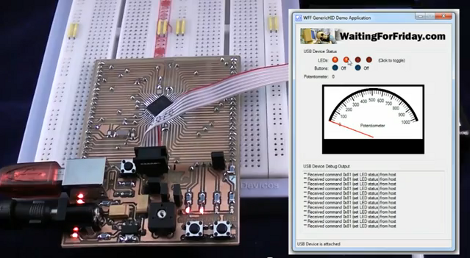
The advent of integrated USB peripherals in microprocessors (PIC, AVR, etc.) has certainly taken a lot of the work out of developing USB devices, not to mention reducing the silicon parts in these designs. But do you know what you’re doing when it comes to controlling them with user-friendly applications? [Simon Inns] is lending a hand with this in his recent tutorial. He shows how to use USB capable AVR chips along with your own Windows applications.
After the break you can see the video from which the above screenshot was captured. That’s a development board of his own making which hosts an ATmega32U4, as well as a USB-B port, LEDs, potentiometer, and a few switches. Taking a closer look, we love the breadboard friendly headers he used on the bottom of the board to break out all of the pins.
His demo shows the Windows app turning LEDs on the board on and off, as well as ADC data displaying the current potentiometer position with the onscreen dial. His code package includes the hardware design, firmware, and app software needed to follow along with what he’s doing.
[youtube=http://www.youtube.com/watch?v=5CgSLAkTgWk&w=470]












Astonished that there’s not yet much reaction to this, Biomed points out that this leads to USB interfaced AVR devices of ANY sort. Weather stations, robots, test bench equipment, you name it. Here we have the keys to the Kingdom of Interfacing ANYTHING Directly to a PC with code on the AVR and Code on the PC. Whatever you want! And doing it with user-level APPS on the pc side. The only explanation I can find for such a lack of immediate enthusiastic response is that you’ve all dug deep into your parts bins and are busy implementing it all right now!
The C# framework breaks interfacing with an arduino down to a few lines of code, so this post is about as exciting as posting a blinking led project. Creating some sort of protocol on top of the framework is interesting, but again not something that takes an extraordinary amount of brain power.
And with all of the wireless interfaces available, usb communication is not as interesting or useful. All of the things you mentioned would be much more effectively implemented with bluetooth.
I agree. The only nice thing about USB HID is that you don’t need to mess with COM port name changing when you plug the connector on a different port but actually if you use FTDI D2XX libs you don’t need either.
Nothing new here.
‘that’s what Orville and Wilbur said in 1902!’
????
@biomed
I’d like to put my hands in the guts of the things I do.
In last term, can’t be open stuff in a closed box.
It’s only Windows.
This is great! I’m currently working on a project where I have a microcontroller gathering and storing data that can be read later via USB.
When stuff isnt open, you figure it out and open it up. reverse engineer, study, attack and conquer. Nothing is truly closed to those who wish to explore
OK… Ok I can accept that.
Show me the Bluetooth!
@Biomed
The Arduino Leonardo that’s coming out very soon uses the 32u4 and there’s already one example of HID programming in Arduino 1.0 so I’m sure it’s only a matter of time until more people catch on.
Otherwise it really depends on what you’re doing. Granted, I haven’t made a lot of things but out of all of them only one was something that had to be connected to a computer as part of its purpose.
.NET bloat. I’ll pass on this one.
Doesn’t the Teensy do the same thing?
Making GUI interfaces on windows? Definitely not an hack. Can we move on to the next article please?
^This
Nice web site and a lot of cool projects there.
I wonder what tool set/programmer he uses for his PIC projects…
Great article….thanks for posting. (inexplicably tough to please crowd here though..)
“For the USB connector I used a full-size type B socket which is a lot more sturdy than the micro and mini B connectors (since the cable gets plugged in and out a lot on a development board).”
The USB Micro connectors are extremely durable. Sure, the larger USB Standard B connector could withstand more force in the worst case, but either type will be more than adequate if properly installed.
“The newer Micro-USB receptacles are designed for up to 10,000 cycles of insertion and removal between the receptacle and plug, compared to 1,500 for the standard USB and 5,000 for the Mini-USB receptacle.” (WP:USB#Durability)
Durability: 5000 mating cycles for USB Standard connectors; 10,000 mating cycles for USB Micro connectors (Digi-Key USB 3.0 Product Training Module).
P.S. Nice work on that self-fabricated circuit board, and with the fine pitch SMD IC.
I thought HAD had changed it commenting policy? Anyway…
It’s worth mentioning that USB HID and Serial over USB are not ‘as good as’ each other. HID has automatic device detection and the ability to form composite devices (say USB MIDI for music and USB HID for complex control surface through the same plug). Also, unlike bluetooth, you can also power the device.
The library saves lots of work dealing with unmanaged API calls in Windows and also gives you an out-of-the-box solution to start with.
This project is not really focused on the firmware (the hard work there is done by the LUFA stack), it’s more focused on providing a simple API from C# to make it easy to talk to your USB driven creations.
Nice project! Thanks for sharing it.