
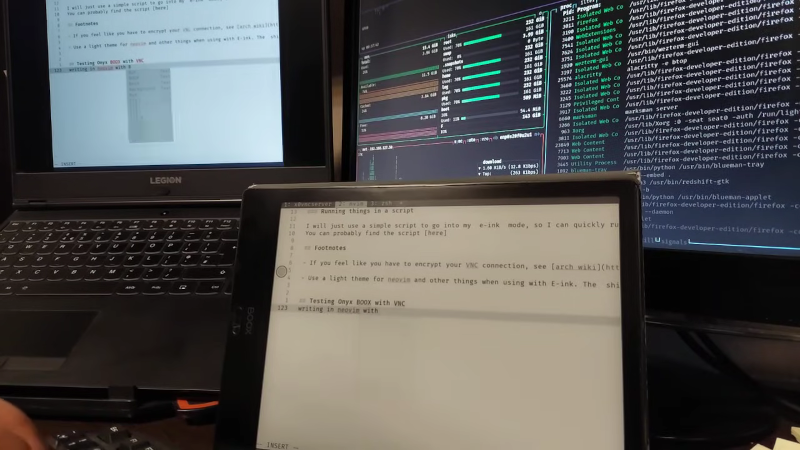
[Alireza Alavi] wanted to use an e-ink tablet as a Linux monitor. Why? We don’t need to ask. You can see the result of connecting an Onyx BOOX Air 2 to an Arch Linux box in the video below.
Like all good projects, this one had a false start. Deskreen sounds good, as it is an easy way to stream your desktop to a browser. The problem is, it isn’t very crisp, and it can be laggy, according to the post. Of course, VNC is a tried-and-true solution. The Onyx uses Android, so there were plenty of VNC clients, and Linux, of course, has many VNC servers.
Putting everything together as a script lets [Alireza] use the ebook as a second monitor. Using it as a main monitor would be difficult, and [Alireza] reports using the two monitors to mirror each other, so you can glance over at the regular screen for a color image, for example.
Another benefit of the mirrored screens is that VNC lets you use the tablet’s screen as an input device, which is handy if you are drawing in GIMP or performing similar tasks.
We sometimes use VNC on Android just to get to a fake Linux install running on the device.












Does it run Gentoo?
E-ink as a second screen would be nice because it doesn’t consume any power most of the time. 20-30 Watts for each extra monitor is just waste heat.
The second reason is that e-ink screens come in standard paper aspect ratios, or nearly, so they would be nice for reading technical documentation in the format it was intended to be viewed. Companies are yet to switch over to making datasheets using power point slides.
The problem with using a regular monitor as a portrait second display is that 9:16 is too damn narrow. To get the width you need a towering tall monitor that looks stupid, and the top won’t align with the regular horizontal screen next to it even if you put the bottom all the way down to the table. You get a crick in the neck looking at it.
If anybody should know of a modern, good (IPS), 4:3 or 5:4 pivoting monitor in the 20-23″ range, please tell me.
Well, if the portrait-mode 16:9 is too tall for your liking, you could always letterbox it.
I suggest black duct tape.
Can’t I just saw the extra bit off?
Except this is simply a mirror for an existing display ALSO how on the tiny e-ink one.
It uses even more power and takes up even more desk space (a new device and a normal monitor)
It also requires an Android e-reader, which makes it >$200 instead of <$40 or free like an old Kindle.
“Why?” Is a pretty damn good question, because this is expensive and bordering on useless.
Always wanted to have one or two of these on standby displaying technical documentation (or knowledge base extracts, or stackoverflow articles). Main display is getting clattered way too quickly, and I’d rather have non-interrupted document flow on one while I am busy scrolling up and down the code on the other. ieink would be easier on the eyes, since it is closer to printed paper.
Having said that, I have yet to learn how to quickly to zoom in and out, and that alone could have saved me frustrated hours of scrolling up and down and all around.
What I truly need is all three, slow-mo help files reading from which I can copy-paste what I found useful – AND multi-split-screen AND zoom-out zoom-in that shows ALL the screens I need as one large workspace. Supposedly so-called Windows were created for the whole purpose of “desktop” where it is organized, and theoretically one somehow should be able to zoom into and out o. Instead, the windows I am using seem to be permanently stuck in one particular view only (the newest additional view of “all open apps” is only a half-solution, I need to see ALL windows AND have some of them zoomed-out, not just “all windows at the display resolution”).
I recall that at some point I run across this nifty JS (back then it was almost open source, ALMOST, as it was being patented) that would allow unlimited zoom-outs. Being JS in the mid-2000s meant it only run inside a browser, so it was dismissed by me as “only partially useful”, since most of my activities take place outside of browser (and I truly do NOT understand why the browsers de-facto became their own GUIs inside GUIs, their own menus, etc). What was nice about the library was its ability to show the entirety of the web pages rendered, so you can actually see the length of it and zoom back into the part you are looking for.
Having rambled all that, I’ve seen my so-called “managers” using gargantuan 48 inch screens where everything is visible at once. Obviously, only The Anointed Few are even allowed to ask for one, and I could truly use one ~10 years back when I was doing some heavy code-lifting (systems programming, which almost always involves three or four developments running concurrently in different environments).
The price for the average monitor, though, has fallen significantly, and I am glad it did, but the thing is, I’ve learned how to make do with one EXCEPT the stackoverflow reading and/or tech specs writing/reading. Since it is stop-and-go process and not smooth flow development THAT part should have been outsourced to eInk display long time ago. Unfortunately, none of the budget eInks I looked at years ago were easy to set up or use according to my (actually quite simple) liking, so maybe this time around there is a better way out.
Thank you for sharing.
For a couple of years I had the use of a gorgeous portrait monochrome CRT — Radius Pivot. It was beautiful for reading documents on: high resolution, no RGB tinge on fonts.
Big monochrome LCDs should be easy to make, and efficient too. Is the market demand so low that they don’t exist? The resin printer market drove high-res small ones. Where are the 20″ ones?
Have a search on Ebay for “barco monochrome” or “barco greyscale”. These are medical monitors used for viewing X ray images at high resolution. I think some of them need a special GPU also to get the correct colors or lack thereof. Worth noting that these were “call for price” expensive when new. I don’t even think greyscale ones are made anymore, as color monitors have caught up to the resolutions they need from them.
I saw them at Tatung many years ago, and they were gorgeous. The main application (I was told) was x-ray displays, where they wanted the highest possible resolution, and standard colour lcds were far too low at the time.
would https://novnc.com/info.html be a good fit?
have used it on raspberry pi to a laptop when I was short of a screen.
worked over https://ngrok.com/ as a remote experiment.
was a little laggie?
So they ran a vnc app on their Android tablet, and mirrored one of their monitors to it.
The tablet happened to be an expensive e-ink Android tablet.
Someone explain the “hack” part of this.
Note, for the cost of an expensive e-ink Android tablet, you could buy an e-ink monitor and not have the software faff OR the reylar monitor sitting in the background. So this only makes ANY sense if you already have an expensive e-ink Android tablet.
I’m trying to be more positive in these comments, but it’s so hard when HaD keeps featuring “guy plugs tv into wall power. Uses extension cord to get further…” stories.