
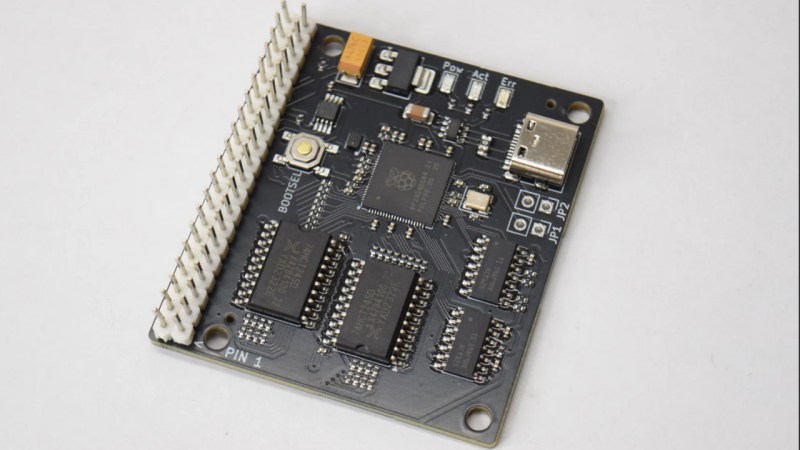
You can get an IDE to USB bridge from all the usual sources, but you may find those fail on the older drives in your collection– apparently they require drives using logical block addressing, which did not become standard until the mid-1990s. Some while some older drives got in on the LBA game early, you were more likely to see Cylinder-Head-Sector (CHS) addressing. That’s why [JJ Dasher], a.k.a [redruM0381] created ATABoy, an open-source IDE bridge that can handle the oldest drives that fit on the bus.
The heart of the build is an RP2350, which serves as both IDE and USB host controller. To computer, after a little bit of setup, the drive attached to ATABoy shows up as a regular USB mass storage device. A little bit of setup is to be expected with drives of this vintage, you may remember. Luckily [JJ] included a handy BIOS-themed configuration utility that can be accessed through any serial console. He says you’ll usually be able to get away with “Auto Detect & Set Geometry,” but if you need to plug in the CHS values yourself, well, it’ll feel just like old times. Seeing is believing, so check it out in the demo video embedded below.
Though the custom PCB has a USB-C connector, and the USB-C standard could provide enough power for ye olde spinning rust drives, [JJ] didn’t include any power delivery with ATABoy. If you’re using it with a desktop, you can use the PSU in the box; MOLEX hasn’t changed. If you’re on a laptop, you’ll need another power supply– perhaps this USB-C powered benchtop unit.
If you’re using a Raspberry Pi or similar SBC, go ahead and skip USB entirely–the GIPO can do PATA IDE.












“Some while some”
“To computer, after a little bit of setup, the drive attached”
“the GIPO can do PATA…”
Edits have been made, thanks.
You need to go back and have another try, it’s a terribly written article and you didn’t even fix most of the errors pointed out above.
When it is that bad, you can be 100% sure he did it himself.
Yeah, at least we know it’s not an AI written article…. lol
I usually don’t critique grammar or spelling on Hack-a-Day as I realize we’re all human and make mistakes, but you really might want to go back and look at that second paragraph at least. There are missing and misspelled words that ought to catch your eye if you read it moderately slowly.
@Tyler – sorry if my comment above came across as sniping. I appreciate the articles that you folks bring us here, really I do.
Have you considered having a “Corrections” link with a web-form? I always feel bad about posting typos/errata in an article’s Comments like this – it feels too much like public author-shaming.
I wonder how compatible with CHS that pi GPIO implementation actually is?
It´s really too bad Pi Pico (2) does not USB1.1 Host. There would be a ton of applications possible if it could do USB2.0
“written with AI assistance” c’mon, really?
At least it’s honest. Too many things aren’t labeled properly these days.
I also like the project. I have some old 40 to 120 MB MB HDDs in the attic.
Now I want to see an MFM-to-USB adapter. Or ESDI-to-USB. Or SA4000 or whatever the 8″ drives were…
I’d settle for a less expensive 5.25 to USB adapter.
http://www.amazon.com/pata-usb-adapter/s?k=pata+usb+adapter
Also SATA is available as well as a few “combo” adapters.
those don´t non work non-LBA disk, as stated in the article, and this was the precise reason why this project exists at all. Now go back to Amazon and dig me out an MFM to USB adapter, presto !
Sorry — I meant 5.25 floppy drive.
MFM is much more complicated.
An IDE HDD is an intelligent drive, an ST412/ST506 drive is “analog” and needs a real, dedicated HDD controller.
IDE “controllers” of old are merely simple ISA host adapters.
MFM is not that intimidating. Once Matt finishes https://github.com/MajenkoProjects/RTmFM (Pico MFM disk emulator) adding reverse functionality will be trivial.
Hi. The problem I see is response time.
Modern tech is very powerful, but not necessarily real-time capable.
While older, discreet TTL era parts have very low reaction time despite them not very powerful.
It’s comparable to how modern LCD displays may have a lag, while CRTs usually don’t.
In this case, the interleave factor and other things might matter.
Similar to how it mattered back in time, when 4,77 MHz XTs struggled to access the HDD at low interleave factor.
Or similarily, to how a Raspberry Pi’s GPIO ports might have trouble interfacing with a real 16-Bit ISA bus at 8 MHz with zero wait states.
We’re surely not unrightful proud of our archivements in 21th century,
but our modern technology is a bit overrated sometimes, too, I think.
Brute force (raw processing power) isn’t always the solution, also.
Should be absolutely fine with a microcontroller, especially if using an rp2350 and one of its high speed interfaces like PIO.
For general computing raw processing power is generally the best thing, the latency really isn’t noticeable to a person and all the hardware is designed to function with a small amount of latency. If you want real time control and processing you need a microcontroller or FPGA, they are still completely capable of precise real time timing.
Here you go https://github.com/raszpl/sigrok-disk. Requires USB Logic Analyzer capable of capturing 1-2 channels at 100MHz ($69 sipeed SLogic16U3, or maybe even $15 SLogic Combo 8 doing 80MHz) and Arduino for flipping tracks. RLL dumping requires 200MHz LA and same software.
Provide me with dumps and Ill add full support to sigrok-disk. Im also looking for dumps of ESDI, SMD, SDI drives.
Thanks for making me aware of the sipeed SLogic16U3. The Sigrok wiki page about supported hardware doesn’t list it though so I’m gonna wait for it to be supported to get it.
That might never happen. Sigrok/Pulseview is not being updated. There is some drama about lack of active maintainers and year old pull requests being ignored. Chinese companies making LAs just fork libsigrokdecode/Pulseview and publish their own executables/sources.
What I’ve read (no experience to date) is that those 8″ drives were just Shugart, maybe with different connectors. Meaning, you can use a Greaseweazle with them. Of course, that is more for making images of the discs (and I guess writing an image to a disc). It’s not like you are going to mount the disc and access it as part of your filesystem. But seriously, what are you doing with an 8″ floppy these days if not just trying to recover the data that is on it.
I think this is better than that actually because it accesses the analog data right off the heads rather than the 1s and 0s the drive can see. That means you can read all sorts of formats and even recover data that is still present but too far gone for the drive’s own electronics to see it. I recovered an old 3½ disc from my childhood which had been damaged in the bottom of a moving box that way.
https://github.com/keirf/greaseweazle
Not so long ago I had a old instrument that booted from a DD Floppy disk. I wondered how difficult it would be to use some uc as a floppy drive. I think the RP2040 would have been an ideal target…
(I know there are floppy drive emulators with SD-Card slot available)
Hi there! The Goteks use an FPGA, not just a microcontroller.
And some more recent versions made during Corona days
had issues with slower USB thumb drives because the RAM for buffering was too little on the new ICs.
So enough fast RAM for buffering is important, too, it seems.
Back in the 1990s, someone would have used a FlashPath floppy disk adapter as a floppy alternative, maybe.
It was meant for SmartMedia cards that were still in use by digital cameras at the time. An MultiMediaCard (MMC) version existed, too.
Without special driver support, though, it’s unclear if it could be used.
I assume it might look like a regular floppy, but I’m not sure.
There were drivers for Windows 9x/NT (incl. XP) and Mac OS (8.6+ or X, I guess).
Hi! Please be careful with the original firmware of these things.
FlashFloppy and HxC are more mature, less buggy, I think.
They also use standard floppy disk image files,
rather than splitting the poor USB drive or flash card into a hundred partitions.
Nice solotion to s pita
I purchased one of the premade boards. I’ve successfully dumped the contents of three older “CHS” drives. The oldest being an 80 Megabyte Maxtor from 1991. I had no issues. Dumping the drives only took a few minutes at USB 1.1 speeds as the drives were only between 80 and 120 MB. The device even identified the drive geometry without manual input.