
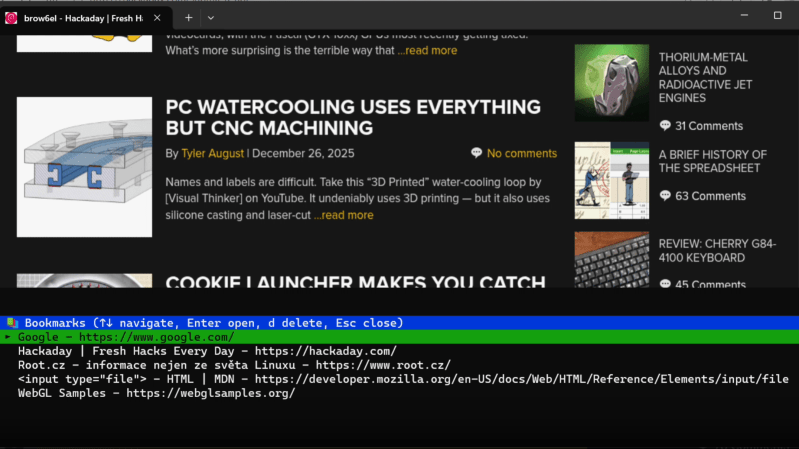
Programmers hold to a wide spectrum of positions on software complexity, from the rare command-line purists to the much more common web app developers, and the two extremes rarely meet. One point of contact, though, might be [Jan Antos]’s Brow6el, which uses sixel graphics to display a fully graphical web browser within a terminal.
Behind the scenes, the Chromium Embedded Framework renders webpages headless, then Brow6el uses libsixel to convert the rendered output image to sixels, a simple kind of console-based graphics representation, which it then outputs to the terminal. It regularly re-renders the page to catch page updates and display them in real time, and it can send mouse or keyboard input back to the webpage. For more advanced work, it also has a JavaScript development console, and it’s possibly to manually inject scripts into rendered webpages, or inject them automatically using URL match patterns.
Some other convenient features include a bookmark system, a download manager, terminal-based popup dialog support, support for multiple simultaneous open windows, and a private mode, all of these features being controllable through the keyboard alone. The mouse input can be taken from a real mouse or from a keyboard-controlled virtual mouse, which lets the user click and scroll through websites even on fully text-based systems. [Jan] provides an impressive video demonstration (and we’re not just saying that because of the demo website), which is embedded below.
Brow6el takes inspiration from a few other terminal-based web browsers, such as Carbonyl, though it improves on their graphics. Experienced readers, however, might already know that with some Wayland tricks, it’s possible to turn any application into a terminal app.












TUIs could dominate the world
The bigger question is, should they?
At the end of the day, the protocols used by this browser to display graphics are incredibly inefficient comapred to how a regular GUI application works.
This isn’t to say I’m a hater of terminals or this project, it’s super cool!
HI Yonatan, absolutely agree, I am the author. It started as idea can this be done and then it went little bit wild. I have some ideas how to improve sixel rendering, something like tile rendering and update only changed regions, this might significantly improve rendering performance, but have some side effects as user will need to tune sixel aspect ratio based on terminal/settings, also each tile might have different colour palette. It is something I might (or not) look into it. The reason I continued improving this was, I had demand from some of my friend being able to run this via ssh and access web resources (grafana) from local network, they say it behaves better than ssh x forwarding and they are disallowed to use port forwarding.
Thank you for calling ChatGPT for us. We couldn’t have done it ourselves.
Did I accidentally open LinkedIn? What is this garbage?
Congrats, you have filled 74.6% of the comments section with barely relevant drivel. With the power of AI, this should increase to 100% in no time!
Not seeing a report button, but this post should be removed. Mile long llm slop does not contribute anything to the discussion, and even the question / answer are mildly braindead. Throwing ml at a process that can be readily described and programmed is stupid
Is it wayland dependent?
Unfortunately at the moment it is using prebuilt chromium cef which have xlibs dependency. But one might be able to compile cef by himself without this dependency. Now it has been also tested running in tty framebuffer under yaft. So it does not need to run under wayland. I am looking into custom build of cef, but it is huge pain (complexity, long compile time, 100GB+ hdd) but it general it might be possible to run without these dep.
You could use it with a simple GameBoy screen. Can’t do it with WIndows 95.
In early 90s, commercial software packages such as Central Point PC-Tools 7/8/9 did use sophisticated TUIs.
They used the custom font feature of EGA/VGA to display icons in text-mode.
The applications looked very hi-res and clean by design.
The DOS freeware benchmark/info tool NSSI also used such a TUI, too.
Same goes for AMI’s WinBIOS on 486/586 PCs in early 90s,
which looked like Windows 3, but used VGA text-mode.
When I got in contact with Linux first time, I was shocked how oldfashioned and ugly Linux utilities looked in text-mode.
Same goes for FreeDOS installer, btw.
Excellent project, thank you for sharing with us, and I may give it a try this weekend.
I’ve long used Lynx and RSS reader for simple text fetching without the bloated (beyond recognition) web rendering engines, and also found that in some particular/limited scenarios cURL was good enough.
Pardon us, old farts like myself, who have unused stashes of vitriol, that gradually accumulated over the decades whilst fighting uncooperative wares, both hard and soft kinds. This project is decidedly a whiff of fresh air, and I also recall there were multiple occasions where there WERE limited successes, none produced lasting results as far as I can tell.
(erm, what was that mid-2000s project that suddenly went dead, Net Stalker? The one that mapped out ALL the links as it went whilst pre-rendering a tiny windows with the first page – THAT one? It supposed to have light rendering engine unencumbered by the JS bloats and whatnots.)
BTW, my rule of thumb for efficient use is thus – if it can scale itself down to simple ANSI-C thing that can (more or reliably) run on a cheapest/slowest (while till being useable) ESP32 – say, C3/C6, then it is a winner of my (rather limited and constrained) attention. Bonus if it can run on SAMD21 (or SAMD51), but it doesn’t have to scale THAT much down the absolute bare ware.
Some things I regularly run into (at my work, not at home) would happily run on Arduino Nano (or MEGA for extra inputs and a bit of extra number crunching power – rough equivalent of cheap graphing calculator clone). Some other things I run into even more often can compute on an 8-bit processor, and half of those don’t even need that, a handwritten 4-bit Karnaugh Map on a 4×6 index card would suffice. LUTs, to be exact, when properly reduced to its logical representation (on the topic of that, I also wish binary architecture wasn’t so hellbent of “everything is binary represented”, since operational amps solutions, where a range of values is needed, would suffice about the same).
Regardless, this a kewl project. I’ll give it a look.
Reminds me that old-school trick using EEPROMs as programmable logic chips.
Yes! That’s exactly what I was tinkering with last year. External EEPROMs as LUTs, and I found few niche low-priced low-speed kinds that work well with the Arduino slow-mo speeds. With a bit of upgrading and proper planning modern EEPROMs would work as well as FPGAs (slow-speeds). Static ROMs.
To tell the truth, FPGAs would be a better solution going forward, since they can be scaled up with code, so I bought few boards for the path ahead. My plan was really “ANSI GUI baked into FPGAs”, so it may even work out this year.
Among some chips of the old that I’ve accumulated is this nifty 20 year old Propeller 1 by Parallax (newer Propeller 2 is somewhat better kinda sorta) that comes with the VGA-generating library, fonts and all, baked into the chip itself. My path was recycling that idea, baking GUI into dedicated ware, and keeping it there, letting CPU do the real work.
The C64 PLA could be replaced by a programmed EPROM that acted as an address decoder.
https://www.geocities.ws/sieg.peter/pla/pla.html