
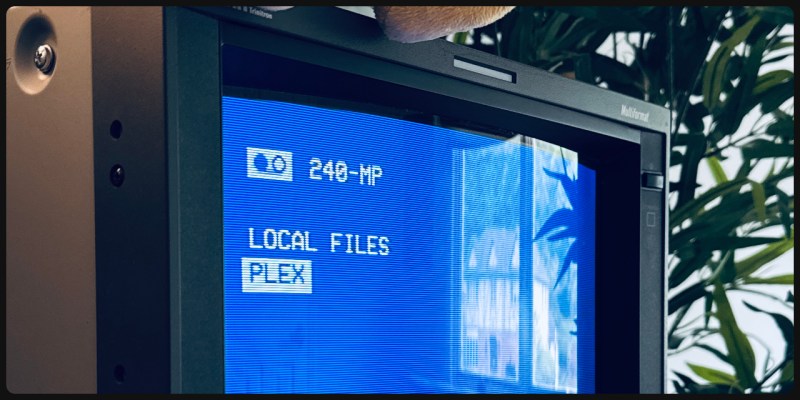
If you have a TV and a Pi, you have the workings of a media center, and you’re not exactly short on options for software. But options are good, so here’s one more by [Anthony Caccese] — a player called 240-MP that explicitly targets CRTs with its retro stylings, released under the GPLv3 license.
Don’t let the name fool you, though. While the blue-and-white styling is very evocative of 90s VCRs, the output isn’t limited to 240p. If you’re running it into a vintage CRT over composite, as [Anthony] does, sure, it’ll do that. If you want to use HDMI on a modern TV, however, that’s an option too, in 4K if that’s your jam. Higher resolution video will need a beefier Pi, of course, but MPV can handle the files, and ultimately this is a wrapper for MPV. You still get the vintage styling, which can do green-and-black as easily as white-and-blue, as well as whatever custom color scheme you want to define. It might not look quite as good if it’s not on a display tube, but we could see this as a good fit for a plasma TV, too.
As you can see in the demo video embedded below, the player is equally happy listing and playing local files — including playlists — or streaming via a PLEX server. Other add-ons, for example to launch emulators, may be forthcoming. Of course, if you’re not willing to wait you could always code them yourself.
Given the roots of this project in old VHS interfaces, we’re somewhat surprised there doesn’t seem to be an option for control via physical tokens. We’ve already seen projects that try and replicate that portion of the VCR magic, though. If it’s not the tapes you miss from back in the day, you can also simulate cable TV.












I got used to much higher image quality very early: I got a video beamer befor 2000 and since that I “could not watch” any VHS tape or CRT screen.
I speculate/guess the VCR menus were really TV menus repackaged/revised for the VCRs on the cheap, since the vast majority of investments were really in the TV making, CRTs, etc. ; but at least they were minimal and usable (most of the times), since that was all they were good for, an they were practical. The DVD players’ menus that I’ve seen were only marginally better than the VCR menus, so those didn’t really matter in the long run.
But back to the topic at hand, returning things that are both simple and practical, and I admire the author’s will to distill the bare minimum.
The medium isn’t even the problem, but the source material.
Shows recorded in SD quality were meant to be viewed on an SD CRT monitor, too.
Watching this on a “higher quality” monitor won’t necessarily improve visual quality.
It could rather be the reverse, depending on the source material.
A professional monitor might expose the flaws and imperfections.
That’s why DVD was such a success, also. It could resolve full resolution of the SD source material.
By using RGB SCART cables, the full image quality of PAL/NTSC material was available to viewers.
Because it allowed utilizing the potential of both the SD material and the SD TV/SD video monitor.
Some DVD players supported ED quality via VGA output, too.
That allowd de-interlaced video playback, for example.
So if someone is a fan of, say, cartoons made for TV broadcast, then someone should think twice before discarding a CRT monitor.
The playback via VHS/DVD on a CRT might be the only way to get the authentic, intended experience.
Until technology has progressed so far that a CRT can be faithfully emulated in real-time.
In vintage gaming, there’s still no external “CRT emulator” box that emulates the CRT mask or the glow of the phosphor.
Scanlines and simple filters alone don’t do it.
This project looks great. Nice simple interface. Even if it was just the local storage playback, I think it would be pretty useful, but being as expansible as it is, I can see a few people building off this.
Most of my movies are on physical media, perhaps a Hackers style autochanger robot might be a nice addition. Something to use those gpio pins for.
If your “movies on physical media” are DVDs, you can “rip” those to a hard drive to: a) have them all conveniently available at a couple of clicks of a mouse, or b) put up a media system such that ANY device connected to your LAN can view them with a couple of taps of a screen. :-)
(Though I’m sure you’ve already thought of that….)
The point of building a 1950s jukebox-style media changer for your wacky CRT media player is definitely not practicality
Absolutely not, but we’d feature the heck out of such a project if anyone actually built it.
Wow! I really love the clean simplicity! Amazing!
Bonus points for the Shinkai movie :D
I wanted to use my Pi400 as a media centre but it only gave stereo.
I will be using this to mod a little, portable (as in “it has a handle”) color CRT TV I have sitting around. The Pi will get a little backup battery backup to safely shut down when the TV is switched off. Maybe I’ll tap into the IR receiver of the TV and control the 240-MP stuff via RC-5 codes!
Fun Project!
Check out https://github.com/shane-mason/FieldStation42, might be right up your alley as well. Even has support for IR receivers and old TV LED 8 segment displays depending on how old your TV is.
I build a pi in to an old 1970’s wood grain cable box using FieldStation to do exactly what you described.
I love every bit of this. The color scheme, the font, the overlay are so perfectly on-brand.
Don’t forget to rewind your MP4s.
Why do it the hard way and waste an expensive Pi? Many HD DVB boxes from not so long ago were using a SoC that could also output analog CVBS/RGB and do scaling and frame rate conversion in hardware. Combined with replacement firmware from https://openpli.org/ you’ll get a really universal media player.
I tried this on both a Pi 3 and Pi 4. Neither of them were able to handle a Plex stream unfortunately (extreme stuttering and poor framerate). Same hardware was able to handle streaming the same media from the same Plex server using LibreELEC.
I loved the look and feel of the interface! Just didn’t seem to have the streaming piece tightened up quite enough yet.