
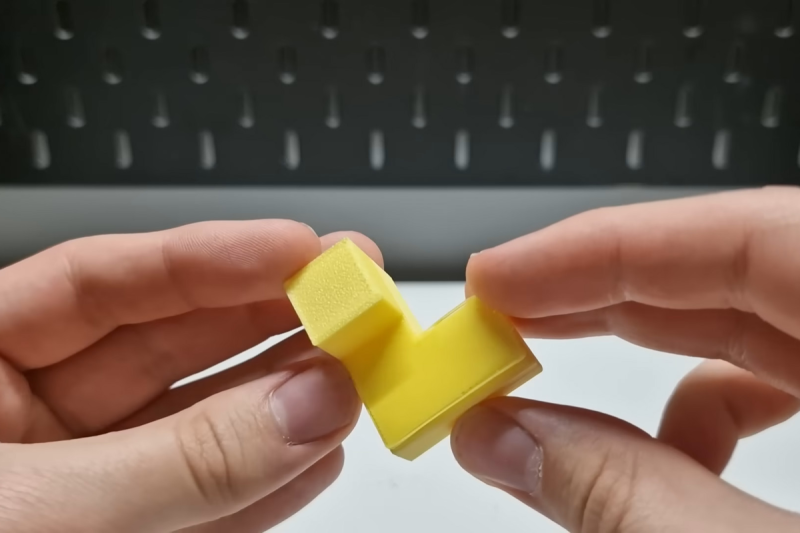
There’s a rule of thumb when it comes to FDM printing that overhangs are really only possible to an angle of around 45 degrees or so. If you try to squirt out plastic with nothing supporting it, it just goes everywhere. However, a new slicer hopes to enable printing up to 90-degree overhangs with some creative techniques.
The software that enables this is called WaveOverhangs, and currently exists as a fork of OrcaSlicer. The idea is straightforward enough — using unique toolpathing to create rings of deposited material that fasten to those laid down before them in the same layer. Thus as the printer lays down a layer into bare space, the deposited plastic is, ideally, able to fix on to the supported edge. As the next ring is laid down, it grabs on to the cooled ring laid down before it, and so on. The idea is inspired by wave propagation, hence the name. You can see a demonstration of the software in the video below by [Cocoanix 3D Printing].
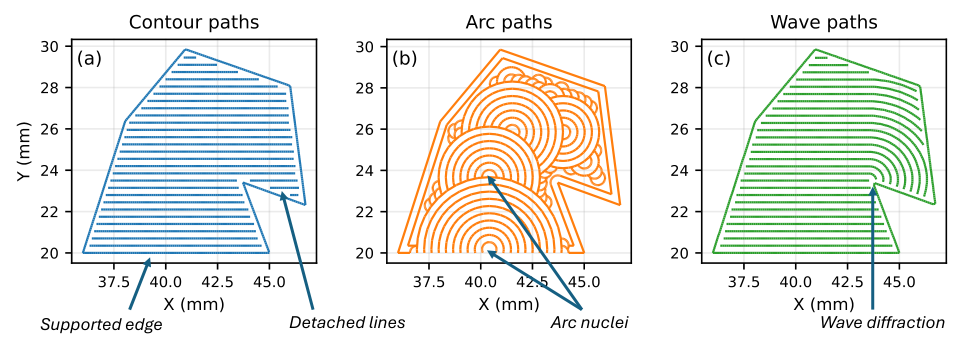
It’s still a very new technique. The slicer has a whole bunch of knobs to turn and two different algorithms. Get the settings just right and you can print horizontal overhangs successfully. There aren’t exactly presets yet, this is something to explore with trial and error. If you test it out, don’t forget to upload your results to the Community Gallery so the developers can see what works and what doesn’t.
We’ve explored how smart slicers can do amazing things before, too, particularly when it comes to things like bridging.












Finally a real slicer implementation! Most previous nonplanar 3d printing tools were just python scripts that deform the part, slice it and then undo the deformation. Hopefully this will be stable enough to be integrated into orcaslicer in the future.
I would also welcome a slicer with non-planar print support, but I don’t think that’s what we have here.
I think of non-planar printing as a top layer ironing step that can operate over slight inclines (across z layers).
This technique prints flat underside layers that don’t need support. There is no z movement as far as a know.
They are both interesting inventions, but unrelated.
i still believe you can’t really print horizonal overhangs, but i have been very pleased that when i have, i have gotten something close to the ‘before’ picture with a bunch of spaghetti hanging under it…and i just take an x-acto to the spaghetti, clean it up, and bob’s your uncle!
I accidentally created a bridge over 50mm long x 4mm wide x 8 mm high (forgot supports). I was shocked by how well the AD5M, in PETG, printed that with only a few hangy strings. (Sliced with Orca)
As the creator of Cura, I can tell you yhe first rule of support material is: “try without, it will surprise you”
Using cura, and my old tricked out kp3s, I could do 150mm bridges all day long. Using orca and cc1 and a cc2 and I get 20-30 at best. Not sure whats different, ive validated both machine and filament combos and dialed in adaptive pa in or a. Just cant bridge like i could.
Yes, if you are willing to accept spaghetti then eventually it often provides enough support by itself.
In addition to an x-acto knife, I have a cheap “deburring tool” that is good for cleaning up concave arches etc.
But “spaghetti support” is like sending footmen against the castle walls until the bodies make a ramp to the top.
Wave overhangs are like sending climbing specialists to scale the wall.
yeah that’s a good analogy with the human ramp. but the corrolarry is that if it is stupid and it works then it isn’t stupid :)
was there some experiments to print something usefull instead of supports ?
you register all those tiny bits you’d like to print “later” (figurines…) in a queue and when your main print needs supports the slicer will search i the queue what could be printed instead of just support trees
Interesting idea, but how often do we simultaneously want to print a large object and another object so small that it fits in the overhang? And it would have surface flaws from the support material above it. And when this desire does comes up, you can achieve it by just manually arranging the objects on the bed. No slicer automation is needed.
Maybe you are thinking of color changing purge towers. When changing colors, the tool must purge lots of the previous filament. There have been experiments to make a 2nd model instead of a purge tower. Or to use that extra filament for more infill.
NOT simultaneously. That’s the whole point. The aim is to feed a library with models that you’d like to print “some day” or on a regular basis (soldiers toys for your nephew you see twice a year, bricks…) and the slicer (or other mechanism) will choose some in the lib to use them instead of supports when you urgently need to print another model.
So you don’t have to think about it. You print the model you need right now and as a bonus you got “free” models instead of junk supports.
That’s probably little benefits for a lot of downsides : models need to be support free, lack of fine tuning of what will be printed…
But I was just curious if anybdy ever thought of it.
As a woodworker, I would love a slicer that uses painters pyramids as supports. I use them by the handful when I’m doing a batch of finishing.
Why do the models need to be support free if you are replacing the supports with (smaller) models? It’s turtles all the way down!
Yeah we could go the recursive way down to the atom…
This is sort of like optimal packing in SLS. Layer time can be very slow because each needs a preheating and exposure cycle. While unfused powder can be reused, minimizing the amount means less virgin nylon powder you need to mix in after each run. And powder is very expensive.
So the slicers have a tool that finds the optimal position and orientation for multiple objects to reduce the total Z height of the print and thus minimize unfused powder.
That’s why SLS is surprisingly cheap from PCBWay and the like. Your small figurine or bracket is a packing peanut for some larger higher cost part.
“still a very new technique”
???
here’s a reference from December 2022
https://www.cnckitchen.com/blog/arc-overhangs-a-new-way-of-printing-without-supports