
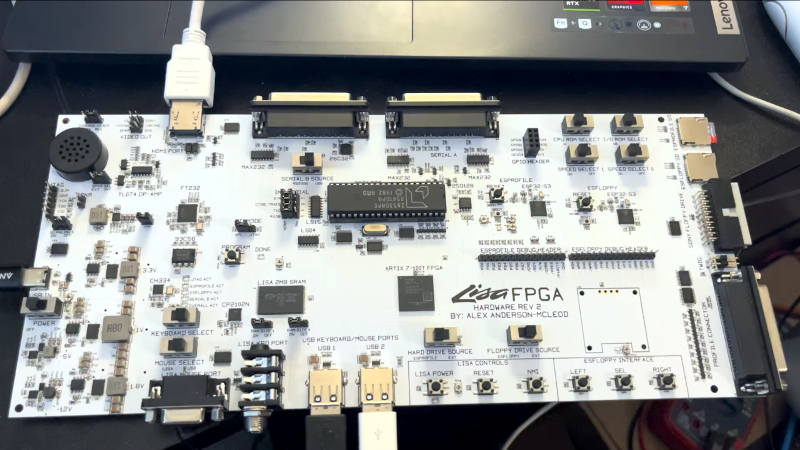
Most of us will know that Apple’s precursor to the Macintosh series of computers was a machine called the Lisa. Something of a behemoth compared to those early Macs, it had a price to match and wasn’t a commercial success. Working Lisas survive, but unlike a Mac you won’t find many at your local swapmeet. But what if you really must try this early Apple GUI? Never fear, because [AlexElectronics] is here with a much more accessible version on a FPGA.
This Lisa has a surprisingly large PCB compared to the size of the FPGA, because of the number of connectors. It takes the approach of mixing new and old in interfaces, for example as well as original Lisa keyboard and mouse support, you can also use modern USB versions. There’s also an HDMI output for a modern monitor, and an SD card. Unexpectedly alongside the FPGA there’s a 40-pin DIP, it’s a UART chip because there’s no handy pre-built one for that particular chip. We’re told it will be up on GitHub when finalized.
Keeping old computers alive, especially rare ones, is hard. We like projects like this one, and we hope to see more developments. Meanwhile you can see the machine in the video below.
Thanks [Tom Stepleton] for the tip!












When we were looking at new computer system for our department – went along for a demo of a Lisa – loved the way it looked but it was way too expensive at £8000!
A few decades ago, there was a German tinkerer who built a Lisa compatible from scratch..
Later on, it was modified to run a patchee copy of Mac’s System OS.
Info: https://hackaday.com/2023/01/25/open-sourcing-the-lisa-macs-bigger-sister/#comment-6584214
Heres the non FPGA version by the same author
https://github.com/alexthecat123/Lisa-PCBs
Alex was also involved IIRC in Adrian’s Digital Basement Lisa restoration, which went pretty well and was fun to watch.
The economics of PCBs are weird its cheaper to buy large numbers of large PCBs than to buy small numbers of small PCBs… lots of setup and handing costs. So a gut level estimate just glancing at a .jpg I think it’ll be like $150 to $1500 depending on if you order 1 engineering prototype from China or qty 1000.
What I do know about the LISA is they did early serial number locked DRM so I assume the FPGA can be programmed to be any unlocked copy of the OS. In that way its probably simpler to use the FPGA than to figure out how to change the serial # on a discrete copy.
That’s really cool! Thank you very much for the information! 😃
Btw, what I think is positive about the FPGA is that it seems to still have most if not all of the old i/o.
So it’s possible to hook a real b/w picture tube onto it (not HDMI only).
Because that’s what many FPGA projects do. They ommit the old i/o and use VGA/HDMI and USB peripherals only.
Which makes the experience barely better compared to just using an emulator.
By keeping old i/o’s such as, say, datasette interfaces, there’s much more to experiment with compared to an emulator.
I read about the ID thing, too. I bet it ruined a lot of commercial software that was test installed (or demoed) on a different machine first before being used at workplace.
But that were the 80s.. I do remember that AutoCAD copies of the mid-80s had introduced a hardware dongle protection,
which quickly was removed in the US due to user protest (rightfully so imho!).
Here in, um, the more obedient/tame Europe, however, the dongle stayed until about the mid 90s.
Which caused headaches to many users who had no free LPT port (notebooks or 8088-based DOS palmtops such as HP 200LX),
or ran multitasking environments that had trouble passing through the dongle to any DOS applications in their VM.
Long story short: In the end, too often, a copy protection hurts the loyal, upright users the most.
Those who buy software instead of just copying it.
(Some clever people did both, got the original package for legal reasons but used the unrestricted, hacked version).
Even worse, copy protections also invite hackers/crackers to break them.
Which basically ensures that software becomes popular in circulation.
Btw, at first glance, maybe, that ID thing seems to be a minor issue because the LISA was generally being considered a flop, anyway.
But the catch is that originally, the Macintosh SDK ran on LISAs only.
So developers had to use a LISA in order to write software for the cheaper Macintosh.
Insofar, the LISA was the equivalent to a workstation.
PS: Later on, LISA or LISA 2 could also run Macintosh software via MacWorks.
There also was the Macintosh XL, which was a modified LISA (LISA 2), I think.
Very interesting story. There was sort of a YT documentary about it.
https://www.youtube.com/watch?v=rZjbNWgsDt8
PS: The LISA also had a network boot feature that never materialized (network icon in start-up screen).
A screenshot can be seen here: https://68kmla.org/bb/threads/lisa-2-mac-xl-prototype-cable.37923/#post-410575
I’m not sure if Macintosh System software ever supportet networking on the LISA.
you’ve written quite a mini-article with good links! I don’t think booting from network is possible. AppleNet(before Appletalk)never got off the drawing board, there was a networking solution called EtherBox on the parallel port, but no booting potential there. I wonder if there was a relationship between the troubles with development on the Lisa and the introduction of AU/X in ’86. I would have thought these things were impossible to find out, but since there’s a digital trail, we can at least speculate.