
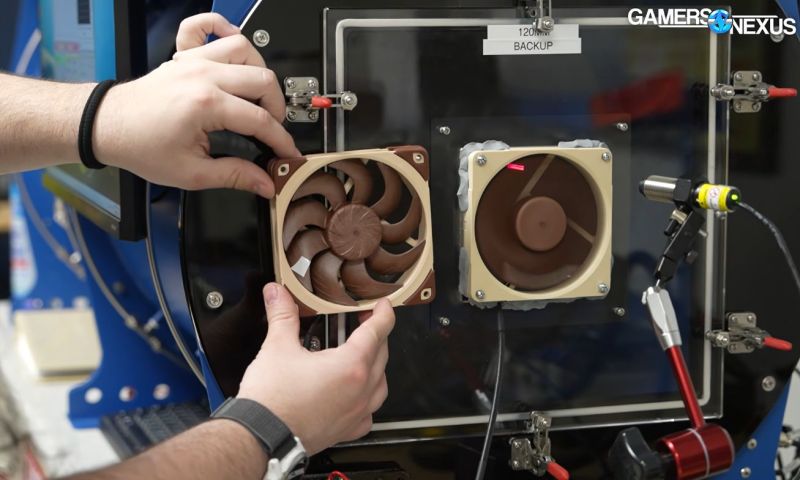
After Noctua recently released CAD files for a range of their computer fans, one of the first thoughts that popped up for most people was: Can you just to 3D print their fans? Even though Noctua begs you not to 3D print the files and even says they changed the design slightly so it wouldn’t be the same anyway, the question persists. Fortunately, [Steve] of Gamers Nexus is here to help us answer the question of whether it makes sense to 3D print a computer fan.
Unsurprisingly, the answer is mostly a resounding ‘no’. After reworking the original CAD models to be both printable on a Bambu Lab FDM printer and printing the parts in PLA, the arguably most important part, the motor, still had to be sourced from an original Noctua fan. Although you could source a cheaper motor, that could change the fan’s characteristics.
The other issue is materials. The special polymer that Noctua uses for its fans is designed not to change shape significantly when the fan blades are spinning, whereas PLA and basically every other thermoplastic will likely deform enough to hit the inside of the fan with the blades. For this reason, a 3 mm gap was used in the PLA print compared with the approximately 0.5 mm gap of the original Noctua fan.
Using the professional fan tester and semi-anechoic chamber over at Gamers Nexus, the original and replica fans were compared, showing that the 3D-printed fan had a similar noise profile but produced only about half the airflow. This is likely due to the blade shape and angle, the increased gap, and probably a dozen other details that presumably justify putting a cool $40 down for the original fan.
In short, you’re probably best off using these Noctua fan CAD models for fit testing in a larger CAD model, or 3D printing it for a similar purpose, rather than for a functional fan design. At least now we know. Thanks, [Steve].












…so print it in SLA?
So Noctua releases CAD files for their fan, specifically stating that they nerfed the blade shape… and the fact that they don’t work very well when made on a 3D printer with inferior plastic and a rougher finish is a surprise to who?
The only surprise here is that this marketing stunt for consumer gear components actually works and generates a lot of free advertisements.
I’m sure that the changes to the CAD files are multiple and subtle, yet enough to make it worthless for anything more than form an fit in a CAD assembly. Being devious, I would be tempted to introduce some ovality, a little eccentricity and tilt the rotor a touch of off axis to induce slight vibration and noise.
Apparently something Noctua were confident enough not to do as the noise was similar. They probably just spoilt the profile of the aerofoil to mess with the efficiency.
I guess they did exactly nothing, knowing that there are no 3D printers available to their target audience to satisfactorily reproduce the parts. Fans aren’t rocket science, the industry has been knowing for decades how to build blowers that are efficient, silent and nearly unbreakable.
Sure there may be no 3D printers that can reproduce the parts but you can use a CAD file for a lot more than 3D printers. Their competitors could either look at the design or just send it off to be injection moulded benefitting from noctuas R&D.
If your assessment of fans is correct then why is there such variation in fans and why are they not silent? Just look at the data people have collected testing lots of different fans, there is clearly still development going on.
It’s kind of easy to ‘optimize’ a large fan for one speed.
For certain definitions of ‘optimize’.
At the Reynold’s number computer fans are operating at, it’s all about the turbulence.
Which is all about the surface finish and fine details.
Plastic 3d printing can’t compete in this space.
CAD files tell you nothing about materials and production methods. Competitors aren’t stupid, they acquire original parts and analyze them in every detail instead of messing around with some files that might contain errors.
Yeah, but they are all cast.
“Fans aren’t rocket science.”
I disagree.
Your average Walmart box fan, with it’s barely functional blades, isn’t rocket science.
Computer case fans certainly are.
Rocket science is mostly fluid dynamics and materials science.
So is fan design.
Both use a clot of computational fluid dynamics modeling.
Both tweak material properties, shapes, and other factors to maximize performance.
Both do acoustic modeling. Fans for noise(and sometimes flow), while rockets are less concerned with noise and more about resonance and pressure failures.
Good fans are HIGHLY optimized, not just in blade shape, but wih varying textures and airflow features like surface embossing.
Fans are ABSOLUTELY rocket science.
How much difference does it make versus the average fan?
If all that jazz is just about optimizing the last 20%, then it’s not rocket science. The analogy implies that you have to get it just about perfect to make it work at all.
Maybe once upon a time fans were rocket science, but now they have been mature products for some decades. Noctua and others are just bragging with features that manufacturers of industrial/professional fans like ebm-papst were already offering in the past century.
Noctua’s classic fan was a copy of a very good fan (Nidec Gentle Typhoon), but they have made many improvements.
I would say they should have had this be a collab with the fan test channel guy who routinely prints fans.
Not sure they are $40, maybe $20. About as useful as 3d printing a Lamborghini, mostly done for the clicks.
Major hardware
major hardware on YT is printing fans since many years the problems is not the material thermoplastic are fine the problem is mostly the surface finish. FDM has hard resolution limits that clash with aerodynamics. SLA could work but probably would need special resin.
I’m sorry, but this was a poor attempt at making a 3D printed fan. The print quality was amateurish, and the CAD skills lacking. They mention the accuracy limits of a 3D printer, but that’s BS. I routinely design parts with a tolerance of 0.05mm. This was just poorly executed.
No you don’t. You think you do, but your measurements are an illusion if you’re talking about regular FDM printers with plastics. Just measuring down to 50 microns with your typical vernier calipers is an exercise in self-deception.
For example, if you have a printed part with layer lines going this and that way, how do you define 0.05 mm tolerance? If your surface roughness is greater than the tolerance you’re specifying, what are you actually measuring? How do you control this tolerance?
What does “tolerance” mean to you?
Well I can tell you that for snap fit designs I do for FDM printing, I regularly use .1mm and .2mm clearance. Moving from .1mm clearance to .2mm has a huge effect. I have also used .05mm adjustments to these as needed and it is my recollection that it made a notable difference as well.
100-200 microns is the typical accuracy or repeatability of FDM printers. Individual features can be printed with about 25 microns of accuracy or better, but the placement from feature to feature can shift by 0.1-0.2 mm within the layer and between layers. That’s the reason why holes tend to come out tight: the hole is accurate on one layer, but the layers keep shifting as they stack up, and that closes up the hole by about 0.1 mm.
Changing your model dimension by 0.05 mm can have an effect by shifting the baseline, but the error or variability you’re getting is still 0.1 mm or worse, so your tolerance cannot be 0.05 mm.
Tolerance is the allowable variation in dimensions that you specify on top of the nominal dimensions, and then measure when the part is done to decide whether to accept or reject the part. If the accuracy of the machine is worse than your tolerance, almost all your prints will be failures. That doesn’t mean your snap-fit boxes won’t work or fit together – it just means they most likely fail your own standards and you should be throwing them out.
If you claimed to be working with 50 micron tolerances on a machine that can at best do 100 micron accuracy, you would be fooling yourself.
I agree that OP is BSing.
But I was just going to point out that 0.05mm tolerance is meaningless without highly exotic material since temperature and humidity would wreck the tolerance of polymers anyway.
So with a good 3d consumer grade fdm printer you hit tolerances within the specification of the printer but based on recollection going below that made a noticeable difference on something you routinely do…
K
Working with 0.05 mm differences in design doesn’t mean you’re controlling the tolerance at the 50 micron level. You’re still working with whatever tolerance the machine has. Yet making a 50 micron adjustment does change things – it will change the overlap of your tolerances and the probability that the parts will or won’t fit.
The only issue is that it’s a game of luck. Making tiny changes is chasing the drifting error in your printer that is subject to a number of variables, and that creates an illusion that you’re in control of the process.
Their legal department got to you, huh?