

It’s a fact of life when starting a computer, that booting into whatever operating system you use will take a while. Mine takes somewhere around 30 seconds, and yours probably does too. There has always been the promise of something faster just around the corner, but somehow the OS just keeps getting a little bigger. Perhaps the only computer with a disk based operating system I have ever owned which bucked this trend was a Commodore Amiga, and that machine’s booting speed was achieved by keeping most of its OS in a ROM. The subject of today’s Daily Drivers takes the idea of a long boot time and shreds it, leaving an experience more akin to that Amiga of old. It’s called KolibriOS, it’s small enough to run from a floppy disk if you want it to, it’s lightweight, and fast as lightning. It achieves this feat by being written entirely in assembly language, and it exists as a free fork of the earlier MenuetOS which moved to a proprietary licence in its 64 bit version. I downloaded the ISO file, and gave it a spin.
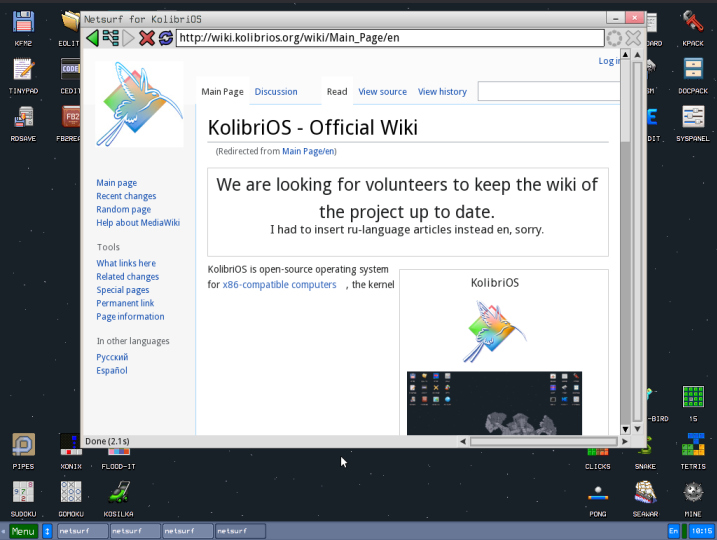
The minimum system requirements for KolibriOS are meagre, 1Mb of disk space, 8Mb of RAM, and a 586-class 32-bit processor. On a 2020s ThinkPad it boots in the proverbial blink of an eye, and drops immediately into a GUI desktop. It has the slightly pixelated look of a 1990s machine, there’s none of the anti-aliasing we’re used to today going on there. Installed software ranges from a set of games, emulators, graphics editors and viewers, internet software including the Webview and Netsurf web browsers, and assembly software development.
The immediate impression is of a mature and useful operating system, without any crashes or blue screens, and with applications that load on a dime. Unfortunately though, despite all the competence I can’t call it a Daily Driver by my definition of being able to write for Hackaday, because the web browser doesn’t support https. Immediately the majority of the modern Internet is off-limits, including this site. This changes the parameters of my review and I can no longer proceed as I normally would, but it doesn’t end it. Something this polished deserves a while to play around.
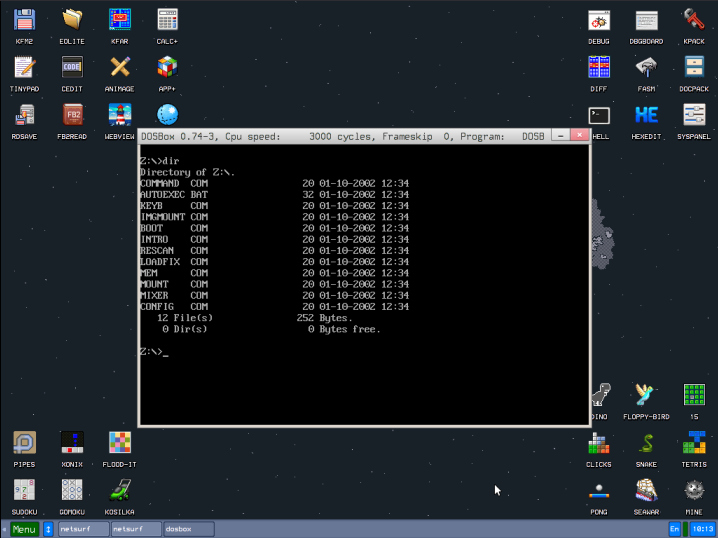
Diving into the command prompt gives a feeling somewhere between a UNIX style OS and DOS, as the commands are UNIX-style but their output feels more DOS-like. Navigating around the disk I’m immediately struck by how small the executables are due to their being written in assembly language. The only exceptions are those applications ported from outside such as Netsurf or DOSBox, which is hardly surprising.
Back in the 1990s there was a single-floppy demo of the QNX operating system that packed the OS, a GUI, and a reasonable web browser for the day. At the time it was mind-blowing to see so much in such a small space, and I am reminded of that QNX demo when I use KolibriOS. This is evidently a useful OS, and I am only sad that it doesn’t support the one thing that would make it useful for my purposes. If you have an older machine I can see it would make a great emulator platform though, and since one of the emulators gives you DOS it’s likely it could also run a lot of useful things from that OS. It will never offer the flexibility on a 32-bit laptop that a Linux distro such as SliTaz can, but on the other hand that low system requirement means it could make a much older 32-bit machine into something useful. If you’ve got some ancient hardware and fancy something new, give it a try!












Lenovo legion 7 win11 boot time to fully loaded OS is 12 seconds. OP must have a bunch of bs software auto starting and an old AF pos laptop.
Are you sure you’re not cheating by having Fast Startup enabled?
Fast startup? Linux doesn’t have that annoyance.
Please, let’s don’t disgrace this article by mentioning this “thing”, okay? :)
If we need to mention a free *nix, let’s please talk about Minix, BSD or ELKS instead.
Another ancient OS is EUMEL, btw. It’s a bit like ELKS in terms of capabilities.
https://en.wikipedia.org/wiki/Eumel
https://6xq.net/eumel/
Resume from Hibernate is less than 10 seconds here (just enough to wash down my pills).
I really hate the forced updates every now and then. Before that it had months with only hibernating, my boat is an island.
Whoa, 2 seconds is long here, since KDE Plasma is rather heavy.
Same here. All of 11.97 seconds and that is with Steam loading and LibreOffice checking for new fonts lol. They must have Bonzi Buddy running or the Arduino IDE on autolaunch lol.
FWIW I tried KolibriOS and I liked it better than modern Haiku and felt it was pretty good for its size and requirements. I dunno might be fun to go back and have another look at it on some of my very old machines :) I will admit I had forgotten about it with the dilution of the OSphere.
KolibriOS is also useful for Thin Client computers with modern, but “weak” embedded CPUs.
And it has SDL library ported, so many applications from “real” OSes can be ported over.
There’s also a port of FCEU, ScummVM and ZSNES, by the way.
So it’s surely capable by now! :)
It should be, once SSH client is hardened and TLS properly implemented.
Terminal-based OSes could be quite impressive in the early 80’s; I remember booting CP/M from floppy to command prompt in around a second or two.
To be honest, the original versions of MS-DOS booted quite quickly off floppy as well, but that was undermined by the early PC BIOSes (they spent ages checking their RAM) and DOS’s insistence on prompting you for the date and time (CMOS batteries weren’t a thing yet)
Of course, that’s also because those OSes barely did anything by modern standards – they just provided a very minimal command interpreter and some barebones hardware abstraction / function calls that all programs could take advantage of. No memory management, no security, no GUI (are you kidding?) and no drivers for anything but the built-in and most basic external hardware.
So it’s always nice (and impressive) to see projects like this that attempt to bring back that kind of performance and simplicity while still providing modern OS features and hardware support.
Hi yes, DOS 1.25 and 2.11 were rather quick at booting.
It had to do with how the boot code was fitted in a sequence of sectors, so they could be load at once.
But these old DOS releases also had slow i/o routines, compared to DOS 3.x and up.
Back in the days of PC-Ditto it was highly recommend to use DOS 3.2 or higher.
Because of enhanced floppy disk support (3,5″ and 720KB; same to as what Atari ST had used) and other things.
(PC-Ditto included a few DOS utilities to speed up screen drawing etc.)
PC-DOS 3.30 was the most recent DOS at the time (’87), predating MS-DOS 3.30 by a few months.
It had added 1,44 MB floppy format support and other things we’re now used to. Also had a cute manual.
Btw, It wasn’t so uncommon to keep using DOS 2 files on DOS 3.x, such as the keyboard drivers.
National versions of keybgr.com, keybfr.com or keybit.com etc. were smaller than the new universal keyboard driver.
In terms of compatibility, MS-DOS 2.01 might be best, perhaps.
It supports the ? wildcard, still, which was used in a few games.
https://www.mobygames.com/game/1870/spider-man/trivia/
API wise, MS-DOS 2.11 was most relevant in the 80s, maybe.
DOS Plus 1.2 implements that API/ABI, too.
I had no idea what PC-Ditto was, are you writing from specifically the view from a back-in-the-day musician using MIDI, or a European perspective? Because Atari was to me, in the US, just a company that didn’t know if they wanted to be a gaming platform(fond memories of Atari 2600) or a computer company. Ironically, Atari was one of the fastest at booting DOS(really “DIP Operating System 2.11” that was DOS 2.11 compatible)
I forgot, there also was Datalight ROM-DOS.
Before that, special ROM versions of DOS existed, too.
The Tandy 1000 has one in ROM, for example.
Some 80c88 sub notebooks (handheld PCs) had MS-DOS 5 in ROM, too.
The Atari Portfolio had DIP DOS in ROM.
Some internet set-up boxes of the 90s had DOS stored in a DOC2000 flash chip.
That was an one-chip SSD with a virtual filesystem, basically. 8 to 128 MB of storage.
All those systems did boot-up in about an instant.
it has nothing to do with being written in asm. just a result of not having a bunch of features.
computers are just fast today and it really takes something exorbitant to slow them down.
“…takes something exorbitant to slow them down.”
Like a modern operating system.
But, really, why? Why does an operating system need to rebuild the virtual universe every time it starts up? Multiplied by a billion users rebooting daily (or even monthly) that’s a monumental time cost.
Seriously, this is billions of dollars per year of wasted time. Some modest effort by the OS vendors (and hardware/firmware too) in reducing unnecessary startup time would reap huge benefits.
(/me, a bit pissed because a docker install just forced a reboot and cost me a 104-day uptime streak)
The best part of Kolibri imho is as a tool for studying x86_64 asm, OS architecture, ABIs, etc. Everything in Kolibri is asm and the system call structure is cute and simple. Creating UIs and accessing system resources is as plain as can be. Possibly my favourite toy OS!
I’m afraid you didnt study very good. KolibriOS is 32-bit only. Also, not everything is written in FASM, there is stuff (drivers/libraries/applicatiins) written in C, Oberon, Fortran, Go, Python,.. you name it!
While that is technically true, most people put their OSes to sleep or “hibernate” them when they aren’t “on.” So the startup time is measured in seconds or less, not minutes.
“Why does an operating system need to rebuild the virtual universe every time it starts up? ”
Because it’s easier to change the world around some apps, than the apps themselves, some of which no one has the source code for.
True. But there were solutions/approaches for this.
For example, Windows NT and OS/2 allowed the user to decide if the legacy compatibility (Win16 VM) should always be loaded on each start-up or merely on demand.
It also allowed for separate instances of WoW/Win-OS/2 for better multitasking (each Win16 application has its own Windows 3.1 all alone).
Mac OS X had a similar option. Classic Environment (that MacOS 9 VM) could be loaded automatically on start-up or on-demand.
If Microsoft was smart, it could have provided a more integrated version of “XP-Mode” (that Windows Virtual PC+XP bundle in Win 7 era).
By using HyperV or whatever technology, Windows XP could have been seamlessly integrated into modern Windows as a compatibility layer.
Similar to how Windows 3.1x was integrated in each Windows NT release.
All it would have needed was 1,5GB of storage (or less).
It also could have been made optional, just like WoW/NTVDM.
This would have provided a clean cut in Windows codebase without sacrificing any backwarts compatibility.
Those who needed the old Windows environment could activate it at wish.
“If Microsoft was smart,”. —> If Microsoft were smart, ….
Microsoft is smart; they generate massive profits from their partnership with h/w vendors who need an OS for new sales. New hardware and features (AI, etc) require new integration into the OS to create a polished hardware product.
If you need XP, Microsoft’s answer is VM.
Which definition of “smart”?
That kind of smart that all the other big US companies are?
Ie, not listening to user needs and taking advantage of a monopoly?
To me, they are as “smart” as sharks in a tank which eat all the small fish until they have to take on each others.
That’s not much foresight, I think. Ruining your own ecosystem/market, I mean.
A smart or reasonable company would try to value a loyal user base and provide quality products over a long time.
That would warrant the company long lasting contracts with mutual respect and trust.
Alas, that wouldn’t be quite the American dream, wouldn’t it?
The philosophy of US companies is making quick money with medicore products and being proud of scamming users (manipulating them into thinking they want/need something they never asked for in first place).
Or so I thought.
@Ray my earlier comment wasn’t meant to be harsh and I didn’t mean to anger you.
What I was thinking of was the behavior of big US tech companies such as Oracle, Adobe or Microsoft who’re not exactly listening to demands of users/clients.
MS/Win11 is most recent example here, maybe.
There’s a product that’s being shoved down the users throath without them wanting it.
Which makes it clear that the interests of the market or the users/clients is secondary.
A company can do try this because of its economic power and its monopoly status in a certain market, but it has consequences.
The base of users/clients will loose trust and start looking for alternatives, as it happens right now.
What we see right now is capital_sm with it’s ugliest face.
This nolonger is the idea of a free market with fair competition that benefits the people.
It’s rather a group of big bullies who enforce certain things because they have the power to do so.
In other countries, a law or goverment would keep them in check.
Or would have tried to do so in the beginning, at least.
But not so much in the US, where they could grew so big.
That’s why “smart” US companies are a worry to the whole world.
They lack the scrupel that, for example, their European counterparts have, I think.
Over here, due to how they’ve been raised,
people throughout all positions have certain ethical/social beliefs when it comes how to do business.
They consider the negative effects of their doing, even if in the end they choose to do it anyway.
Basically, they don’t take advantage of every opportunity, just because it’s available.
There’s a point where they think “we can’t do that, it goes too far”.
They’re no saints by any means, but there’s a slightly different mindset, I’d say.
Money isn’t everything, certain things have higher priority, still.
Such as families or trying to not lay off all the workers just because there’s a financial issue.
Sellers also don’t necessarily focus on maximum profits they can get by scamming customers.
Instead, they do consider which effect an unfair price would have on customers.
So they’re more carefully, focusing on a good provider/customer relationship.
Owners of restaurants want to see happy customers that enjoy the homemade meals, for example, even if they barely make enough money to pay the expenses.
That’s basic human reasoning, basically. But by US definition, it’s probably not “smart”.
@Joshua
I don’t think that’s much the case.
Rather, it’s the layers of “abstraction”, hierarchy. On a certain point, your customers/users are just numbers, especially to the narcissists + psychoapths leveraged in such structures. They’ve begun to erode democracy and federalsim here too, especially in the EU (one layer too much). It’s just maybe 10 years later and not as extreme as in the US.
Because there’s a fairly fixed speed users are happy to wait, and as computers get faster that time doesn’t go down, so they can do more, or code more sloppy.
Also there’s a known effect where if it’s too fast users don’t think it’s done anything…
Because we have stopped innovating hardware after the 80s and instead built a huge stack of software only.
+1
There was even a saying about it.
“Software is getting slower more rapidly than hardware is becoming faster.”
https://en.wikipedia.org/wiki/Wirth%27s_law
And it’s true, I think. And it’s why we never will have computers that live up to their full potential.
Unless we use modern hobby OSes or older commercial OSes.
The first time this became apparent in mainstream was with Windows XP, I think.
Due to the delays of the successor(s), XP was used for multiple PC generations.
It made users realize how blazing fast XP was on modern hardware, compared to the current OS of the times (XP ran on Asus Eeepc and other netbooks).
Even recent Linux moved like an obese cow in direct comparison to XP.
No different to Vista, basically.
Exactly! Modern OS take forever to load because all the shlep code written since – most of shlep code is pointers to other pointers, so by the time all pointers are properly pointed OS truly starts loading.
Disagree:
http://www.google.com/search?q=PC+hardware+innovations+since+1990%3F
Is software getting bloated? Yes.
But the why is the competitive free market for paid/subscription software: feature bloat. Features and extended capabilities are expected.
Even “free” software suffers from this “bloat” malady.
For OS bloat, the architecture has gone from 16-bit to 32-bit to 64-bit and has followed the CPU advances which has driven the RAM memory needs to 8 gig for a baseline Win-11 Pro machine. (My development PC is 32G and my business notebook is 16G … Is that RAM necessary? Only when running multiple heavy applications simultaneously.)
And why all the bitching over 30 seconds? That is like a billionaire fussing over a $1 error on a new Lamborghini. In a hughly complex hardware integration era, 30 seconds to initialize a PC from cold start to being useful is to be expected and accepted as completely acceptable – for those who need more seconds added to their productivity, simply let your PC sleep instead of powering it down.
From multiple Microsoft blogs:
1. Pre-Session Init (Kernel Initialization) 2.0 to 6.5 seconds
2. Session Init (Subsystem & Driver Loading) 4.0 to 6.0 seconds
3. Winlogon Init (Security & System Services) 3.5 to 10.0 seconds
4. Explorer Init (User Interface Composition) 2.0 to 5.0 seconds
5. Post-Boot Phase (UI Ready to Idle State) 10.0 to 30.0 seconds
Dig into Event ID 100 (Boot Performance Monitoring) and look for elements labeled BootMainPathDuration (total time to interactive UI) alongside individual strings mapping the kernel, service, and user shell initialization times.
And why is that advance in hardware neccessary? To drive a 10x abstracted interface that does the same worse than one from 1990.
shrug i use ‘modern’ linux and it’s super fast for me. i just don’t use systemd or gnome and i don’t run my browser locally. everything else is fast even though it’s ‘modern’
Linux platform is chubby, though. It’s by no means a role model for a fast and lean operating system.
Not anymore, at least. In the 90s, Linux 0.99 was about the last time it had modest requirements.
It could run lightweight Bellcore ManaGeR, even.
That was when it could still run on same productivity systems running Windows for Workgroups or Novell Netware.
I suggest to have a look at BeOS, QNX or L4 for something with grace.
Even Temple OS has more structure and discipline, IMHO.
There’s even a fork that’s worth tinkering with (TinkerOS).
Modern computers also take quite a while to start up because they have more peripherals to initialize before even attempting to start booting.
Um.. Why exactly does a modern printer driver require a few hundred MBs of storage when in the 90s it the same thing just a few hundred KBs?
I mean, let’s take Windows NT 4. It has all the features of a modern OS and is extensible, while consumes just a fraction of resources of a Windows of the past 25+ years.
From a 90s programmer’s perspective, it’s hard to understand how any personal computer OS can not forever be made to run on a fast 486 with 16 MB of RAM.
Because reasonably, the majority of system files are made of small DLLs that can be dynamically loaded/unloaded from memory.
While HDD storage requirements are understandable to grow over the years with each new driver an API being introduced,
the base system is not required to suffer from bloat.
There’s no law in computing that demands for it.
If there’s a will, OSes could have kept their efficiency and small sizes over the years through their modularity.
Alas, in reality, software uses more and more layers. APIs on top of existing APIs.
With underlying APIs calling higher level APIs again.
That’s a mess. No matter if it’s *nix or Windows. Doing that is often lazy and shortsighted, I think.
Printer drivers on Linux are still tiny. The windows drivers that you download from the printer manufacturer are full of bloated utilities and spyware. Most modern printers support driverless printing, so you don’t need to install any of that junk.
The bunch of missing features is a direct result of it being written in asm IMHO.
If we’re not counting a dead cold boot with bios doing things even my 2012 mac mini with its 16 gigs of ddr3 ram and sata ssd can go from post post to running applications in kbuntu in less than 30 seconds (not much less mind you) what are you measuring?
i with kdawg; dell optiplex 5040 i7-6700 albeit with 32gb ddr3 ram and kbuntu. I turn off machine after every use along with monitors, and still have to wait less than 10-15 secs for cold boot. Heck the monitors take longer than the computer to boot.
You should try out the 64 Bit Kolibrios version; would be good if the Web browser was modernized and if there were graphic drivers for modern graphics cards. Honestly, the AmigaOS was quite decent too back yours ago. Maybe some one will make a 2nm 8 core Motorola 68K; always loved Motorola assembly over ugly Intel assembly.
Given AmigaOS was mentioned, on my i5 2.5 GHz HP Elitebook AROS, the open source re-creation of AmigaOS, takes 5 seconds from GRUB to fully booted (both for 64 bit and 32 bit). On my atom 1.6 GHz Samsung netbook, 32 bit AROS takes 7 seconds from GRUB (the atom’s only 32 bit so unfortunately I can’t try 64 bit). Admittedly both of these are booting from MSATA storage but inheriting AmigsOS’s efficient use of resources really helps too :-) It might still be possible to boot AROS from a 1.44 MB floppy, although I haven’t tried that for a while.
P.S. have you ever considered including AROS as a Daily Driver candidate?
The article incorrectly uses Mb instead of MB. And yes, I know even the KolibriOS docs contain the same error in a few places.
Just tested KolibriOS Live CD on my Pentium MMX with 64MB of RAM..
Pros: It runs very quickly, albeit screen draw is a bit sluggish.
Cons:
– No serial mouse support, merely PS/2 mouse support.
My Microsoft mouse on COM1 wasn’t found and I have no bracket with a PS/2 socket at hand.
They were optional back then. A 4pin header for PS/2 is on the motherboard.
– No VBE 1.2 support by default, needs VBE 2 or 3.
So my S3 ViRGE graphics card with VBE 1.2 could only be used in VGA modes 320×200 256c or 640×480 16c.
The S3VBE20 driver on DOS that provided VBE 2 was not available after reboot into KolibriOS.
– Some demos required modern instructions such as SSE
They didn’t run on a standard Pentium PC, thus.
Here’s the hardware compatibility list.
https://wiki.kolibrios.org/wiki/Hardware_Support
It lacks support for bus mouse and MS InPort mice, too.
So even if someone had tried a PS/2 mouse alternative, it wouldn’t help.
Many of the industry standard devices are not yet supported.
Other classic devices missing are old CD-ROM controller cards.
Such as Mitsumi, Sony, Philips or SCSI.
Audio drivers for Gravis Ultrasound (GUS), Windows Sound System (WSS) or Pro AudioSpectrum 16 (PAS16) are still missing, too.