
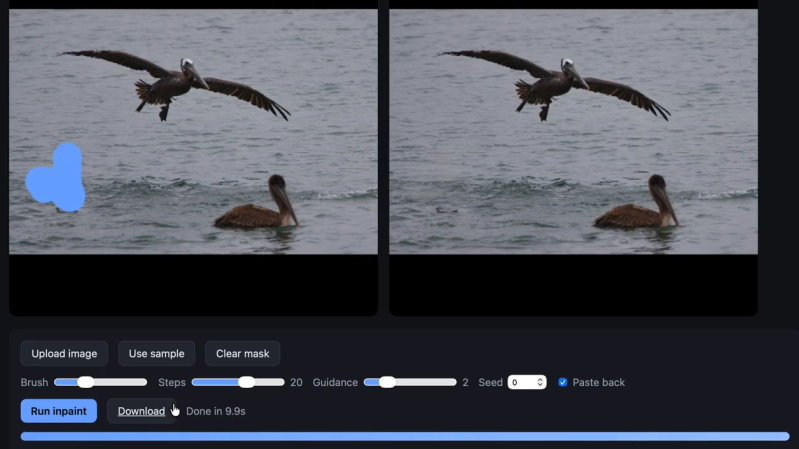
[Simon Willison] ported the Moebuis 0.2B image inpainting model to run locally in a web browser. The web tool simply requires a user to provide an image, mark a section of it to be removed, and the model will do it’s best to patch up the missing area. The project was handled by Claude Code as an experiment in how things in the AI coding world have evolved, but more on that in a moment.
The existence of this tool shows that it’s possible for this kind of image editing to be done on the client side, running entirely locally with no reliance on remote services or server-side GPU resources. The online demo (GitHub repository here) is available if you want to try it out, but be warned it triggers a 1.27 gigabyte download of the required model on the first run.
What’s also interesting is [Simon]’s write-up, because he used the project as an opportunity to learn what has changed in the realm of AI coding agents. [Simon] is a software developer but in this project he didn’t personally write any of the code. One may think that means he didn’t learn anything other than how to use the tools, but that’s not quite true.
He learned it’s possible to convert a PyTorch-based model to ONXX, that the converted model can run in supported browsers using local WebGPU acceleration, and that the CacheStorage API will work on large files. Last but not least, he learned Claude Opus 4.8 is capable of handling such a project pretty much autonomously, and even created an informative document explaining the underlying architecture.
One may consider AI coding agents to be disasters waiting to happen, but it’s also true that the landscape is changing quickly, and write-ups like [Simon]’s give a helpful peek at those developments.












So… it does what Photoshop already had like 10 years ago, maybe more. Meh.
That was pretty much my exact thought. Yes, it’s impressive that it can be done automatically. I have to wonder if this is a result of the problem being so thoroughly documented as to be regurgitation or not. I also wonder how many tokens that burned.
I see now that the hack here has nothing to do with the inpainting. The hack is porting it to webgpu. That is fairly neat but rather underwhelming compared to what I thought the text AI was doing
…is WebAssembly too crazy? I could never vibe code my way to anything working in WebAssembly
I’m more concerned that this can be done automatically.
There’s many reasons why a 1.2Gb download of a model into the browser isn’t a great idea. But an AI doesn’t care.
Now idiots who don’t know why things shouldn’t be done can do them.
I think that is a bit unkind, as it solves a problem for free that Adobe charges quite a lot for.
I do my best to avoid any proprietary software and have so far managed my photo editing with GIMP and Darktable. And no, they are not up to Adobe’s standard, but they have an infinitely better price per feature.
Intelligent healing is a boon, when it works, but has been (and still is) notoriously far behind the vanguard (actually behind the mainstream) in open source products.
If anyone knows a good, open source program to do this, please tell me about it.
with a $500/year (or whatever it costs; i’ve never paid it) subscription (i use a copy of Photoshop “obtained” in 2003 that has no such features)
Me too! Just yesterday I reinstalled Windows and once again set up my ever-trial of CS6. Turns out keygen (which I’m not sure is clean) runs just fine under VirtualBox-Wine. After generating serial and activation code I can just revert VM to previous snapshot.
Simon ported a model and Todd Howard made Oblivion
Ok. So we have a free version of photoshop. Which is more efficient and uses less watts/hour?
I remember trying to do some work on large resolution photos; if this can do exceptionally large resolution photos with lots of detail for low power, well that’s better math then Adobe to me.
“The project was handled by Claude Code”… Reading no further.
Same. I’m getting pretty tired of how many recent Hackaday posts are just “look at what this person prompted Claude to do.” What happened to this site?
The tech industry: But hey 8gig of RAM is plenty enough?
Running models of this size with say Chrome open maxes that 8gig easily.
I’ll be the outlier commenter here:
I think this is a cool hack and that there are many situations where in-painting has given me better results faster than Adobe Photoshop. Especially with fussy low res asset BG removal. I love browser port projects, very cool project.
Put this sort of crap into our live browser and get blacklisted.
A link would have been OK. What you did isn’t: I obviously can’t speak for everybody but the version of Firefox being shipped by Debian had it jumping around and difficult to dismiss.