Get A Remote Terminal With One Binary, One URL, And Zero Config

Launch a single static binary executable, send someone a QR code or URL (or failing that, text a numerical code or shout it across a room), and they’ll get an encrypted terminal in their browser. No VPN, no port forwarding, no firewall modifications, and no account setup required. It’s BitBang by [Rich LeGrand], and there is a lot to go through in this one.

The best part? It’s not actually limited to just firing off a terminal. It’s a whole open framework for establishing an encrypted peer-to-peer connection between two systems over WebRTC without needing either a trusted central authority, or any special network configuration.
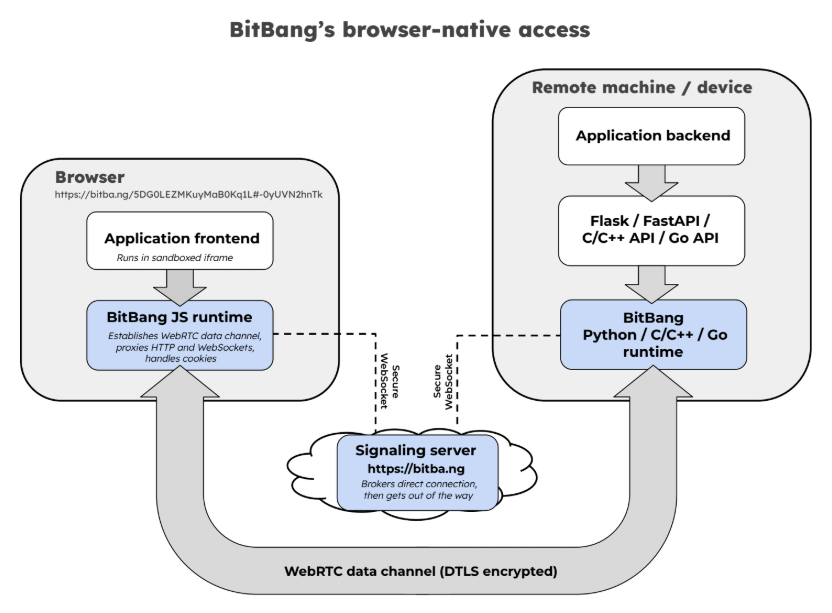
The signaling server brokers the handshake, then has no further involvement. By design, it couldn’t see application data even if it wanted to. Click to enlarge.

Opening a remote terminal, transferring files, or accessing web apps on a remote machine’s network is done with bitbang-cli, an implementation of BitBang focused on providing simple, zero-config remote access.

Before we go on, we want to mention that BitBang does require a lightweight, trustless signaling server only to broker the initial connection, but more on that in a moment.

On the machine to be shared, one first downloads the binary. Easiest way to do that is to go to bitba.ng and download manually, or copy and paste the one-line installer to auto-detect one’s system, download the correct release, and verify the checksum.

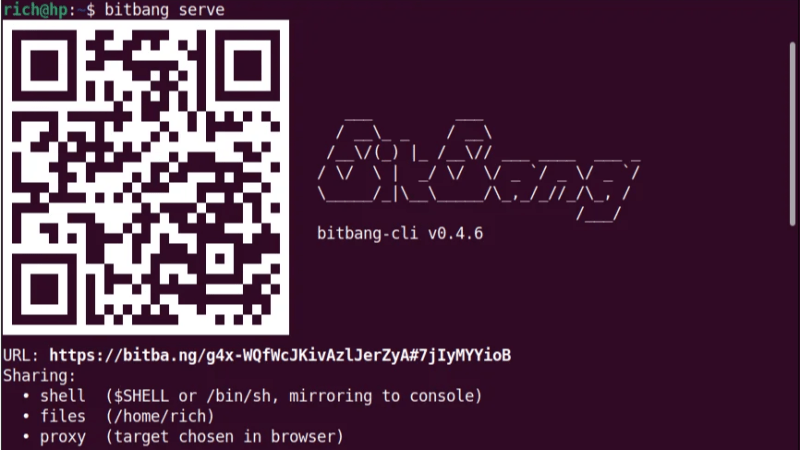
After the binary is downloaded, simply run it in a terminal and receive a QR code to scan, a URL to copy & paste, or a numerical code if those are inconvenient. On the remote side, one accesses the signaling server and the connection is made — one gets a terminal on the target machine open in the browser tab, with added options for file sharing and accessing web applications on the target network.

The signaling server isn’t involved in authentication or encryption, and couldn’t see private data between the two ends even if it wanted to. Prefer not to use someone else’s regardless? Run your own local instance with bitbang-server.

Originally developed as an easy way to securely make telepresence robots reachable over the Internet with nothing more than a QR code, today it’s a whole framework.

It includes not just the remote-access tool mentioned above, but also a BitBang Octoprint plugin for cloud-free remote access to 3D printers, and bitbang-python is a library for turning local Python web applications into a URL that can be opened from anywhere.

We’re sure some of you are getting more than a few ideas from this. If it lets you bring a project over the finish line, let us know on our tips line.

Tiny, Hackable Telepresence Robot For Under $100? Meet Goby

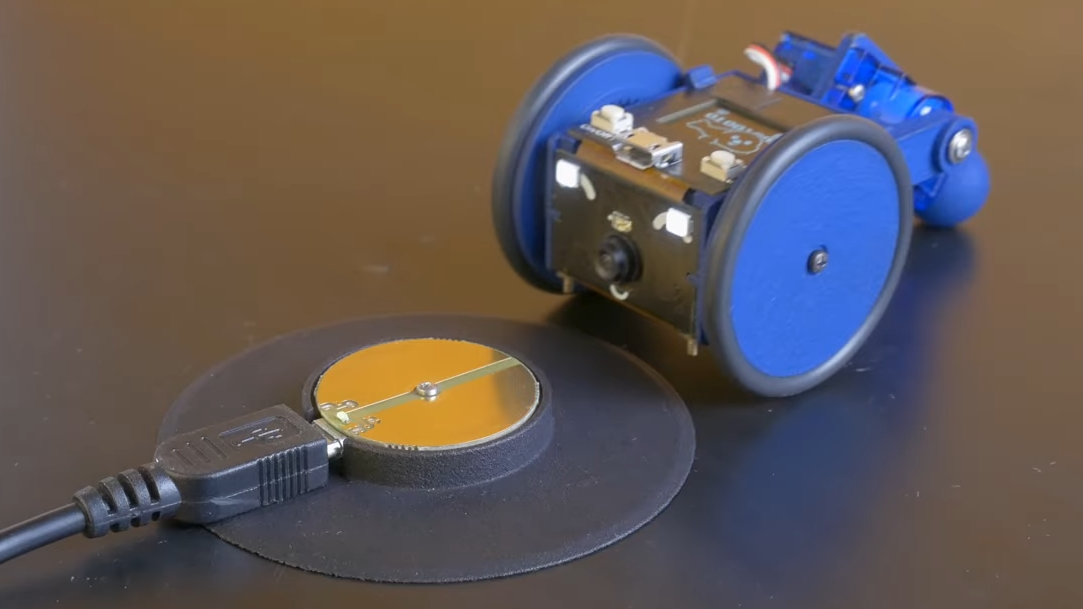
[Charmed Labs] are responsible for bringing numerous open-source hardware products to fruition over the years, and their latest device is an adorably small robotic camera platform called Goby, currently crowdfunding for its initial release. Goby has a few really clever design features and delivers a capable (and hackable) platform for under 100 USD.

Goby embraces its small size, delivering what its creators dub “tinypresence” — or the feeling of being there, but on a very small scale. Cardboard courses, LEGO arenas, or even tabletop gaming scenery hits different when experienced from a first-person perspective. Goby is entirely reprogrammable with nothing more than a USB cable and the Arduino IDE, while costing less than most Arduino starter kits.

Recharging happens by driving over the charger, then pivoting down so the connectors (the little blunt vampire fangs under and to each side of the camera) come into contact with the charger.

One of the physical features we really like is the tail-like articulated caster at the rear. Flexing this pivots Goby up or down (and can even flip Goby completely over), allowing one to pan and tilt the view without needing to mount the camera on a gimbal. It also comes into play for recharging; Goby simply moves over the disc-shaped charger and pivots down to make contact.

At Goby‘s heart is an ESP32-S3 and OmniVision OV2640 camera sensor streaming a live video feed (and driving controls) with WebRTC. Fitting the WebRTC stack onto an ESP32 wasn’t easy, but opens up possibilities beyond just media streaming.

Goby is set up to make launching an encrypted connection as easy as sharing a URL or scanning a QR code. The link is negotiated between bot and client with the initial help of an external server, and once a peer-to-peer connection is established, the server’s job is done and it is out of the picture. [Charmed Labs]’s code for this functionality — named BitBang — is in beta and destined for an open release as well. While BitBang is being used here to make it effortless to access Goby remotely, it’s more broadly intended to make web access for any ESP32-based device easier to implement.

As far as tiny remote camera platforms go, it might not be as small as rebuilding a Hot Wheels car into a micro RC platform, but it’s definitely more accessible and probably cheaper, to boot. Check it out at the Kickstarter (see the first link in this post) and watch it in action in the video, embedded just below the page break.

Continue reading “Tiny, Hackable Telepresence Robot For Under $100? Meet Goby

FLOSS Weekly Episode 787: VDO Ninja — It’s A Little Bit Hacky

This week Jonathan Bennett and Katherine Druckman chat with Steve Seguin about VDO.Ninja and Social Stream Ninja, tools for doing live WebRTC video calls, recording audio and video, wrangling comments on a bunch of platforms, and more!

Continue reading “FLOSS Weekly Episode 787: VDO Ninja — It’s A Little Bit Hacky”

FLOSS Weekly Episode 766: WebRTC — The Hack That Connects Everyone To Everything

This week Jonathan Bennett and Dan Lynch talk with Sean DuBois, WebRTC wizard, all about the crazy feats the Pion Go server is capable of, how WebRTC is about to change OBS, and what it looks like to build a successful Open Source Career.

WebRTC is for more than video. The TOR Snowflake project uses Pion to sneak TOR traffic through firewalls even with Deep Packet Inspection (DPI) at play. Since nobody wants to block web conferencing, TOR and even Wireguard can use this to slip though.

Sean is also working on some game-changing patches for OBS Studio, including WHEP support to go along with the newly introduced WHIP feature. This enables direct connections to another OBS client, as well as connection to another WebRTC client like vdo.ninja without running an embedded browser to make it work.

And then there’s WebRTC For The Curious, a free CC0 e-book all about the nuts and bolts of WebRTC. And Broadcast Box, a ready-to-run WebRTC one-to-many broadcasting solution that lets you run your own streaming service. You can connect with Sean at the Real-time Broadcast Discord server for information about all of the projects listed here and more!

Continue reading “FLOSS Weekly Episode 766: WebRTC — The Hack That Connects Everyone To Everything”

Robot Allows Remote Colleagues To Enjoy Office Shenanigans

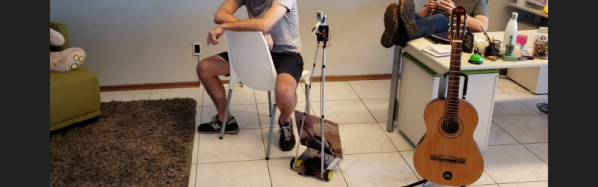
[Esther Rietmann] and colleagues built a Telepresence Robot to allow work at home teammates to have a virtual, but physical presence in the office. A telepresence robot is like a tablet mounted on a Roomba, providing motion capability in addition to an audio/video connection. Built during a 48 hour hackathon, it is a bit crude under the hood and misses out on some features, such as a bidirectional video feed. But overall, it pretty much does what is expected from such a device.

The main structure is build from cheap aluminium profiles and sheets. A Raspberry Pi is at the heart of the electronics hardware, with a servo mounted Pi-camera and speaker-microphone pair taking care of video and audio. The two DC motors are driven by H-bridges controlled from the Pi and an idle swivel caster is attached as the third wheel. The whole thing is powered by a power bank. The one important thing missing is an HDMI display which can show a video feed from the remote laptop camera. That may have been due to time constraints, but this feature should not be too difficult to add as a future upgrade. It’s important for both sides to be able to see each other.

The software is built around WebRTC protocol, with the WebRTC Extension from UV4L doing most of the heavy lifting. The UV4L Streaming Server not only provides its own built-in set of web applications and services, but also embeds a general-purpose web server on another port, allowing the user to run and deploy their own custom web apps. This allowed [Esther Rietmann]’s team to build a basic but functional front-end to transmit data from the remote interface for controlling the robot. The remote computer runs a Python control script, running as a system service, to control the drive motors and camera servo.

The team also played with adding basic object, gesture and action recognition features. This was done using PoseNet – a machine learning model, which allows for real-time human pose estimation in the browser using TensorFlowJS – allowing them to demonstrate some pose detection capability. This could be useful as a “follow me” feature for the robot.

Another missing feature, which most other commercial telepresence robots have, is a sensor suite for collusion avoidance, object detection and awareness such as micro switches, IR / ultrasonic detectors, time of flight cameras or LiDAR’s. It would be relatively easy to add one or several sensors to the robot.

If you’d like to build one for yourself, check out their code repository on Github and the videos below.

Continue reading “Robot Allows Remote Colleagues To Enjoy Office Shenanigans”

Pi Zero Streams Video From “Fake” Security Camera

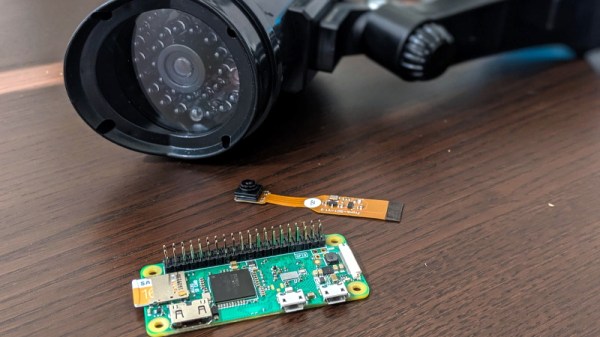
Fake security cameras are advertised as a cheap way to deter anyone who might be up to no good. This isn’t a crime and punishment blog, so we’re not really in a position to say how accurate that claim actually is, but we see enough of these things for sale that somebody out there must believe they’re worth having. Though if it were us, we’d take this tip from [Daniel Andrade] and convert our “fake” camera into a real one with the Raspberry Pi and WebRTC.

There are an untold number of makes and models of these fake cameras out there, but it seems that many of them share a fairly common design in that the enclosure they use is actually pretty useful for putting your own hardware in. They’re hollow, relatively well protected from the elements, and as most of them use a blinking LED or some other feature to make them look more authentic, they already have a functional battery compartment.

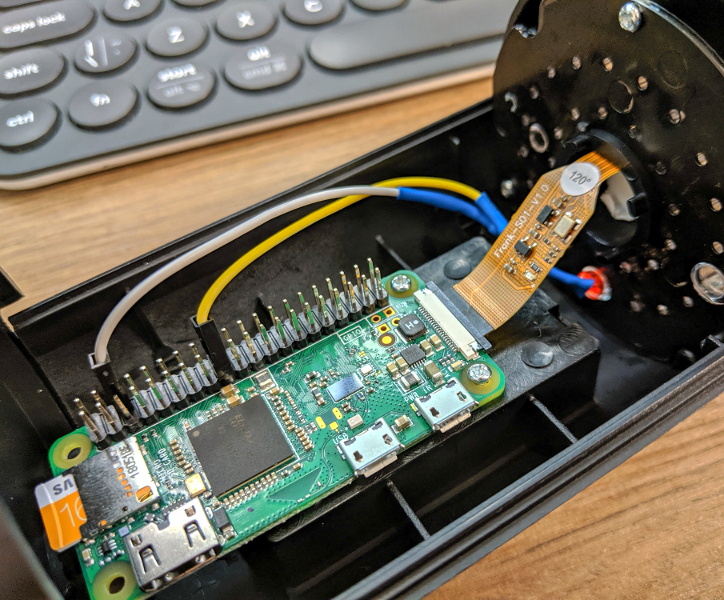
As it turns out, the one that [Daniel] picked up for $9 USD is pretty much perfect for the Raspberry Pi Zero and its camera module. He even wired the blinking LED up to the Pi’s GPIO pins so it will still look the part, though replacing it with an RGB LED and appropriate scripts to drive it would be a nice way to get some visual feedback on what the system is doing.

The software side of things is done with Balena, a suite of tools for setting up and managing Linux Internet of Things devices. They provide everything from the SD card image that runs on the Pi itself to the cloud infrastructure that pulls all the data together. [Daniel] dove a little deeper into the software stack when he created his Bitcoin traffic light last year.

For any readers who may feel a sense of déjà vu looking at this project, you aren’t going crazy. We recently saw a similar project that used an ESP8266 and a PIR sensor to add motion sensing capabilities to one of these fake cameras. Now all we need is somebody to put an Arduino in one of them, and we’ll have the Holy Trinity represented.

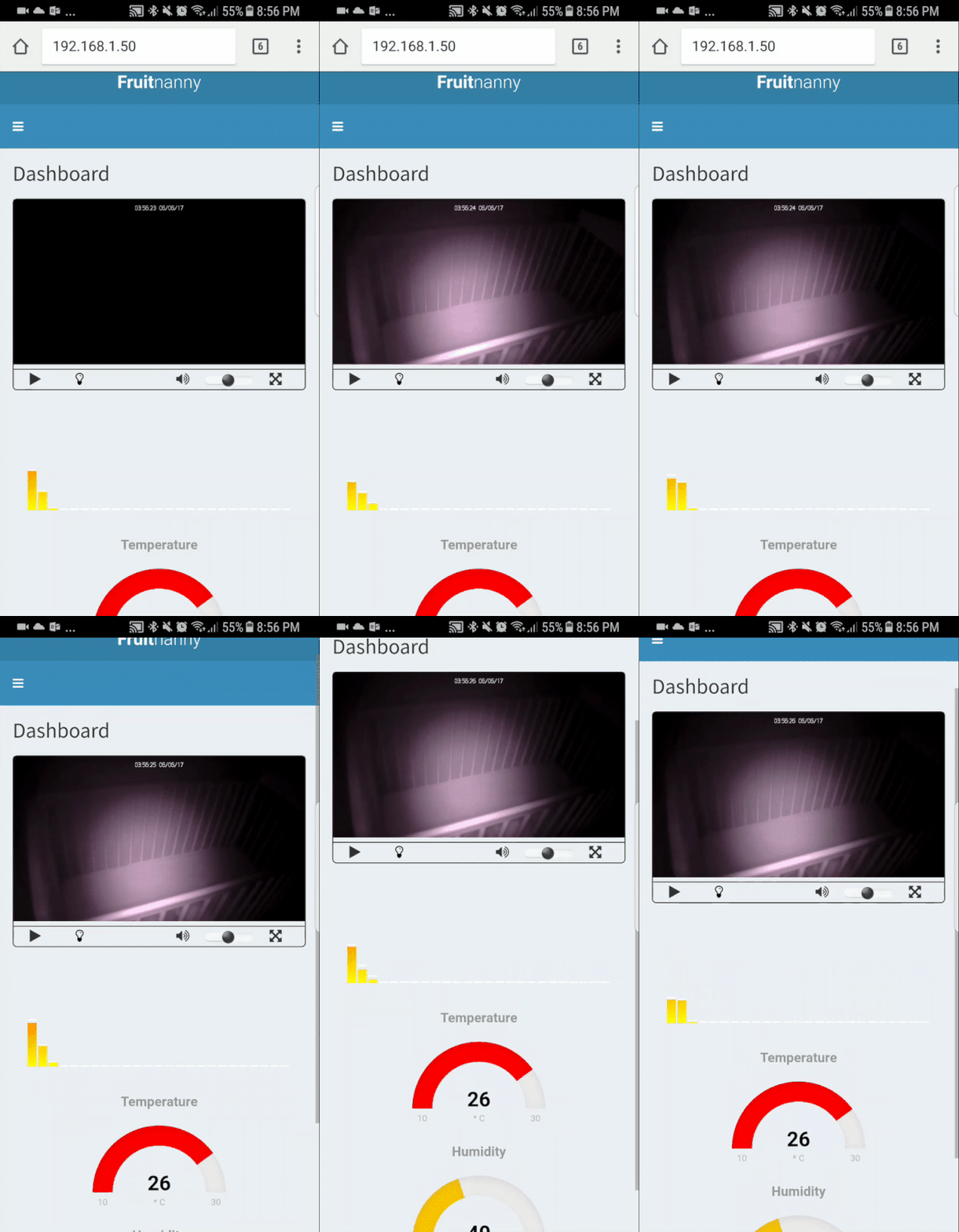
FruitNanny: The Raspberry Pi Baby Monitor For Geeks

Having a child is perhaps the greatest “hack” a human can perform. There’s no soldering iron, no Arduino (we hope), but in the end, you’ve managed to help create the most complex piece of machinery in the known galaxy. The joys of having a child are of course not lost on the geekier of our citizens, for they wonder the same things that all new parents do: how do we make sure the baby is comfortable, how many IR LEDs do we need to see her in the dark, and of course the age old question, should we do this with a web app or go native?

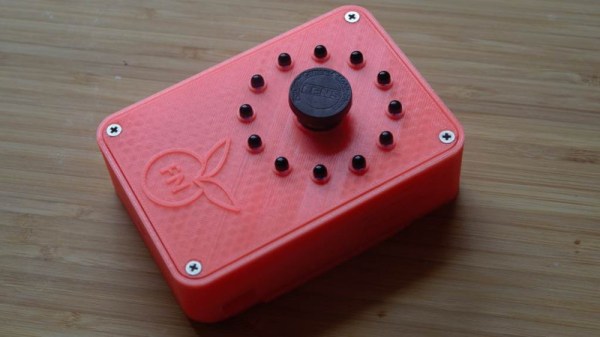
If you’re the kind of person who was frustrated to see that “What to Expect When You’re Expecting” didn’t even bother to mention streaming video codecs, then you’ll love FruitNanny, the wonderfully over-engineered baby monitor created by [Dmitry Ivanov]. The product of nearly two years of development, FruitNanny started as little more than a Raspberry Pi 1n a plastic lunch box. But as [Dmitry] details in his extensive write-up, the latest iteration could easily go head-to-head with products on the commercial market.

[Dmitry] gives a full bill of materials on his page, but all the usual suspects are here. A Raspberry Pi 3 paired with the official NoIR camera make up the heart of the system, and the extremely popular DHT22 handles the environmental monitoring. A very nice 3D printed case, a lens intended for the iPhone, and a dozen IR LEDs round out the build.

The software side is where the project really kicks into high gear. Reading through the setup instructions [Dmitry] has provided is basically a crash course in platform-agnostic video streaming. Even if a little bundle of joy isn’t on your development roadmap, there’s probably a tip or two you can pick up for your next project that requires remote monitoring.

It probably won’t surprise you that geeky parents have been coming up with ways to spy on their kids for some time now, and if you can believe it, some don’t even include a Raspberry Pi.