
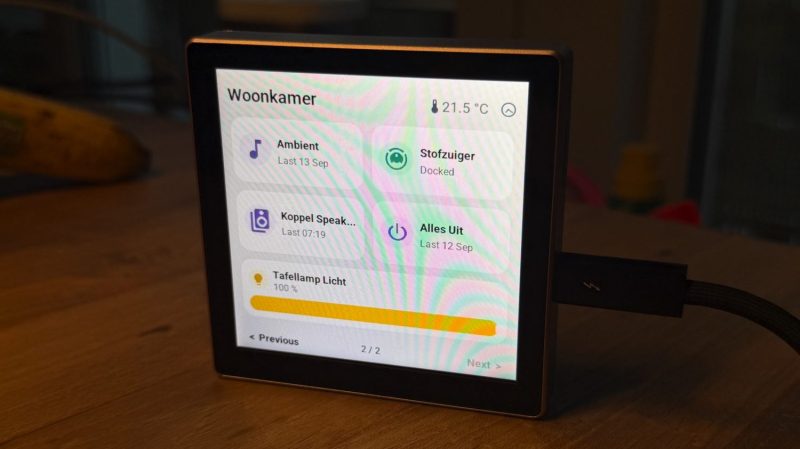
Home Assistant is a great way to rig up and manage your smart home and its many and varied devices. You can of course control the system from your smartphone or a computer, but you might like to have a dedicated interface too. In that regard, [Max Gramser]’s project may come in handy.
At heart, it’s a Home Assistant control screen that you can lay out yourself. It’s intended to run on ESP32 hardware. Most specifically, it’s built to run on the Cheap Yellow Display which combines an ILI9341 display with an XPT2046 resistive touchscreen, or a Guition ESP32-S3-4848S040, which has a ST7701S RGB display combined with a capacitive GT911 touchscreen. You merely need to load the firmware on to one of these units, and you’ll have a configurable and customizable touchscreen interface for your own Home Assistant setup.
The GUI used is clean, attractive, and flexible. You can have it display weather, time, and date widgets, populate the screen with buttons for activating lights and appliances, or even command a compatible robot vacuum. Whatever you might want to do with Home Assistant, you can almost certainly create a quick control for it on the display so it’s always on the wall, ready to go when you need it.
If you’ve always dreamed of your house having a futuristic control panel like we used to dream of in the 1980s, well… now it’s a reality. You just need to drop a few bucks on a touchscreen ESP32 rig and you’re ready to go. There’s plenty more you can do with a Cheap Yellow Display, too, so don’t hesitate to check out some of the previous builds we’ve featured with it!











It looks like another option besides https://github.com/cptkirki/BETTA-HA-PANEL and https://jtenniswood.github.io/espcontrol/ Both of those are functional but lack a lot of features that I’d like to have.
Will give it a try!
A cheaper and better option is to use and old Android phone. You can use it as Assist satellite too.
I’ve just got a ESP32-S3-4848S040 as a dashboard, have been using an LVGL designer (posted here previously) to design the UI, but this looks much quicker – the big hassle with the route I’m using is that the UI design is completely separated from all the dynamic and interactive parts.
I keep looking at home assistant. Then I keep seeing that its minimal recommended hardware configuration is an RPi4, and given the current chip market I am not inclined to shop for one. I’m having trouble believing that a home automation hub really needs to be that resource hungry.
home assistant on pi is a terrible idea, beyond controlling a few small items.
use an old thin client or small pc or laptop. x86 image. I create sensors and devices with esphome. compile time and response of pi will make you just quit.
An old HP thin-client with HA OS is definitely the way to go. Cheap (<£30 on fleabay), lots of USB ports, silent and zero fuss. I have mine setup with a 433SDR and Zigbee gateway sticks plugged in and can not only control everything in the house, but all the sensors in the garden as well.
Same here. I’m running it on an HP T620 with an AMD GX-217GA Dual Core CPU running at 1.65GHz, 4GB ram, 16GB flash, and it runs great on that setup.
That T620 cost me 45 euro second hand, cheaper than a PI 4. It comes in a nice case that contains everything. But ok, it IS larger than a PI case. But I don’t care, the thing is sitting in my utility closet, and all that I see of it is the HA web interface.
I don’t know about the power usage. To be honest, I would not be surprised if a PI 4 uses less power while it’s doing its work. That might be an important consideration, but I personally don’t care so much. My vacuum cleaner is probably using 200x more power, and I use that at least once a week for at least an hour.
I do care about power usage, given that one of the reasons I want home automation is to use power more efficiently.
I’m still having trouble imagining why intelligence for a system made up of microcontrollers, running at human response time and mostly interrupt driven, would need to handle enough traffic/computing to need a system much larger than them. A great deal can be done with a basic hub, after all. You can run phased mic array and voice recognition on a microcontroller, for Pete’s sake. I accept that Home Assistant in specific has these requirements but I don’t understand why.
But, yeah, used is a solution to inflated need prices. Though demand will push that up, so if ’twere done when ’tis done, ’twere best done quickly.
Try Domoticz. Runs without problems on a Raspberry Pi 2. Not as versatile and flexible as HA, but I think the interface looks much better and you don’t have to tangle with YAML.
It depends on what you do with it also, I have addons for a ssh and web terminal, music assistant, tvheadend, esp, visual studio code server, mosquitto mqtt broker, zigbee2mqtt, appdaemon to run some python stuff for my reflashed nspanels and cloudflared and esphome device builder. Besides that it has about 200 zigbee devices, and maybe 100 other iot devices via wifi, shelly, tasmota, openbeken, reolink cameras etc. Ive been running homeassistant for a long time (like decades it feels like) and prior to that rolled my own web interface on a linux box with perl and php and x10 gear. For a while I ran it on a haos instance in a vm on my fibre router which has a quad core arm cpu at 2.2Ghz and 4gb of ram and the reasoning was it was on anyway so free device, and it struggled at times especially with esphome device builder compiling and musicassistant off to 6 mpd instance, but now using a mini pc. The main reason for switching from the haos on the router was that the router wouldnt bring up the vm instances until it had fibre connection, so when we got a line issue, and it rebooted, we’d have no homeassistant.
For that reason I dont want to run on a pi, because its integrated into your life after a few years of tweaking and it should be 100% reliable, no rebooting or crashes or card corruption should be tolerated…
Okay, so you are using it as a general home data and media hub rather than just a home automation hub. Obviously, that requires a larger machine; my media and backup box is a small repurposed desktop with umpteen terabytes of storage and enough compute power to handle real-time transcoding tasks.
But all I want out of the home automation hub is to run home automation. If I watch the home automation to include media, I can have the hub talk to the media box.
Regarding card corruption: modern pi systems will happily boot from usb, which mostly avoids that issue. It need be no more risk than the upgradable microcode on the devices being controlled. For that matter, I already have five pi based devices scattered around the house and have been no problem of bit decay. And see about regarding backup.
These days the RPi is an overpriced luxury item for such a task. Any used mini PC with an acceptable energy footprint will outperform the Pi at a fraction of the price, and could host a lot more services. Also don’t forget about old cheap Chromeboxes that can be repurposed by unlocking them then reflashing their firmware to install any Linux distro. see here: https://docs.mrchromebox.tech/
Considering it’s able to run on a Pi4, means it’s not that resource hungry. I’m running HASS on a Pi5 just fine. The prices for Pi5’s are through the roof sadly, but it’s still weak hardware and HASS runs on it. I will upgrade to an N150 when I get the chance. I got well over a hundred devices added and the Pi can still handle it.
Looks good and the CYD helps make it even more affordable, its all good!
I run a few nspanels that I reflashed with tasmota firmware and run appdaemon running some python to update and interact with them and in a similar manner its all extensible, you can send tones to them, paint images and icons and send text, depends on the dashboard config for that panel and you can flip between dashboards and interact with them using the touch screen. Its awesome to have that much configurability available and seeing “light switches” with all the data and solar output and weather etc always wow’s people and they think it cost thousands of euros, reality is theyre 50e apiece on ali express and your reflashing the firmware on day1 anyway so no worries around security.
I bought a Dell wyze thin client off ebay for 30 bucks. Upgraded to 8gig ram and 256 g ssd. Installed HOS. Works great. All for less than 80 bucks. S rew the high priced rip.